<?xml version="1.0" encoding="utf-8"?>
<feed xmlns="http://www.w3.org/2005/Atom">

  <title>Leo&#39;s blog</title>
	<subtitle></subtitle>
	<link href="https://leoloso.com/feed.xml" rel="self"/>
	<link href="https://leoloso.com/"/>
	
	<updated>2019-08-12T00:00:00+00:00</updated>
	
	<id>https://leoloso.com</id>
	<author>
  <name>Leonardo Losoviz</name>
  <email>leo@getpop.org</email>
	</author>
	
  
  <entry>
    <title>🍋 Escaping the LemonSqueezy nightmare: migrating my ecommerce elsewhere</title>
    <link href="https://leoloso.com/posts/escaping-the-lemonsqueezy-nightmare-migrating-my-ecommerce-elsewhere/"/>
    <updated>2026-03-05T00:00:00+00:00</updated>
    <id>https://leoloso.com/posts/escaping-the-lemonsqueezy-nightmare-migrating-my-ecommerce-elsewhere/</id>
    <content type="html"><![CDATA[
      <p>For the last years I’ve been using LemonSqueezy as my ecommerce provider to sell my plugins.</p>
<p>For a long time I was genuinely happy with it. The product hit most of the boxes I cared about: selling digital products, newsletter, and affiliates.</p>
<p>Overall, the service was solid enough that I could live with the rough edges.</p>
<h3>Stripe acquires LemonSqueezy… and everything freezes</h3>
<p>That changed when Stripe acquired LemonSqueezy (<a href="https://www.lemonsqueezy.com/blog/stripe-acquires-lemon-squeezy">announcement</a>).</p>
<p>Since then, product development has effectively stopped. According to <a href="https://lemonsqueezy.nolt.io/widget/786">this comment</a> (which, notably, has never been refuted):</p>
<blockquote>
<p>The entire LS team is currently working on Stripe. They are essentially recreating LS’s Merchant of Record functionality within Stripe.</p>
<p>Once the updates in Stripe are completed, all LS users will be migrated to Stripe. LS will be discontinued.</p>
</blockquote>
<p>The roadmap page was silently removed, and the “Roadmap” link in the footer (<code>www.lemonsqueezy.com/roadmap</code>) now just redirects to their blog. (They haven’t even bothered to remove the link from the footer. I honestly don’t know if they even realized it’s still there.)</p>
<p>No roadmap and no new features already sucks. But it’s worse than that.</p>
<p>They had publicly promised features like marketing automation, which I had been planning to rely on. When a company announces functionality, you start making plans around it. Having that silently abandoned feels like a betrayal.</p>
<p>And if there’s no active dev team, there’s also nobody fixing bugs.</p>
<h3>Support theater instead of bug fixing</h3>
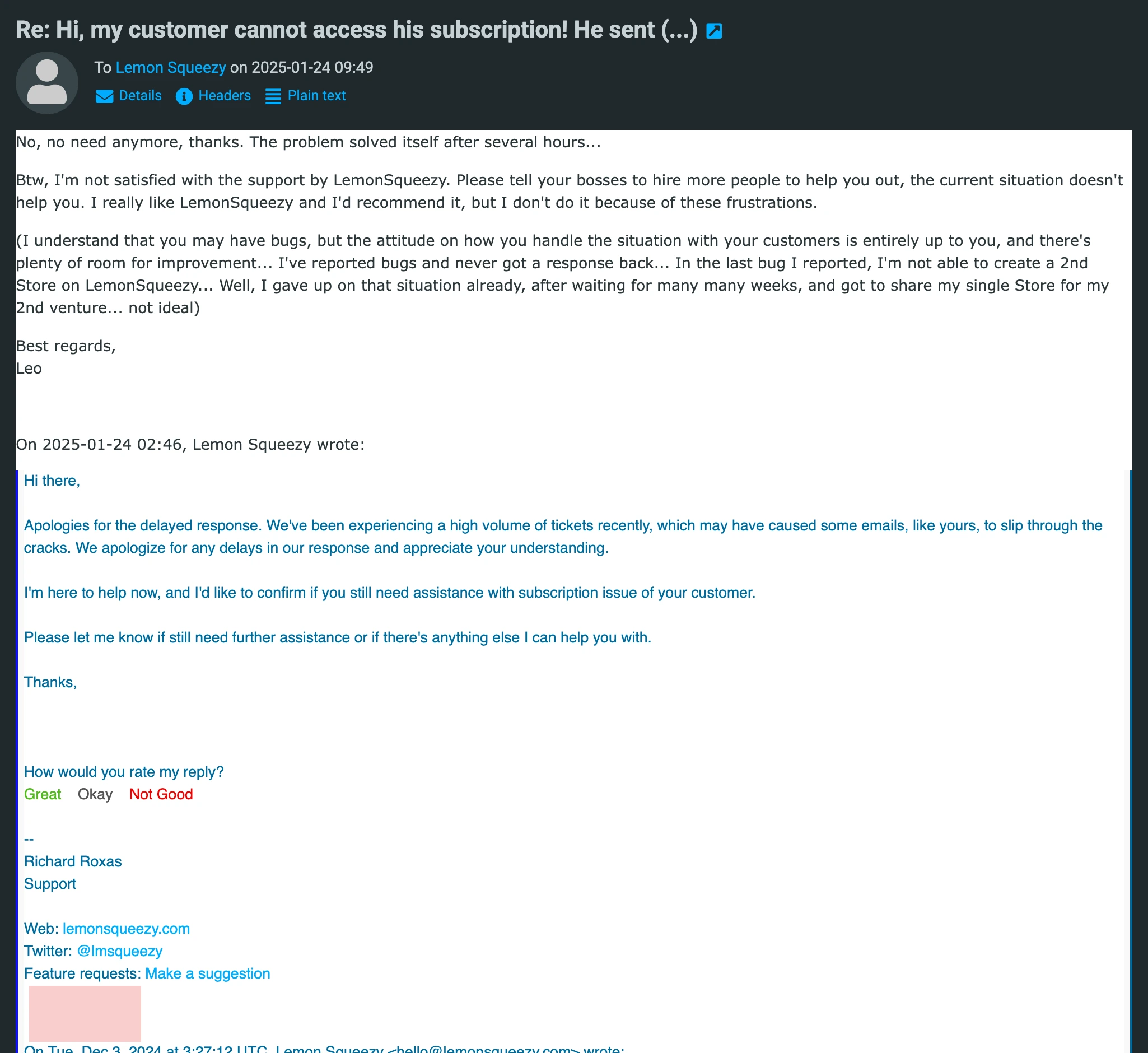
<p>I’ve reported many bugs over many months. None of them were fixed. Not a single one.</p>
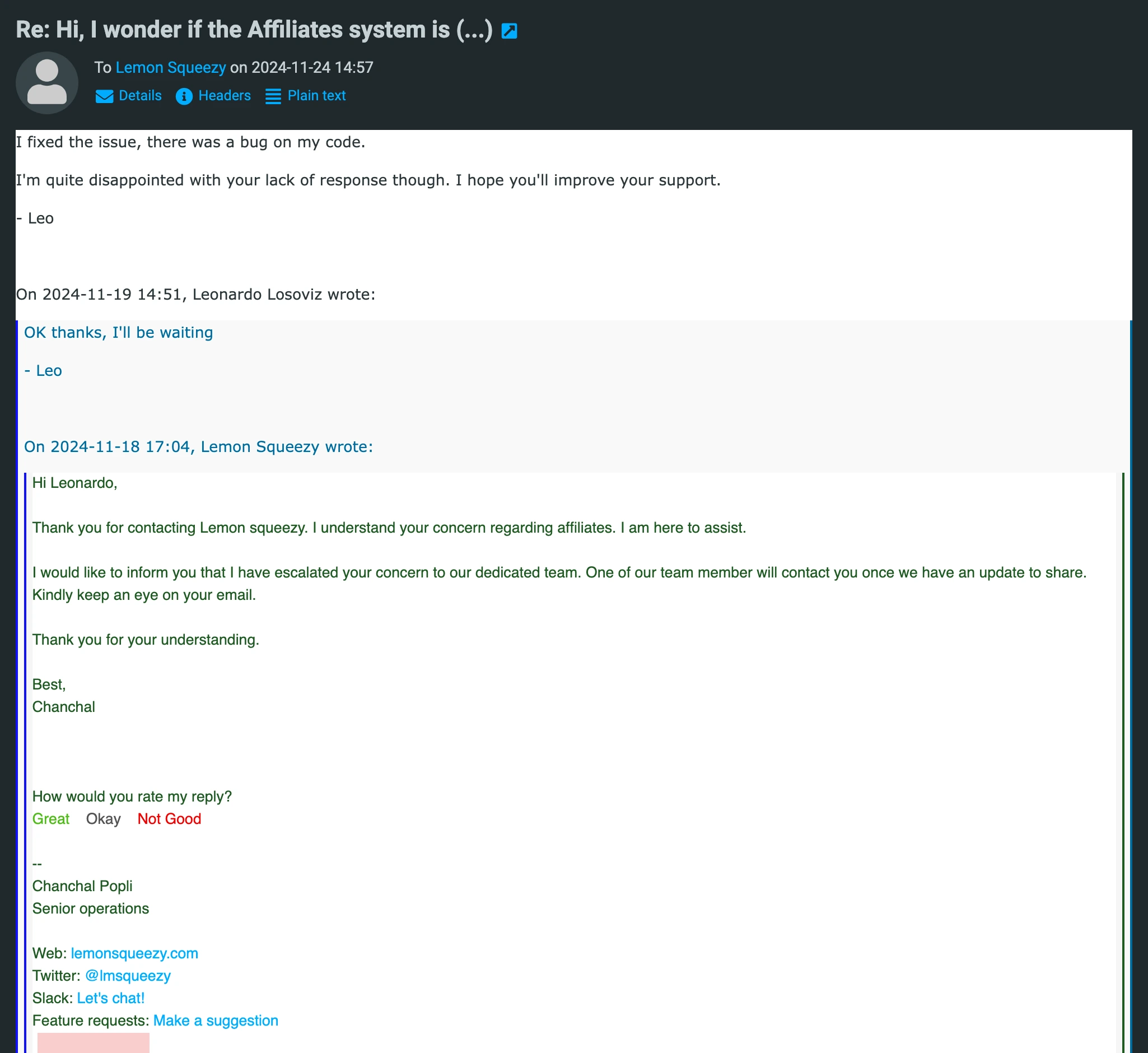
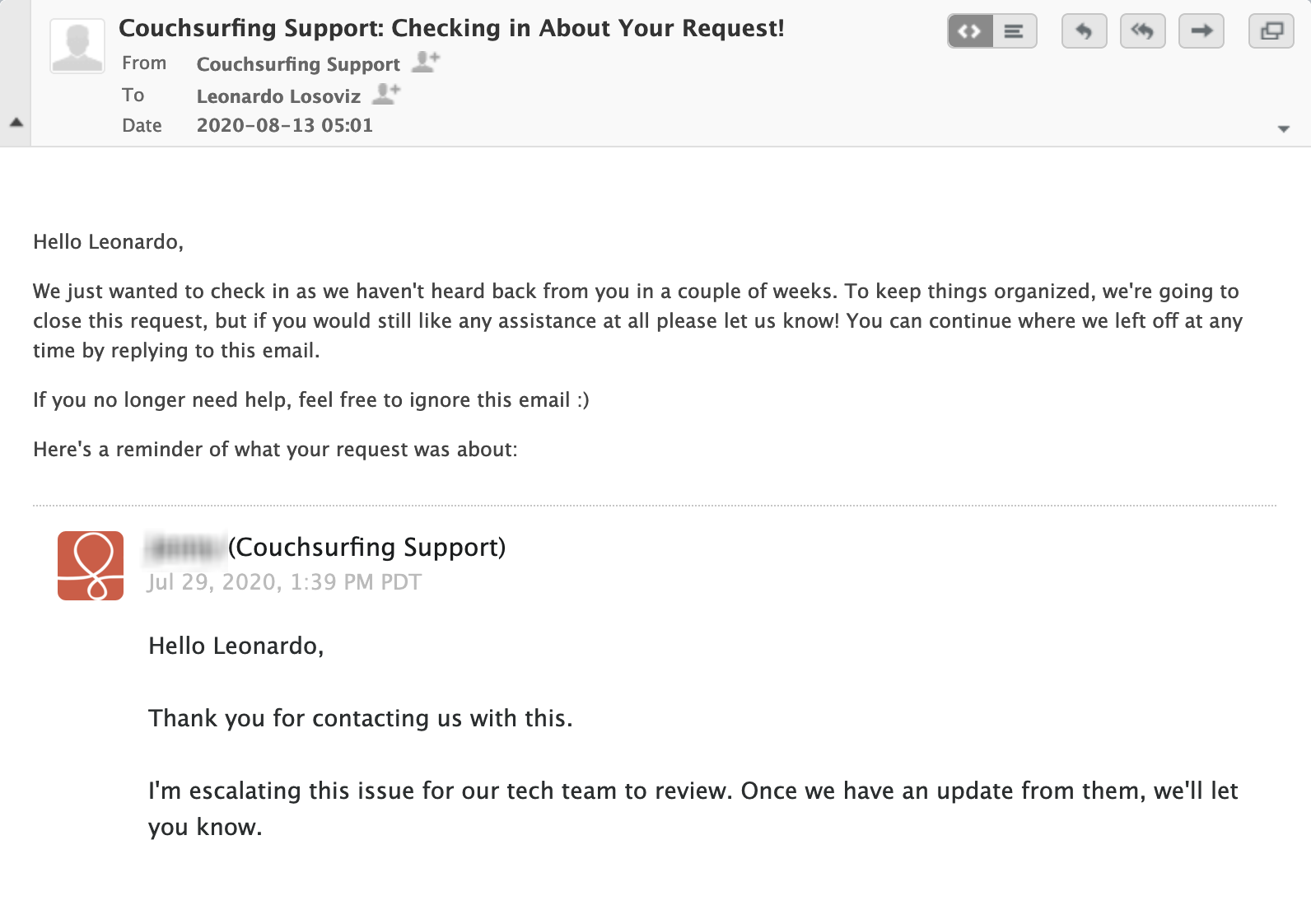
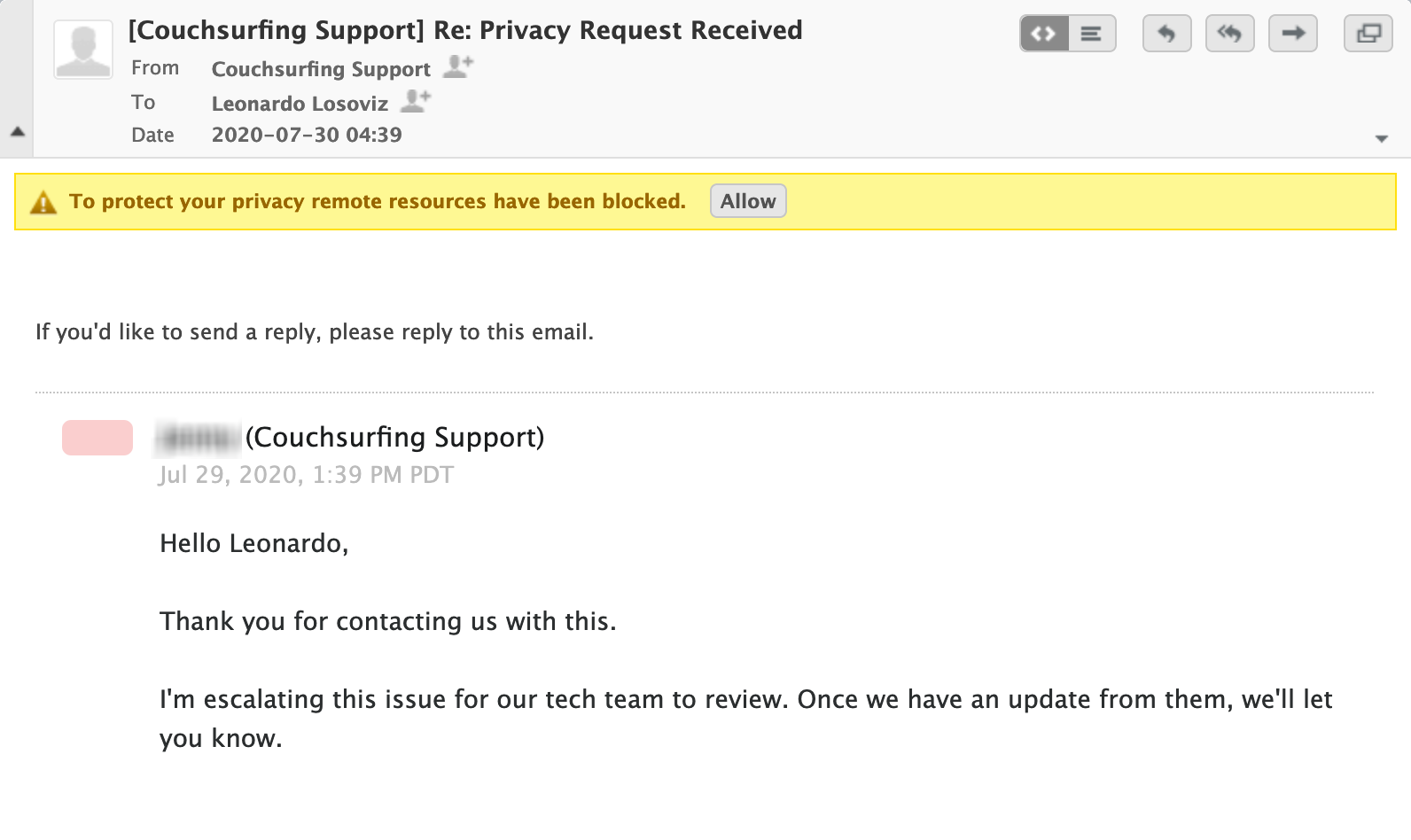
<p>The pattern was always the same. I’d send an email to their support team, and they’d send something along the lines of:</p>
<blockquote>
<p>I would like to inform you that I have escalated your concern to our dedicated team. One of our team member will contact you once we have an update to share. Kindly keep an eye on your email.</p>
</blockquote>
<p>And then… nothing. No follow-up, no workaround, no acknowledgement that the bug still exists and is hurting people’s businesses.</p>
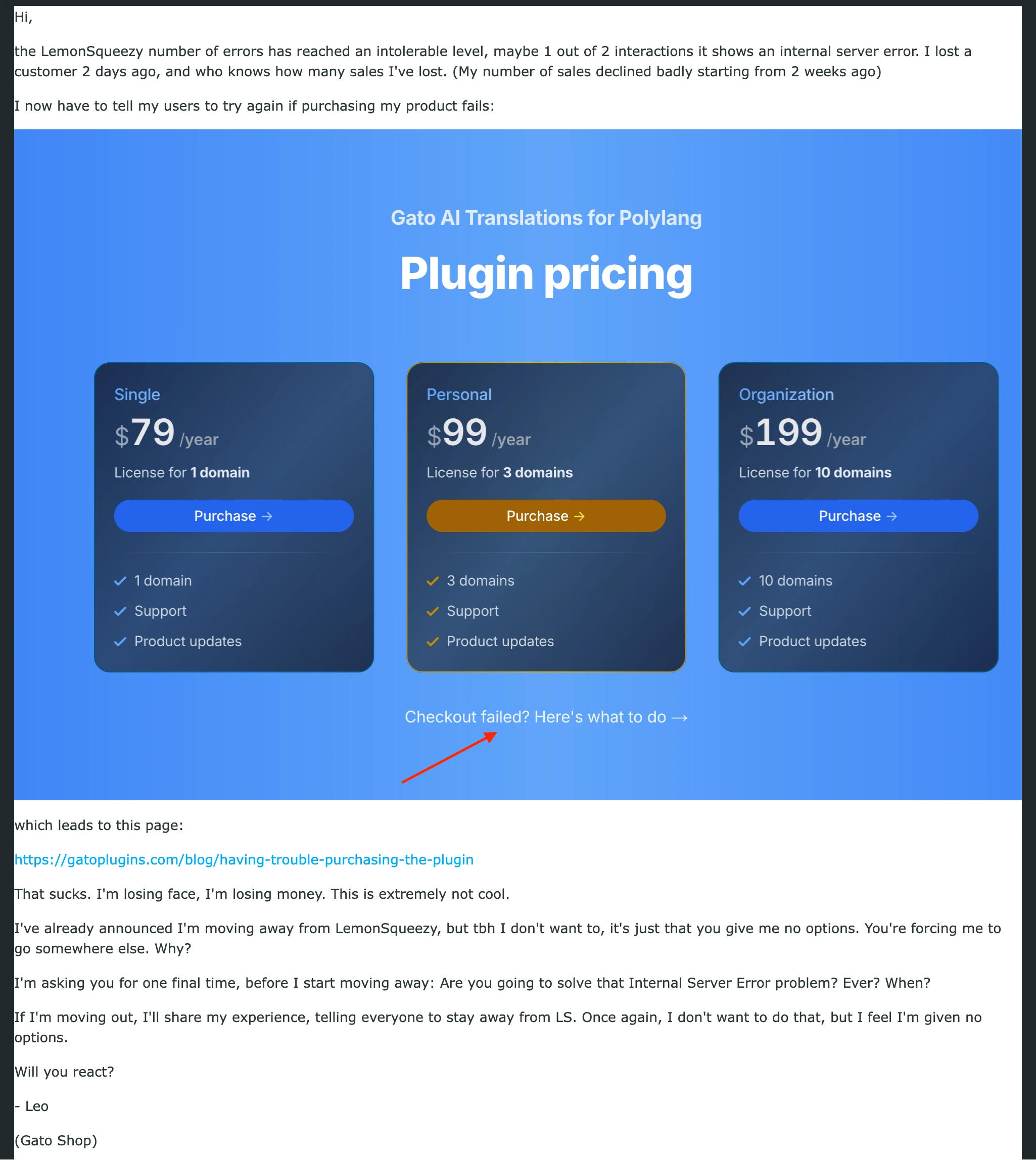
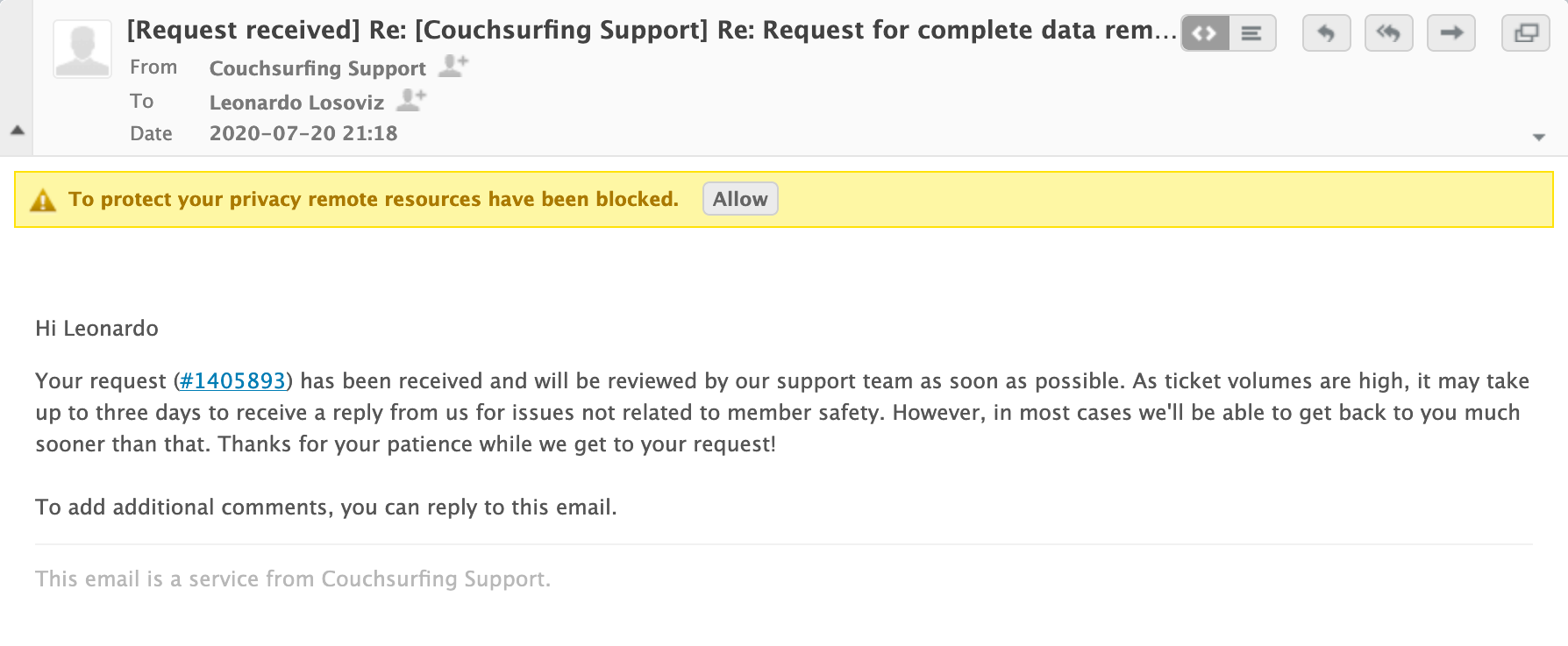
<p><img src="/images/lemonsqueezy/lemonsqueezy-email-support-example.webp" alt="LemonSqueezy's copy-paste support answer" title="LemonSqueezy's copy-paste support answer"></p>
<p>Here are some of the things I tried to get them to fix. Notice my ever-growing level of desperation by the end of each interaction.</p>
<h4>Broken affiliate tracking on gatographql.com</h4>
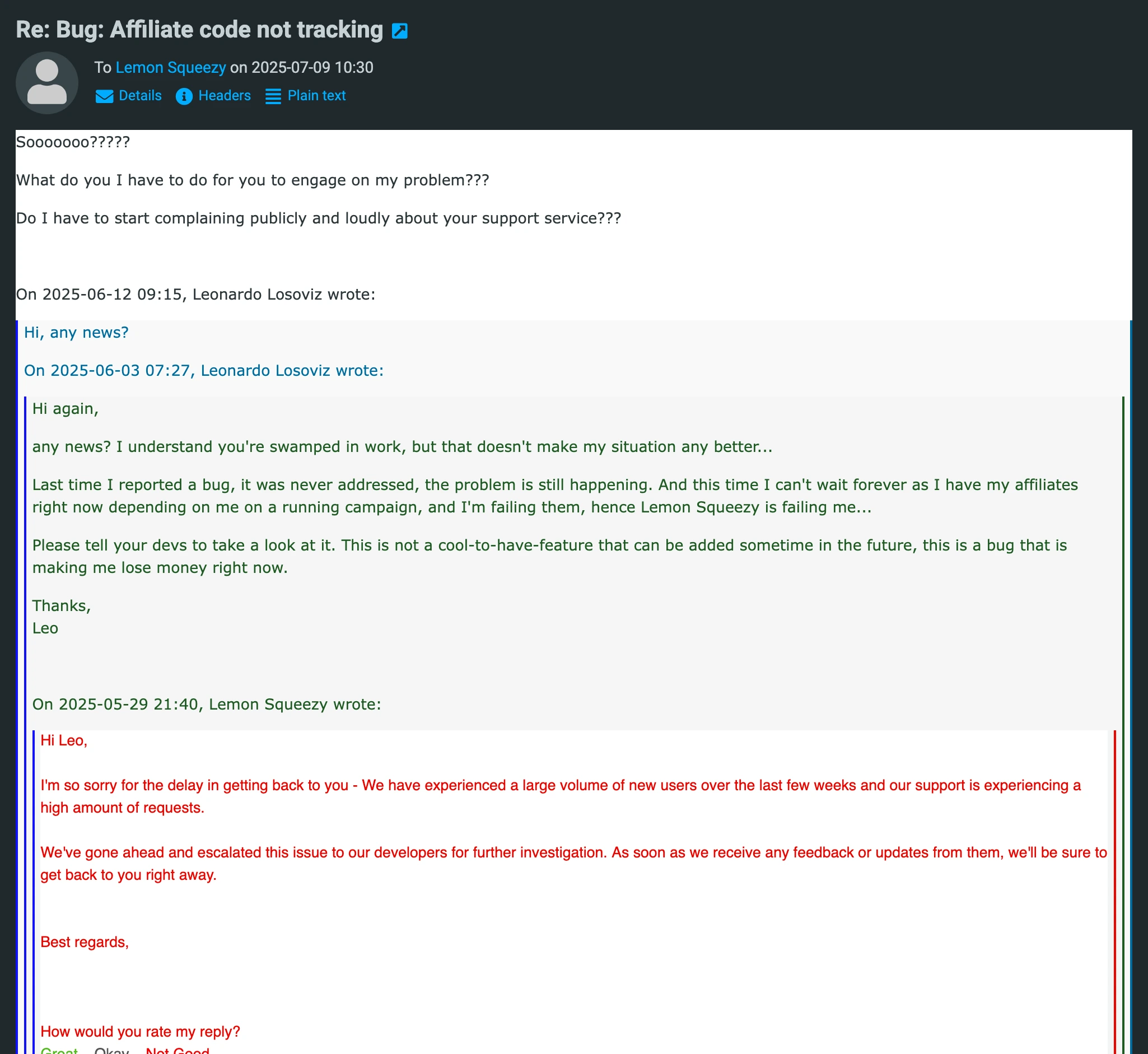
<p>The affiliate tracking script simply refused to work on the <a href="https://gatographql.com/">Gato GraphQL</a> website. One affiliate actually stopped running a campaign for my plugin because their clicks weren’t being tracked at all.</p>
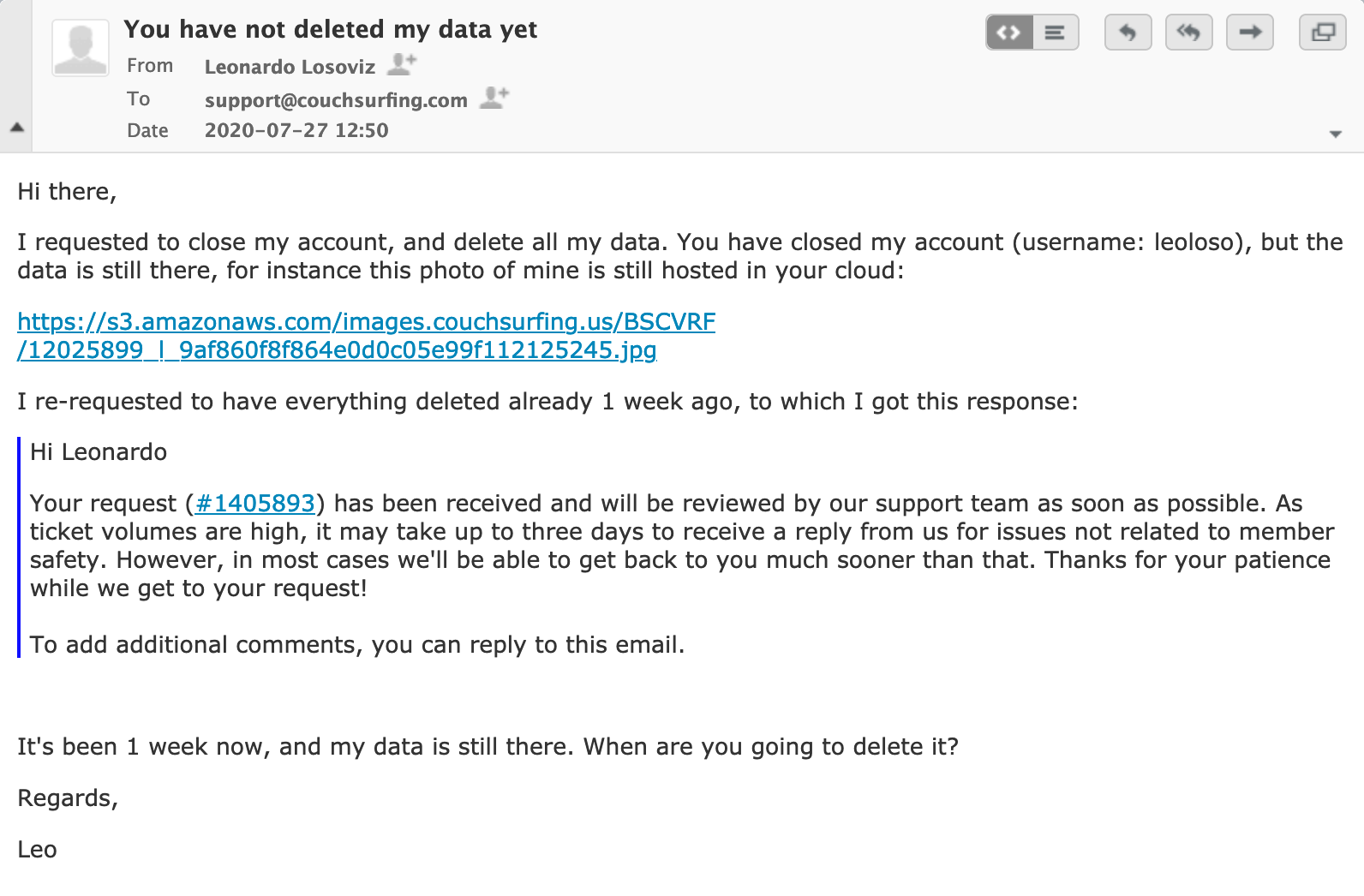
<p><img src="/images/lemonsqueezy/lemonsqueezy-email-support-affiliate.webp" alt="Support email: Affiliate tracking not working" title="Support email: Affiliate tracking not working"></p>
<h4>LemonSqueezy invalidating <em>all</em> new Gmail newsletter subscribers</h4>
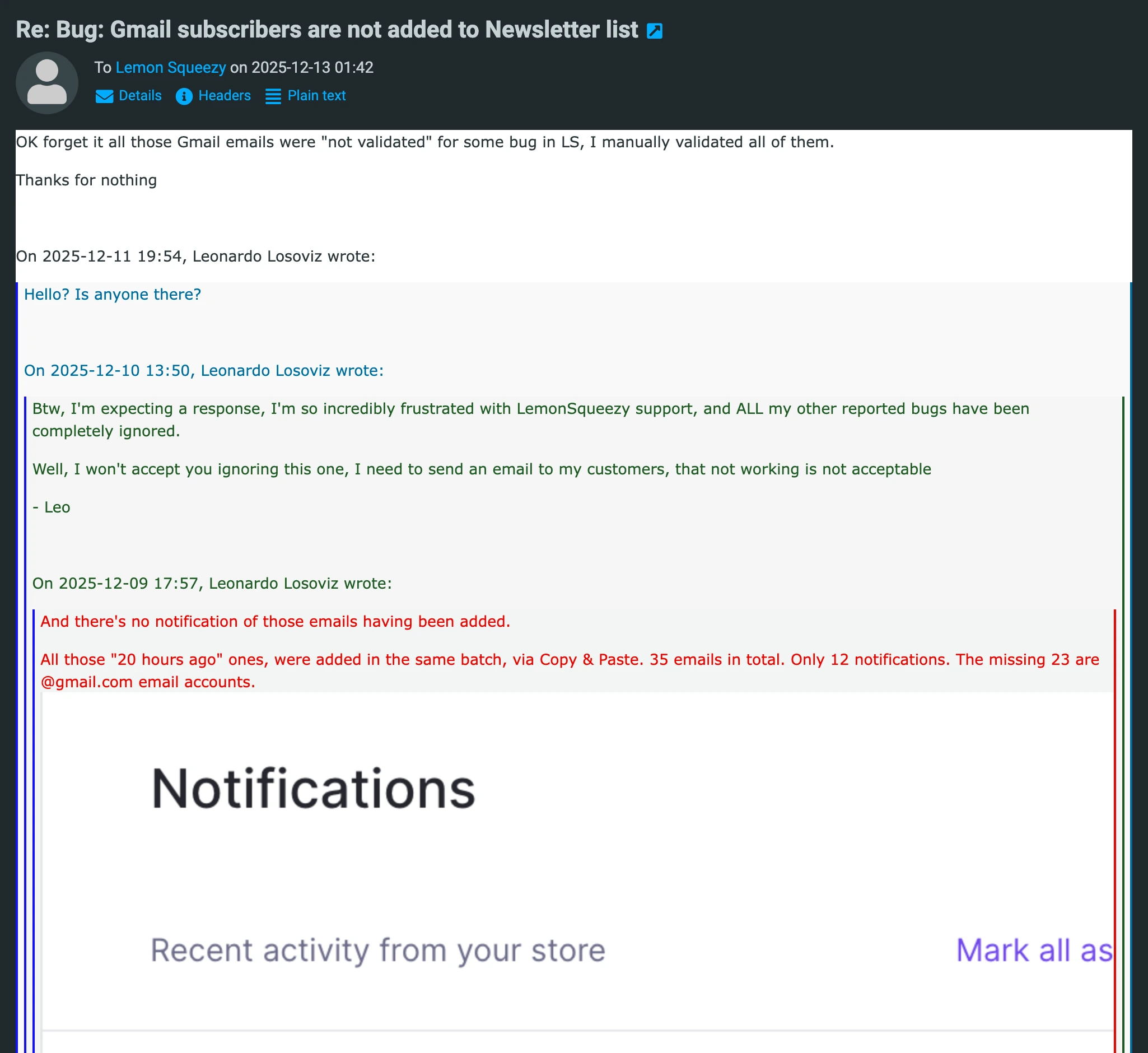
<p>LemonSqueezy started invalidating every new Gmail address subscribing to my newsletter.</p>
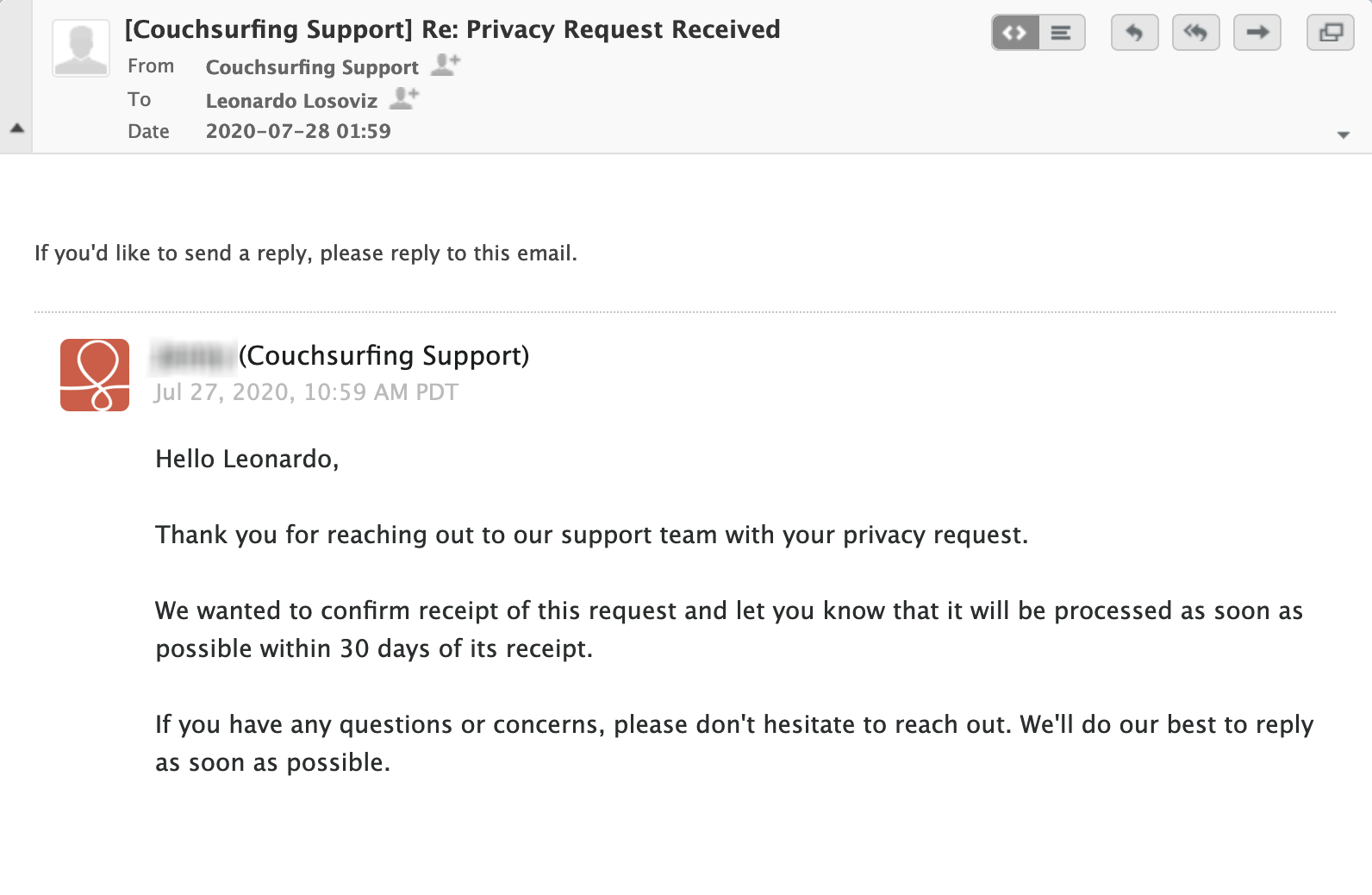
<p><img src="/images/lemonsqueezy/lemonsqueezy-email-support-subscribers-problem.webp" alt="Support email: LemonSqueezy invalidating Gmail subscribers" title="Support email: LemonSqueezy invalidating Gmail subscribers"></p>
<h4>Double opt‑in emails not being sent</h4>
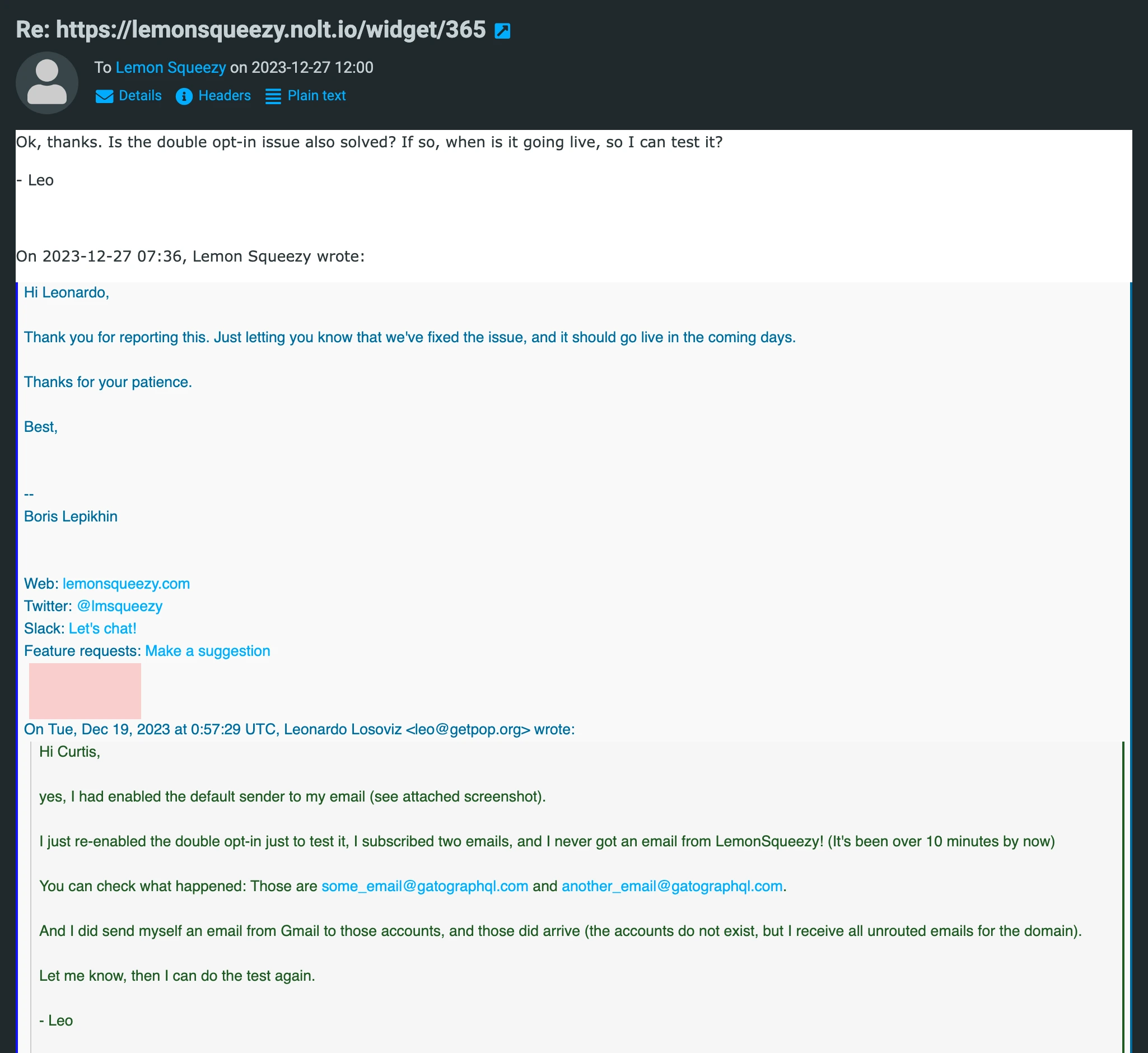
<p>Users would not receive the “double opt‑in” confirmation email when subscribing to the newsletter.</p>
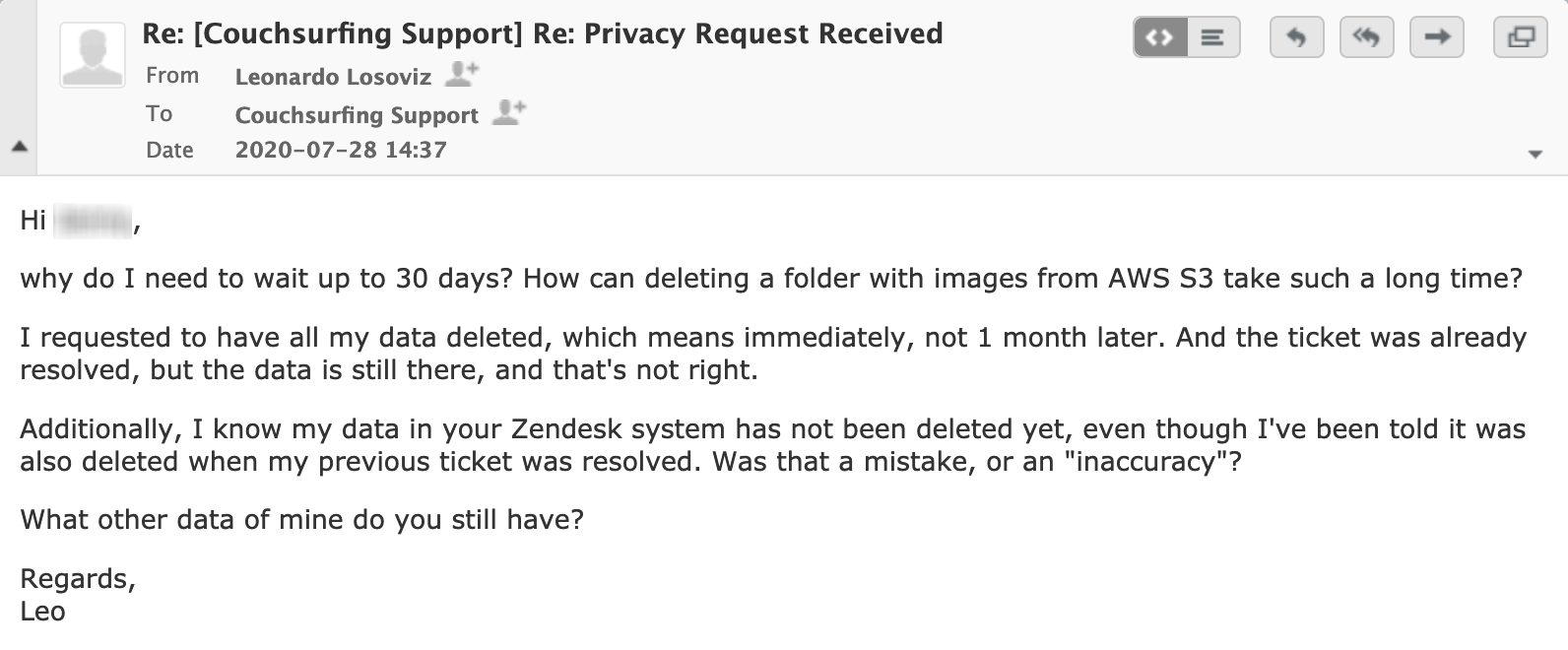
<p><img src="/images/lemonsqueezy/lemonsqueezy-email-support-double-optin.webp" alt="Support email: LemonSqueezy double opt‑in emails not arriving" title="Support email: LemonSqueezy double opt‑in emails not arriving"></p>
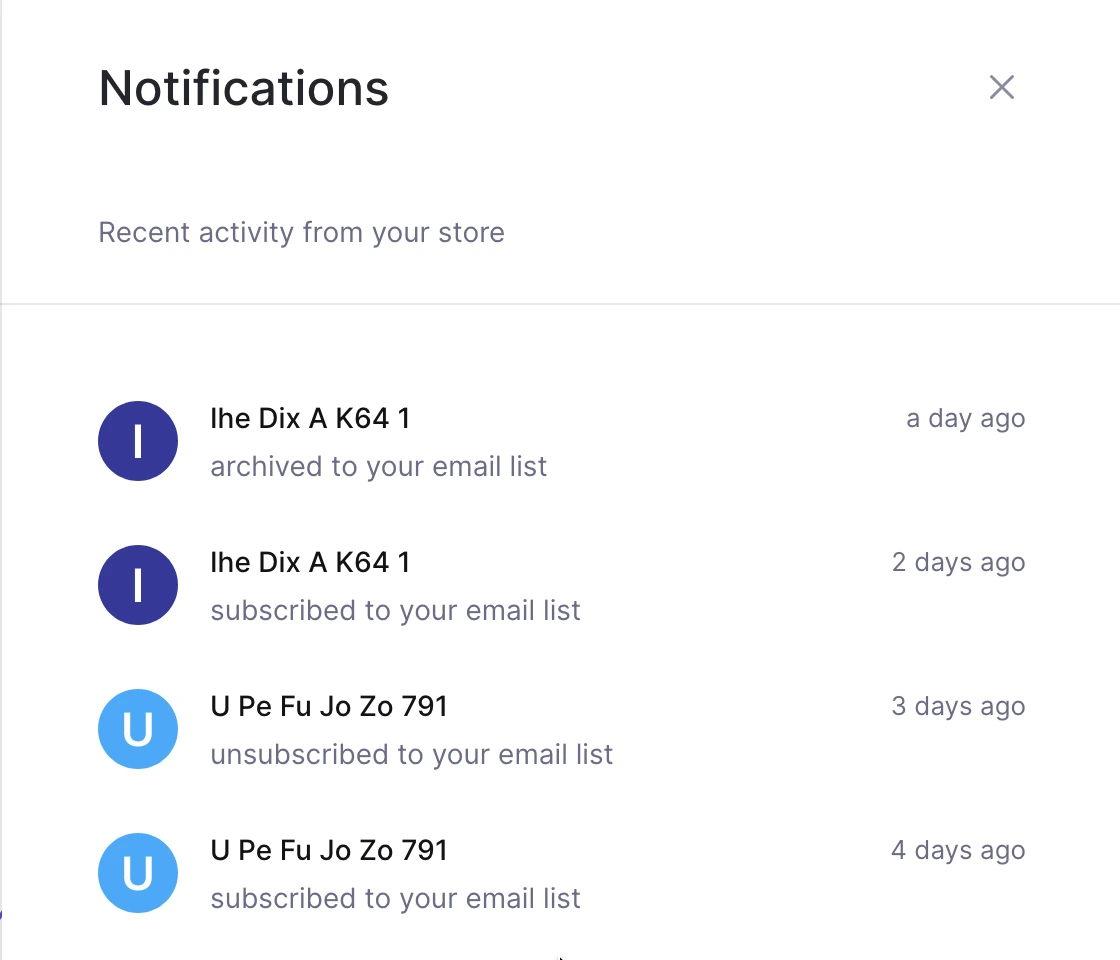
<p>Because this bug was never fixed, I had to disable double opt‑in entirely. The result: I’ve been flooded with spam signups ever since. Every day I have to check whether there are new spam subscribers and manually archive them.</p>
<p><img src="/images/lemonsqueezy/lemonsqueezy-notifications-spam-emails.webp" alt="Spam notifications after disabling double opt‑in" title="Spam notifications after disabling double opt‑in"></p>
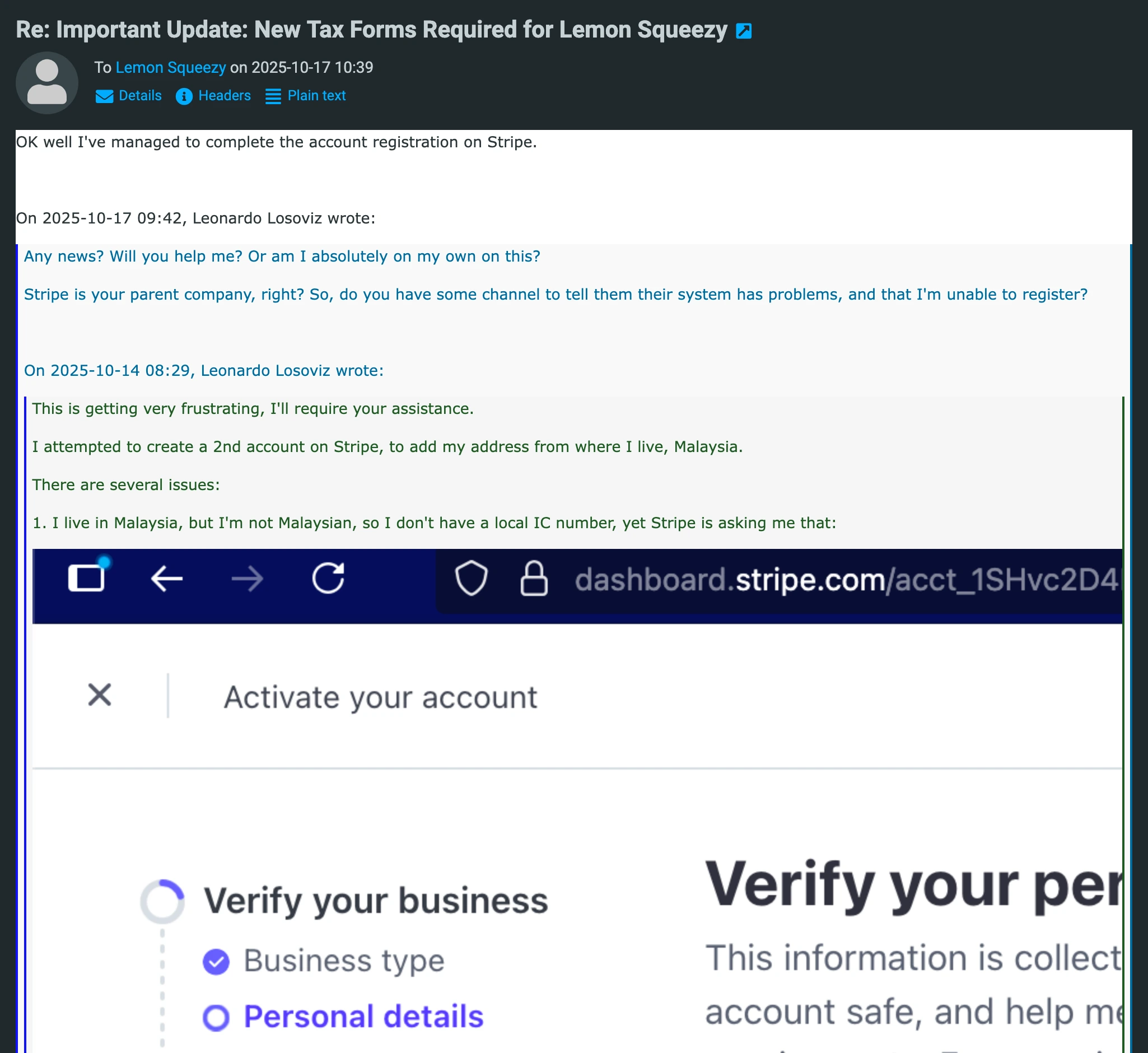
<h4>Zero help when I had trouble registering a Stripe account</h4>
<p>When I had trouble registering a new Stripe account, LemonSqueezy support was… not helpful.</p>
<p><img src="/images/lemonsqueezy/lemonsqueezy-email-support-stripe-account.webp" alt="Support email: LemonSqueezy support not helping with Stripe account issues" title="Support email: LemonSqueezy support not helping with Stripe account issues"></p>
<h4>A second shop that never worked</h4>
<p>When I launched my second venture, <a href="https://gatoplugins.com">Gato Plugins</a>, I wanted it to have its own shop, separate from the one for Gato GraphQL.</p>
<p>That never worked. Their onboarding kept throwing an exception during identity verification, so I was forced to run a single “Gato” shop for both Gato Plugins and Gato GraphQL.</p>
<p><img src="/images/lemonsqueezy/lemonsqueezy-email-support-2ndstore.webp" alt="Support email: LemonSqueezy second store creation failing" title="Support email: LemonSqueezy second store creation failing"></p>
<h4>Prices mysteriously reverting to an old version</h4>
<p>At one point, LemonSqueezy reverted my product prices back to a previous version.</p>
<p>I only noticed because a sale came in with a lower-than-expected amount. That’s money simply gone.</p>
<p>After I complained publicly on Twitter, someone from their support reached out and said they’d investigate ASAP.</p>
<p>They never came back.</p>
<p>And then, about a month later, <strong>the exact same problem happened again</strong>.</p>
<p>Despite all of this, I stayed, because I still needed to sell my products and I kept hoping they’d eventually turn things around.</p>
<h3>The final straw: 500s everywhere and lost sales</h3>
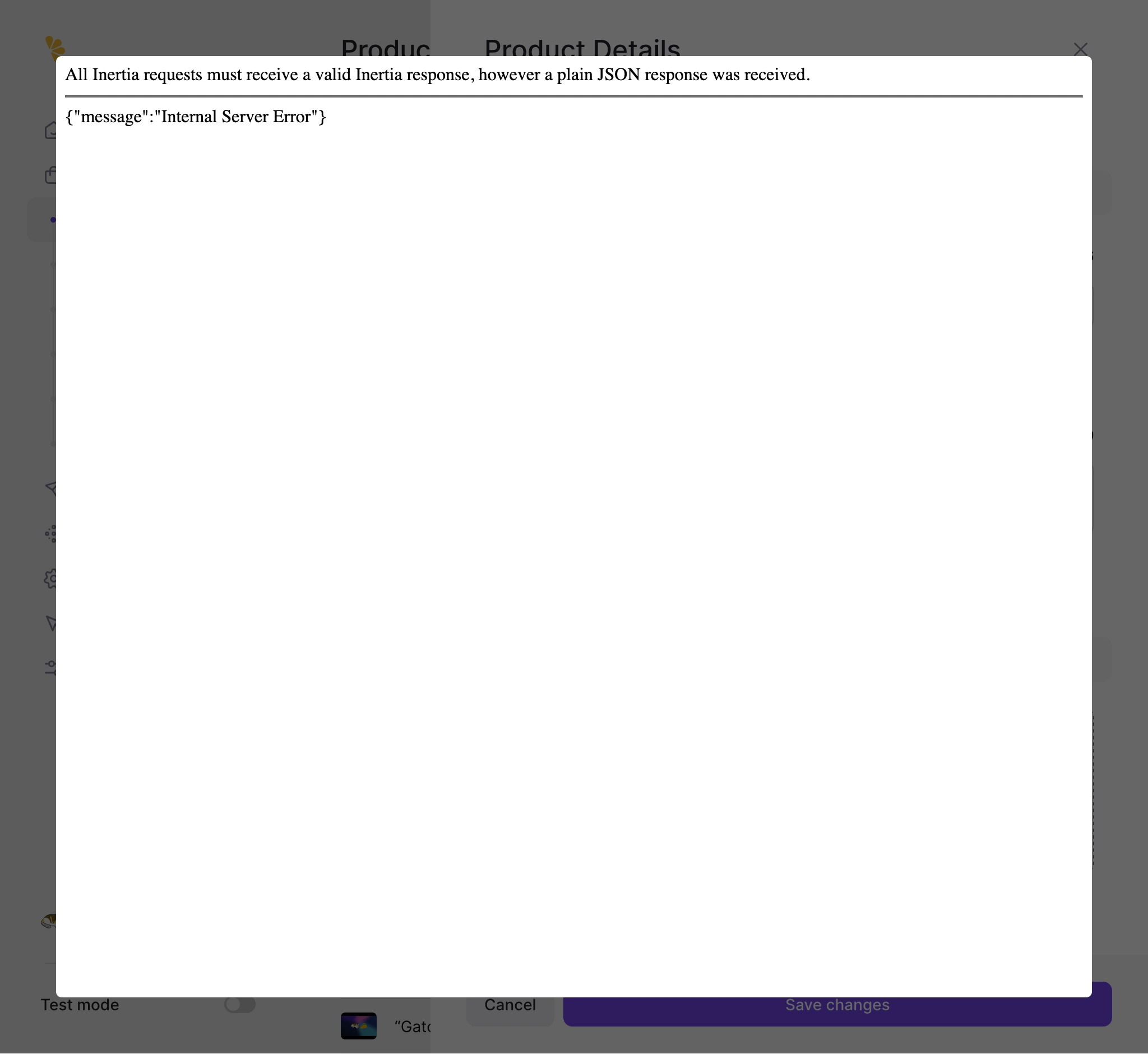
<p>About a month ago, their servers started throwing “Internal Server Error” more and more often. It got progressively worse until at times <strong>one out of three interactions</strong> with the platform resulted in an error.</p>
<p><img src="/images/lemonsqueezy/lemonsqueezy-error.webp" alt="Frequent internal server errors on LemonSqueezy" title="Frequent internal server errors on LemonSqueezy"></p>
<p>This wasn’t just in the dashboard. It also happened when customers tried to purchase my plugins.</p>
<p>I have <strong>two confirmed failed sales</strong>, where users wrote to me saying they tried to buy the plugin, got an error, and then lost trust and left.</p>
<p>And I have no idea how many others simply tried, failed, and silently left the site.</p>
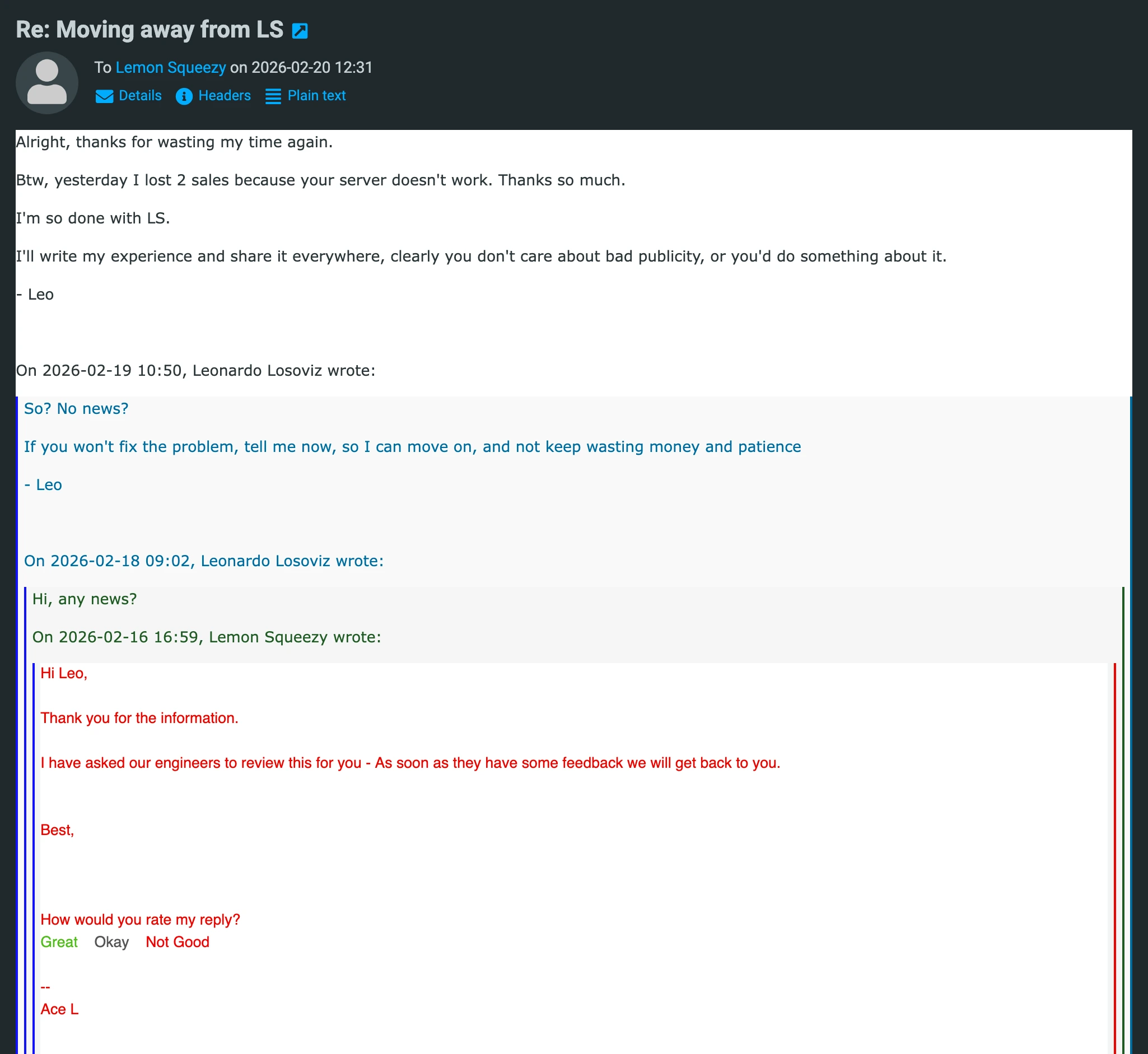
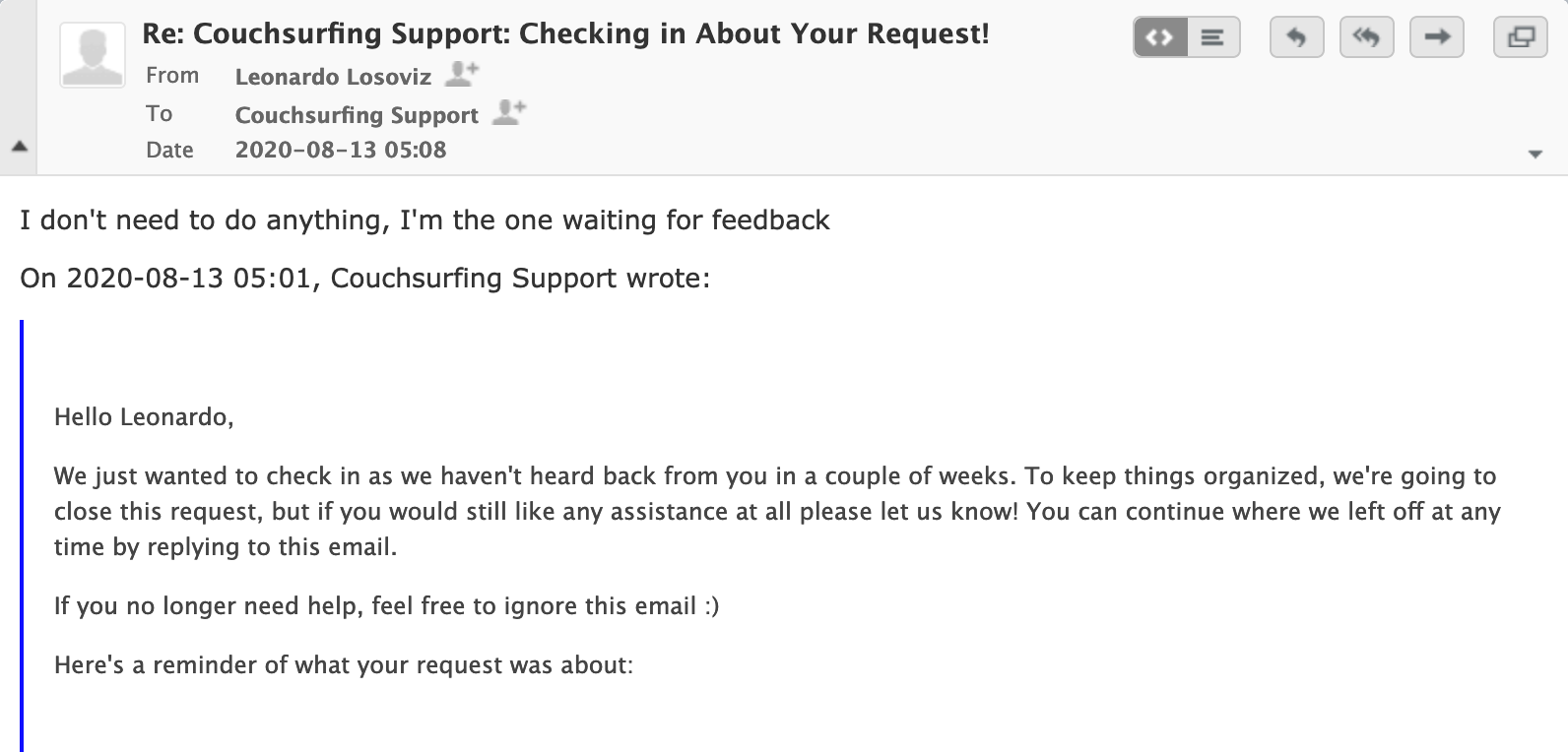
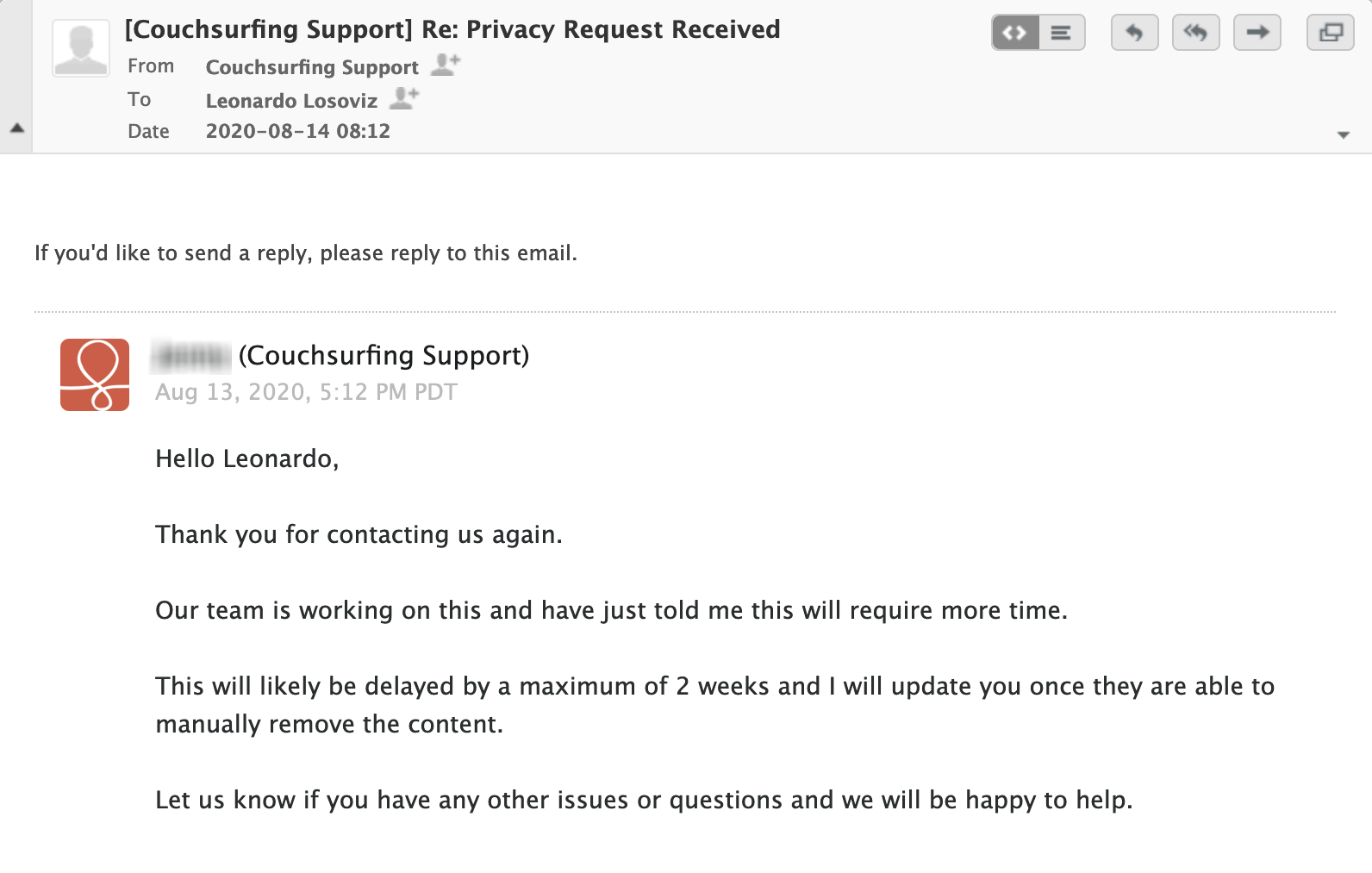
<p>At that point I sent them a last email with the subject <strong>“Moving away from LS”</strong>:</p>
<p><img src="/images/lemonsqueezy/lemonsqueezy-final-email.webp" alt="My final email to LemonSqueezy" title="My final email to LemonSqueezy"></p>
<p>Did I really think they’d react? Of course not. I was being naive.</p>
<p>They wasted my time one last time:</p>
<p><img src="/images/lemonsqueezy/lemonsqueezy-final-email-final.webp" alt="LemonSqueezy's non-response to my final email" title="LemonSqueezy's non-response to my final email"></p>
<h3>A product that actively makes me lose money</h3>
<p>At this point, LemonSqueezy had crossed a line.</p>
<p>It wasn’t just a tool with bugs. It was a service that was:</p>
<ul>
<li><strong>Actively making me lose sales</strong>, and</li>
<li><strong>Actively ignoring paying customers</strong>.</li>
</ul>
<p>The worst part is how they kept a thin shell of “support” going — whether that’s bots or humans, I honestly can’t tell.</p>
<p>They kept insisting the problem was not happening (or that they “hadn’t noticed it”), even as more and more users complained. They kept asking me for more data, more details, even screen recordings. They kept promising they’d fix it “soon”.</p>
<p>Nothing ever changed.</p>
<p>At some point I had to stop lying to myself and accept reality:</p>
<blockquote>
<p><strong>LemonSqueezy is completely, utterly unusable.</strong></p>
</blockquote>
<p>Stripe’s acquisition was not an acqui-hire. It was an <strong>acqui‑kill</strong>.</p>
<p>There’s no other way to explain their behavior: Stripe acquired LemonSqueezy in order to extract the technology and then let the existing product quietly die.</p>
<h3>Migration wasn’t optional anymore</h3>
<p>At that point, switching to a new platform was no longer something I “should probably do at some point”. It became an imperative.</p>
<p>I had to find a new ecommerce provider, integrate it into <a href="https://gatoplugins.com">gatoplugins.com</a> and <a href="https://gatographql.com">gatographql.com</a>, and update the plugins so that license validation hits the new provider’s API instead of LemonSqueezy.</p>
<p>Doing all of this took me around two weeks.</p>
<p>Two weeks during which I couldn’t sell my plugins at all. 😰</p>
<p>But it’s now done. 🙏</p>
<p>(I still need to replace LemonSqueezy for newsletters and affiliates, but that can wait a few more days.)</p>
<h3>LemonSqueezy fought back to the very end</h3>
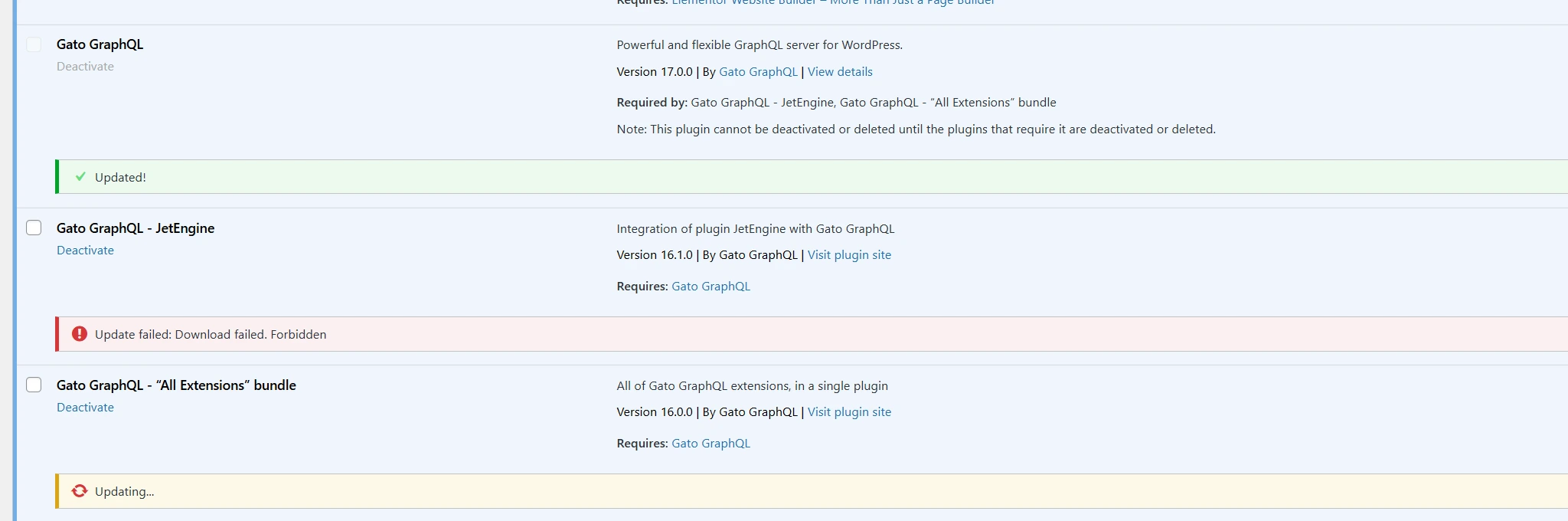
<p>On the last plugin update that was still hosted on LemonSqueezy (the new version points to the new platform), some users complained that they couldn’t update the plugin at all.</p>
<p><img src="/images/lemonsqueezy/lemonsqueezy-update-failed.webp" alt="Plugin update failing while still on LemonSqueezy" title="Plugin update failing while still on LemonSqueezy"></p>
<p>Fitting, in a way. LemonSqueezy kept throwing errors right until the very end.</p>
<p>But that’s it. I’m done.</p>
<p><strong>The LemonSqueezy nightmare is finally over.</strong> 😮‍💨</p>

    ]]></content>
  </entry>
	
  
  <entry>
    <title>🎉 Gato GraphQL v1.0 is finally out!</title>
    <link href="https://leoloso.com/posts/gatographql-v1.0-is-finally-out/"/>
    <updated>2023-09-11T00:00:00+00:00</updated>
    <id>https://leoloso.com/posts/gatographql-v1.0-is-finally-out/</id>
    <content type="html"><![CDATA[
      <p>Development of the Gato GraphQL plugin has finally reached <code>v1.0</code>.</p>
<p>Yayyyyyyyyy!!!!!!</p>
<p>Check it out under its new home, <a href="https://gatographql.com">gatographql.com</a>.</p>
<p><a href="https://gatographql.com"><img src="/assets/GatoGraphQL-logo-suki.png" alt="Gato GraphQL logo"></a></p>

    ]]></content>
  </entry>
	
  
  <entry>
    <title>🏆 Reaching #1 on Google &lt;= How it happened</title>
    <link href="https://leoloso.com/posts/path-to-number-1-in-google/"/>
    <updated>2021-03-01T00:00:00+00:00</updated>
    <id>https://leoloso.com/posts/path-to-number-1-in-google/</id>
    <content type="html"><![CDATA[
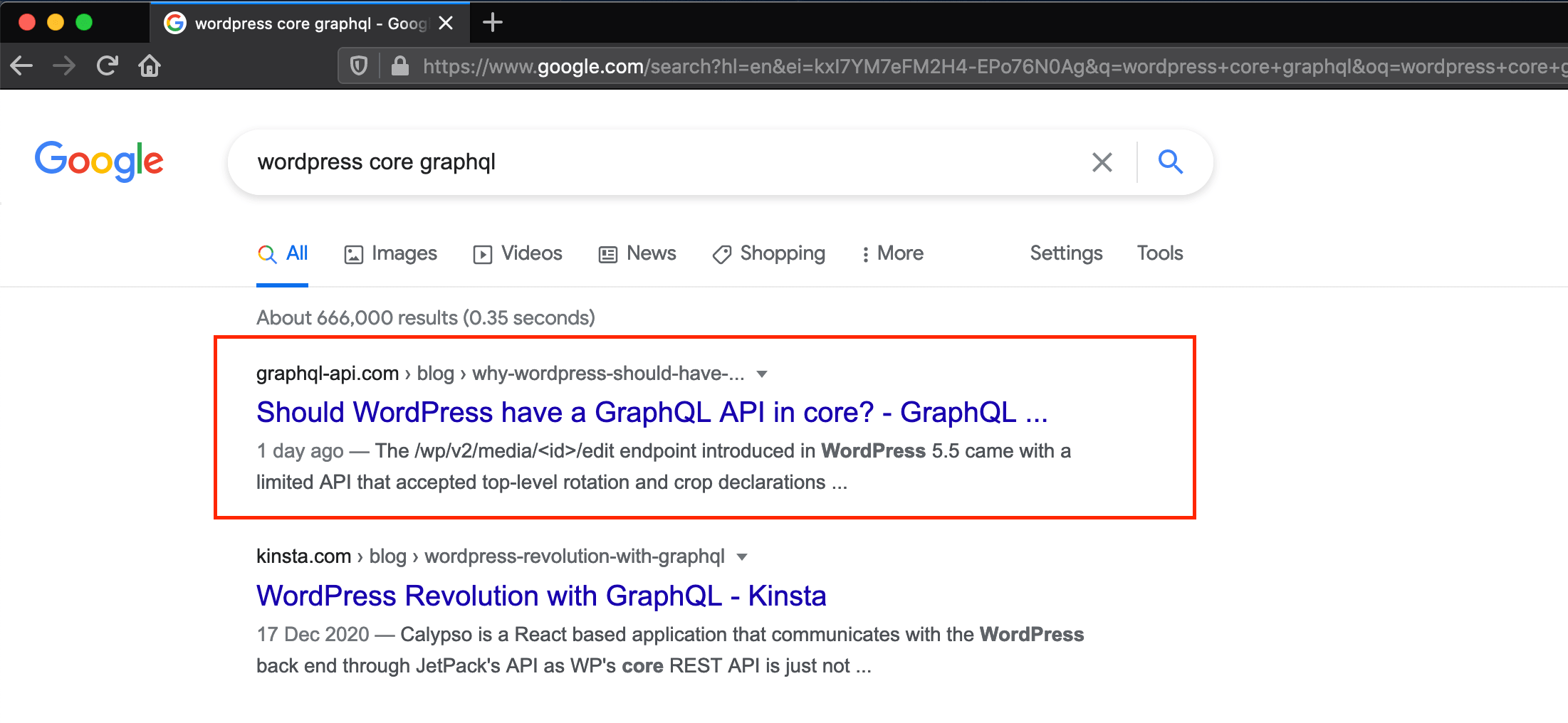
      <p>This weekend I had a very nice surprise: My <a href="https://gatographql.com/blog/why-wordpress-should-have-a-graphql-api-in-core/">latest blog post on gatographql.com</a> made it to the top of Google's search results, when searching for &quot;wordpress core graphql&quot;:</p>
<p><img src="/images/blog-post-first-in-google.png" alt="1st position in Google!" title="1st position in Google!"></p>
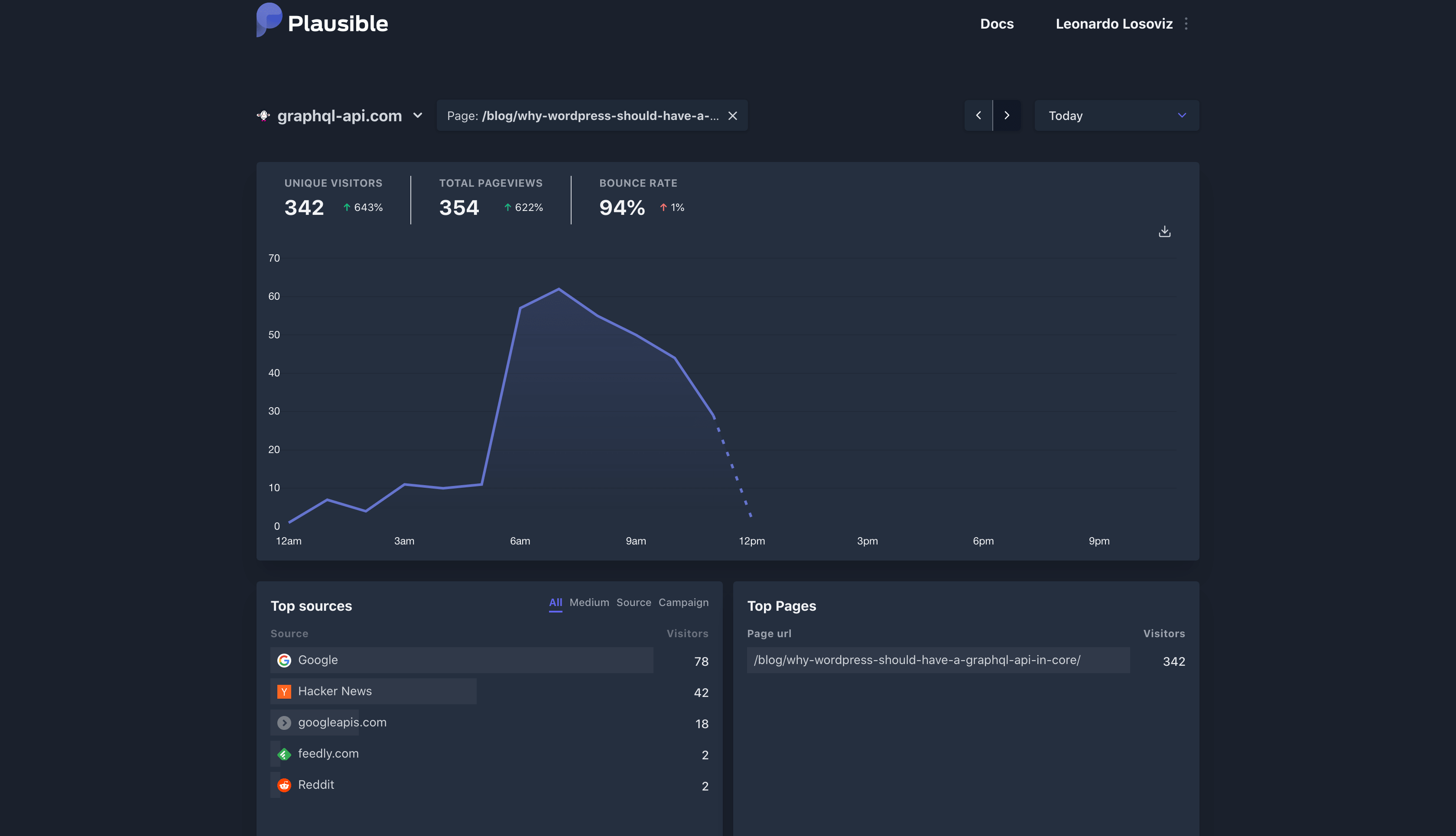
<p>I noticed because, as I woke up on Sunday morning and I checked my traffic, I saw a wonderful spike:</p>
<p><img src="/images/traffic-graphql-api-on-sunday-28-feb.png" alt="Traffic from gatographql.com on Feb 28th" title="Traffic from gatographql.com on Feb 28th"></p>
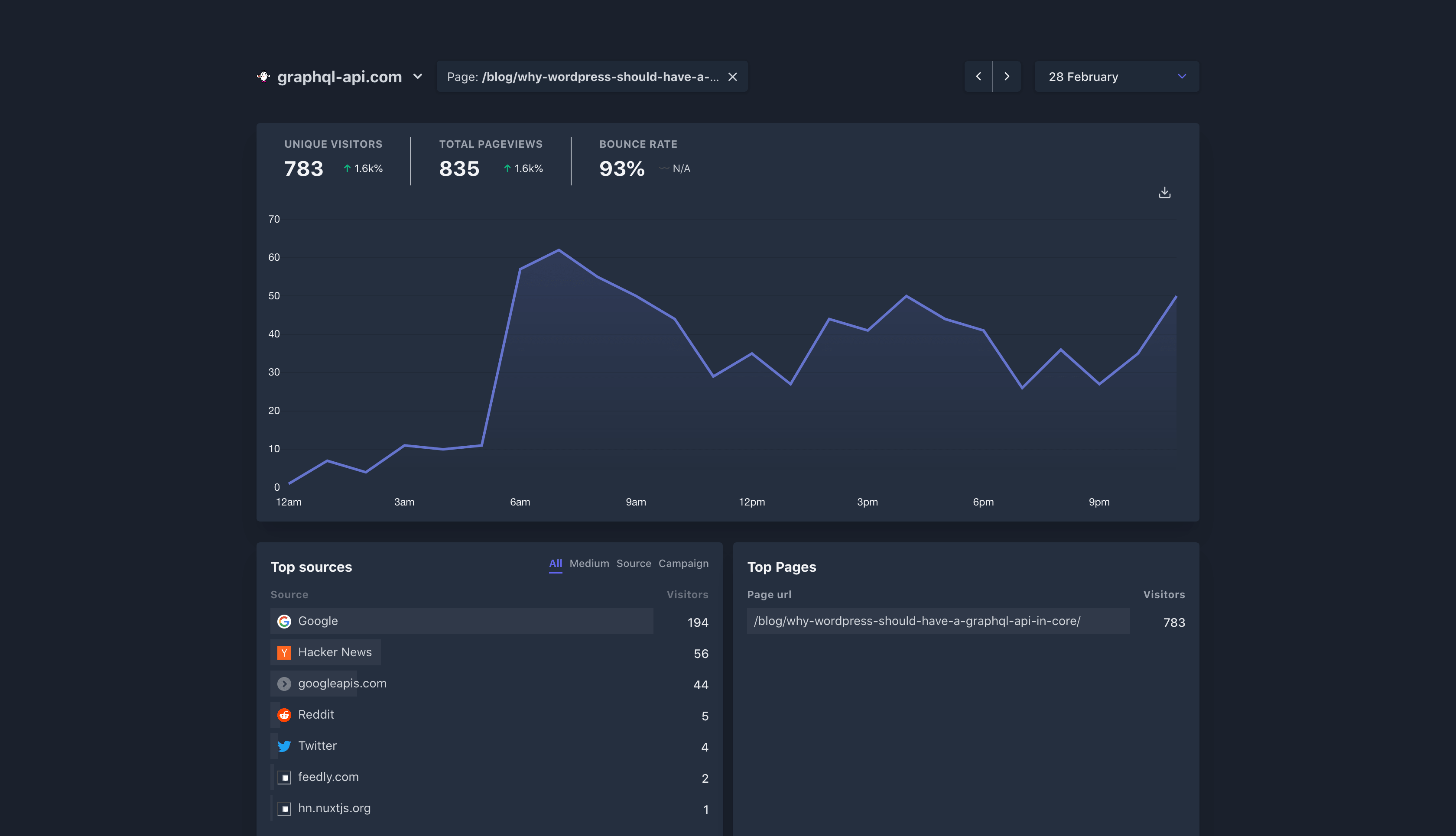
<p>By the end of the day, that blog post had brought in near 800 visitors (and they kept arriving the following day):</p>
<p><img src="/images/traffic-blog-post-on-sunday-28-feb.png" alt="Traffic from the blog post on Feb 28th" title="Traffic from the blog post on Feb 28th"></p>
<p>I believe this is the first time I reach the top of Google, when searching for some rather generic terms (say, without mentioning my name as part of the search).</p>
<p>I must admit, making it to the top of Google feels good!</p>
<p><img src="/images/top-of-google-meme.jpg" alt="This is how I felt like" title="This is how I felt like"></p>
<h2>Strategy to reach #1</h2>
<p>Ok, so this is how it happened.</p>
<p>On Saturday, I wrote the blog post <a href="https://gatographql.com/blog/why-wordpress-should-have-a-graphql-api-in-core/">🛠 Should WordPress have a GraphQL API in core?</a> for my plugin's blog.</p>
<p>I had the blog post's URL, <code>why-wordpress-should-have-a-graphql-api-in-core</code>, contains those keywords I wanted the post to be associated with:</p>
<ul>
<li>GraphQL</li>
<li>WordPress</li>
<li>core</li>
</ul>
<p>I then promoted the <a href="https://www.reddit.com/r/PHP/comments/ltnzd9/should_wordpress_have_a_graphql_api_in_core/">post on Reddit's /r/php channel</a>, and <a href="https://news.ycombinator.com/item?id=26286388">shared it on Hacker News</a>.</p>
<p>For HN, I posted it under the special section &quot;Show HN&quot;, because the number of articles submitted there is lower, hence each post remains visible longer (before falling out of the first 30 results shown on the page).</p>
<p>The traffic on the &quot;new&quot; section is low, but really high on the front page. Then, the intention is to get the article upvoted, so it will make it to the Hacker News' front page (at least the one for Show HN).</p>
<p>A way to improve one's chances is to use a compelling title. Then, instead of using the blog post's actual title (&quot;Should WordPress have a GraphQL API in core?&quot;), I chose one more suitable to the Show HN ethos: &quot;GraphQL API in WordPress core would look like this&quot;.</p>
<p>I crossed my fingers that the article would get upvoted, and went to sleep.</p>
<p>I woke up, and saw to my delight that the article got upvoted, and it made it to Show HN's front page. Yay!</p>
<p>I wish I had taken a screenshot. I did not. But it looked like this:</p>
<p><img src="/images/hacker-news.jpg" alt="Showing up on HN Show front page" title="Showing up on HN Show front page"></p>
<p>Google (I believe) picked it up from there, and the traffic then went through the roof 🚀</p>
<p><img src="/images/through-the-roof.jpg" alt="My traffic on Sunday morning" title="My traffic on Sunday morning"></p>
<h2>Search is a battle</h2>
<p>I was lucky this time, because people upvoting my article is out of my control. However, this is part of a long-term strategy, to have my plugin the <a href="https://gatographql.com">GraphQL API for WordPress</a> feature higher on Google.</p>
<p>That search result is actually a bit esoteric: &quot;wordpress core graphql&quot;. Who adds the word &quot;core&quot;?</p>
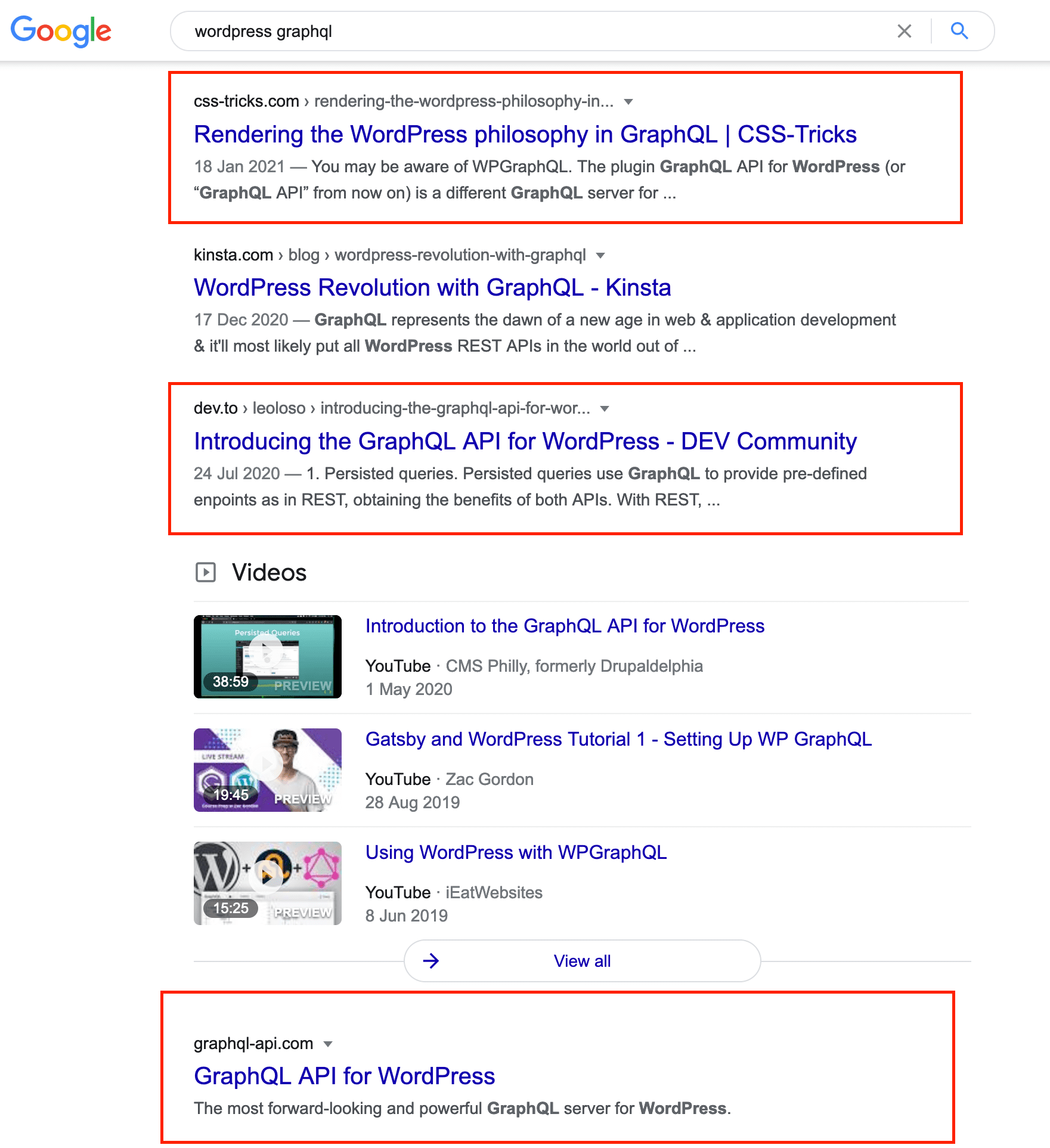
<p>This is a step in between. The actual objective is to feature higher when searching for &quot;wordpress graphql&quot;. And in this concern, my plugin is not doing great yet, but it's been improving!</p>
<p>When Googling &quot;wordpress graphql&quot;, my plugin now shows on the homepage! (This was not the case as far as last week). It shows on the 7th position and, in addition, the 4th and 6th positions also concern my plugin:</p>
<p><img src="/images/googling-wordpress-graphql.png" alt="Googling &quot;wordpress graphql&quot;" title="Googling 'wordpress graphql'"></p>
<p>WPGraphQL is currently dominating results for this search, taking positions 1, 2 and 3, which are the ones that truly matter.</p>
<p>But I'm coming behind, and will battle my way up 😜</p>
<p><img src="/images/looking-up.jpg" alt="Looking up, going up" title="Looking up, going up"></p>

    ]]></content>
  </entry>
	
  
  <entry>
    <title>🏠 GraphQL API for WP has its first home 👉 gatographql.com</title>
    <link href="https://leoloso.com/posts/i-launched-graphql-api-dot-com/"/>
    <updated>2021-01-23T00:00:00+00:00</updated>
    <id>https://leoloso.com/posts/i-launched-graphql-api-dot-com/</id>
    <content type="html"><![CDATA[
      <p>Well, that took time! After several months, I finally launched the site for my plugin GraphQL API for WordPress:</p>
<p><a href="https://gatographql.com">https://gatographql.com</a></p>
<p>It took so long, because when you're doing everything on your own (which is my case, I don't have a team), you literally need to do everything. So to make this website, I had to learn so many things:</p>
<ul>
<li>Jamstack + Eleventy</li>
<li>CSS animations</li>
<li>Screencasting</li>
</ul>
<p>And I even had to design the logo (with help from my wife):</p>
<p><img src="/images/graphql-api-logo-with-name.jpg" alt="GraphQL API for WordPress logo" title="GraphQL API for WordPress logo"></p>
<p>It looks not bad, right? 😅</p>
<p>And all of that while still <a href="https://gatographql.com/blog/released-graphql-api-v07-with-mutations-and-nested-mutations/">developing the plugin</a>, and <a href="https://gatographql.com/guides">writing documentation</a>, so that users can start playing with it immediately.</p>
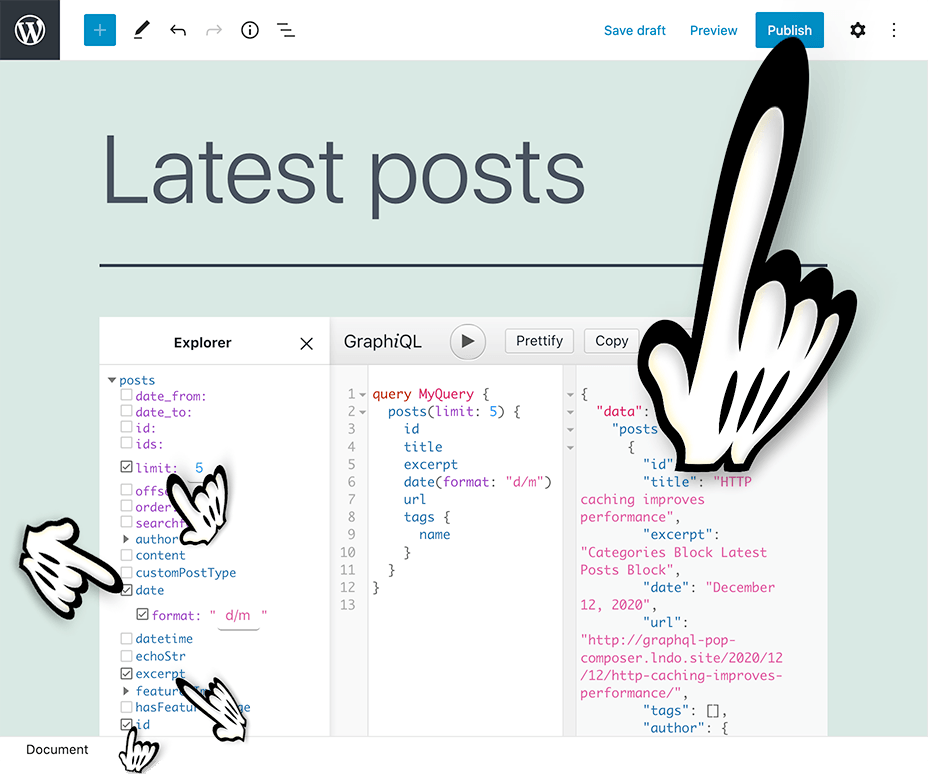
<p>But it's been worth it. I'm very pleased with how it looks. Check this image for instance, added to the homepage:</p>
<p><img src="/images/click-publish.png" alt="Click click click click Publish" title="Click click click click Publish"></p>
<p>I believe it's able to convey how powerful the product is, which was my goal all along.</p>
<p>Now, on to the next challenge: how to get people to visit it 🙀</p>

    ]]></content>
  </entry>
	
  
  <entry>
    <title>🎉 Released GraphQL API v0.7, with support for mutations, and nested mutations!</title>
    <link href="https://leoloso.com/posts/released-graphql-api-v07-with-mutations-and-nested-mutations/"/>
    <updated>2021-01-22T00:00:00+00:00</updated>
    <id>https://leoloso.com/posts/released-graphql-api-v07-with-mutations-and-nested-mutations/</id>
    <content type="html"><![CDATA[
      <p><strong>Note:</strong> This blog post <a href="https://gatographql.com/blog/released-graphql-api-v07-with-mutations-and-nested-mutations/">has been crossposted</a> from <a href="https://gatographql.com">gatographql.com</a> (the GraphQL API for WordPress plugin's new site).</p>
<p>I released version 0.7 of the <a href="https://gatographql.com">GraphQL API for WordPress</a>, supporting mutations, and nested mutations! 🎉</p>
<p><img src="/images/finally-got-mutations.jpg" alt="Mutations are awesome!"></p>
<p>Here is a tour showing the new additions.</p>
<h2>1. Mutations! 🚀</h2>
<p><a href="https://graphql.org/learn/queries/#mutations">GraphQL mutations</a> enable to modify data (i.e. perform side-effect) through the query.</p>
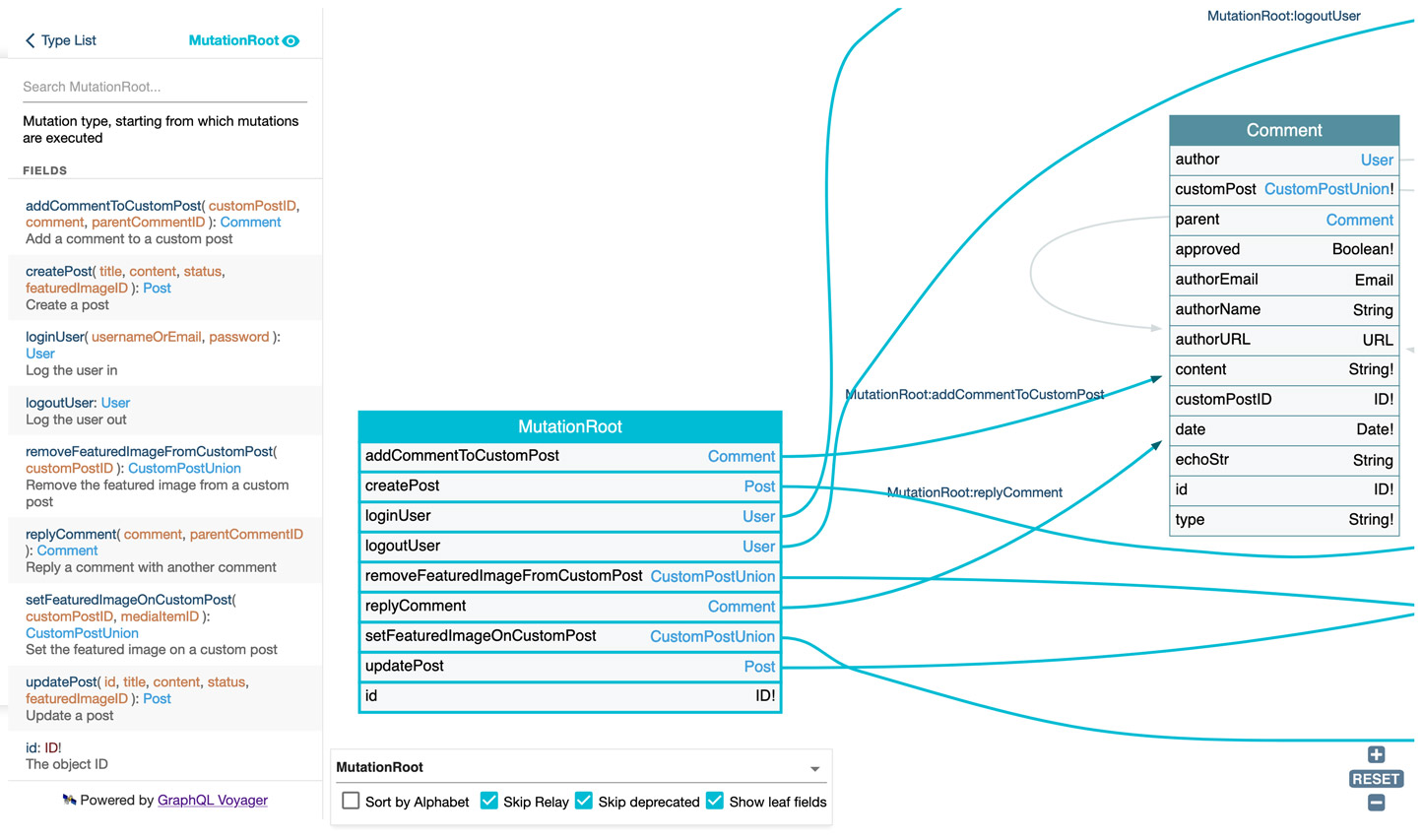
<p>Mutations was the big item still missing from the GraphQL API. Now that it's been added, I can claim that this GraphQL server is pretty much feature-complete (only subscriptions are missing, and I'm already <a href="https://github.com/GatoGraphQL/GatoGraphQL/issues/194">thinking on how to add them</a>).</p>
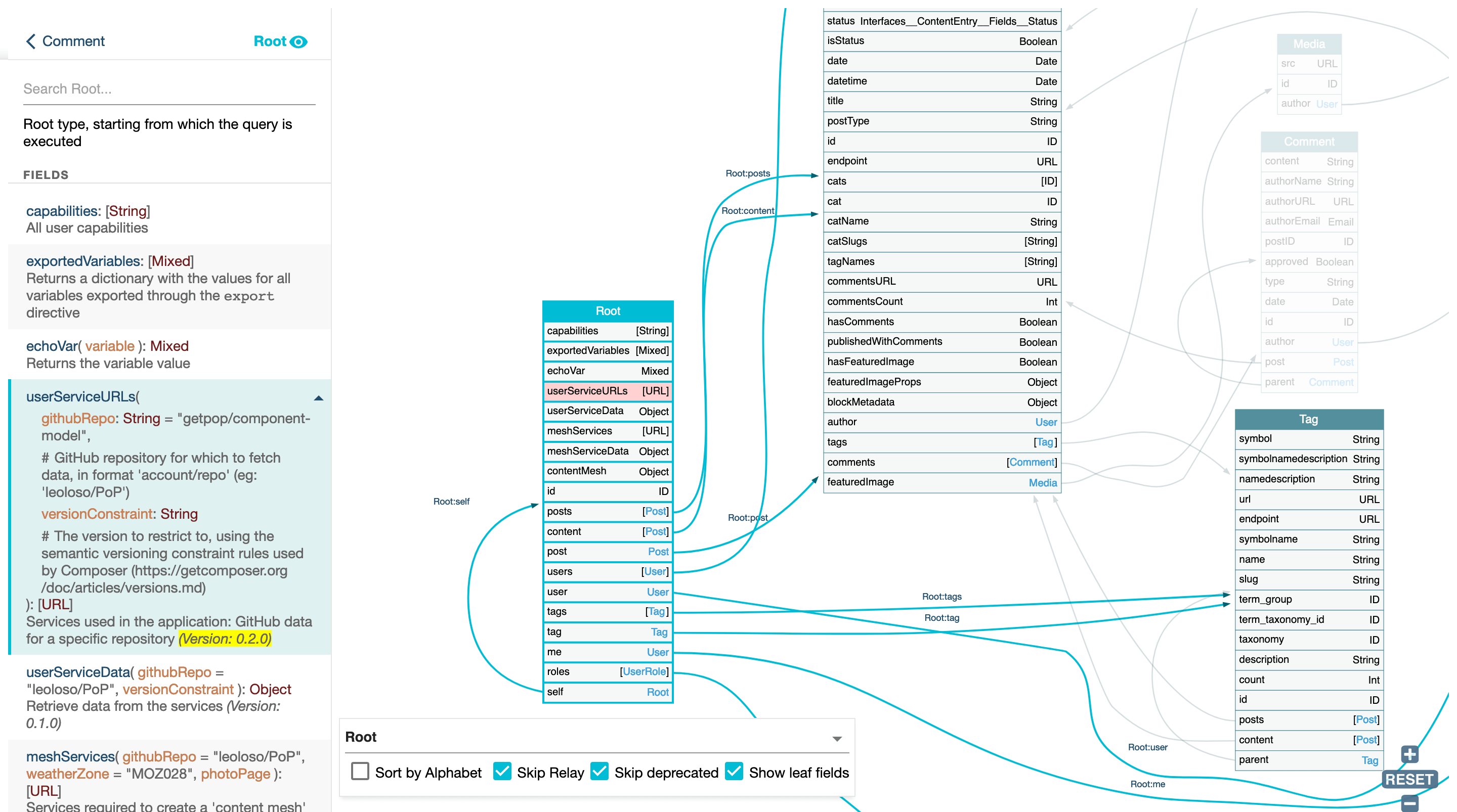
<p><img src="/images/graphql-schema-mutation-root.jpg" alt="Mutation root in the interactive schema" title="Mutation root in the interactive schema"></p>
<p>Let's check an example on adding a comment. But first, we need to execute another mutation to log you in, so you can add comments. Press the &quot;Run&quot; button on the GraphiQL client below, to execute mutation field <code>loginUser</code> with a pre-created testing user:</p>
<link href="https://unpkg.com/graphiql/graphiql.min.css" rel="stylesheet" />
<div id="graphiql-1st" style="height: 65vh; padding-top: 0; margin-top: 1rem;" class="video-player"></div>
<p>[<a href="https://newapi.getpop.org/graphiql/?query=mutation%20LogUserIn%20%7B%0A%20%20loginUser(%0A%20%20%20%20usernameOrEmail%3A%22test%22%2C%0A%20%20%20%20password%3A%22pass%22%0A%20%20)%20%7B%0A%20%20%20%20id%0A%20%20%20%20name%0A%20%20%7D%0A%7D&operationName=LogUserIn" target="_blank">🔗 Open GraphiQL client in new window</a>]</p>
<p>Now, let's add some comments. Press the Run button below, to add a comment to some post by executing mutation field <code>addCommentToCustomPost</code> (you can also edit the comment text):</p>
<div id="graphiql-2nd" style="height: 65vh; padding-top: 0; margin-top: 1rem;" class="video-player"></div>
<p>[<a href="https://newapi.getpop.org/graphiql/?query=mutation%20AddCommentToPost%20%7B%0A%20%20addCommentToCustomPost(%0A%20%20%20%20customPostID%3A%201459%2C%0A%20%20%20%20comment%3A%20%22Adding%20a%20comment:%20bla%20bla%20bla%22%0A%20%20)%20%7B%0A%20%20%20%20id%0A%20%20%20%20content%0A%20%20%20%20date%0A%20%20%7D%0A%7D&operationName=AddCommentToPost" target="_blank">🔗 Open GraphiQL client in new window</a>]</p>
<hr>
<p>In this first release, the plugin ships with the following mutations:</p>
<p>✅ <code>createPost</code><br/>
✅ <code>updatePost</code><br/>
✅ <code>setFeaturedImageforCustomPost</code><br/>
✅ <code>removeFeaturedImageforCustomPost</code><br/>
✅ <code>addCommentToCustomPost</code><br/>
✅ <code>replyComment</code><br/>
✅ <code>loginUser</code><br/>
✅ <code>logoutUser</code></p>
<h2>2. Nested Mutations! 🚀🚀</h2>
<p>Nested mutations is the ability to perform mutations on a type other than the root type in GraphQL.</p>
<p>They have been <a href="https://github.com/graphql/graphql-spec/issues/252">requested for the GraphQL spec</a> but not yet approved (and may never will), hence GraphQL API adds support for them as an opt-in feature, via the <a href="https://github.com/GatoGraphQL/GatoGraphQL/tree/master/layers/GatoGraphQLForWP/plugins/gatographql/docs/en/modules/nested-mutations.md">Nested Mutations</a> module.</p>
<p>Then, the plugin supports the 2 behaviors:</p>
<ol>
<li>The standard GraphQL behavior (i.e. adding mutation fields to the root type), by default</li>
<li>Nested mutations, as an opt-in</li>
</ol>
<p>For instance, the query from above can also be executed with the following query, in which we first retrieve the post via <code>Root.post</code>, and only then add a comment to it via <code>Post.addComment</code>:</p>
<div id="graphiql-3rd" style="height: 65vh; padding-top: 0; margin-top: 1rem;" class="video-player"></div>
<p>[<a href="https://newapi.getpop.org/graphiql/?mutation_scheme=nested&query=mutation%20AddComment%20%7B%0A%20%20post(id%3A%201459)%20%7B%0A%20%20addComment(%0A%20%20%20%20comment%3A%20%22Notice%20how%20field%20%60addCommentToCustomPost%60%20under%20the%20%60Root%60%20type%20is%20renamed%20as%20%60addComment%60%20under%20the%20%60Post%60%20type%3F%20The%20schema%20got%20neater!%22%0A%20%20)%20%7B%0A%20%20%20%20%20%20id%0A%20%20%20%20%20%20content%0A%20%20%20%20%20%20date%0A%20%20%20%20%7D%0A%20%20%7D%0A%7D&operationName=AddComment" target="_blank">🔗 Open GraphiQL client in new window</a>]</p>
<p>Mutations can also modify data on the result from another mutation. In the query below, we first obtain the post through <code>Root.post</code>, then execute mutation <code>Post.addComment</code> on it and obtain the created comment object, and finally execute mutation <code>Comment.reply</code> on it:</p>
<div id="graphiql-4th" style="height: 65vh; padding-top: 0; margin-top: 1rem;" class="video-player"></div>
<p>[<a href="https://newapi.getpop.org/graphiql/?mutation_scheme=nested&query=mutation%20AddCommentAndResponse%20%7B%0A%20%20post(id%3A1459)%20%7B%0A%20%20%20%20id%0A%20%20%20%20title%0A%20%20%20%20addComment(comment%3A%22Isn%27t%20this%20awesome%3F%22)%20%7B%0A%20%20%20%20%20%20id%0A%20%20%20%20%20%20date%0A%20%20%20%20%20%20content%0A%20%20%20%20%20%20reply(comment%3A%22I%20think%20so!%22)%20%7B%0A%20%20%20%20%20%20%20%20id%0A%20%20%20%20%20%20%20%20date%0A%20%20%20%20%20%20%20%20content%0A%20%20%20%20%20%20%7D%0A%20%20%20%20%7D%0A%20%20%7D%0A%7D&operationName=AddCommentAndResponse" target="_blank">🔗 Open GraphiQL client in new window</a>]</p>
<p>This is certainly useful! 😍 (The alternative method to produce this same behavior, in a single query, is via the <code>@export</code> directive... I'll compare both of them in an upcoming blog post).</p>
<hr>
<p>In this first release, the plugin ships with the following mutations:</p>
<p>✅ <code>CustomPost.update</code><br/>
✅ <code>CustomPost.setFeaturedImage</code><br/>
✅ <code>CustomPost.removeFeaturedImage</code><br/>
✅ <code>CustomPost.addComment</code><br/>
✅ <code>Comment.reply</code></p>
<h3>Standard or nested? Or both?</h3>
<p>You may have a GraphQL API that is used by your own application, and is also publicly available for your clients. You may want to enable nested mutations but only for your own application, not for your clients because this is a non-standard feature.</p>
<p>Good news: you can.</p>
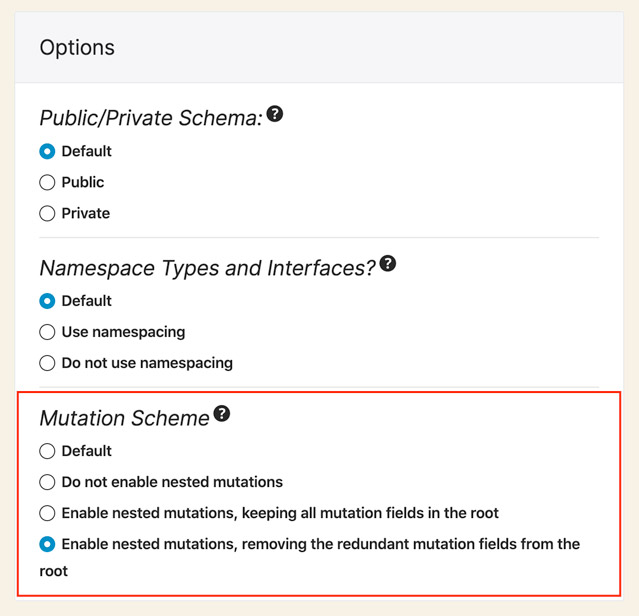
<p>I've added a &quot;Mutation Scheme&quot; section in the Schema Configuration, which is used to customize the schema for <a href="https://github.com/GatoGraphQL/GatoGraphQL/tree/master/layers/GatoGraphQLForWP/plugins/gatographql/docs/en/modules/custom-endpoints.md">Custom Endpoints</a> and <a href="https://github.com/GatoGraphQL/GatoGraphQL/tree/master/layers/GatoGraphQLForWP/plugins/gatographql/docs/en/modules/persisted-queries.md">Persisted Queries</a>:</p>
<p><img src="/images/schema-configuration-mutation-scheme.jpg" alt="Mutation scheme in the Schema configuration"></p>
<p>Hence, you can disable the nested mutations everywhere, but enable them just for a specific custom endpoint that only your application will use. 💪</p>
<h3>Removing redundant fields from the root type</h3>
<p>With nested mutations, mutation fields may be added two times to the schema:</p>
<ul>
<li>once under the root type</li>
<li>once under the specific type</li>
</ul>
<p>For instance, these fields can be considered a &quot;duplicate&quot; of each other:</p>
<ul>
<li><code>Root.updatePost</code></li>
<li><code>Post.update</code></li>
</ul>
<p>The GraphQL API enables to keep both of them, or remove the ones from the root type, which are redundant.</p>
<p>Check-out the following 3 schemas:</p>
<ol>
<li><a href="https://newapi.getpop.org/graphql-interactive/">Standard behavior</a>:<br/>it uses types <code>QueryRoot</code> to handle queries and <code>MutationRoot</code> to handle queries</li>
<li><a href="https://newapi.getpop.org/graphql-interactive/?mutation_scheme=nested">Nested mutations keeping mutation fields duplicate</a>:<br/>a single <code>Root</code> type handles queries and mutations, and redundant mutation fields in this type are kept</li>
<li><a href="https://newapi.getpop.org/graphql-interactive/?mutation_scheme=lean_nested">Nested mutations removing redundant mutation fields from the root type</a>:<br/>same as above, but removing all redundant mutation fields from the <code>Root</code> type</li>
</ol>
<p>✱ Btw1, these 3 schemas all use the same endpoint, but changing a URL param <code>?mutation_scheme</code> to values <code>standard</code>, <code>nested</code> and <code>lean_nested</code>. That's possible because the GraphQL server follows the <a href="https://graphql-by-pop.com/docs/architecture/code-first.html">code-first approach</a>. 🤟</p>
<p>✱ Btw2, these options can be selected on the &quot;Mutation Scheme&quot; section in the Schema configuration (shown above), hence you can also decide what behavior to apply for individual custom endpoints and persisted queries. 👏</p>
<hr>
<p>Check out the <a href="https://github.com/GatoGraphQL/GatoGraphQL/tree/master/layers/GatoGraphQLForWP/plugins/gatographql">GraphQL API for WordPress</a>, and download it from <a href="https://github.com/GatoGraphQL/GatoGraphQL/releases/latest/download/gatographql.zip">here</a>.</p>
<p>Now it's time to start preparing for v0.8!</p>
<p><span style="font-size: 150px;">🙏</span></p>
<script
  crossorigin
  src="https://unpkg.com/react/umd/react.production.min.js"
></script>
<script
  crossorigin
  src="https://unpkg.com/react-dom/umd/react-dom.production.min.js"
></script>
<script
  crossorigin
  src="https://unpkg.com/graphiql/graphiql.min.js"
></script>
<script src="/js/graphql-endpoints.js" type="application/javascript"></script>
<script type="application/javascript">
  const graphQLFetcher = graphQLParams =>
    fetch(getGraphQLEndpointURL(graphQLParams), getGraphQLOptions(graphQLParams, 'include'))
      .then(response => response.json())
      .catch(() => response.text());

  ReactDOM.render(
    React.createElement(
      GraphiQL,
      {
        fetcher: graphQLFetcher,
        docExplorerOpen: false,
        response: GRAPHQL_RESPONSE_TEXT,
        query: 'mutation LogUserIn {\n  loginUser(\n    usernameOrEmail:"test",\n    password:"pass"\n  ) {\n    id\n    name\n  }\n}',
        variables: null,
        defaultVariableEditorOpen: false
      }
    ),
    document.getElementById('graphiql-1st'),
  );

  ReactDOM.render(
    React.createElement(
      GraphiQL,
      {
        fetcher: graphQLFetcher,
        docExplorerOpen: false,
        response: GRAPHQL_RESPONSE_TEXT,
        query: 'mutation AddComment {\n  addCommentToCustomPost(\n    customPostID: 1459,\n    comment: "Adding a comment: bla bla bla"\n  ) {\n    id\n    content\n    date\n  }\n}',
        variables: null,
        defaultVariableEditorOpen: false
      }
    ),
    document.getElementById('graphiql-2nd'),
  );

  const graphQLFetcher2 = graphQLParams =>
    fetch(getGraphQLEndpointURL(graphQLParams, 'mutation_scheme=nested'), getGraphQLOptions(graphQLParams, 'include'))
      .then(response => response.json())
      .catch(() => response.text());

  ReactDOM.render(
    React.createElement(
      GraphiQL,
      {
        fetcher: graphQLFetcher2,
        docExplorerOpen: true,
        response: GRAPHQL_RESPONSE_TEXT,
        query: 'mutation AddComment {\n  post(id: 1459) {\n  addComment(\n    comment: "Notice how field `addCommentToCustomPost` under the `Root` type is renamed as `addComment` under the `Post` type? The schema got neater!"\n  ) {\n      id\n      content\n      date\n    }\n  }\n}',
        variables: null,
        defaultVariableEditorOpen: false
      }
    ),
    document.getElementById('graphiql-3rd'),
  );

  ReactDOM.render(
    React.createElement(
      GraphiQL,
      {
        fetcher: graphQLFetcher2,
        docExplorerOpen: true,
        response: GRAPHQL_RESPONSE_TEXT,
        query: 'mutation AddCommentAndResponse {\n  post(id:1459) {\n    id\n    title\n    addComment(comment:"Isn\'t this awesome?") {\n      id\n      date\n      content\n      reply(comment:"I think so!") {\n        id\n        date\n        content\n      }\n    }\n  }\n}',
        variables: null,
        defaultVariableEditorOpen: false
      }
    ),
    document.getElementById('graphiql-4th'),
  );
</script>

    ]]></content>
  </entry>
	
  
  <entry>
    <title>🚀 Coding in PHP 7.4 and deploying to 7.1 via Rector and GitHub Actions</title>
    <link href="https://leoloso.com/posts/coding-with-php74-deploying-to-71-guide/"/>
    <updated>2020-11-11T00:00:00+00:00</updated>
    <id>https://leoloso.com/posts/coding-with-php74-deploying-to-71-guide/</id>
    <content type="html"><![CDATA[
      <p>I've written a step-by-step guide about transpiling PHP code, from PHP 7.4 to 7.1, when creating a WordPress plugin:</p>
<p><a href="https://blog.logrocket.com/coding-in-php-7-4-and-deploying-to-7-1-via-rector-and-github-actions/">Coding in PHP 7.4 and deploying to 7.1 via Rector and GitHub Actions</a></p>
<p>It explains all the hows and whys:</p>
<ul>
<li>Why the target is PHP 7.1 and not 5.6</li>
<li>Which are the PHP features from each PHP version that our code can support</li>
<li>How to find out which 3rd party dependencies must be transpiled</li>
<li>How to make Rector work specifically for WordPress</li>
<li>Testing the downgrade through Travis</li>
<li>Creating the WordPress plugin via GitHub Actions</li>
</ul>
<p>Enjoy!</p>

    ]]></content>
  </entry>
	
  
  <entry>
    <title>🧱 Reusing code in WordPress plugins with blocks</title>
    <link href="https://leoloso.com/posts/reusing-code-in-wp-plugin-with-blocks/"/>
    <updated>2020-11-03T00:00:00+00:00</updated>
    <id>https://leoloso.com/posts/reusing-code-in-wp-plugin-with-blocks/</id>
    <content type="html"><![CDATA[
      <p>I've written a new article about Gutenberg (the WordPress editor), exploring:</p>
<p>👉 What is the most effective way to reuse code, within a (single or multi-block) WordPress plugin?</p>
<p>The answer is here:</p>
<p><a href="https://www.designbombs.com/reusing-functionality-for-wordpress-plugins-with-blocks/">Reusing Functionality for WordPress Plugins with Blocks</a></p>
<p>Enjoy!</p>

    ]]></content>
  </entry>
	
  
  <entry>
    <title>💵 Funding a plugin through sponsorware, how successful is it?</title>
    <link href="https://leoloso.com/posts/funding-wp-plugin-thru-sponsorware/"/>
    <updated>2020-10-24T00:00:00+00:00</updated>
    <id>https://leoloso.com/posts/funding-wp-plugin-thru-sponsorware/</id>
    <content type="html"><![CDATA[
      <!-- Yesterday I added [this comment in WPTavern](https://wptavern.com/eslint-maintainers-share-challenges-of-funding-open-source-utilities-through-sponsorship#comment-349812), on an article discussing strategies to fund open source projects.

For some reason, WPTavern is removing the links (and the formatting) from the comment. I asked about it, but got no response, so here I republish my comment including the links.

--- -->
<p>I've learnt about Caleb Porzio's <a href="https://calebporzio.com/sponsorware">sponsorware model</a> as a way to fund an open source project. The idea is to release a new feature only to the funders and, once you got X new funders, only then the new feature becomes open source, available to everyone.</p>
<p>But I haven't seen much success with this strategy yet to fund <a href="https://github.com/GatoGraphQL/GatoGraphQL/tree/master/layers/GatoGraphQLForWP/plugins/gatographql">my open source plugin</a>. The reason is clear: Sponsorware initially worked for Caleb because he asked the 10.000 subscribers on his newsletter for support, from which 75 agreed to be part of it. But I do not have 10.000 subscribers or followers or users, and building such a list takes time.</p>
<p>Caleb's second strategy seems much more promising: He also started selling access to <a href="https://calebporzio.com/i-just-hit-dollar-100000yr-on-github-sponsors-heres-how-i-did-it">tutorials on using the software</a>. He says this strategy has been incredibly successful: as I'm writing this, <a href="https://github.com/sponsors/calebporzio#sponsors">he's surpassed 1100 sponsors</a>!</p>
<p>The <strong>quest for learning</strong> appears to be a <strong>strong motivator to fund a project</strong>.</p>
<p>I've been delaying implementing this strategy, though, because it takes effort to:</p>
<ol>
<li>Build the website to check if the user is sponsoring me on GitHub, and only then grant him/her access to the private video in Vimeo</li>
<li>Create professional videos</li>
</ol>
<p>The day has only 24 hs, and I'm working alone on my project, so there's only so much I can do. I've so far decided to prioritize improving the plugin first, adding all the minimal basic features that I would love to have as a user, and only then start producing tutorial videos.</p>
<p>I've actually been lucky: just a few days ago, site <a href="https://spatie.be/">spatie.be</a> (based on Laravel) was <a href="https://github.com/spatie/spatie.be">open sourced</a>, making available the code implementing several of the required features:</p>
<ul>
<li>Validating users through GitHub login</li>
<li>Giving access to private Vimeo videos to paying users</li>
</ul>
<p>So building the site is now within my reach. I just need to work on creating the videos.</p>
<p>Hopefully I'll soon be able to comment if selling tutorial videos can succeed in funding the open source plugin.</p>

    ]]></content>
  </entry>
	
  
  <entry>
    <title>🙅🏻‍♀️ How the Jamstack is failing at comments</title>
    <link href="https://leoloso.com/posts/jamstack-failing-at-comments/"/>
    <updated>2020-10-20T00:00:00+00:00</updated>
    <id>https://leoloso.com/posts/jamstack-failing-at-comments/</id>
    <content type="html"><![CDATA[
      <p>A few weeks ago I added <a href="https://wptavern.com/matt-mullenweg-clarifies-jamstack-remarks#comment-344626">this comment in WPTavern</a>, on an article where WordPress founder's Matt Mullenweg clarifies his earlier remarks that the Jamstack is &quot;a regression for the vast majority of the people adopting it&quot;.</p>
<p>Since I like owing my own content, I reproduce it here in my own blog.</p>
<hr>
<p>I think Matt’s brutal honesty is welcome, because most information out there about the Jamstack praises it. However, it also comes from developers using these modern new tools, evaluating their own convenience and satisfaction. As Matt points out, that doesn’t mean it makes it easier for the end user to use the software, which is what WordPress is good at.</p>
<p>I actually like the Jamstack, but because of how complex it is, it’s rather limiting, even to support some otherwise basic functionality.</p>
<p>The definitive example is comments, which should be at the core websites building communities. WordPress is extremely good at supporting comments in the site. The Jamstack is sooooo bad at it. In all these many years, nobody has been able to solve comments for the Jamstack, which for me evidences that it is inherently unsuitable to support this feature.</p>
<p>All attempts so far have been workarounds, not solutions. Eg:</p>
<ul>
<li>Netlify forms: no hierarchy, so can post a comment but not a response (unless adding some meta to the comment body? how ugly is that?)</li>
<li>Storing comments in a GitHub repo: it takes a long time to merge the PR with the comment</li>
</ul>
<p>Also, all these solutions are overtly complicated. Do I need to set-up a webhook to trigger a new build just to add a comment? And then, maybe cache the new comment in the client’s LocalStorage for if the user refreshes the page immediately, before the new build is finished? Seriously?</p>
<p>And then, they don’t provide the killer feature: to send notifications of the new comment to all parties involved in the discussion. That’s how communities get built, and websites become successful. Speed is a factor. But more important than speed, it is dynamic functionality to support communities. The website may look fancy, but it may well become a ghost town.</p>
<p>(Btw, as an exercise, you can research which websites started as WordPress and then migrated to the Jamstack, and check how many comments they had then vs now… the numbers will, most likely, be waaaaaaay down)</p>
<p>Another way is to not pre-render the comments, but render them dynamically after fetching it with an API. Yes, this solution works, but then you still have WordPress (or some other CMS) in the back-end to store the comments :P</p>
<p>The final option is to use 3rd parties such as Disqus to handle this functionality for you. Then, I will be sharing my users’ data with the 3rd party, and they may use it who knows how, and for the benefit of who (most likely, not my users’). Since I care about privacy, that’s a big no for me.</p>
<p>As a result, my own blog, which is a Jamstack site, doesn’t support comments! What do I do if I want feedback on a blog post? I add a link to a corresponding tweet, asking to add a comment there. I myself feel ashamed at this compromise, but given my site’s stack, I don’t see how I can solve it.</p>
<p>I still like my blog as a Jamstack, though, because it’s fast, it’s free, and I create all the blog posts in Markdown using VSCode. But I can’t create a community! So, as Matt says, there are things the Jamstack can handle. But certainly not everything. And possibly, not the one(s) that enable your your website to become successful.</p>

    ]]></content>
  </entry>
	
  
  <entry>
    <title>🎉 I got my 1st big sponsor for the GraphQL API for WordPress</title>
    <link href="https://leoloso.com/posts/rector-new-sponsor-graphql-api-for-wp/"/>
    <updated>2020-10-13T00:00:00+00:00</updated>
    <id>https://leoloso.com/posts/rector-new-sponsor-graphql-api-for-wp/</id>
    <content type="html"><![CDATA[
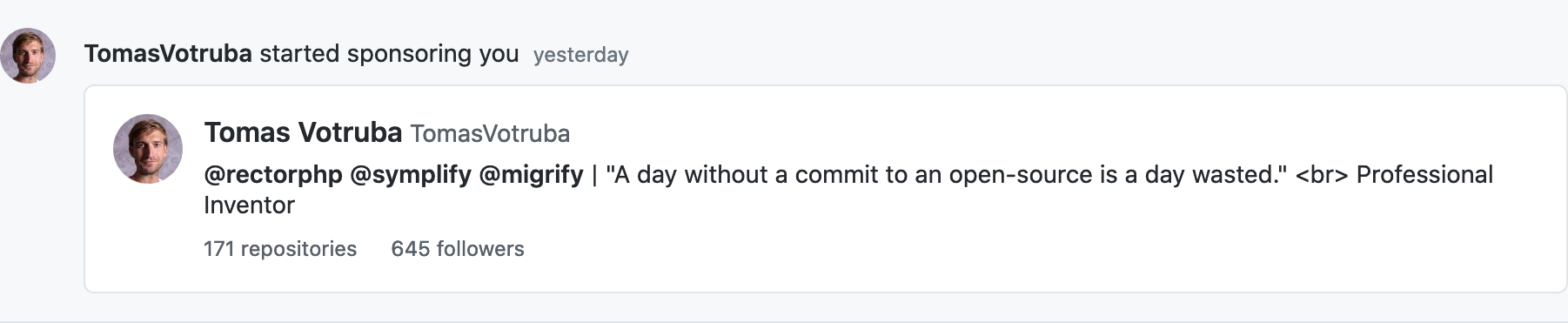
      <p>My plugin <a href="https://github.com/GatoGraphQL/GatoGraphQL/tree/master/layers/GatoGraphQLForWP/plugins/gatographql">GraphQL API for WordPress</a> just got a new sponsor!</p>
<p><img src="/images/tomas-sponsor.png" alt="My new sponsor" title="My new sponsor"></p>
<p>This is <a href="https://github.com/sponsors/leoloso/">the second sponsor</a> that I get, and the first one at the u$d 1400/m tier (the other was is at u$d 70/m).</p>
<p>This is a huge step forward, since it gives me the economic certainty as to keep developing the plugin (at least for the short/medium term... I still need a few more sponsors for it to become a living wage and long-term economic reliability).</p>
<p>I'll describe how it happened.</p>
<h2>The road to sponsorship</h2>
<p>Several weeks ago, there was a <a href="https://make.wordpress.org/core/2020/08/24/proposal-dropping-support-for-old-php-versions-via-a-fixed-schedule/">proposal to introduce a fixed schedule to WordPress</a> to bump the minimum required PHP version. Among the comments, <a href="https://make.wordpress.org/core/2020/08/24/proposal-dropping-support-for-old-php-versions-via-a-fixed-schedule/#comment-39591">one of them</a> struck me:</p>
<blockquote>
<p>So effectively this means that we cannot use PHP 8 syntax in themes/plugins if we want to support all WordPress versions until December 2023, 3 years after it has been released. This is very disappointing.</p>
</blockquote>
<p>I work with WordPress. My plugin is for WordPress. Not being able to use the latest PHP features in 3 more years feels very disempowering.</p>
<p>So I decided to look for some solution, and I discovered <a href="https://github.com/rectorphp/rector/">Rector</a>, a tool to reconstruct PHP code based on rules. It is like <a href="https://babeljs.io/">Babel</a>, but for PHP. I asked if I could use Rector to transpile code from PHP 7.4 to 7.1, and they said yes, it could be done, but the rules to do it had not been created yet.</p>
<p>So I created them.</p>
<p>I contributed to this open source project full time for some 2 weeks, and produced some 15 rules to downgrade code, which I have applied to my plugin: Now I can code it <a href="https://github.com/GatoGraphQL/GatoGraphQL/tree/master/layers/GatoGraphQLForWP/plugins/gatographql#supported-php-features">using features from PHP 7.4</a> (and even from PHP 8.0), and release it to run on PHP 7.1, so it can still target most of the WordPress user base (only users running PHP 5.6 and 7.0 are out). That's a huge win!</p>
<p>After implementing those 15 rules, I <a href="https://github.com/rectorphp/rector/issues?q=is%3Aissue+is%3Aopen+%22%5BDowngrade+PHP%5D%22+">documented the remaining rules</a> to downgrade PHP code, and called it a day. I didn't mind working on them, but I didn't have the time to do it. Nevertheless, I also created this task as a <a href="https://github.com/GatoGraphQL/GatoGraphQL/issues/199">sponsorable feature for my plugin</a>; if anyone sponsored my time to work on it, I could then attempt to finish the task.</p>
<p>Well, <a href="https://tomasvotruba.com/">Tomáš Votruba</a>, creator of Rector, liked my contributions so he decided to become my sponsor.</p>
<p>Yay! 🍾 🎉 🎊 🥳 🍻 🥂</p>
<p>In exchange, I'll work on the downgrade rules, and even attempt to have Rector itself run on PHP 7.1.</p>
<h2>Nature of the sponsorship</h2>
<p>Now, let's be clear: Tomáš is sponsoring me to work on Rector, not on GraphQL API for WordPress. That's why the sponsoring tier is u$d 1400/m, since it involves me working on the sponsor's repo.</p>
<p>While I get to increase the price for the tier, it makes no difference to me if the code is in my repo or my sponsor's: when I first worked those 2 weeks, it was for the benefit of my own plugin anyway, even if the code does not belong to my project.</p>
<p>Ultimately, where the code lives is not really important. What is important is that my project (and, for that matter, any project based on PHP) will be able to benefit from it.</p>
<p>In addition, anyone from the PHP community who starts using Rector because of my work on it, may learn that it was the GraphQL API for WP that made it possible, so I gain face and recognition.</p>
<p>So I think this is a win-win-win for all parties involved:</p>
<ul>
<li>Tomáš gets Rector expanded, supporting a broader set of use cases</li>
<li>I get the sponsorship money, and the associated badge of recognition from having a big sponsor</li>
<li>My plugin GraphQL API for WordPress can use the new rules to use new PHP features (which was my objective all along)</li>
<li>The WordPress community can implement this same strategy for their own themes and plugins</li>
<li>Other PHP-based projects can also use it</li>
</ul>
<h2>Takeaways</h2>
<p>Some personal takeaways from this experience:</p>
<ul>
<li>Contributing to open source projects may pay off</li>
<li>Looking for synergies may pay off. Rector and my plugin can benefit from each other. Contributing to Rector is contributing to the GraphQL API for WP</li>
<li>Getting sponsors is tough, mainly at the beginning. They may not come to you. So you need to (directly or indirectly) go to them</li>
<li>I'm working on my plugin for the long run, and its being successful depends on many small victories, like this one</li>
</ul>
<h2>Coming next</h2>
<p>My next step is to share my work on Rector with the broader WordPress and PHP communities: I've just published <a href="https://blog.logrocket.com/transpiling-php-code-from-8-0-to-7-x-via-rector/">an intro to downgrading from PHP 8.0 to 7.x</a>, and in a few weeks I'll publish a step-by-step guide on transpiling code for a WordPress plugin, using my repo as the example.</p>
<p>Hopefully, along the way I'll be able to get new sponsors, and eventually achieve long-term economic certainty with my plugin 😀</p>

    ]]></content>
  </entry>
	
  
  <entry>
    <title>📹 Video of my talk @ WPLDN is now on Youtube</title>
    <link href="https://leoloso.com/posts/video-wp-london-meetup-intro-graphql-api/"/>
    <updated>2020-10-12T00:00:00+00:00</updated>
    <id>https://leoloso.com/posts/video-wp-london-meetup-intro-graphql-api/</id>
    <content type="html"><![CDATA[
      <p>My talk &quot;Intro to the GraphQL API for WordPress&quot; <a href="https://www.meetup.com/London-WordPress/events/273609351/">for the WordPress London meetup</a> from last week is now <a href="https://youtu.be/t6stJN3apGs?t=1537">available in Youtube</a>:</p>
<iframe width="1191" height="670" src="https://www.youtube.com/embed/t6stJN3apGs?t=1537" frameborder="0" allow="accelerometer; autoplay; clipboard-write; encrypted-media; gyroscope; picture-in-picture" allowfullscreen></iframe>
<p>My presentation starts at 25:37. It is only around 20 min long (15 min presenting + 5 min of Q&amp;A).</p>
<p>Please check it out. It's a succinct summary of the benefits of using GraphQL in WordPress, through my plugin <a href="https://gatographql.com">GraphQL API for WordPress</a>.</p>
<p>These are <a href="https://slides.com/leoloso/graphql-api-for-wp">the slides</a>:</p>
<iframe src="//slides.com/leoloso/graphql-api-for-wp/embed" width="576" height="420" scrolling="no" frameborder="0" webkitallowfullscreen mozallowfullscreen allowfullscreen></iframe>
<p>I hope you enjoy it!</p>

    ]]></content>
  </entry>
	
  
  <entry>
    <title>💪 Scripting capabilities in non-standard GraphQL server</title>
    <link href="https://leoloso.com/posts/scripting-capabilities-in-non-standard-graphql-server/"/>
    <updated>2020-10-03T00:00:00+00:00</updated>
    <id>https://leoloso.com/posts/scripting-capabilities-in-non-standard-graphql-server/</id>
    <content type="html"><![CDATA[
      <p>Last week I made a <a href="https://leoloso.com/posts/proposal-for-embeddable-fields-in-graphql-query/">proposal to add embeddable fields to GraphQL</a>, but it didn't get a lot of support. I got the feedback that the extra complexity added to the server doesn't justify the benefits of this new feature, as in <a href="https://www.reddit.com/r/graphql/comments/j043rw/proposal_for_embeddable_fields_in_graphql/g6pvqcj">this comment on Reddit</a> (which I replied to through <a href="https://leoloso.com/posts/justifying-embeddable-fields-in-graphql-query/">this post</a>).</p>
<p>My proposed feature then appears to be not about GraphQL as we know it nowadays, but about an über GraphQL, or what GraphQL could possibly be. That's either a problem, or an opportunity. In <a href="https://artsy.github.io/blog/2018/05/08/is-graphql-the-future/">this write-up</a>, Alan Johnson says:</p>
<blockquote>
<p>[...] the execution model of GraphQL is in many ways just like a scripting language interpreter. The limitations of its model are strategic, to keep the technology focused on client-server interaction. What's interesting is that you as a developer provide nearly all of the definition of what operations exist, what they mean, and how they compose. For this reason, I consider GraphQL to be a <strong>meta-scripting language</strong>, or, in other words, a toolkit for building scripting languages.</p>
</blockquote>
<p>I agree with this observation, but then I wonder: Where do these limitations start? What should be allowed, and what not? If any feature made GraphQL's scripting capabilities a bit more visible, gave a bit more control to the developer, and made the query a bit more powerful, should that be straightforward rejected? Or could it be given a chance?</p>
<h2>Show me the stuff!</h2>
<p>Let's talk business now. Here is something that GraphQL is not good at.</p>
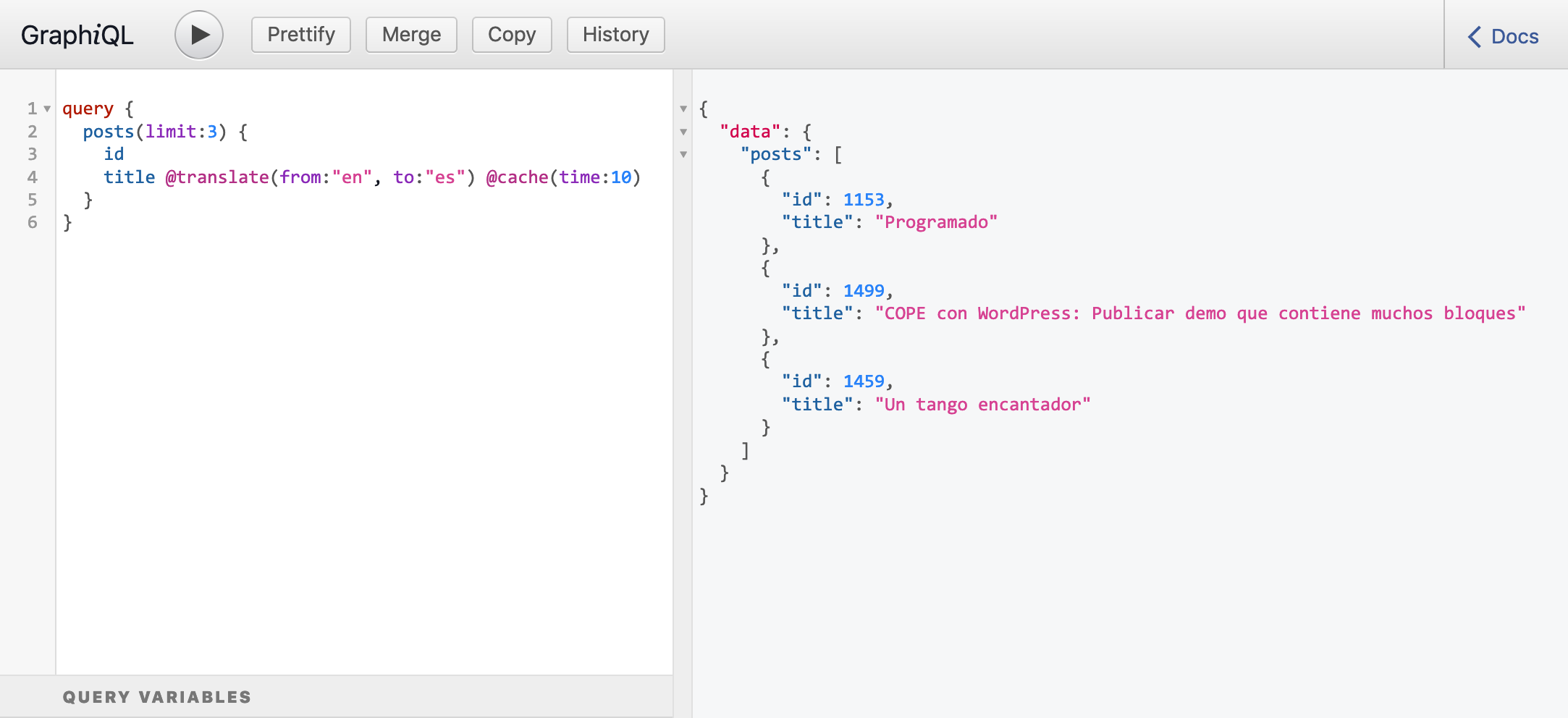
<p>Say that you have a <code>@translate</code> directive that is applied on a <code>String</code>, as in <a href="https://newapi.getpop.org/graphiql/?query=query%20%7B%0A%20%20posts%20%7B%0A%20%20%20%20id%0A%20%20%20%20title%20%40translate(from%3A%20%22en%22%2C%20to%3A%20%22es%22)%0A%20%20%7D%0A%7D">this query</a>:</p>
<pre class="language-graphql"><code class="language-graphql"><span class="highlight-line"><span class="token punctuation">{</span></span><br><span class="highlight-line">  posts <span class="token punctuation">{</span></span><br><span class="highlight-line">    id</span><br><span class="highlight-line">    title <span class="token directive function">@translate</span><span class="token punctuation">(</span><span class="token attr-name">from</span><span class="token punctuation">:</span> <span class="token string">"en"</span><span class="token punctuation">,</span> <span class="token attr-name">to</span><span class="token punctuation">:</span> <span class="token string">"es"</span><span class="token punctuation">)</span></span><br><span class="highlight-line">  <span class="token punctuation">}</span></span><br><span class="highlight-line"><span class="token punctuation">}</span></span></code></pre>
<p>You cannot apply <code>@translate</code> on a field different than a <code>String</code>. If you need to, you must then create a new directive, which involves extra effort (often being ad-hoc) and pollutes the schema:</p>
<ul>
<li>
<p>If a field returns <code>[String]</code>, you'd need to create another directive <code>@translateArrays</code></p>
</li>
<li>
<p>If only some entries from the array must be translated, you need to add an optional argument <code>$keys: [String]</code> to specify which keys to translate</p>
</li>
<li>
<p>If the keys are not strings, but are numeric, you need another argument <code>$numericKeys: [Int]</code> as to avoid type conflicts</p>
</li>
<li>
<p>If instead of an array, you get an array of arrays, you need yet another directive</p>
</li>
</ul>
<p>And so on, concerning any random requirement from your clients.</p>
<p>As a result, the schema might eventually become unwieldy.</p>
<hr>
<p>So, how could this situation be improved for GraphQL?</p>
<p>If GraphQL had capabilities to compose or manipulate fields, then a few elements could already satisfy all possible combinations.</p>
<p><a href="https://graphql-by-pop.com">GraphQL by PoP</a> (the engine powering the recently launched <a href="https://gatographql.com">GraphQL API for WordPress</a>) is a GraphQL server because it respects the <a href="https://spec.graphql.org/">GraphQL spec</a>, but is also a non-standard API server that provides other capabilities, including <a href="https://github.com/graphql/graphql-spec/issues/682">composable fields</a> and <a href="https://github.com/graphql/graphql-spec/issues/683">composable directives</a>.</p>
<p>Let's see how this server can satisfy all combinations described above, with just a few elements:</p>
<blockquote>
<p><strong>Notes:</strong></p>
<ul>
<li>GraphQL by PoP relies on the URL-based <a href="https://graphql-by-pop.com/docs/extended/pql.html">PQL syntax</a>, so you can click on the links to execute the query and see its response</li>
<li>Field <code>Root.echo</code> is used to build the arrays</li>
<li><code>forEach</code> and <code>advancePointerInArray</code> are directives that composes another directive</li>
</ul>
</blockquote>
<p>Translating posts as strings (<a href="https://newapi.getpop.org/api/graphql/?query=posts.title%3Ctranslate(from:en,to:es)%3E" target="_blank">run query</a>):</p>
<pre class="language-less"><code class="language-less"><span class="highlight-line">posts.title&lt;</span><br><span class="highlight-line">  <span class="token function">translate</span><span class="token punctuation">(</span><span class="token property">from</span><span class="token punctuation">:</span>en<span class="token punctuation">,</span> <span class="token property">to</span><span class="token punctuation">:</span>es<span class="token punctuation">)</span></span><br><span class="highlight-line">></span></code></pre>
<p>Translating a list of strings (<a href="https://newapi.getpop.org/api/graphql/?query=echo([hello, world, how are you today?])%3CforEach%3Ctranslate(from:en,to:es)%3E%3E" target="_blank">run query</a>):</p>
<pre class="language-less"><code class="language-less"><span class="highlight-line"><span class="token function">echo</span><span class="token punctuation">(</span>[</span><br><span class="highlight-line">  hello<span class="token punctuation">,</span></span><br><span class="highlight-line">  world<span class="token punctuation">,</span></span><br><span class="highlight-line">  how are you today?</span><br><span class="highlight-line">]<span class="token punctuation">)</span>&lt;</span><br><span class="highlight-line">  forEach&lt;</span><br><span class="highlight-line">    <span class="token function">translate</span><span class="token punctuation">(</span><span class="token property">from</span><span class="token punctuation">:</span>en<span class="token punctuation">,</span><span class="token property">to</span><span class="token punctuation">:</span>es<span class="token punctuation">)</span></span><br><span class="highlight-line">  ></span><br><span class="highlight-line">></span></code></pre>
<p>Translating only one element from the list of strings, with numeric keys (<a href="https://newapi.getpop.org/api/graphql/?query=echo([hello,%20world,how%20are%20you%20today?])%3CadvancePointerInArray(path:0)%3Ctranslate(from:en,to:es)%3E%3E" target="_blank">run query</a>):</p>
<pre class="language-less"><code class="language-less"><span class="highlight-line"><span class="token function">echo</span><span class="token punctuation">(</span>[</span><br><span class="highlight-line">  hello<span class="token punctuation">,</span></span><br><span class="highlight-line">  world<span class="token punctuation">,</span></span><br><span class="highlight-line">  how are you today?</span><br><span class="highlight-line">]<span class="token punctuation">)</span>&lt;</span><br><span class="highlight-line">  <span class="token function">advancePointerInArray</span><span class="token punctuation">(</span><span class="token property">path</span><span class="token punctuation">:</span> 0<span class="token punctuation">)</span>&lt;</span><br><span class="highlight-line">    <span class="token function">translate</span><span class="token punctuation">(</span><span class="token property">from</span><span class="token punctuation">:</span>en<span class="token punctuation">,</span><span class="token property">to</span><span class="token punctuation">:</span>es<span class="token punctuation">)</span></span><br><span class="highlight-line">  ></span><br><span class="highlight-line">></span></code></pre>
<p>Translating only one element from the list of strings, with keys as strings (<a href="https://newapi.getpop.org/api/graphql/?query=echo([first:hello,second:world,third:how%20are%20you%20today?])%3CadvancePointerInArray(path:second)%3Ctranslate(from:en,to:es)%3E%3E" target="_blank">run query</a>):</p>
<pre class="language-less"><code class="language-less"><span class="highlight-line"><span class="token function">echo</span><span class="token punctuation">(</span>[</span><br><span class="highlight-line">  <span class="token property">first</span><span class="token punctuation">:</span>hello<span class="token punctuation">,</span></span><br><span class="highlight-line">  <span class="token property">second</span><span class="token punctuation">:</span>world<span class="token punctuation">,</span></span><br><span class="highlight-line">  <span class="token property">third</span><span class="token punctuation">:</span>how are you today?</span><br><span class="highlight-line">]<span class="token punctuation">)</span>&lt;</span><br><span class="highlight-line">  <span class="token function">advancePointerInArray</span><span class="token punctuation">(</span><span class="token property">path</span><span class="token punctuation">:</span>second<span class="token punctuation">)</span>&lt;</span><br><span class="highlight-line">    <span class="token function">translate</span><span class="token punctuation">(</span><span class="token property">from</span><span class="token punctuation">:</span>en<span class="token punctuation">,</span><span class="token property">to</span><span class="token punctuation">:</span>es<span class="token punctuation">)</span></span><br><span class="highlight-line">  ></span><br><span class="highlight-line">></span></code></pre>
<p>Translating an array of arrays (<a href="https://newapi.getpop.org/api/graphql/?query=echo([[one,two,three],[four,five,six],[seven,eight,nine]])%3CforEach%3CforEach%3Ctranslate(from:en,to:es)%3E%3E%3E" target="_blank">run query</a>):</p>
<pre class="language-less"><code class="language-less"><span class="highlight-line"><span class="token function">echo</span><span class="token punctuation">(</span>[[</span><br><span class="highlight-line">  one<span class="token punctuation">,</span></span><br><span class="highlight-line">  two<span class="token punctuation">,</span></span><br><span class="highlight-line">  three</span><br><span class="highlight-line">]<span class="token punctuation">,</span> [</span><br><span class="highlight-line">  four<span class="token punctuation">,</span></span><br><span class="highlight-line">  five<span class="token punctuation">,</span></span><br><span class="highlight-line">  six</span><br><span class="highlight-line">]<span class="token punctuation">,</span> [</span><br><span class="highlight-line">  seven<span class="token punctuation">,</span></span><br><span class="highlight-line">  eight<span class="token punctuation">,</span></span><br><span class="highlight-line">  nine</span><br><span class="highlight-line">]]<span class="token punctuation">)</span>&lt;</span><br><span class="highlight-line">  forEach&lt;</span><br><span class="highlight-line">    forEach&lt;</span><br><span class="highlight-line">      <span class="token function">translate</span><span class="token punctuation">(</span><span class="token property">from</span><span class="token punctuation">:</span>en<span class="token punctuation">,</span><span class="token property">to</span><span class="token punctuation">:</span>es<span class="token punctuation">)</span></span><br><span class="highlight-line">    ></span><br><span class="highlight-line">  ></span><br><span class="highlight-line">></span></code></pre>
<p>And so on, concerning any random requirement from your clients.</p>
<p>In my opinion, these features make the queries more powerful, and the schema more elegant. So they could be perfectly considered to be added to GraphQL.</p>
<h2>Should consider adding extra scripting capabilities to GraphQL?</h2>
<p>Bringing these additional scripting capabilities to GraphQL, wouldn't it be more valuable than not?</p>
<p>I understand that there is more complexity added to the server. But that's a one-time off. The GraphQL server maintainers can implement these features in a few months, and developers would be able to use them forever.</p>
<p>Isn't that a good tradeoff?</p>

    ]]></content>
  </entry>
	
  
  <entry>
    <title>🔑 Justifying &quot;Embeddable Fields&quot; for GraphQL</title>
    <link href="https://leoloso.com/posts/justifying-embeddable-fields-in-graphql-query/"/>
    <updated>2020-09-27T00:00:00+00:00</updated>
    <id>https://leoloso.com/posts/justifying-embeddable-fields-in-graphql-query/</id>
    <content type="html"><![CDATA[
      <p>This post is my response to <a href="https://www.reddit.com/r/graphql/comments/j043rw/proposal_for_embeddable_fields_in_graphql/g6pvqcj">this comment on Reddit</a> concerning my <a href="https://leoloso.com/posts/proposal-for-embeddable-fields-in-graphql-query/">proposal to add embeddable fields to GraphQL</a>.</p>
<hr>
<blockquote>
<p>If we want to make GraphQL good at transforming data, we need much more than string interpolation.</p>
</blockquote>
<p>I don't disagree with this, but I don't have a clear answer. If we allow <code>String</code> interpolation, should we do the same for <code>Int</code>s, such as allowing additions or substractions?</p>
<p>I'd say no, but then why not? If we do allow it, something like this could be possible:</p>
<pre class="language-graphql"><code class="language-graphql"><span class="highlight-line"><span class="token keyword">query</span> <span class="token punctuation">{</span></span><br><span class="highlight-line">  service <span class="token directive function">@include</span><span class="token punctuation">(</span><span class="token attr-name">if</span><span class="token punctuation">:</span> <span class="token punctuation">{</span><span class="token punctuation">{</span> totalCredits <span class="token punctuation">}</span><span class="token punctuation">}</span> - <span class="token punctuation">{</span><span class="token punctuation">{</span> usedCredits <span class="token punctuation">}</span><span class="token punctuation">}</span> > <span class="token number">0</span><span class="token punctuation">)</span> <span class="token punctuation">{</span></span><br><span class="highlight-line">    id</span><br><span class="highlight-line">  <span class="token punctuation">}</span></span><br><span class="highlight-line"><span class="token punctuation">}</span></span></code></pre>
<!-- For comparison, VuePress also uses the `{{ var }}` syntax, and [writing `{{ 1 + 1 }}` is resolved as `2`](https://vuepress.vuejs.org/guide/using-vue.html#templating). -->
<p>I do not support this use case as shown here, I certainly don't like it. The question is why then we do allow for <code>String</code> interpolation? Because it enables templating, which could be considered a legitimate use case:</p>
<pre class="language-graphql"><code class="language-graphql"><span class="highlight-line"><span class="token keyword">mutation</span> <span class="token punctuation">{</span></span><br><span class="highlight-line">  comment<span class="token punctuation">(</span><span class="token attr-name">id</span><span class="token punctuation">:</span> <span class="token number">1</span><span class="token punctuation">)</span> <span class="token punctuation">{</span></span><br><span class="highlight-line">    replyToComment<span class="token punctuation">(</span><span class="token attr-name">data</span><span class="token punctuation">:</span> data<span class="token punctuation">)</span> <span class="token punctuation">{</span></span><br><span class="highlight-line">      id <span class="token directive function">@sendEmail</span><span class="token punctuation">(</span></span><br><span class="highlight-line">        <span class="token attr-name">to</span><span class="token punctuation">:</span> <span class="token string">"{{ parentComment.author.email }}"</span><span class="token punctuation">,</span></span><br><span class="highlight-line">        <span class="token attr-name">subject</span><span class="token punctuation">:</span> <span class="token string">"{{ author.name }} has replied to your comment"</span><span class="token punctuation">,</span></span><br><span class="highlight-line">        <span class="token attr-name">content</span><span class="token punctuation">:</span> "</span><br><span class="highlight-line">          &lt;p>On <span class="token punctuation">{</span><span class="token punctuation">{</span> comment.date<span class="token punctuation">(</span><span class="token attr-name">format</span><span class="token punctuation">:</span> \"d/m/<span class="token constant">Y</span>\"<span class="token punctuation">)</span> <span class="token punctuation">}</span><span class="token punctuation">}</span><span class="token punctuation">,</span> <span class="token punctuation">{</span><span class="token punctuation">{</span> author.name <span class="token punctuation">}</span><span class="token punctuation">}</span> <span class="token attr-name">says</span><span class="token punctuation">:</span>&lt;/p></span><br><span class="highlight-line">          &lt;blockquote><span class="token punctuation">{</span><span class="token punctuation">{</span> comment.content <span class="token punctuation">}</span><span class="token punctuation">}</span>&lt;/blockquote></span><br><span class="highlight-line">          &lt;p>Read <span class="token attr-name">online</span><span class="token punctuation">:</span> <span class="token punctuation">{</span><span class="token punctuation">{</span> comment.url <span class="token punctuation">}</span><span class="token punctuation">}</span>&lt;/p></span><br><span class="highlight-line">        "</span><br><span class="highlight-line">      <span class="token punctuation">)</span></span><br><span class="highlight-line">    <span class="token punctuation">}</span></span><br><span class="highlight-line">  <span class="token punctuation">}</span></span><br><span class="highlight-line"><span class="token punctuation">}</span></span></code></pre>
<blockquote>
<p>Programming languages are good at transforming data. Why not use application logic?</p>
</blockquote>
<p>Indeed, my initial proposed features for the spec, <a href="https://github.com/graphql/graphql-spec/issues/682">composable fields</a> and <a href="https://github.com/graphql/graphql-spec/issues/683">composable directives</a>, add meta-scripting capabilities to GraphQL.</p>
<p>How could that be benefitial? Say that you have a <code>@translate</code> directive that is applied on a <code>String</code>, as in <a href="https://newapi.getpop.org/graphiql/?query=query%20%7B%0A%20%20posts%20%7B%0A%20%20%20%20id%0A%20%20%20%20title%20%40translate(from%3A%20%22en%22%2C%20to%3A%20%22es%22)%0A%20%20%7D%0A%7D">this query</a>:</p>
<pre class="language-graphql"><code class="language-graphql"><span class="highlight-line"><span class="token keyword">query</span> <span class="token punctuation">{</span></span><br><span class="highlight-line">  posts <span class="token punctuation">{</span></span><br><span class="highlight-line">    id</span><br><span class="highlight-line">    title <span class="token directive function">@translate</span><span class="token punctuation">(</span><span class="token attr-name">from</span><span class="token punctuation">:</span> <span class="token string">"en"</span><span class="token punctuation">,</span> <span class="token attr-name">to</span><span class="token punctuation">:</span> <span class="token string">"es"</span><span class="token punctuation">)</span></span><br><span class="highlight-line">  <span class="token punctuation">}</span></span><br><span class="highlight-line"><span class="token punctuation">}</span></span></code></pre>
<p>Now, what happens if a field returns <code>[String]</code>, i.e. a list of <code>String</code>s? Then you can't use <code>@translate</code> anymore, you'd need to create another directive <code>@translateArrays</code>. And if there is only one entry from the array you need to translate, and not all of them? Then you need to add an optional argument <code>$keys: [String]</code> to specify which keys to translate. And if the keys are not strings, but are numeric? Or if instead of an array, you get an array of arrays? And so on, and on, and on.</p>
<p>Working with only fields to fetch data, the schema might eventually become unwieldy.</p>
<p>Now, if we have capabilities to compose or manipulate fields, then there is no need to pollute the schema with ad-hoc fields to satisfy each custom combination.</p>
<p>For <a href="https://graphql-by-pop.com">GraphQL by PoP</a> (a GraphQL server that I've designed from scratch), I have accomplished this through a syntax called <a href="https://graphql-by-pop.com/docs/extended/pql.html">PQL</a>, which is a superset from the GraphQL query, supporting <a href="https://graphql-by-pop.com/docs/extended/pql-language-features.html#composable-fields">composable fields</a> and <a href="https://graphql-by-pop.com/docs/extended/pql-language-features.html#composable-directives">composable directives</a>.</p>
<p>Let's see how all combinations can be satisfied just composing elements:</p>
<ul>
<li>Translating posts as strings:<br/><a href="https://newapi.getpop.org/api/graphql/?query=posts.title%3Ctranslate(from:en,to:es)%3E" target="_blank"><code>posts.title&lt;translate(from:en,to:es)&gt;</code></a></li>
<li>Translating a list of strings:<br/><a href="https://newapi.getpop.org/api/graphql/?query=echo([hello, world, how are you today?])%3CforEach%3Ctranslate(from:en,to:es)%3E%3E" target="_blank"><code>echo([hello, world, how are you today?])&lt;forEach&lt;translate(from:en,to:es)&gt;&gt;</code></a></li>
<li>Translating only one element from the list of strings, with numeric keys:<br/><a href="https://newapi.getpop.org/api/graphql/?query=echo([hello,%20world,how%20are%20you%20today?])%3CadvancePointerInArray(path:0)%3Ctranslate(from:en,to:es)%3E%3E" target="_blank"><code>echo([hello, world, how are you today?])&lt;advancePointerInArray(path: 0)&lt;translate(from:en,to:es)&gt;&gt;</code></a></li>
<li>Translating only one element from the list of strings, with keys as strings:<br/><a href="https://newapi.getpop.org/api/graphql/?query=echo([first:hello,second:world,third:how%20are%20you%20today?])%3CadvancePointerInArray(path:second)%3Ctranslate(from:en,to:es)%3E%3E" target="_blank"><code>echo([first:hello, second:world, third:how are you today?])&lt;advancePointerInArray(path:second)&lt;translate(from:en,to:es)&gt;&gt;</code></a></li>
<li>Translating an array of arrays:<br/><a href="https://newapi.getpop.org/api/graphql/?query=echo([[one,two,three],[four,five,six],[seven,eight,nine]])%3CforEach%3CforEach%3Ctranslate(from:en,to:es)%3E%3E%3E" target="_blank"><code>echo([[one, two, three], [four, five, six], [seven, eight, nine]])&lt;forEach&lt;forEach&lt;translate(from:en,to:es)&gt;&gt;&gt;</code></a></li>
<li>And so on, and on, and on.</li>
</ul>
<p>Embeddable fields is a watered-down version of composable fields, good enough for templating, but not for more advanced use cases.</p>
<blockquote>
<p>In your article you argue, that it is better to do this on GraphQL, but I don't understand why it would be.</p>
</blockquote>
<p>I think there is value in GraphQL having additional capabilities. If a GraphQL query can execute a complex operation all by itself, the query may become more difficult, but the overall application would become much simpler.</p>
<p>For instance, instead of a typical workflow of using GraphQL to retrieve data, process the data in the client with JavaScript, and then execute some operation in the server with this data, a single GraphQL query with meta-scripting capabilities can completely do away with the client. This is not just fewer lines of code, it's also fewer systems involved.</p>
<p>As an example that I've implemented for demonstration purposes, a single query <a href="https://graphql-by-pop.com/guides/localized-newsletter.html">can send a localized newsletter</a>.</p>
<p>This is not far-fetched. I think GraphQL can be considered good for more than just fetching and posting data, because in this modern world of APIs interacting with cloud-based services, it's difficult to determine what is fetching data, and what is executing functionality.</p>
<p>For instance, are these cases within the confines of just fetching/posting data?</p>
<ul>
<li>When uploading an image to the site, we upload it to an S3 bucket</li>
<li>When creating a post, we send an email notification</li>
<li>When adding a comment on a static site hosted on Netlify, we trigger a new build</li>
<li>When executing a query, we save the traces on AWS DynamoDB or Kinesis</li>
</ul>
<p>These are all operations that can be perfectly integrated within the GraphQL service, and that are typically found on a CI/CD pipeline. Imagine if the pipeline stages were GraphQL queries. GraphQL would then become the interface not just for fetching/posting data, but also for interacting with services.</p>
<p>I'm pretty confident that providing a robust support to GraphQL to interact with these cloud-based services can only make our API more powerful, capable of supporting more use cases, and better prepared for new requirements in the future.</p>
<blockquote>
<p>Another principle for GraphQL was coined by Lee Byron: A GraphQL server should only expose queries, that it can fulfill efficiently.</p>
</blockquote>
<p>These are not contradictory propositions. If well architected, the GraphQL server will not necessarily degrade its performance. GraphQL by PoP, for instance, resolves the query with <a href="https://blog.logrocket.com/simplifying-the-graphql-data-model/">linear complexity time on the number of types</a>, so it supports composable fields to any number of levels without a scratch.</p>
<blockquote>
<p>The more features we add to GraphQL, the harder it becomes to ensure, that the queries are efficiently executable.</p>
</blockquote>
<p>Same as above.</p>
<blockquote>
<p>Furthermore, your functionality requires consecutive resolver executions for one single field. This fundamentally changes how queries are executed (in a way that IMO is incompatible with the spec).</p>
</blockquote>
<p>That's up to interpretation. I have not seen it described in the spec, and I believe it should not be there, since the spec is about defining standards on how the API must behave, and not about the nitty-gritty of the server's implementation.</p>
<blockquote>
<p>GraphQL is designed to be simple on purpose.</p>
</blockquote>
<p>I agree that these changes add complexity to the GraphQL servers, and extra capabilities to the GraphQL queries that make it more difficult to learn.</p>
<p>But at the same time, they make the GraphQL service more powerful and versatile, and enable the architecture of the overall application to become simpler.</p>
<p>For me the question is, is it worth it?</p>

    ]]></content>
  </entry>
	
  
  <entry>
    <title>📢 Proposal for &quot;Embeddable fields&quot; in GraphQL</title>
    <link href="https://leoloso.com/posts/proposal-for-embeddable-fields-in-graphql-query/"/>
    <updated>2020-09-26T00:00:00+00:00</updated>
    <id>https://leoloso.com/posts/proposal-for-embeddable-fields-in-graphql-query/</id>
    <content type="html"><![CDATA[
      <p>I'd like to make a proposal for a new feature for GraphQL, not to be appended to the <a href="https://spec.graphql.org/">official spec</a>, but as an optional feature that GraphQL servers may decide to support (similar to the <a href="https://relay.dev/graphql/connections.htm">GraphQL Cursor Connections spec</a>).</p>
<p>This post is part of the groundwork to find out if there is support for this feature within the GraphQL community. If there is, only then I'll submit it as a new issue to the <a href="https://github.com/graphql/graphql-spec/">GraphQL spec repo</a> for a thorough discussion, and offer to become its champion.</p>
<blockquote>
<p><strong>Note:</strong> This feature is already <a href="https://graphql-by-pop.com/docs/operational/embeddable-fields.html">supported by GraphQL by PoP</a>. Click on the &quot;Run&quot; button on the GraphiQL clients throughout this post, to execute the query and see the expected response.</p>
</blockquote>
<hr>
<h2>Proposed new feature: &quot;Embeddable fields&quot;</h2>
<p>Embeddable fields is a syntax construct, that enables to resolve a field within an argument for another field from the same type, using the <a href="https://en.wikipedia.org/wiki/Mustache_%28template_system%29">mustache</a> syntax <code>{{field}}</code>.</p>
<blockquote>
<p><strong>Note:</strong> To make it convenient to use, field <code>echoStr(value: String): String</code> can be added to the schema, as in the examples shown throughout this post.</p>
</blockquote>
<p><a href="https://newapi.getpop.org/graphiql/?query=query%20%7B%0A%20%20posts%20%7B%0A%20%20%20%20description%3A%20echoStr(value%3A%20%22Post%20%7B%7Btitle%7D%7D%20was%20published%20on%20%7B%7Bdate%7D%7D%22)%0A%20%20%7D%0A%7D" target="_blank">This query</a> contains embedded fields <code>{{title}}</code> and <code>{{date}}</code>:</p>
<div id="graphiql-1st" style="height: 65vh; padding-top: 0; margin-top: 1rem;" class="video-player"></div>
<p>The syntax can contain whitespaces around the field: <code>{{ field }}</code>.</p>
<p><a href="https://newapi.getpop.org/graphiql/?query=query%20%7B%0A%20%20posts%20%7B%0A%20%20%20%20description%3A%20echoStr(value%3A%20%22Post%20%7B%7B%20title%20%7D%7D%20was%20published%20on%20%7B%7B%20date%20%7D%7D%22)%0A%20%20%7D%0A%7D" target="_blank">This query</a> contains embedded fields <code>{{ title }}</code> and <code>{{ date }}</code>:</p>
<div id="graphiql-2nd" style="height: 65vh; padding-top: 0; margin-top: 1rem;" class="video-player"></div>
<p>The embedded field may or may not contain arguments:</p>
<ul>
<li><code>{{ fieldName }}</code></li>
<li><code>{{ fieldName(fieldArgs) }}</code></li>
</ul>
<p><a href="https://newapi.getpop.org/graphiql/?query=query%20%7B%0A%20%20posts%20%7B%0A%20%20%20%20description%3A%20echoStr(value%3A%20%22Post%20%7B%7B%20title%20%7D%7D%20was%20published%20on%20%7B%7B%20date(format%3A%20%5C%22d%2Fm%2FY%5C%22)%20%7D%7D%22)%0A%20%20%7D%0A%7D" target="_blank">This query</a> formats the date: <code>date(format: \&quot;d/m/Y\&quot;)</code>:</p>
<div id="graphiql-3rd" style="height: 65vh; padding-top: 0; margin-top: 1rem;" class="video-player"></div>
<blockquote>
<p>Note: The string quotes must be escaped: <code>\&quot;</code></p>
</blockquote>
<p>Embedded fields also work within directive arguments.</p>
<p><a href="https://newapi.getpop.org/graphiql/?query=query%20%7B%0A%20%20posts%20%7B%0A%09%20%20id%0A%20%20%20%20title%20%40skip(if%3A%20%22%7B%7B%20hasComments%20%7D%7D%22)%0A%20%20%7D%0A%7D" target="_blank">This query</a> resolves field <code>title</code> only if the same post has comments:</p>
<div id="graphiql-4th" style="height: 65vh; padding-top: 0; margin-top: 1rem;" class="video-player"></div>
<blockquote>
<p><strong>Note:</strong> Using embeddable fields together with directives <code>@skip</code> and <code>@include</code> is an interesting use case. However, condition <code>if</code> expects a <code>Boolean</code>, not a <code>String</code>; even though the query can be resolved properly in the server, there is type mismatch in the client.</p>
<p>This proposal may suggest to accept embedded fields also on their own, and not only within a string, so they can be casted to their own type: <code>@skip(if: {{ hasComments }})</code>. More on this below.</p>
</blockquote>
<p><a href="https://newapi.getpop.org/graphiql/?query=query%20%7B%0A%20%20posts%20%7B%0A%20%20%20%20title%3A%20echoStr(value%3A%20%22(%7B%7B%20commentCount%20%7D%7D)%20%7B%7B%20title%20%7D%7D%20-%20posted%20on%20%7B%7B%20date%20%7D%7D%22)%20%40include(if%3A%20%22%7B%7B%20hasComments%20%7D%7D%22)%0A%20%20%20%20title%20%40skip(if%3A%20%22%7B%7B%20hasComments%20%7D%7D%22)%0A%20%20%7D%0A%7D" target="_blank">This query</a> resolves field <code>title</code> in two different ways, depending on the post having comments or not:</p>
<div id="graphiql-5th" style="height: 65vh; padding-top: 0; margin-top: 1rem;" class="video-player"></div>
<h2>Benefits of this new feature</h2>
<p>Why would we want a GraphQL query to support embeddable fields? The following are benefits I've identified so far.</p>
<h3>It lessens the need for a client to process the response</h3>
<p>In most situations, we have a client to request the data from the GraphQL server and transform it into the required format.</p>
<p>For instance, a website on the client-side can process the data with JavaScript, as to transform fields <code>title</code> and <code>date</code> into a description:</p>
<pre class="language-js"><code class="language-js"><span class="highlight-line"><span class="token keyword">const</span> desc <span class="token operator">=</span> <span class="token template-string"><span class="token string">`Post </span><span class="token interpolation"><span class="token interpolation-punctuation punctuation">${</span> response<span class="token punctuation">.</span>data<span class="token punctuation">.</span>title <span class="token interpolation-punctuation punctuation">}</span></span><span class="token string"> was published on </span><span class="token interpolation"><span class="token interpolation-punctuation punctuation">${</span> response<span class="token punctuation">.</span>data<span class="token punctuation">.</span>date <span class="token interpolation-punctuation punctuation">}</span></span><span class="token string">`</span></span></span></code></pre>
<p>However, in some situations we may need to retrieve the data for a service that we do not control, and which does not offer tools to process the results.</p>
<p>For instance, a newsletter service (such as Mailchimp) may accept to define an endpoint from which to retrieve the data for the newsletter. Whatever data is returned by the endpoint is final; it can't be manipulated before being injected into the newsletter.</p>
<p>In these situtations, the query could use embeddable fields to manipulate the response into the required format. This could be particularly useful when accessing <a href="https://github.com/graphql/graphql-over-http">GraphQL over HTTP</a>.</p>
<h3>It can help declutter the schema</h3>
<p>The use case above could also be satisfied by adding an extra field <code>Post.descriptionForNewsletter</code> to the schema. But this solution clutters the schema, and embeddable fields could be considered a more elegant solution.</p>
<h3>It improves the development experience</h3>
<p>Embeddable fields could be compared to <a href="https://www.w3schools.com/Js/js_arrow_function.asp">arrow functions</a> in JavaScript, which is syntactic sugar over a feature already available in the language.</p>
<p>Arrow functions are not really needed, but they provide benefits:</p>
<ul>
<li>they shorten the amount of code needed to achieve something</li>
<li>they simplify the syntax</li>
</ul>
<p>As such, the feature becomes a welcome-to-have in the language, producing a better development experience.</p>
<h3>The <code>if</code> condition in <code>@skip</code> and <code>@include</code> can become dynamic</h3>
<p>Currently, argument <code>&quot;if&quot;</code> for the <code>@skip</code> and <code>@include</code> directives can only be an actual boolean value (<code>true</code> or <code>false</code>) or a variable with the boolean value. This behavior is pretty static.</p>
<p>Embeddable fields would enable to make this behavior more dynamic, by evaluating the condition on some property from the object itself.</p>
<p>There is an issue to address: <code>if</code> is a <code>Boolean</code>, not a <code>String</code>, so to avoid type conflicts the GraphQL syntax may also need to accept the embedded field on its own, not wrapping it between string quotes:</p>
<pre class="language-graphql"><code class="language-graphql"><span class="highlight-line"><span class="token keyword">query</span> <span class="token punctuation">{</span></span><br><span class="highlight-line">  posts <span class="token punctuation">{</span></span><br><span class="highlight-line">	  id</span><br><span class="highlight-line">    title <span class="token directive function">@skip</span><span class="token punctuation">(</span><span class="token attr-name">if</span><span class="token punctuation">:</span> <span class="token punctuation">{</span><span class="token punctuation">{</span> hasComments <span class="token punctuation">}</span><span class="token punctuation">}</span><span class="token punctuation">)</span></span><br><span class="highlight-line">  <span class="token punctuation">}</span></span><br><span class="highlight-line"><span class="token punctuation">}</span></span></code></pre>
<p>Removing the need to wrap <code>{{ }}</code> between quotes <code>&quot; &quot;</code> would solve this issue for every scalar type other than <code>String</code>, not just <code>Boolean</code> (check the example below with <code>droid</code>, using embeddable fields to resolve an <code>ID</code>).</p>
<h3>It enables to code templates within the GraphQL query</h3>
<p>Embeddable fields enable to embed a template within the GraphQL query itself, which would render the GraphQL service more configuration-friendly.</p>
<p>For instance, combined with the <a href="https://github.com/graphql/graphql-spec/issues/174">flat chain syntax</a> and <a href="https://github.com/graphql/graphql-spec/issues/252">nested mutations</a> (two other features also proposed for the spec), we could produce the following query, which sends an email to the user notifying that his/her comment was replied to:</p>
<pre class="language-graphql"><code class="language-graphql"><span class="highlight-line"><span class="token keyword">mutation</span> <span class="token punctuation">{</span></span><br><span class="highlight-line">  comment<span class="token punctuation">(</span><span class="token attr-name">id</span><span class="token punctuation">:</span> <span class="token number">1</span><span class="token punctuation">)</span> <span class="token punctuation">{</span></span><br><span class="highlight-line">    replyToComment<span class="token punctuation">(</span><span class="token attr-name">data</span><span class="token punctuation">:</span> data<span class="token punctuation">)</span> <span class="token punctuation">{</span></span><br><span class="highlight-line">      id <span class="token directive function">@sendEmail</span><span class="token punctuation">(</span></span><br><span class="highlight-line">        <span class="token attr-name">to</span><span class="token punctuation">:</span> <span class="token string">"{{ parentComment.author.email }}"</span><span class="token punctuation">,</span></span><br><span class="highlight-line">        <span class="token attr-name">subject</span><span class="token punctuation">:</span> <span class="token string">"{{ author.name }} has replied to your comment"</span><span class="token punctuation">,</span></span><br><span class="highlight-line">        <span class="token attr-name">content</span><span class="token punctuation">:</span> "</span><br><span class="highlight-line">          &lt;p>On <span class="token punctuation">{</span><span class="token punctuation">{</span> comment.date<span class="token punctuation">(</span><span class="token attr-name">format</span><span class="token punctuation">:</span> \"d/m/<span class="token constant">Y</span>\"<span class="token punctuation">)</span> <span class="token punctuation">}</span><span class="token punctuation">}</span><span class="token punctuation">,</span> <span class="token punctuation">{</span><span class="token punctuation">{</span> author.name <span class="token punctuation">}</span><span class="token punctuation">}</span> <span class="token attr-name">says</span><span class="token punctuation">:</span>&lt;/p></span><br><span class="highlight-line">          &lt;blockquote><span class="token punctuation">{</span><span class="token punctuation">{</span> comment.content <span class="token punctuation">}</span><span class="token punctuation">}</span>&lt;/blockquote></span><br><span class="highlight-line">          &lt;p>Read <span class="token attr-name">online</span><span class="token punctuation">:</span> <span class="token punctuation">{</span><span class="token punctuation">{</span> comment.url <span class="token punctuation">}</span><span class="token punctuation">}</span>&lt;/p></span><br><span class="highlight-line">        "</span><br><span class="highlight-line">      <span class="token punctuation">)</span></span><br><span class="highlight-line">    <span class="token punctuation">}</span></span><br><span class="highlight-line">  <span class="token punctuation">}</span></span><br><span class="highlight-line"><span class="token punctuation">}</span></span></code></pre>
<h3>It could satisfy &quot;exporting variables between queries&quot;</h3>
<p>Proposed feature <a href="https://github.com/graphql/graphql-spec/issues/377">[RFC] exporting variables between queries</a> attempts to <code>@export</code> the value of a field, and inject it into another field in the same query:</p>
<pre class="language-graphql"><code class="language-graphql"><span class="highlight-line"><span class="token keyword">query</span> <span class="token constant">A</span> <span class="token punctuation">{</span></span><br><span class="highlight-line">  hero <span class="token punctuation">{</span></span><br><span class="highlight-line">    id <span class="token directive function">@export</span><span class="token punctuation">(</span><span class="token attr-name">as</span><span class="token punctuation">:</span> <span class="token string">"droidId"</span><span class="token punctuation">)</span> </span><br><span class="highlight-line">  <span class="token punctuation">}</span></span><br><span class="highlight-line"><span class="token punctuation">}</span></span><br><span class="highlight-line"></span><br><span class="highlight-line"><span class="token keyword">query</span> <span class="token constant">B</span><span class="token punctuation">(</span><span class="token variable">$droidId</span><span class="token punctuation">:</span> String<span class="token operator">!</span><span class="token punctuation">)</span> <span class="token punctuation">{</span></span><br><span class="highlight-line">  droid <span class="token punctuation">(</span><span class="token attr-name">id</span><span class="token punctuation">:</span> <span class="token variable">$droidId</span><span class="token punctuation">)</span> <span class="token punctuation">{</span></span><br><span class="highlight-line">    name</span><br><span class="highlight-line">  <span class="token punctuation">}</span></span><br><span class="highlight-line"><span class="token punctuation">}</span></span></code></pre>
<p>With embeddable fields and the flat chain syntax, this use case could be satisfied like this:</p>
<pre class="language-graphql"><code class="language-graphql"><span class="highlight-line"><span class="token keyword">query</span> <span class="token punctuation">{</span></span><br><span class="highlight-line">  droid <span class="token punctuation">(</span><span class="token attr-name">id</span><span class="token punctuation">:</span> <span class="token punctuation">{</span><span class="token punctuation">{</span> hero.id <span class="token punctuation">}</span><span class="token punctuation">}</span> <span class="token punctuation">)</span> <span class="token punctuation">{</span></span><br><span class="highlight-line">    name</span><br><span class="highlight-line">  <span class="token punctuation">}</span></span><br><span class="highlight-line"><span class="token punctuation">}</span></span></code></pre>
<h2>Backwards compatibility</h2>
<p>This feature <strong>breaks backwards compatibility</strong>. <a href="https://github.com/graphql/graphql-spec/blob/master/CONTRIBUTING.md#guiding-principles">From the spec</a>:</p>
<blockquote>
<p>Once a query is written, it should always mean the same thing and return the same shaped result. Future changes should not change the meaning of existing schema or queries or in any other way cause an existing compliant GraphQL service to become non-compliant for prior versions of the spec.</p>
</blockquote>
<p>In our case, if a query currently has this shape:</p>
<pre class="language-graphql"><code class="language-graphql"><span class="highlight-line"><span class="token keyword">query</span> <span class="token punctuation">{</span></span><br><span class="highlight-line">  <span class="token attr-name">foo</span><span class="token punctuation">:</span> echoStr<span class="token punctuation">(</span><span class="token attr-name">value</span><span class="token punctuation">:</span> <span class="token string">"Hello {{ world }}!"</span><span class="token punctuation">)</span></span><br><span class="highlight-line"><span class="token punctuation">}</span></span></code></pre>
<p>...it expects the response to be:</p>
<pre class="language-json"><code class="language-json"><span class="highlight-line"><span class="token punctuation">{</span></span><br><span class="highlight-line">  <span class="token property">"data"</span><span class="token operator">:</span> <span class="token punctuation">{</span></span><br><span class="highlight-line">    <span class="token property">"foo"</span><span class="token operator">:</span> <span class="token string">"Hello {{ world }}!"</span></span><br><span class="highlight-line">  <span class="token punctuation">}</span></span><br><span class="highlight-line"><span class="token punctuation">}</span></span></code></pre>
<p>With embeddable fields the query above will produce a different response and, moreover, it may even produce an error message, as when there is no field <code>Root.world</code>.</p>
<p>In addition, considering the case of not wrapping <code>{{ }}</code> between string quotes <code>&quot; &quot;</code>, as in the query below:</p>
<pre class="language-graphql"><code class="language-graphql"><span class="highlight-line"><span class="token keyword">query</span> <span class="token punctuation">{</span></span><br><span class="highlight-line">  posts <span class="token punctuation">{</span></span><br><span class="highlight-line">	  id</span><br><span class="highlight-line">    title <span class="token directive function">@skip</span><span class="token punctuation">(</span><span class="token attr-name">if</span><span class="token punctuation">:</span> <span class="token punctuation">{</span><span class="token punctuation">{</span> hasComments <span class="token punctuation">}</span><span class="token punctuation">}</span><span class="token punctuation">)</span></span><br><span class="highlight-line">  <span class="token punctuation">}</span></span><br><span class="highlight-line"><span class="token punctuation">}</span></span></code></pre>
<p>Currently, this query would produce a syntax error, being displayed in the GraphiQL client, and possibly not parsed by the server. This behavior would change.</p>
<p>Because of being backwards incompatible, it is suggested to make embeddable fields an <strong>opt-in feature</strong>, prompting users to be fully aware of the consequences before enabling it.</p>
<h2>Further research</h2>
<p>Embeddable fields would affect some components from the GraphQL workflow. How should these be dealt with?</p>
<h3>GraphiQL integration</h3>
<p>The <a href="https://github.com/graphql/graphiql">GraphiQL client</a> shows an error message when a field does not exist, or if a field argument receives a value with a different type than declared in the schema, among other potential errors. Can this information be conveyed for embeddable fields too?</p>
<p>For this to happen, GraphiQL would need to parse the field argument inputs and identify all <code>{{ fieldName(fieldArgs) }}</code> instances, as to do the validations and show the error messages.</p>
<h3>Behavior when field is not found</h3>
<p>What happens when an embedded field does not exist? For instance, if in the query below, field <code>{{ name }}</code> exists but <code>{{ surname }}</code> does not:</p>
<pre class="language-graphql"><code class="language-graphql"><span class="highlight-line"><span class="token punctuation">{</span></span><br><span class="highlight-line">  users <span class="token punctuation">{</span></span><br><span class="highlight-line">    <span class="token attr-name">fullName</span><span class="token punctuation">:</span> echoStr<span class="token punctuation">(</span><span class="token attr-name">value</span><span class="token punctuation">:</span> <span class="token string">"{{ name }} {{ surname }}"</span><span class="token punctuation">)</span></span><br><span class="highlight-line">  <span class="token punctuation">}</span></span><br><span class="highlight-line"><span class="token punctuation">}</span></span></code></pre>
<p>Should the response produce an error message, and skip processing the field? Eg:</p>
<pre class="language-json"><code class="language-json"><span class="highlight-line"><span class="token punctuation">{</span></span><br><span class="highlight-line">  <span class="token property">"errors"</span><span class="token operator">:</span> <span class="token punctuation">[</span></span><br><span class="highlight-line">    <span class="token string">"Field 'surname' does not exist, so 'echoStr(value: \"{{ name }} {{ surname }}\")' cannot be resolved"</span></span><br><span class="highlight-line">  <span class="token punctuation">]</span></span><br><span class="highlight-line"><span class="token punctuation">}</span></span></code></pre>
<p>Or should the missing field be skipped but still resolve the field, and possibly show a warning? Eg:</p>
<pre class="language-json"><code class="language-json"><span class="highlight-line"><span class="token punctuation">{</span></span><br><span class="highlight-line">  <span class="token property">"warnings"</span><span class="token operator">:</span> <span class="token punctuation">[</span></span><br><span class="highlight-line">    <span class="token string">"Field 'surname' does not exist"</span></span><br><span class="highlight-line">  <span class="token punctuation">]</span><span class="token punctuation">,</span></span><br><span class="highlight-line">  <span class="token property">"data"</span><span class="token operator">:</span> <span class="token punctuation">{</span></span><br><span class="highlight-line">    <span class="token property">"users"</span><span class="token operator">:</span> <span class="token punctuation">[</span></span><br><span class="highlight-line">      <span class="token punctuation">{</span></span><br><span class="highlight-line">        <span class="token property">"fullName"</span><span class="token operator">:</span> <span class="token string">"Juan {{ surname }}"</span></span><br><span class="highlight-line">      <span class="token punctuation">}</span><span class="token punctuation">,</span></span><br><span class="highlight-line">      <span class="token punctuation">{</span></span><br><span class="highlight-line">        <span class="token property">"fullName"</span><span class="token operator">:</span> <span class="token string">"Pedro {{ surname }}"</span></span><br><span class="highlight-line">      <span class="token punctuation">}</span><span class="token punctuation">,</span></span><br><span class="highlight-line">      <span class="token punctuation">{</span></span><br><span class="highlight-line">        <span class="token property">"fullName"</span><span class="token operator">:</span> <span class="token string">"Manuel {{ surname }}"</span></span><br><span class="highlight-line">      <span class="token punctuation">}</span></span><br><span class="highlight-line">    <span class="token punctuation">]</span></span><br><span class="highlight-line">  <span class="token punctuation">}</span></span><br><span class="highlight-line"><span class="token punctuation">}</span></span></code></pre>
<p>Or should the failing field be removed altogether? (Notice there's still a space at the end of each resolved value):</p>
<pre class="language-json"><code class="language-json"><span class="highlight-line"><span class="token punctuation">{</span></span><br><span class="highlight-line">  <span class="token property">"warnings"</span><span class="token operator">:</span> <span class="token punctuation">[</span></span><br><span class="highlight-line">    <span class="token string">"Field 'surname' does not exist"</span></span><br><span class="highlight-line">  <span class="token punctuation">]</span><span class="token punctuation">,</span></span><br><span class="highlight-line">  <span class="token property">"data"</span><span class="token operator">:</span> <span class="token punctuation">{</span></span><br><span class="highlight-line">    <span class="token property">"users"</span><span class="token operator">:</span> <span class="token punctuation">[</span></span><br><span class="highlight-line">      <span class="token punctuation">{</span></span><br><span class="highlight-line">        <span class="token property">"fullName"</span><span class="token operator">:</span> <span class="token string">"Juan "</span></span><br><span class="highlight-line">      <span class="token punctuation">}</span><span class="token punctuation">,</span></span><br><span class="highlight-line">      <span class="token punctuation">{</span></span><br><span class="highlight-line">        <span class="token property">"fullName"</span><span class="token operator">:</span> <span class="token string">"Pedro "</span></span><br><span class="highlight-line">      <span class="token punctuation">}</span><span class="token punctuation">,</span></span><br><span class="highlight-line">      <span class="token punctuation">{</span></span><br><span class="highlight-line">        <span class="token property">"fullName"</span><span class="token operator">:</span> <span class="token string">"Manuel "</span></span><br><span class="highlight-line">      <span class="token punctuation">}</span></span><br><span class="highlight-line">    <span class="token punctuation">]</span></span><br><span class="highlight-line">  <span class="token punctuation">}</span></span><br><span class="highlight-line"><span class="token punctuation">}</span></span></code></pre>
<h3>Escaping <code>{{ field }}</code></h3>
<p>If we actually want to print the string <code>&quot;{{ field }}&quot;</code> in the response, without resolving it, how should it be done?</p>
<h2>Previous literature</h2>
<p>This feature is a less ambitious version of <a href="https://github.com/graphql/graphql-spec/issues/682">composable fields</a>, differing in these aspects:</p>
<ul>
<li>It's not meant to be part of the GraphQL spec, but as an attached optional spec, and offered as an opt-in feature by the GraphQL server</li>
<li>If resolved only within a string, embeddable fields would not require a change to the GraphQL syntax</li>
<li>Having a field resolve the value for another field happens only 1 level down, not multiple-levels down as with composable fields</li>
</ul>
<h2>Current implementations</h2>
<p>Embeddable fields are supported in GraphQL server <a href="https://graphql-by-pop.com">GraphQL by PoP</a>, and its implementation for WordPress <a href="https://gatographql.com">GraphQL API for WordPress</a>, in both as an opt-in feature.</p>
<h2>Join the discussion!</h2>
<p>If there is enough support for this feature, I will add an RFC issue to the GraphQL spec. Everyone is welcome to <a href="https://www.reddit.com/r/graphql/comments/j043rw/proposal_for_embeddable_fields_in_graphql/">provide feedback in this Reddit post</a>:</p>
<ul>
<li>Do you support embeddable fields in GraphQL? Would you benefit from it? How?</li>
<li>Are you against embeddable fields? Why?</li>
</ul>
<link href="https://unpkg.com/graphiql/graphiql.min.css" rel="stylesheet" />
<script
  crossorigin
  src="https://unpkg.com/react/umd/react.production.min.js"
></script>
<script
  crossorigin
  src="https://unpkg.com/react-dom/umd/react-dom.production.min.js"
></script>
<script
  crossorigin
  src="https://unpkg.com/graphiql/graphiql.min.js"
></script>
<script>
  const responseText = "Click the \"Execute Query\" button";
  const endpointGraphQLFetcher = (endpoint, graphQLParams) =>
    fetch(endpoint, {
      method: 'post',
      headers: { 'Content-Type': 'application/json' },
      body: JSON.stringify(graphQLParams),
    })
      .then(response => response.json())
      .catch(() => response.text());

  const apiURL = 'https://newapi.getpop.org/api/graphql/';
  const graphQLFetcher = graphQLParams => endpointGraphQLFetcher(apiURL, graphQLParams);

  ReactDOM.render(
    React.createElement(
      GraphiQL, 
      { 
        fetcher: graphQLFetcher,
        docExplorerOpen: false,
        response: responseText,
        query: 'query {\n  posts {\n    description: echoStr(value: "Post {{title}} was published on {{date}}")\n  }\n}',
        variables: null,
        defaultVariableEditorOpen: false
      }
    ),
    document.getElementById('graphiql-1st'),
  );

  ReactDOM.render(
    React.createElement(
      GraphiQL, 
      { 
        fetcher: graphQLFetcher,
        docExplorerOpen: false,
        response: responseText,
        query: 'query {\n  posts {\n    description: echoStr(value: "Post {{ title }} was published on {{ date }}")\n  }\n}',
        variables: null,
        defaultVariableEditorOpen: false
      }
    ),
    document.getElementById('graphiql-2nd'),
  );

  ReactDOM.render(
    React.createElement(
      GraphiQL, 
      { 
        fetcher: graphQLFetcher,
        docExplorerOpen: false,
        response: responseText,
        query: 'query {\n  posts {\n    description: echoStr(value: "Post {{ title }} was published on {{ date(format: \\"d/m/Y\\") }}")\n  }\n}',
        variables: null,
        defaultVariableEditorOpen: false
      }
    ),
    document.getElementById('graphiql-3rd'),
  );

  ReactDOM.render(
    React.createElement(
      GraphiQL, 
      { 
        fetcher: graphQLFetcher,
        docExplorerOpen: false,
        response: responseText,
        query: 'query {\n  posts {\n	id\n    title @skip(if: "{{ hasComments }}")\n  }\n}',
        variables: null,
        defaultVariableEditorOpen: false
      }
    ),
    document.getElementById('graphiql-4th'),
  );

  ReactDOM.render(
    React.createElement(
      GraphiQL, 
      { 
        fetcher: graphQLFetcher,
        docExplorerOpen: false,
        response: responseText,
        query: 'query {\n  posts {\n    title: echoStr(value: "({{ commentCount }}) {{ title }} - posted on {{ date }}") @include(if: "{{ hasComments }}")\n    title @skip(if: "{{ hasComments }}")\n  }\n}',
        variables: null,
        defaultVariableEditorOpen: false
      }
    ),
    document.getElementById('graphiql-5th'),
  );
</script>
    ]]></content>
  </entry>
	
  
  <entry>
    <title>📣 Released v0.6 of GraphQL API for WordPress</title>
    <link href="https://leoloso.com/posts/released-version-06-graphql-api-for-wp-plugin/"/>
    <updated>2020-09-23T00:00:00+00:00</updated>
    <id>https://leoloso.com/posts/released-version-06-graphql-api-for-wp-plugin/</id>
    <content type="html"><![CDATA[
      <p>I have just released version 0.6 of the <a href="https://github.com/GatoGraphQL/GatoGraphQL/tree/master/layers/GatoGraphQLForWP/plugins/gatographql">GraphQL API for WordPress</a> 🎉.</p>
<p>This is a mighty new version, with <a href="https://github.com/GatoGraphQL/GatoGraphQL/tree/master/layers/GatoGraphQLForWP/plugins/gatographql/docs/en/release-notes/0.6.md">several new features and improvements</a>:</p>
<p>✅ The <strong>GraphiQL Explorer</strong> has been <strong>added to all the GraphiQL clients</strong>, including the public ones</br>
✅ Added support for <strong>GitHub Updater</strong>, to enable self-updating when there's a new version</br>
✅ The plugin is <strong>coded with PHP 7.4</strong>, and can <strong>run with PHP 7.1</strong></br>
✅ Introduced &quot;<strong>embeddable fields</strong>&quot;, a custom GraphQL query syntax construct to enable templating and improve performance</br>
✅ <strong>PHPStan</strong> has been upgraded to <strong>level 8</strong> (the strictest level), reducing the change of bugs happening</br>
✅ Release notes are displayed within the plugin, after being updated</br></p>
<p>👉🏽 Read the descriptions in detail <a href="https://github.com/GatoGraphQL/GatoGraphQL/tree/master/layers/GatoGraphQLForWP/plugins/gatographql/docs/en/release-notes/0.6.md">in the release notes</a>.</p>
<p>👉🏽 Install the plugin in your site: download <a href="https://github.com/GatoGraphQL/GatoGraphQL/tree/master/layers/GatoGraphQLForWP/plugins/gatographql/releases/latest/download/gatographql.zip">gatographql.zip</a>, and in the wp-admin go to <code>Plugins</code> =&gt; <code>Add New</code> =&gt; <code>Upload Plugin</code> <a href="https://github.com/GatoGraphQL/GatoGraphQL/tree/master/layers/GatoGraphQLForWP/plugins/gatographql#upload">to install it</a>.</p>

    ]]></content>
  </entry>
	
  
  <entry>
    <title>💪 Fancy this GraphQL query? I&#39;m on my way to build it!</title>
    <link href="https://leoloso.com/posts/fancy-graphql-query/"/>
    <updated>2020-09-14T00:00:00+00:00</updated>
    <id>https://leoloso.com/posts/fancy-graphql-query/</id>
    <content type="html"><![CDATA[
      <p>The query is this one:</p>
<pre class="language-graphql"><code class="language-graphql"><span class="highlight-line"><span class="token keyword">mutation</span> <span class="token punctuation">{</span></span><br><span class="highlight-line">  comment<span class="token punctuation">(</span><span class="token attr-name">id</span><span class="token punctuation">:</span> <span class="token number">1</span><span class="token punctuation">)</span> <span class="token punctuation">{</span></span><br><span class="highlight-line">    replyToComment<span class="token punctuation">(</span><span class="token attr-name">data</span><span class="token punctuation">:</span> data<span class="token punctuation">)</span> <span class="token punctuation">{</span></span><br><span class="highlight-line">      id <span class="token directive function">@sendEmail</span><span class="token punctuation">(</span></span><br><span class="highlight-line">        <span class="token attr-name">to</span><span class="token punctuation">:</span> <span class="token string">"{{ parentComment.author.email }}"</span><span class="token punctuation">,</span></span><br><span class="highlight-line">        <span class="token attr-name">subject</span><span class="token punctuation">:</span> <span class="token string">"{{ author.name }} has replied to your comment"</span><span class="token punctuation">,</span></span><br><span class="highlight-line">        <span class="token attr-name">content</span><span class="token punctuation">:</span> "</span><br><span class="highlight-line">          &lt;p>On <span class="token punctuation">{</span><span class="token punctuation">{</span> comment.date<span class="token punctuation">(</span><span class="token attr-name">format</span><span class="token punctuation">:</span> \"d/m/<span class="token constant">Y</span>\"<span class="token punctuation">)</span> <span class="token punctuation">}</span><span class="token punctuation">}</span><span class="token punctuation">,</span> <span class="token punctuation">{</span><span class="token punctuation">{</span> author.name <span class="token punctuation">}</span><span class="token punctuation">}</span> <span class="token attr-name">says</span><span class="token punctuation">:</span>&lt;/p></span><br><span class="highlight-line">          &lt;blockquote><span class="token punctuation">{</span><span class="token punctuation">{</span> comment.content <span class="token punctuation">}</span><span class="token punctuation">}</span>&lt;/blockquote></span><br><span class="highlight-line">          &lt;p>Read <span class="token attr-name">online</span><span class="token punctuation">:</span> <span class="token punctuation">{</span><span class="token punctuation">{</span> comment.url <span class="token punctuation">}</span><span class="token punctuation">}</span>&lt;/p></span><br><span class="highlight-line">        "</span><br><span class="highlight-line">      <span class="token punctuation">)</span></span><br><span class="highlight-line">    <span class="token punctuation">}</span></span><br><span class="highlight-line">  <span class="token punctuation">}</span></span><br><span class="highlight-line"><span class="token punctuation">}</span></span></code></pre>
<p>This query demonstrates how <a href="https://github.com/GatoGraphQL/GatoGraphQL/issues/215">sending notifications</a> via Symfony Notifier will be accomplished (for email, Slack and SMS). It makes use of a few pioneering features, still being considered (to more or less extent) for the <a href="https://spec.graphql.org/draft/">GraphQL spec</a>:</p>
<p>🔥 <a href="https://github.com/graphql/graphql-spec/issues/252">Nested mutations</a><br/>
🔥 <a href="https://graphql-by-pop.com/docs/operational/embeddable-fields.html">Embeddable fields</a> (based on <a href="https://github.com/graphql/graphql-spec/issues/682">composable fields</a>)<br/>
🔥 <a href="https://github.com/graphql/graphql-spec/issues/174">Flat chain syntax</a></p>
<hr>
<p>I am working to get the funding to implement them, through my recently launched <a href="https://github.com/sponsors/leoloso/">GitHub sponsors</a>. In total, currently there are <a href="https://github.com/GatoGraphQL/GatoGraphQL/projects/1">23 features looking for sponsorship</a>:</p>
<figure><a href="/images/sponsorable-features.png" target="_blank"><img src="/images/sponsorable-features.png" alt="Features looking for sponsors" loading="lazy" width="3200" height="1806"></a><figcaption>Features looking for sponsors</figcaption></figure>
<p>Once implemented, the <a href="https://github.com/GatoGraphQL/GatoGraphQL/tree/master/layers/GatoGraphQLForWP/plugins/gatographql">GraphQL API for WordPress</a> may perfectly be the most forward-looking GraphQL in the market 🙀.</p>
<p>What do you think? Is it worth sponsoring this project? Want to <a href="https://github.com/sponsors/leoloso/">become a sponsor</a>?</p>
<p>Please share with your friends and colleagues! 🙏</p>
<blockquote class="twitter-tweet"><p lang="en" dir="ltr">I&#39;m building (I hope) the most forward-looking GraphQL server out there.<br><br>Here is how I plan to make it happen.<a href="https://t.co/2lOvqqh4lM">https://t.co/2lOvqqh4lM</a></p>&mdash; Leonardo Losoviz (@losoviz) <a href="https://twitter.com/losoviz/status/1305550295657664513?ref_src=twsrc%5Etfw">September 14, 2020</a></blockquote> <script async src="https://platform.twitter.com/widgets.js" charset="utf-8"></script> 

    ]]></content>
  </entry>
	
  
  <entry>
    <title>🤩 Personal milestone - My first GitHub sponsor!</title>
    <link href="https://leoloso.com/posts/milestone-first-github-sponsor/"/>
    <updated>2020-09-12T00:00:00+00:00</updated>
    <id>https://leoloso.com/posts/milestone-first-github-sponsor/</id>
    <content type="html"><![CDATA[
      <p>2 days ago I subscribed to GitHub sponsors to fund my work on the <a href="https://gatographql.com">GraphQL API for WordPress</a>, and I already got <a href="https://github.com/sponsors/leoloso/">my first sponsor</a>!</p>
<p><img src="/images/leoloso-github-sponsors.png" alt="GitHub sponsors" title="GitHub sponsors"></p>
<p>Following the example set by Caleb Porzio (who's making <a href="https://calebporzio.com/i-just-hit-dollar-100000yr-on-github-sponsors-heres-how-i-did-it">more than u$d 100k/y doing open source</a>), I have decided to use the <a href="https://calebporzio.com/sponsorware">sponsorware model</a> to fund my project. It works like this:</p>
<ul>
<li>Whenever I get 10 new sponsors (at u$d 14/m), I start developing the most up-voted feature from a special <a href="https://github.com/GatoGraphQL/GatoGraphQL/projects/1">&quot;Sponsorware&quot; list</a> (which I'm completing as I'm writing this milestone)</li>
<li>Once implemented, the new feature becomes available to all the sponsors, via a private GitHub repo</li>
<li>As soon as I get 50 new sponsors, the new feature becomes open source, accessible to everyone via the public GitHub repo, and is integrated into the plugin</li>
</ul>
<p><img src="/images/sponsorware-features.png" alt="Sponsorware features" title="Sponsorware features"></p>
<p>In a few months, I will also start creating instructional videos, explaining how to make the most out of the plugin. According to Caleb, this is the biggest money-making strategy.</p>
<p>I have also decided to add a middle tier (at u$d 70/m), where I provide Slack-based personal support, to help users of my plugin set-up GraphQL with WordPress, troubleshooting, and answering their questions. A user needed help to develop a functionality, so he decided to sponsor me &lt;= my first sponsor ❤️</p>
<p>Finally, I added a higher tier (at u$d 700) for corporate sponsors. I plan to ask around in the WordPress community if their companies may be interested in participating. That would be a win-win: They get plenty of face from contributing to open source, and I get the certainty that I can make a living wage from my work and can focus on the development of the plugin (and not on marketing, which is not my forte).</p>
<p><img src="/images/leoloso-github-sponsor-projects.png" alt="My sponsors and sponsored projects" title="My sponsors and sponsored projects"></p>
<p>I hope the sponsorware model works, and I can make a living while working on open source. I'll keep writing updates on how it goes, here on my blog, and <a href="https://www.indiehackers.com/leoloso">on IndieHackers</a>.</p>
<h2>Update 15/09: The list of sponsorable features is ready</h2>
<p>I have now <a href="https://github.com/GatoGraphQL/GatoGraphQL/projects/1">listed down all the features</a> I plan to implement if I can get the funding. Right now, there are 23 of them (some of them are low-effort, so they can be bundled together):</p>
<figure><a href="/images/sponsorable-features.png" target="_blank"><img src="/images/sponsorable-features.png" alt="Features looking for sponsors" loading="lazy" width="3200" height="1806"></a><figcaption>Features looking for sponsors</figcaption></figure>

    ]]></content>
  </entry>
	
  
  <entry>
    <title>🚀 Adding directives to the schema in code-first GraphQL servers</title>
    <link href="https://leoloso.com/posts/adding-directives-to-schema-in-code-first-graphql-servers/"/>
    <updated>2020-09-08T00:00:00+00:00</updated>
    <id>https://leoloso.com/posts/adding-directives-to-schema-in-code-first-graphql-servers/</id>
    <content type="html"><![CDATA[
      <p>I wrote a new article for my series on designing a GraphQL server for the LogRocket block:</p>
<p><a href="https://blog.logrocket.com/adding-directives-schema-code-first-graphql-servers/">Adding directives to the schema in code-first GraphQL servers</a></p>
<p>This time, I explore several topics:</p>
<ul>
<li>A strategy to add directives to the schema when there is no SDL</li>
<li>Decoupling the query into 2: requested and executable</li>
<li>A potential solution for implementing the flat chain syntax</li>
<li>Adding directives to the schema by configuration, not code</li>
<li>Server-side field aliases</li>
</ul>
<p>Now that the <a href="https://github.com/GatoGraphQL/GatoGraphQL/tree/master/layers/GatoGraphQLForWP/plugins/gatographql">GraphQL API for WordPress</a> has been released, I can use it to demonstrate the IFTTT feature, to add directives to the schema by configuration, not code:</p>
<p><img src="/images/ifttt-for-access-control.gif" alt="Adding directives by configuration in the GraphQL API for WP" title="Adding directives by configuration in the GraphQL API for WP"></p>
<p>As always, I hope you enjoy it!</p>

    ]]></content>
  </entry>
	
  
  <entry>
    <title>🚫 GDPR illegal - Couchsurfing may be keeping your (deleted) photos</title>
    <link href="https://leoloso.com/posts/gdpr-illegal-couchsurfing-keeping-deleted-photos/"/>
    <updated>2020-08-28T00:00:00+00:00</updated>
    <id>https://leoloso.com/posts/gdpr-illegal-couchsurfing-keeping-deleted-photos/</id>
    <content type="html"><![CDATA[
      <p>Because <a href="https://leoloso.com/posts/couchsurfing-is-dead/">Couchsurfing is dead</a> (or, more appropriately, Couchsurfing has been killed), I requested to delete my account from the site. And it's been done: <a href="https://www.couchsurfing.com/people/leoloso">my profile</a> does not exist anymore.</p>
<p>But, surprise surprise, they had not deleted my photos! For instance, this photo of mine was still hosted in their cloud:</p>
<p><img src="/images/cs-not-deleted-photo.png" alt="A non-deleted photo of mine" title="A non-deleted photo of mine"></p>
<p>These guys should have deleted all my data, absolutely all of it, including photos. To be sure that that would happen, I explicitly mentioned this when requesting to close down my account:</p>
<p><img src="/images/cs-request-delete-data.png" alt="Requesting to delete my data" title="Requesting to delete my data"></p>
<p>They deleted my account, and replied back saying that they were closing the ticket. As I noticed that my photos were still there, I replied to that same email, asking them, once again, to delete them:</p>
<p><img src="/images/cs-request-delete-data-again.png" alt="Requesting to delete my data, again" title="Requesting to delete my data, again"></p>
<p>To which I got a response, saying that my ticket would be handled within 3 days:</p>
<p><img src="/images/cs-ticket-last-response.png" alt="New ticket for old request" title="New ticket for old request"></p>
<p>(Btw, if they deleted my data from their customer support tool, how does this system still know that my name is Leonardo? I hope they got it from the email headers, instead of lying about it.)</p>
<p>After one week, no response, my photos were still there. I wrote a new ticket to them:</p>
<p><img src="/images/cs-new-ticket-delete-data.png" alt="Newer ticket for old request" title="Newer ticket for old request"></p>
<p>And what was their response? That they needed 1 month to delete my photos!!!</p>
<p><img src="/images/cs-new-ticket-delete-data-1.png" alt="1 month to delete photos!" title="1 month to delete photos!"></p>
<p>I replied back, asking why deleting a folder from AWS S3 (the hosting service from Amazon) takes such a long time:</p>
<p><img src="/images/cs-new-ticket-delete-data-2.png" alt="How can it take 30 days to delete photos?" title="How can it take 30 days to delete photos?"></p>
<p>I use AWS myself, and I know what it takes: Login to AWS =&gt; Click on the S3 link =&gt; Browse to the folder =&gt; Delete all the images =&gt; Delete the folder. Amount of time required: 5 minutes. 15 minutes max.</p>
<p>I got their response, saying they were escalating this issue:</p>
<p><img src="/images/cs-new-ticket-delete-data-3.png" alt="Escalating the issue" title="Escalating the issue"></p>
<p>But, surprise surprise, they never contacted me again! And even more, 2 weeks later I got an automatic response, saying that my ticket was being closed because they hadn't heard back from me!:</p>
<p><img src="/images/cs-new-ticket-delete-data-4.png" alt="Not hearing back from me and trying to close my ticket, huh?" title="Not hearing back from me and trying to close my ticket, huh?"></p>
<p>I had to reply again, just to keep the ticket open:</p>
<p><img src="/images/cs-new-ticket-delete-data-5.png" alt="Don't dare close my ticket!" title="Don't dare close my ticket!"></p>
<p>And then I got a new response: they still needed 2 weeks to &quot;manually&quot; process my request:</p>
<p><img src="/images/cs-new-ticket-delete-data-6.png" alt="We need 2 weeks more" title="We need 2 weeks more"></p>
<p>That was the last interaction with them. These 2 weeks, I kept checking if my photos were there. Just before the 2 weeks were over, the photos had been deleted.</p>
<p>Escalation? What escalation? They took their whole time. Giving me a response after they had deleted my photos? Nops, that never happened. How did Zendesk know my name? They never explained. What other data do they still have about me? Who knows?</p>
<h2>Manually deleting pics?</h2>
<p>The main issue is: why did they have to manually delete my photos? When I requested to have my data deleted, that meant all my data, including the photos. If they have some automatic system to delete data, they seem to be cherry-picking what data to delete.</p>
<h2>Attending to some requests, ignoring others</h2>
<p>I had to write not once but twice, to have my data actually deleted, and wait and wait and wait.</p>
<p>My wife also wrote to them, twice, to have her photos deleted. But they never replied back to her, and up to this day her photos are still in their cloud.</p>
<h2>What will happen next</h2>
<p>I know what will happen. If they come across this blog post, the Couchsurfing guys will make some excuse, they will say it was a mistake, &quot;we are very sorry, but look, we have deleted the images now, and we'll take better care in the future, because we care about our community, oh yes we love our community&quot; (and then they'll repeat the word community 37 times).</p>
<h2>Invoking GDPR, anyone?</h2>
<p>I wouldn't be surprised that this is not an isolated case (and my wife's photos are still hosted by them, after she repeatedly requested for their deletion). I bet that they are only deleting the user data from their website database, but they are keeping some other assets, such as the user photos.</p>
<p>And this, through the GDPR legislation, <strong>is illegal</strong>.</p>
<p>I'm not European, so I can't do anything about it. But if you're European, and you have requested to delete your CS account and all its data, you can try to <strong>find out if they have deleted your images!</strong>.</p>
<p>If they still hold your photos (which is your data, not theirs), they could be punished through GDPR.</p>

    ]]></content>
  </entry>
	
  
  <entry>
    <title>‼️ Single source of truth =&gt; 2 presentations for doc</title>
    <link href="https://leoloso.com/posts/single-source-of-truth-2-presentations-for-doc/"/>
    <updated>2020-08-24T00:00:00+00:00</updated>
    <id>https://leoloso.com/posts/single-source-of-truth-2-presentations-for-doc/</id>
    <content type="html"><![CDATA[
      <p>Today I released <a href="https://github.com/GraphQLAPI/graphql-api-for-wp/releases/tag/v0.3">v0.3 for plugin GraphQL API for WordPress</a>, shipping one of the most urgent requests: documentation for the plugin!</p>
<p>The plugin now ships 37 modules from 10 categories, distinguished by color:</p>
<p><img src="/images/module-docs.png" alt="Modules in GraphQL API for WP" title="Modules in GraphQL API for WP"></p>
<p>The docs have been implemented as Markdown, and they are opened when clicking on the <code>View details</code> link below each module:</p>
<p><img src="/images/module-doc-view-details.png" alt="Opening the doc for a module"></p>
<p>Since Markdown can also be viewed directly in the <a href="https://github.com/GatoGraphQL/GatoGraphQL/tree/master/layers/GatoGraphQLForWP/plugins/gatographql">GitHub repo</a>, I implemented a cool feature: the same docs can be viewed within the plugin, or in the repo, from a single source of truth, but with 2 different presentations:</p>
<ul>
<li>Tabs + video embeds in plugin</li>
<li>Long page in repo</li>
</ul>
<p>Check out the <a href="https://github.com/GatoGraphQL/GatoGraphQL/tree/master/layers/GatoGraphQLForWP/plugins/gatographql/docs/en/modules/persisted-queries.md">doc for Persisted Queries in the repo</a>, and the same doc in the plugin:</p>
<p><img src="/images/module-docs.gif" alt="Reading doc for module in the plugin"></p>
<p>Cool, isn't it? 😎</p>
<p>If you want to find out how it's done, the implementation code is <a href="https://github.com/GraphQLAPI/graphql-api-for-wp/blob/595e6c67eb4feb8a5a2237527e9091281b355f94/src/ModuleResolvers/HasMarkdownDocumentationModuleResolverTrait.php#L69">here</a>.</p>

    ]]></content>
  </entry>
	
  
  <entry>
    <title>🚀 Executing multiple queries in a single operation in GraphQL</title>
    <link href="https://leoloso.com/posts/executing-multiple-queries-in-a-single-operation-in-graphql/"/>
    <updated>2020-08-08T00:00:00+00:00</updated>
    <id>https://leoloso.com/posts/executing-multiple-queries-in-a-single-operation-in-graphql/</id>
    <content type="html"><![CDATA[
      <p><strong>Update 23/01/2021:</strong> I created the guides for the Multiple Execution Query in <a href="https://gatographql.com">gatographql.com</a>:</p>
<ul>
<li><a href="https://gatographql.com/guides/forward/multiple-query-execution/">Demo</a></li>
<li><a href="https://gatographql.com/guides/optin/executing-multiple-queries-concurrently/">Explanation</a></li>
</ul>
<p>It's been only 15 days since releasing the <a href="https://github.com/GatoGraphQL/GatoGraphQL/tree/master/layers/GatoGraphQLForWP/plugins/gatographql">GraphQL API for WordPress</a>, and I couldn't help myself, so this week I added yet a new feature: the server can now execute multiple queries in a single operation.</p>
<p><img src="/images/executing-multiple-queries.gif" alt="Executing queries independently, and then all together as a single operation" title="Executing queries independently, and then all together as a single operation"></p>
<p>This is not <a href="https://www.apollographql.com/blog/query-batching-in-apollo-63acfd859862/">query batching</a>. When doing query batching, the GraphQL server executes multiple queries in a single request. But those queries are still independent from each other. They just happen to be executed one after the other, to avoid the latency from multiple requests.</p>
<p>In this case, all queries are combined together, and executed as a single operation. That means that they will reuse their state and their data. For instance, if a first query fetches some data, and a second query also accesses the same data, this data is retrieved only once, not twice.</p>
<p>This feature is shipped together with the <code>@export</code> directive, which enables to have the results of a query injected as an input into another query. Check out <a href="https://newapi.getpop.org/graphiql/?query=%23%20Run%20this%20query%20to%20execute%20all%20other%20queries%2C%20together%0Aquery%20__ALL%20%7B%20id%20%7D%0A%0A%23%20Export%20the%20user%27s%20name%0Aquery%20GetUserName%20%7B%0A%20%20user(id%3A1)%20%7B%0A%20%20%20%20name%20%40export(as%3A%20%22_search%22)%0A%20%20%7D%0A%7D%0A%0A%23%20Search%20for%20posts%20with%20the%20user%27s%20name%20from%20the%20previous%20query%0Aquery%20SearchPosts(%24_search%3A%20String%20%3D%20%22%22)%20%7B%0A%20%20posts(searchfor%3A%20%24_search)%20%7B%0A%20%20%20%20title%0A%20%20%7D%0A%7D&operationName=__ALL">the query below</a>, hit &quot;Run&quot; and select query with name <code>&quot;__ALL&quot;</code>, and see how the user's name obtained in the first query is used to search for posts in the second query:</p>
<link href="https://unpkg.com/graphiql/graphiql.min.css" rel="stylesheet" />
<div id="graphiql-first" style="height: 65vh; padding-top: 0; margin-top: 1rem;" class="video-player"></div>
<p>(GraphiQL currently <a href="https://github.com/graphql/graphiql/issues/1635">does not allow</a> to execute multiple operations. Hence, that <code>__ALL</code> query is a hack I added, as to tell the GraphQL server to execute all queries.)</p>
<h2>How is this feature useful?</h2>
<p>This functionality is currently not part of the GraphQL spec, but it has been requested:</p>
<ul>
<li><a href="https://github.com/graphql/graphql-spec/issues/375">[RFC] Executing multiple operations in a query</a></li>
<li><a href="https://github.com/graphql/graphql-spec/issues/377">[RFC] exporting variables between queries</a></li>
</ul>
<p>This feature improves performance, for whenever we need to execute an operation against the GraphQL server, then wait for its response, and then use that result to perform another operation. By combining them together, we are saving this extra request.</p>
<p>You may think that saving a single roundtrip is no big deal. Maybe. But this is not limited to just 2 queries: it can be chained, containing as many operations as needed.</p>
<p>For instance, <a href="https://newapi.getpop.org/graphiql/?query=%23%20Run%20this%20query%20to%20execute%20all%20other%20queries%2C%20together%0Aquery%20__ALL%20%7B%20id%20%7D%0A%0A%23%20Export%20the%20user%27s%20name%0Aquery%20GetUserName()%20%7B%0A%20%20user(id%3A%201)%20%7B%0A%20%20%20%20name%20%40export(as%3A%20%22_search%22)%0A%20%20%7D%0A%7D%0A%0A%23%20Search%20for%20posts%20with%20the%20user%27s%20name%20from%20the%20previous%20query%0Aquery%20SearchPosts(%24offset%3AInt%20%3D%200%2C%20%24_search%3A%20String%20%3D%20%22%22)%20%7B%0A%20%20posts(searchfor%3A%20%24_search%2C%20limit%3A%201%2C%20offset%3A%20%24offset)%20%7B%0A%20%20%20%20title%20%40export(as%3A%20%22_postTitles%22)%0A%20%20%20%20hasComments%20%40export(as%3A%20%22_postHasComments%22)%0A%20%20%7D%0A%7D%0A%0A%23%20Translate%20post%20titles%2C%20or%20show%20user%20ID%20if%20not%0Aquery%20TranslatePosts(%24_postTitles%3A%20%5BString%5D%20%3D%20%5B%5D%2C%20%24_postHasComments%3A%20Boolean!%20%3D%20false)%20%7B%0A%20%20translatedTitle%3A%20echoVar(variable%3A%20%24_postTitles)%20%40include(if%3A%24_postHasComments)%20%40translate(from%3A%22en%22%2C%20to%3A%22fr%22)%0A%20%20noTitleForUser%3A%20echoVar(variable%3A%20%24_search)%20%40skip(if%3A%24_postHasComments)%0A%7D&operationName=__ALL&variables=%7B%0A%20%20%22offset%22%3A%200%0A%7D">this simple example</a> chains a third query, and adds a conditional logic applied on the result from a previous query: if the post has comments, translate the post's title to French, but if it doesn't, show the name of the user. Click on the &quot;Run&quot; button below, see the results, then change variable <code>offset</code> to <code>1</code>, run the query again, and see how the results change:</p>
<div id="graphiql-second" style="height: 65vh; padding-top: 0; margin-top: 1rem;" class="video-player"></div>
<h2>GraphQL as a (meta-)scripting language</h2>
<p>As we've seen, we could attempt to use GraphQL to execute scripts, including conditional statements and even loops.</p>
<p><a href="https://graphql-by-pop.com">GraphQL by PoP</a>, which is the GraphQL engine over which the GraphQL API for WordPress is based, is a few steps ahead in providing a language to manipulate the operations performed on the query graph.</p>
<p>For instance, I have implemented a query which allows to send a newsletter to multiple users, fetching the content of the latest blog post and translating it to each person's language, all in a single operation!</p>
<p>Check the query below, which is using the <a href="https://graphql-by-pop.com/docs/extended/pql.html">PoP Query Language</a>, an alternative to the GraphQL Query Language:</p>
<pre class="language-javascript"><code class="language-javascript"><span class="highlight-line"><span class="token operator">/</span><span class="token operator">?</span></span><br><span class="highlight-line">postId<span class="token operator">=</span><span class="token number">1</span><span class="token operator">&amp;</span></span><br><span class="highlight-line">query<span class="token operator">=</span></span><br><span class="highlight-line">  <span class="token function">post</span><span class="token punctuation">(</span>$postId<span class="token punctuation">)</span>@post<span class="token punctuation">.</span></span><br><span class="highlight-line">    content<span class="token operator">|</span></span><br><span class="highlight-line">    <span class="token function">date</span><span class="token punctuation">(</span>d<span class="token operator">/</span>m<span class="token operator">/</span><span class="token constant">Y</span><span class="token punctuation">)</span>@date<span class="token punctuation">,</span></span><br><span class="highlight-line">  <span class="token function">getJSON</span><span class="token punctuation">(</span><span class="token string">"https://newapi.getpop.org/wp-json/newsletter/v1/subscriptions"</span><span class="token punctuation">)</span>@userList<span class="token operator">|</span></span><br><span class="highlight-line">  <span class="token function">arrayUnique</span><span class="token punctuation">(</span></span><br><span class="highlight-line">    <span class="token function">extract</span><span class="token punctuation">(</span></span><br><span class="highlight-line">      <span class="token function">getSelfProp</span><span class="token punctuation">(</span><span class="token operator">%</span>self<span class="token operator">%</span><span class="token punctuation">,</span> userList<span class="token punctuation">)</span><span class="token punctuation">,</span></span><br><span class="highlight-line">      lang</span><br><span class="highlight-line">    <span class="token punctuation">)</span></span><br><span class="highlight-line">  <span class="token punctuation">)</span>@userLangs<span class="token operator">|</span></span><br><span class="highlight-line">  <span class="token function">extract</span><span class="token punctuation">(</span></span><br><span class="highlight-line">    <span class="token function">getSelfProp</span><span class="token punctuation">(</span><span class="token operator">%</span>self<span class="token operator">%</span><span class="token punctuation">,</span> userList<span class="token punctuation">)</span><span class="token punctuation">,</span></span><br><span class="highlight-line">    email</span><br><span class="highlight-line">  <span class="token punctuation">)</span>@userEmails<span class="token operator">|</span></span><br><span class="highlight-line">  <span class="token function">arrayFill</span><span class="token punctuation">(</span></span><br><span class="highlight-line">    <span class="token function">getJSON</span><span class="token punctuation">(</span></span><br><span class="highlight-line">      <span class="token function">sprintf</span><span class="token punctuation">(</span></span><br><span class="highlight-line">        <span class="token string">"https://newapi.getpop.org/users/api/rest/?query=name|email%26emails[]=%s"</span><span class="token punctuation">,</span></span><br><span class="highlight-line">        <span class="token punctuation">[</span><span class="token function">arrayJoin</span><span class="token punctuation">(</span></span><br><span class="highlight-line">          <span class="token function">getSelfProp</span><span class="token punctuation">(</span><span class="token operator">%</span>self<span class="token operator">%</span><span class="token punctuation">,</span> userEmails<span class="token punctuation">)</span><span class="token punctuation">,</span></span><br><span class="highlight-line">          <span class="token string">"%26emails[]="</span></span><br><span class="highlight-line">        <span class="token punctuation">)</span><span class="token punctuation">]</span></span><br><span class="highlight-line">      <span class="token punctuation">)</span></span><br><span class="highlight-line">    <span class="token punctuation">)</span><span class="token punctuation">,</span></span><br><span class="highlight-line">    <span class="token function">getSelfProp</span><span class="token punctuation">(</span><span class="token operator">%</span>self<span class="token operator">%</span><span class="token punctuation">,</span> userList<span class="token punctuation">)</span><span class="token punctuation">,</span></span><br><span class="highlight-line">    email</span><br><span class="highlight-line">  <span class="token punctuation">)</span>@userData<span class="token punctuation">;</span></span><br><span class="highlight-line"></span><br><span class="highlight-line">  <span class="token function">post</span><span class="token punctuation">(</span>$postId<span class="token punctuation">)</span>@post<span class="token operator">&lt;</span></span><br><span class="highlight-line">    <span class="token function">copyRelationalResults</span><span class="token punctuation">(</span></span><br><span class="highlight-line">      <span class="token punctuation">[</span>content<span class="token punctuation">,</span> date<span class="token punctuation">]</span><span class="token punctuation">,</span></span><br><span class="highlight-line">      <span class="token punctuation">[</span>postContent<span class="token punctuation">,</span> postDate<span class="token punctuation">]</span></span><br><span class="highlight-line">    <span class="token punctuation">)</span></span><br><span class="highlight-line">  <span class="token operator">></span><span class="token punctuation">;</span></span><br><span class="highlight-line"></span><br><span class="highlight-line">  <span class="token function">getSelfProp</span><span class="token punctuation">(</span><span class="token operator">%</span>self<span class="token operator">%</span><span class="token punctuation">,</span> postContent<span class="token punctuation">)</span>@postContent<span class="token operator">&lt;</span></span><br><span class="highlight-line">    <span class="token function">translate</span><span class="token punctuation">(</span></span><br><span class="highlight-line">      <span class="token keyword">from</span><span class="token punctuation">:</span> en<span class="token punctuation">,</span></span><br><span class="highlight-line">      to<span class="token punctuation">:</span> <span class="token function">arrayDiff</span><span class="token punctuation">(</span><span class="token punctuation">[</span></span><br><span class="highlight-line">        <span class="token function">getSelfProp</span><span class="token punctuation">(</span><span class="token operator">%</span>self<span class="token operator">%</span><span class="token punctuation">,</span> userLangs<span class="token punctuation">)</span><span class="token punctuation">,</span></span><br><span class="highlight-line">        <span class="token punctuation">[</span>en<span class="token punctuation">]</span></span><br><span class="highlight-line">      <span class="token punctuation">]</span><span class="token punctuation">)</span></span><br><span class="highlight-line">    <span class="token punctuation">)</span><span class="token punctuation">,</span></span><br><span class="highlight-line">    <span class="token function">renameProperty</span><span class="token punctuation">(</span>postContent<span class="token operator">-</span>en<span class="token punctuation">)</span></span><br><span class="highlight-line">  <span class="token operator">></span><span class="token operator">|</span></span><br><span class="highlight-line">  <span class="token function">getSelfProp</span><span class="token punctuation">(</span><span class="token operator">%</span>self<span class="token operator">%</span><span class="token punctuation">,</span> userData<span class="token punctuation">)</span>@userPostData<span class="token operator">&lt;</span></span><br><span class="highlight-line">    forEach<span class="token operator">&lt;</span></span><br><span class="highlight-line">      <span class="token function">applyFunction</span><span class="token punctuation">(</span></span><br><span class="highlight-line">        <span class="token keyword">function</span><span class="token punctuation">:</span> <span class="token function">arrayAddItem</span><span class="token punctuation">(</span></span><br><span class="highlight-line">          array<span class="token punctuation">:</span> <span class="token punctuation">[</span><span class="token punctuation">]</span><span class="token punctuation">,</span></span><br><span class="highlight-line">          value<span class="token punctuation">:</span> <span class="token string">""</span></span><br><span class="highlight-line">        <span class="token punctuation">)</span><span class="token punctuation">,</span></span><br><span class="highlight-line">        addArguments<span class="token punctuation">:</span> <span class="token punctuation">[</span></span><br><span class="highlight-line">          key<span class="token punctuation">:</span> postContent<span class="token punctuation">,</span></span><br><span class="highlight-line">          array<span class="token punctuation">:</span> <span class="token operator">%</span>value<span class="token operator">%</span><span class="token punctuation">,</span></span><br><span class="highlight-line">          value<span class="token punctuation">:</span> <span class="token function">getSelfProp</span><span class="token punctuation">(</span></span><br><span class="highlight-line">            <span class="token operator">%</span>self<span class="token operator">%</span><span class="token punctuation">,</span></span><br><span class="highlight-line">            <span class="token function">sprintf</span><span class="token punctuation">(</span></span><br><span class="highlight-line">              postContent<span class="token operator">-</span><span class="token operator">%</span>s<span class="token punctuation">,</span></span><br><span class="highlight-line">              <span class="token punctuation">[</span><span class="token function">extract</span><span class="token punctuation">(</span><span class="token operator">%</span>value<span class="token operator">%</span><span class="token punctuation">,</span> lang<span class="token punctuation">)</span><span class="token punctuation">]</span></span><br><span class="highlight-line">            <span class="token punctuation">)</span></span><br><span class="highlight-line">          <span class="token punctuation">)</span></span><br><span class="highlight-line">        <span class="token punctuation">]</span></span><br><span class="highlight-line">      <span class="token punctuation">)</span><span class="token punctuation">,</span></span><br><span class="highlight-line">      <span class="token function">applyFunction</span><span class="token punctuation">(</span></span><br><span class="highlight-line">        <span class="token keyword">function</span><span class="token punctuation">:</span> <span class="token function">arrayAddItem</span><span class="token punctuation">(</span></span><br><span class="highlight-line">          array<span class="token punctuation">:</span> <span class="token punctuation">[</span><span class="token punctuation">]</span><span class="token punctuation">,</span></span><br><span class="highlight-line">          value<span class="token punctuation">:</span> <span class="token string">""</span></span><br><span class="highlight-line">        <span class="token punctuation">)</span><span class="token punctuation">,</span></span><br><span class="highlight-line">        addArguments<span class="token punctuation">:</span> <span class="token punctuation">[</span></span><br><span class="highlight-line">          key<span class="token punctuation">:</span> header<span class="token punctuation">,</span></span><br><span class="highlight-line">          array<span class="token punctuation">:</span> <span class="token operator">%</span>value<span class="token operator">%</span><span class="token punctuation">,</span></span><br><span class="highlight-line">          value<span class="token punctuation">:</span> <span class="token function">sprintf</span><span class="token punctuation">(</span></span><br><span class="highlight-line">            string<span class="token punctuation">:</span> <span class="token string">"&lt;p>Hi %s, we published this post on %s, enjoy!&lt;/p>"</span><span class="token punctuation">,</span></span><br><span class="highlight-line">            values<span class="token punctuation">:</span> <span class="token punctuation">[</span></span><br><span class="highlight-line">              <span class="token function">extract</span><span class="token punctuation">(</span><span class="token operator">%</span>value<span class="token operator">%</span><span class="token punctuation">,</span> name<span class="token punctuation">)</span><span class="token punctuation">,</span></span><br><span class="highlight-line">              <span class="token function">getSelfProp</span><span class="token punctuation">(</span><span class="token operator">%</span>self<span class="token operator">%</span><span class="token punctuation">,</span> postDate<span class="token punctuation">)</span></span><br><span class="highlight-line">            <span class="token punctuation">]</span></span><br><span class="highlight-line">          <span class="token punctuation">)</span></span><br><span class="highlight-line">        <span class="token punctuation">]</span></span><br><span class="highlight-line">      <span class="token punctuation">)</span></span><br><span class="highlight-line">    <span class="token operator">></span></span><br><span class="highlight-line">  <span class="token operator">></span><span class="token punctuation">;</span></span><br><span class="highlight-line"></span><br><span class="highlight-line">  <span class="token function">getSelfProp</span><span class="token punctuation">(</span><span class="token operator">%</span>self<span class="token operator">%</span><span class="token punctuation">,</span> userPostData<span class="token punctuation">)</span>@translatedUserPostProps<span class="token operator">&lt;</span></span><br><span class="highlight-line">    <span class="token function">forEach</span><span class="token punctuation">(</span></span><br><span class="highlight-line">      <span class="token keyword">if</span><span class="token punctuation">:</span> <span class="token function">not</span><span class="token punctuation">(</span></span><br><span class="highlight-line">        <span class="token function">equals</span><span class="token punctuation">(</span></span><br><span class="highlight-line">          <span class="token function">extract</span><span class="token punctuation">(</span><span class="token operator">%</span>value<span class="token operator">%</span><span class="token punctuation">,</span> lang<span class="token punctuation">)</span><span class="token punctuation">,</span></span><br><span class="highlight-line">          en</span><br><span class="highlight-line">        <span class="token punctuation">)</span></span><br><span class="highlight-line">      <span class="token punctuation">)</span></span><br><span class="highlight-line">    <span class="token punctuation">)</span><span class="token operator">&lt;</span></span><br><span class="highlight-line">      <span class="token function">advancePointerInArray</span><span class="token punctuation">(</span></span><br><span class="highlight-line">        path<span class="token punctuation">:</span> header<span class="token punctuation">,</span></span><br><span class="highlight-line">        appendExpressions<span class="token punctuation">:</span> <span class="token punctuation">[</span></span><br><span class="highlight-line">          toLang<span class="token punctuation">:</span> <span class="token function">extract</span><span class="token punctuation">(</span><span class="token operator">%</span>value<span class="token operator">%</span><span class="token punctuation">,</span> lang<span class="token punctuation">)</span></span><br><span class="highlight-line">        <span class="token punctuation">]</span></span><br><span class="highlight-line">      <span class="token punctuation">)</span><span class="token operator">&lt;</span></span><br><span class="highlight-line">        <span class="token function">translate</span><span class="token punctuation">(</span></span><br><span class="highlight-line">          <span class="token keyword">from</span><span class="token punctuation">:</span> en<span class="token punctuation">,</span></span><br><span class="highlight-line">          to<span class="token punctuation">:</span> <span class="token operator">%</span>toLang<span class="token operator">%</span><span class="token punctuation">,</span></span><br><span class="highlight-line">          oneLanguagePerField<span class="token punctuation">:</span> <span class="token boolean">true</span><span class="token punctuation">,</span></span><br><span class="highlight-line">          override<span class="token punctuation">:</span> <span class="token boolean">true</span></span><br><span class="highlight-line">        <span class="token punctuation">)</span></span><br><span class="highlight-line">      <span class="token operator">></span></span><br><span class="highlight-line">    <span class="token operator">></span></span><br><span class="highlight-line">  <span class="token operator">></span><span class="token punctuation">;</span></span><br><span class="highlight-line"></span><br><span class="highlight-line">  <span class="token function">getSelfProp</span><span class="token punctuation">(</span><span class="token operator">%</span>self<span class="token operator">%</span><span class="token punctuation">,</span>translatedUserPostProps<span class="token punctuation">)</span>@emails<span class="token operator">&lt;</span></span><br><span class="highlight-line">    forEach<span class="token operator">&lt;</span></span><br><span class="highlight-line">      <span class="token function">applyFunction</span><span class="token punctuation">(</span></span><br><span class="highlight-line">        <span class="token keyword">function</span><span class="token punctuation">:</span> <span class="token function">arrayAddItem</span><span class="token punctuation">(</span></span><br><span class="highlight-line">          array<span class="token punctuation">:</span> <span class="token punctuation">[</span><span class="token punctuation">]</span><span class="token punctuation">,</span></span><br><span class="highlight-line">          value<span class="token punctuation">:</span> <span class="token punctuation">[</span><span class="token punctuation">]</span></span><br><span class="highlight-line">        <span class="token punctuation">)</span><span class="token punctuation">,</span></span><br><span class="highlight-line">        addArguments<span class="token punctuation">:</span> <span class="token punctuation">[</span></span><br><span class="highlight-line">          key<span class="token punctuation">:</span> content<span class="token punctuation">,</span></span><br><span class="highlight-line">          array<span class="token punctuation">:</span> <span class="token operator">%</span>value<span class="token operator">%</span><span class="token punctuation">,</span></span><br><span class="highlight-line">          value<span class="token punctuation">:</span> <span class="token function">concat</span><span class="token punctuation">(</span><span class="token punctuation">[</span></span><br><span class="highlight-line">            <span class="token function">extract</span><span class="token punctuation">(</span><span class="token operator">%</span>value<span class="token operator">%</span><span class="token punctuation">,</span> header<span class="token punctuation">)</span><span class="token punctuation">,</span></span><br><span class="highlight-line">            <span class="token function">extract</span><span class="token punctuation">(</span><span class="token operator">%</span>value<span class="token operator">%</span><span class="token punctuation">,</span> postContent<span class="token punctuation">)</span></span><br><span class="highlight-line">          <span class="token punctuation">]</span><span class="token punctuation">)</span></span><br><span class="highlight-line">        <span class="token punctuation">]</span></span><br><span class="highlight-line">      <span class="token punctuation">)</span><span class="token punctuation">,</span></span><br><span class="highlight-line">      <span class="token function">applyFunction</span><span class="token punctuation">(</span></span><br><span class="highlight-line">        <span class="token keyword">function</span><span class="token punctuation">:</span> <span class="token function">arrayAddItem</span><span class="token punctuation">(</span></span><br><span class="highlight-line">          array<span class="token punctuation">:</span> <span class="token punctuation">[</span><span class="token punctuation">]</span><span class="token punctuation">,</span></span><br><span class="highlight-line">          value<span class="token punctuation">:</span> <span class="token punctuation">[</span><span class="token punctuation">]</span></span><br><span class="highlight-line">        <span class="token punctuation">)</span><span class="token punctuation">,</span></span><br><span class="highlight-line">        addArguments<span class="token punctuation">:</span> <span class="token punctuation">[</span></span><br><span class="highlight-line">          key<span class="token punctuation">:</span> to<span class="token punctuation">,</span></span><br><span class="highlight-line">          array<span class="token punctuation">:</span> <span class="token operator">%</span>value<span class="token operator">%</span><span class="token punctuation">,</span></span><br><span class="highlight-line">          value<span class="token punctuation">:</span> <span class="token function">extract</span><span class="token punctuation">(</span><span class="token operator">%</span>value<span class="token operator">%</span><span class="token punctuation">,</span> email<span class="token punctuation">)</span></span><br><span class="highlight-line">        <span class="token punctuation">]</span></span><br><span class="highlight-line">      <span class="token punctuation">)</span><span class="token punctuation">,</span></span><br><span class="highlight-line">      <span class="token function">applyFunction</span><span class="token punctuation">(</span></span><br><span class="highlight-line">        <span class="token keyword">function</span><span class="token punctuation">:</span> <span class="token function">arrayAddItem</span><span class="token punctuation">(</span></span><br><span class="highlight-line">          array<span class="token punctuation">:</span> <span class="token punctuation">[</span><span class="token punctuation">]</span><span class="token punctuation">,</span></span><br><span class="highlight-line">          value<span class="token punctuation">:</span> <span class="token punctuation">[</span><span class="token punctuation">]</span></span><br><span class="highlight-line">        <span class="token punctuation">)</span><span class="token punctuation">,</span></span><br><span class="highlight-line">        addArguments<span class="token punctuation">:</span> <span class="token punctuation">[</span></span><br><span class="highlight-line">          key<span class="token punctuation">:</span> subject<span class="token punctuation">,</span></span><br><span class="highlight-line">          array<span class="token punctuation">:</span> <span class="token operator">%</span>value<span class="token operator">%</span><span class="token punctuation">,</span></span><br><span class="highlight-line">          value<span class="token punctuation">:</span> <span class="token string">"PoP API example :)"</span></span><br><span class="highlight-line">        <span class="token punctuation">]</span></span><br><span class="highlight-line">      <span class="token punctuation">)</span><span class="token punctuation">,</span></span><br><span class="highlight-line">      sendByEmail</span><br><span class="highlight-line">    <span class="token operator">></span></span><br><span class="highlight-line">  <span class="token operator">></span></span></code></pre>
<p>(Please don't be shocked by this complex query! The PQL language is actually even simpler than GraphQL, as can be seen <a href="https://github.com/getpop/field-query/">when put side-by-side</a>.)</p>
<p>To run the query, there's no need for GraphiQL: it's URL-based, so it can be executed via <code>GET</code>, and a normal link will do. Click here and marvel: <a href="https://newapi.getpop.org/api/graphql/?postId=1&query=post($postId)@post.content|date(d/m/Y)@date,getJSON(%22https://newapi.getpop.org/wp-json/newsletter/v1/subscriptions%22)@userList|arrayUnique(extract(getSelfProp(%self%,%20userList),lang))@userLangs|extract(getSelfProp(%self%,%20userList),email)@userEmails|arrayFill(getJSON(sprintf(%22https://newapi.getpop.org/users/api/rest/?query=name|email%26emails[]=%s%22,[arrayJoin(getSelfProp(%self%,%20userEmails),%22%26emails[]=%22)])),getSelfProp(%self%,%20userList),email)@userData;post($postId)@post%3CcopyRelationalResults([content,%20date],[postContent,%20postDate])%3E;getSelfProp(%self%,%20postContent)@postContent%3Ctranslate(from:%20en,to:%20arrayDiff([getSelfProp(%self%,%20userLangs),[en]])),renameProperty(postContent-en)%3E|getSelfProp(%self%,%20userData)@userPostData%3CforEach%3CapplyFunction(function:%20arrayAddItem(array:%20[],value:%20%22%22),addArguments:%20[key:%20postContent,array:%20%value%,value:%20getSelfProp(%self%,sprintf(postContent-%s,[extract(%value%,%20lang)]))]),applyFunction(function:%20arrayAddItem(array:%20[],value:%20%22%22),addArguments:%20[key:%20header,array:%20%value%,value:%20sprintf(string:%20%22%3Cp%3EHi%20%s,%20we%20published%20this%20post%20on%20%s,%20enjoy!%3C/p%3E%22,values:%20[extract(%value%,%20name),getSelfProp(%self%,%20postDate)])])%3E%3E;getSelfProp(%self%,%20userPostData)@translatedUserPostProps%3CforEach(if:%20not(equals(extract(%value%,%20lang),en)))%3CadvancePointerInArray(path:%20header,appendExpressions:%20[toLang:%20extract(%value%,%20lang)])%3Ctranslate(from:%20en,to:%20%toLang%,oneLanguagePerField:%20true,override:%20true)%3E%3E%3E;getSelfProp(%self%,translatedUserPostProps)@emails%3CforEach%3CapplyFunction(function:%20arrayAddItem(array:%20[],value:%20[]),addArguments:%20[key:%20content,array:%20%value%,value:%20concat([extract(%value%,%20header),extract(%value%,%20postContent)])]),applyFunction(function:%20arrayAddItem(array:%20[],value:%20[]),addArguments:%20[key:%20to,array:%20%value%,value:%20extract(%value%,%20email)]),applyFunction(function:%20arrayAddItem(array:%20[],value:%20[]),addArguments:%20[key:%20subject,array:%20%value%,value:%20%22PoP%20API%20example%20:)%22]),sendByEmail%3E%3E">query to create, translate and send newsletter</a> (this is a demo, so I'm just printing the content on screen, not actually sending it by email 😂).</p>
<p>What is going on there? The query is a series of operations executed in order, with each passing its results to the succeeding operations: fetching the list of emails from a REST endpoint, fetching the users from the database, obtaining their language, fetching the post content, translating the content to the language of each user, and finally sending the newsletter.</p>
<p>To check it out in detail, I've written a <a href="https://leoloso.com/posts/demonstrating-pop-api-graphql-on-steroids/">step-by-step description of how this query works</a>.</p>
<h2>Eventually in GraphQL?</h2>
<p>You may think that you don't need to implement a newsletter-sending service. But that's not the point. The point is that, if you can implement this, you can implement pretty much anything you will ever need.</p>
<p>The query above uses a couple of features available in PQL but not in GQL, which I have requested for the GraphQL spec:</p>
<ul>
<li><a href="https://github.com/graphql/graphql-spec/issues/682">Composable fields</a></li>
<li><a href="https://github.com/graphql/graphql-spec/issues/683">Composable directives</a></li>
</ul>
<p>Sadly, I've been told that these features will most likely not be add to the spec.</p>
<p>Hence, GraphQL cannot implement the example, yet. But through executing multiple queries in a single operation, <code>@export</code>, and powerful custom directives, it can certainly support novel use cases.</p>
<script
  crossorigin
  src="https://unpkg.com/react/umd/react.production.min.js"
></script>
<script
  crossorigin
  src="https://unpkg.com/react-dom/umd/react-dom.production.min.js"
></script>
<script
  crossorigin
  src="https://unpkg.com/graphiql/graphiql.min.js"
></script>
<script>
  const apiURL = 'https://newapi.getpop.org/api/graphql/';
  const responseText = "Click the \"Execute Query\" button";
  const graphQLFetcher = graphQLParams =>
    fetch(apiURL, {
      method: 'post',
      headers: { 'Content-Type': 'application/json' },
      body: JSON.stringify(graphQLParams),
    })
      .then(response => response.json())
      .catch(() => response.text());

  ReactDOM.render(
    React.createElement(
      GraphiQL,
      {
        fetcher: graphQLFetcher,
        docExplorerOpen: true,
        response: responseText,
        query: '# Run this query to execute all other queries, together\nquery __ALL { id }\n\n# Export the user\'s name\nquery GetUserName {\n  user(id:1) {\n    name @export(as: "_search")\n  }\n}\n\n# Search for posts with the user\'s name from the previous query\nquery SearchPosts($_search: String = "") {\n  posts(searchfor: $_search) {\n    title\n  }\n}\n',
        variables: null,
        defaultVariableEditorOpen: false
      }
    ),
    document.getElementById('graphiql-first'),
  );

  ReactDOM.render(
    React.createElement(
      GraphiQL,
      {
        fetcher: graphQLFetcher,
        docExplorerOpen: true,
        response: responseText,
        query: '# Run this query to execute all other queries, together\nquery __ALL { id }\n\n# Export the user\'s name\nquery GetUserName() {\n  user(id: 1) {\n    name @export(as: "_search")\n  }\n}\n\n# Search for posts with the user\'s name from the previous query\nquery SearchPosts($offset:Int = 0, $_search: String = "") {\n  posts(searchfor: $_search, limit: 1, offset: $offset) {\n    title @export(as: "_postTitles")\n    hasComments @export(as: "_postHasComments")\n  }\n}\n\n# Translate post titles, or show user ID if not\nquery TranslatePosts($_postTitles: [String] = [], $_postHasComments: Boolean! = false) {\n  translatedTitle: echoVar(variable: $_postTitles) @include(if:$_postHasComments) @translate(from:"en", to:"fr")\n  noTitleForUser: echoVar(variable: $_search) @skip(if:$_postHasComments)\n}\n',
        variables: '{\n  "offset": 0\n}',
        defaultVariableEditorOpen: true
      }
    ),
    document.getElementById('graphiql-second'),
  );
</script>

    ]]></content>
  </entry>
	
  
  <entry>
    <title>😎 Using GitHub actions to release a WordPress plugin</title>
    <link href="https://leoloso.com/posts/github-action-to-release-wp-plugin/"/>
    <updated>2020-07-31T00:00:00+00:00</updated>
    <id>https://leoloso.com/posts/github-action-to-release-wp-plugin/</id>
    <content type="html"><![CDATA[
      <p>The <a href="https://github.com/GatoGraphQL/GatoGraphQL/tree/master/layers/GatoGraphQLForWP/plugins/gatographql">GraphQL API for WordPress</a> plugin (<a href="https://leoloso.com/posts/introducing-the-graphql-api-for-wordpress/">launched last week</a>) has plenty of PHP dependencies, managed through Composer. These dependencies, which are located under <code>vendor/</code>, are not stored in the GitHub repo, because they do not belong there.</p>
<p>However, these dependencies must be inside the .zip file when installing the plugin in the WordPress site. Then, when and how do we add them into the release?</p>
<p>The answer is to create a <a href="https://github.com/features/actions">GitHub action</a> which, upon tagging the code, will automatically create the .zip file and upload it as a release asset.</p>
<p>The end result looks like this: In addition to the <code>Source code (zip)</code> (which does not contain the PHP dependencies), the release assets contain a <code>gatographql.zip</code> file, which does have the PHP dependencies, and is the actual plugin to install in the WordPress site:</p>
<p><img src="/images/release-assets.png" alt="Release assets after tagging code" title="Release assets after tagging code"></p>
<p>In this post, I'll demonstrate step-by-step the GitHub action to build the plugin.</p>
<h2>Exploring existing actions</h2>
<p>Before attempting to create my own action, I tried the following ones:</p>
<ul>
<li>10up's <a href="https://github.com/10up/action-wordpress-plugin-deploy">WordPress.org Plugin Deploy</a></li>
<li><a href="https://github.com/actions/upload-release-asset"><code>upload-release-asset</code></a></li>
</ul>
<p>None of them worked for my case. Concerning 10up's action, its purpose is to upload the plugin release from GitHub to WordPress' SVN. This can be very useful, saving us plenty of time by avoiding to do this bureaucratic conversion manually. However, I can't use it, because my plugin is not in the WordPress plugin directory yet (for the time being, it's available only through GitHub). I attempted to use it just to generate the .zip file, without uploading to the SVN, but nope, it doesn't work.</p>
<p><code>upload-release-asset</code> should have been suitable for my use case, however I couldn't make it work properly, because this action creates a release, which is then uploaded as an asset. However, when tagging the source code (say, with <code>v0.1.5</code>), the release is already created! Hence, this tool would create yet-another release, which is far from ideal. And even worse, it requires parameter <code>tag_name</code>, but this tag can't be the same used for tagging the source code, or it gives a <code>duplicated</code> error. Then, my source code was being tagged twice: first manually as <code>v0.1.5</code>, and then automatically as <code>plugin-v0.1.5</code>. Very far from ideal.</p>
<p>So, I created my own action.</p>
<h2>Creating the action</h2>
<p>The action is <a href="https://github.com/GraphQLAPI/graphql-api-for-wp/blob/d820f4aa63e42780ea6ce19a8b52cb0261c1052f/.github/workflows/main.yml">this one</a>:</p>
<pre class="language-yaml"><code class="language-yaml"><span class="highlight-line"><span class="token key atrule">name</span><span class="token punctuation">:</span> Generate Installable Plugin<span class="token punctuation">,</span> and Upload as Release Asset</span><br><span class="highlight-line"><span class="token key atrule">on</span><span class="token punctuation">:</span></span><br><span class="highlight-line">  <span class="token key atrule">release</span><span class="token punctuation">:</span></span><br><span class="highlight-line">    <span class="token key atrule">types</span><span class="token punctuation">:</span> <span class="token punctuation">[</span>published<span class="token punctuation">]</span></span><br><span class="highlight-line"><span class="token key atrule">jobs</span><span class="token punctuation">:</span></span><br><span class="highlight-line">  <span class="token key atrule">build</span><span class="token punctuation">:</span></span><br><span class="highlight-line">    <span class="token key atrule">name</span><span class="token punctuation">:</span> Upload Release Asset</span><br><span class="highlight-line">    <span class="token key atrule">runs-on</span><span class="token punctuation">:</span> ubuntu<span class="token punctuation">-</span>latest</span><br><span class="highlight-line">    <span class="token key atrule">steps</span><span class="token punctuation">:</span></span><br><span class="highlight-line">      <span class="token punctuation">-</span> <span class="token key atrule">name</span><span class="token punctuation">:</span> Checkout code</span><br><span class="highlight-line">        <span class="token key atrule">uses</span><span class="token punctuation">:</span> actions/checkout@v2</span><br><span class="highlight-line">      <span class="token punctuation">-</span> <span class="token key atrule">name</span><span class="token punctuation">:</span> Build project</span><br>        <span class="token key atrule">run</span><span class="token punctuation">:</span> <span class="token punctuation">|</span><span class="token scalar string"><br><span class="highlight-line">          composer install --no-dev --optimize-autoloader</span><br>          mkdir build</span><br><span class="highlight-line">      <span class="token punctuation">-</span> <span class="token key atrule">name</span><span class="token punctuation">:</span> Create artifact</span><br><span class="highlight-line">        <span class="token key atrule">uses</span><span class="token punctuation">:</span> montudor/action<span class="token punctuation">-</span>zip@v0.1.0</span><br><span class="highlight-line">        <span class="token key atrule">with</span><span class="token punctuation">:</span></span><br><span class="highlight-line">          <span class="token key atrule">args</span><span class="token punctuation">:</span> zip <span class="token punctuation">-</span>X <span class="token punctuation">-</span>r build/gatographql.zip . <span class="token punctuation">-</span>x *.git* node_modules/\* .* "*/\.*" CODE_OF_CONDUCT.md CONTRIBUTING.md ISSUE_TEMPLATE.md PULL_REQUEST_TEMPLATE.md *.dist composer.* dev<span class="token punctuation">-</span>helpers** build**</span><br><span class="highlight-line">      <span class="token punctuation">-</span> <span class="token key atrule">name</span><span class="token punctuation">:</span> Upload artifact</span><br><span class="highlight-line">        <span class="token key atrule">uses</span><span class="token punctuation">:</span> actions/upload<span class="token punctuation">-</span>artifact@v2</span><br><span class="highlight-line">        <span class="token key atrule">with</span><span class="token punctuation">:</span></span><br><span class="highlight-line">            <span class="token key atrule">name</span><span class="token punctuation">:</span> graphql<span class="token punctuation">-</span>api</span><br><span class="highlight-line">            <span class="token key atrule">path</span><span class="token punctuation">:</span> build/gatographql.zip</span><br><span class="highlight-line">      <span class="token punctuation">-</span> <span class="token key atrule">name</span><span class="token punctuation">:</span> Upload to release</span><br><span class="highlight-line">        <span class="token key atrule">uses</span><span class="token punctuation">:</span> JasonEtco/upload<span class="token punctuation">-</span>to<span class="token punctuation">-</span>release@master</span><br><span class="highlight-line">        <span class="token key atrule">with</span><span class="token punctuation">:</span></span><br><span class="highlight-line">          <span class="token key atrule">args</span><span class="token punctuation">:</span> build/gatographql.zip application/zip</span><br><span class="highlight-line">        <span class="token key atrule">env</span><span class="token punctuation">:</span></span><br><span class="highlight-line">          <span class="token key atrule">GITHUB_TOKEN</span><span class="token punctuation">:</span> $<span class="token punctuation">{</span><span class="token punctuation">{</span> secrets.GITHUB_TOKEN <span class="token punctuation">}</span><span class="token punctuation">}</span></span></code></pre>
<p>The workflow is like this:</p>
<p>The action, called <code>&quot;Generate Installable Plugin, and Upload as Release Asset&quot;</code>, is executed whenever a new release is created, i.e. whenever I tag my code, as defined in the <code>on</code> entry:</p>
<pre class="language-yaml"><code class="language-yaml"><span class="highlight-line"><span class="token key atrule">name</span><span class="token punctuation">:</span> Generate Installable Plugin<span class="token punctuation">,</span> and Upload as Release Asset</span><br><span class="highlight-line"><span class="token key atrule">on</span><span class="token punctuation">:</span></span><br><span class="highlight-line">  <span class="token key atrule">release</span><span class="token punctuation">:</span></span><br><span class="highlight-line">    <span class="token key atrule">types</span><span class="token punctuation">:</span> <span class="token punctuation">[</span>published<span class="token punctuation">]</span></span></code></pre>
<p>The computer (called a &quot;runner&quot;) where it runs is a Linux:</p>
<pre class="language-yaml"><code class="language-yaml"><span class="highlight-line"><span class="token key atrule">jobs</span><span class="token punctuation">:</span></span><br><span class="highlight-line">  <span class="token key atrule">build</span><span class="token punctuation">:</span></span><br><span class="highlight-line">    <span class="token key atrule">name</span><span class="token punctuation">:</span> Upload Release Asset</span><br><span class="highlight-line">    <span class="token key atrule">runs-on</span><span class="token punctuation">:</span> ubuntu<span class="token punctuation">-</span>latest</span></code></pre>
<p>The first step is to check out the source code from the repo:</p>
<pre class="language-yaml"><code class="language-yaml"><span class="highlight-line">    <span class="token key atrule">steps</span><span class="token punctuation">:</span></span><br><span class="highlight-line">      <span class="token punctuation">-</span> <span class="token key atrule">name</span><span class="token punctuation">:</span> Checkout code</span><br><span class="highlight-line">        <span class="token key atrule">uses</span><span class="token punctuation">:</span> actions/checkout@v2</span></code></pre>
<p>Then, it builds the WordPress plugin, by having Composer download the PHP dependencies and store them under <code>vendor/</code>. This is the crucial step, for which this action exists.</p>
<p>Because this is the plugin for production, we can attach options <code>--no-dev --optimize-autoloader</code> to optimize the release:</p>
<pre class="language-yaml"><code class="language-yaml"><span class="highlight-line">      <span class="token punctuation">-</span> <span class="token key atrule">name</span><span class="token punctuation">:</span> Build project</span><br>        <span class="token key atrule">run</span><span class="token punctuation">:</span> <span class="token punctuation">|</span><span class="token scalar string"><br>          composer install --no-dev --optimize-autoloader</span></code></pre>
<p>Next, we will create the .zip file, stored under a <code>build/</code> folder. We first create the folder:</p>
<pre class="language-yaml"><code class="language-yaml"><span class="highlight-line">          mkdir build</span></code></pre>
<p>And then make use of <a href="https://github.com/montudor/action-zip"><code>montudor/action-zip</code></a> to zip the files into <code>build/gatographql.zip</code>.</p>
<p>In this step, I also exclude those files and folder which are needed when coding the plugin, but are not needed in the actual final plugin:</p>
<ul>
<li>All hidden files and folders (<code>.git</code>, <code>.gitignore</code>, etc)</li>
<li>Any <code>node_modules/</code> folder (there should be none, but just in case...)</li>
<li>Development files ending in .dist (such as <code>phpcs.xml.dist</code>, <code>phpstan.neon.dist</code> and <code>phpunit.xml.dist</code>)</li>
<li>Composer files <code>composer.json</code> and <code>composer.lock</code></li>
<li>Markdown files for managing the repo: <code>CODE_OF_CONDUCT.md</code>, <code>CONTRIBUTING.md</code>, <code>ISSUE_TEMPLATE.md</code> and <code>PULL_REQUEST_TEMPLATE.md</code></li>
<li>Folder <code>build/</code>, which is created only to store the .zip file</li>
<li>Folder <code>dev-helpers/</code>, which contains helpful scripts for development</li>
</ul>
<pre class="language-yaml"><code class="language-yaml"><span class="highlight-line">      <span class="token punctuation">-</span> <span class="token key atrule">name</span><span class="token punctuation">:</span> Create artifact</span><br><span class="highlight-line">        <span class="token key atrule">uses</span><span class="token punctuation">:</span> montudor/action<span class="token punctuation">-</span>zip@v0.1.0</span><br><span class="highlight-line">        <span class="token key atrule">with</span><span class="token punctuation">:</span></span><br><span class="highlight-line">          <span class="token key atrule">args</span><span class="token punctuation">:</span> zip <span class="token punctuation">-</span>X <span class="token punctuation">-</span>r build/gatographql.zip . <span class="token punctuation">-</span>x *.git* node_modules/\* .* "*/\.*" CODE_OF_CONDUCT.md CONTRIBUTING.md ISSUE_TEMPLATE.md PULL_REQUEST_TEMPLATE.md *.dist composer.* dev<span class="token punctuation">-</span>helpers** build**</span></code></pre>
<p>After this step, the release will have been created as <code>build/gatographql.zip</code>. Next, as an optional step, we upload it as an artifact to the action:</p>
<pre class="language-yaml"><code class="language-yaml"><span class="highlight-line">      <span class="token punctuation">-</span> <span class="token key atrule">name</span><span class="token punctuation">:</span> Upload artifact</span><br><span class="highlight-line">        <span class="token key atrule">uses</span><span class="token punctuation">:</span> actions/upload<span class="token punctuation">-</span>artifact@v2</span><br><span class="highlight-line">        <span class="token key atrule">with</span><span class="token punctuation">:</span></span><br><span class="highlight-line">            <span class="token key atrule">name</span><span class="token punctuation">:</span> graphql<span class="token punctuation">-</span>api</span><br><span class="highlight-line">            <span class="token key atrule">path</span><span class="token punctuation">:</span> build/gatographql.zip</span></code></pre>
<p>And finally, we make use of <a href="https://github.com/JasonEtco/upload-to-release"><code>JasonEtco/upload-to-release</code></a> upload the .zip file as a release asset, under the release package which triggered the GitHub action. The secret <code>secrets.GITHUB_TOKEN</code> is implicit, GitHub already sets it up for us:</p>
<pre class="language-yaml"><code class="language-yaml"><span class="highlight-line">      <span class="token punctuation">-</span> <span class="token key atrule">name</span><span class="token punctuation">:</span> Upload to release</span><br><span class="highlight-line">        <span class="token key atrule">uses</span><span class="token punctuation">:</span> JasonEtco/upload<span class="token punctuation">-</span>to<span class="token punctuation">-</span>release@master</span><br><span class="highlight-line">        <span class="token key atrule">with</span><span class="token punctuation">:</span></span><br><span class="highlight-line">          <span class="token key atrule">args</span><span class="token punctuation">:</span> build/gatographql.zip application/zip</span><br><span class="highlight-line">        <span class="token key atrule">env</span><span class="token punctuation">:</span></span><br><span class="highlight-line">          <span class="token key atrule">GITHUB_TOKEN</span><span class="token punctuation">:</span> $<span class="token punctuation">{</span><span class="token punctuation">{</span> secrets.GITHUB_TOKEN <span class="token punctuation">}</span><span class="token punctuation">}</span></span></code></pre>
<p>When tagging the source code with tag <code>v0.1.20</code>, the action is triggered, and we can see in real-time what the process is doing. Once finished, if everything went fine, all the steps executed in the workflow will have a beautiful ✅ mark:</p>
<p><img src="/images/action-run.png" alt="GitHub action run and succeeded" title="GitHub action run and succeeded"></p>
<p>Now, heading to the <a href="https://github.com/GraphQLAPI/graphql-api-for-wp/releases/tag/v0.1.20">releases for tag <code>v0.1.20</code></a>, it displays a link to the newly-create release <code>graphql-api</code>:</p>
<p><img src="/images/release-assets.png" alt="Release asset success" title="Release asset success"></p>
<p>Hurray!</p>

    ]]></content>
  </entry>
	
  
  <entry>
    <title>❓ Why I built GraphQL API if there was WPGraphQL?</title>
    <link href="https://leoloso.com/posts/why-i-built-graphql-api-when-there-was-wpgraphql/"/>
    <updated>2020-07-29T00:00:00+00:00</updated>
    <id>https://leoloso.com/posts/why-i-built-graphql-api-when-there-was-wpgraphql/</id>
    <content type="html"><![CDATA[
      <p>When announcing the launch of my brand-new <a href="https://github.com/GatoGraphQL/GatoGraphQL/tree/master/layers/GatoGraphQLForWP/plugins/gatographql">GraphQL API plugin for WordPress</a> <a href="https://www.reddit.com/r/graphql/comments/hvucw2/i_finally_released_my_graphql_api_for_wordpress/">on Reddit</a>, I got this question:</p>
<blockquote>
<p>Why build your own when one already , and is developed by a gatsby dev?</p>
</blockquote>
<p>I reproduce my response here.</p>
<h2>Why I built GraphQL API when there already was WPGraphQL</h2>
<p>I can reply to this question from 3 different angles:</p>
<h3>1. Personal angle</h3>
<p>I actually started working on this project much earlier than WPGraphQL. It's just that, when I started with it, I didn't know it would eventually become a GraphQL server for WordPress, or even a GraphQL server!</p>
<p>I started the mental process of thinking about my solution after I published this article on Smashing Magazine, describing an architecture of server-side components to load data:</p>
<p><a href="https://www.smashingmagazine.com/2019/01/introducing-component-based-api/">https://www.smashingmagazine.com/2019/01/introducing-component-based-api/</a></p>
<p>This article describes the foundation of how my GraphQL server works. It was published in January 2019, before Jason Bahl was even hired by Gatsby.</p>
<p>Around then I learnt about GraphQL, and how it returns exactly the queried data. And with my architecture, I was already solving that problem, and beautifully, since it doesn't employ a graph, so it's super performant.</p>
<p>So then, I had no alternative towards myself than to go ahead, and implement the GraphQL server. It took around 1 year to do. But in the process, I built it to be super super powerful, as I've been trying to show in my series of articles for LogRocket, and sharing in this channel [/r/graphql in Reddit].</p>
<p>And concerning the component-based architecture, when did I start working on it? Its repo, <a href="https://github.com/GatoGraphQL/GatoGraphQL">https://github.com/GatoGraphQL/GatoGraphQL</a>, was actually published in September 2016!</p>
<p>So I was working on my GraphQL server way back before I even knew about the existence of GraphQL.</p>
<p>Btw, Jason is doing a great job with WPGraphQL. Launching an alternative to his project is not about posing a challenge. We just happen, by chance, to have implemented 2 different solutions to the same problem...</p>
<h3>2. Technological angle</h3>
<p>I don't want to sound arrogant, I truly do not want. But my solution is better. Indeed, I meant it in my original post when I said this is serious GraphQL business. I'm extremely proud of what features it supports and, the best of all, is that the features it can potentially implement are boundless, thanks to the directive pipeline architecture that I described here:</p>
<p><a href="https://blog.logrocket.com/treating-graphql-directives-as-middleware/">https://blog.logrocket.com/treating-graphql-directives-as-middleware/</a></p>
<p>WPGraphQL is, on the opposite, quite limited. Its support for directives is quite paltry. This is because it relies on webonyx/graphql-php, which is OK, but nothing great.</p>
<p>I have just published a blog post, comparing my plugin to both WP REST API and WPGraphQL, and explaining what makes my plugin special from a feature-point-of-view. Please read it:</p>
<p><a href="https://leoloso.com/posts/introducing-the-graphql-api-for-wordpress/">https://leoloso.com/posts/introducing-the-graphql-api-for-wordpress/</a></p>
<h3>3. Why not angle</h3>
<p>I understand the feeling that, if somebody is working on an open source project about the topic I want to implement, then I should contribute there instead of doing my own thing.</p>
<p>But that doesn't apply if your idea to solve the problem is completely different, and can solve the problem better. Imagine if we had declared the problem of search solved by 1994, so that Google would not have been created, and we'd still be searching with Altavista nowadays.</p>
<p>In addition: creating another project brings innovation and improvement all across. Now that my project is out, WPGraphQL has to improve. I'm providing persisted queries. They are not. They will need to implement it, or risk having their users switch to my plugin. Can they implement it? I hope their architecture supports it (I guess it should), but I don't know for sure. What if I had contributed to their project, instead of working on mine? Well, then I couldn't have created 1/10th of what I did using my own architecture.</p>
<p>Have I convinced you with my explanation? 😀</p>

    ]]></content>
  </entry>
	
  
  <entry>
    <title>🎉 Introducing the GraphQL API for WordPress</title>
    <link href="https://leoloso.com/posts/introducing-the-graphql-api-for-wordpress/"/>
    <updated>2020-07-23T00:00:00+00:00</updated>
    <id>https://leoloso.com/posts/introducing-the-graphql-api-for-wordpress/</id>
    <content type="html"><![CDATA[
      <p><strong>Update 04/02:</strong> The plugin <a href="https://gatographql.com/blog/graphql-api-for-wp-is-now-scoped-thanks-to-php-scoper/">is now scoped</a>! So it is fully ready for production, and will be soon uploaded to <a href="https://wordpress.org/plugins/">wp.org</a> 🥳</p>
<p><strong>Update 23/01:</strong> The GraphQL API for WordPress has its own site now: <a href="https://gatographql.com">gatographql.com</a>.</p>
<p>Yesterday I launched the project I've put all my efforts into: the <a href="https://github.com/GatoGraphQL/GatoGraphQL/tree/master/layers/GatoGraphQLForWP/plugins/gatographql">GraphQL API for WordPress</a>, a plugin which enables to retrieve data from a WordPress site using the increasingly popular <a href="https://graphql.org">GraphQL</a> API.</p>
<p><img src="/images/interactive-schema.png" alt="Interactive Schema screen in GraphQL API for WordPress" title="Interactive Schema screen in GraphQL API for WordPres. &lt;a href='/images/interactive-schema.png' target='_blank'&gt;Open in new tab&lt;/a&gt;"></p>
<p>I've been developing this plugin full time for most of the last 12 months. And, taken together with <a href="https://graphql-by-pop.com">GraphQL by PoP</a> (the CMS-agnostic GraphQL server in PHP, on which it is based), I've spent several years into this project.</p>
<p>So it's a great relief and pleasure to be finally able to release it to the world. In this blog post I explain all about it.</p>
<h2>Existing API solutions in WordPress</h2>
<p>Before anything, let's tackle the elephant in the room. You may be thinking: &quot;Wait a second. Aren't there already API solutions for WordPress?&quot;</p>
<p>Yes, there are. The 2 most popular solutions are WP REST API, which is already part of WordPress core, and <a href="https://www.wpgraphql.com/">WPGraphQL</a>, a plugin which is also based in GraphQL.</p>
<div class="[ md:box-flex space-between ]">
    <div class="[ md:width-half ]">
        <img src="/images/wp-rest-logo.png" alt="WP REST API logo">
    </div>
    <div class="[ md:width-half ]">
        <img src="/images/wpgraphql-logo.png" alt="WPGraphQL logo">
    </div>
</div>
<p>&quot;I thought so! But aren't these APIs already good?&quot;</p>
<p>Yes, they are indeed good. The WP REST API is kept always up-to-date with the latest requirements from the WordPress project, most notably concerning Gutenberg. And WPGraphQL, even though it hasn't been published to the WordPress directory yet, has become more stable during the past year, gained an increasing community of users, and is approaching its 1.0 version.</p>
<p>&quot;So then, why do we need yet another solution?&quot;</p>
<p>Possibly, you do not need another solution. If whichever solution you're already using satisfies all your needs, and doesn't give you any trouble at all, then stay there.</p>
<p>But if your solution doesn't fully satisfy your needs, because it's not so fast, secure or friendly to use; it takes plenty of time to code or write documentation for it; it has limitations that hinder your application; or any other reason at all... then hear me out.</p>
<h2>What's so good about this new plugin</h2>
<p>These are, I believe, GraphQL API for WordPress's two killer features:</p>
<h3>1. Persisted queries</h3>
<p>Persisted queries use GraphQL to provide pre-defined enpoints as in REST, obtaining the benefits of both APIs.</p>
<p>With <strong>REST</strong>, you create multiple endpoints, each returning a pre-defined set of data.</p>
<table>
<thead>
<tr>
<th>Advantages</th>
</tr>
</thead>
<tbody>
<tr>
<td>✅ It's simple</td>
</tr>
<tr>
<td>✅ Accessed via <code>GET</code> or <code>POST</code></td>
</tr>
<tr>
<td>✅ Can be cached on the server or CDN</td>
</tr>
<tr>
<td>✅ It's secure: only intended data is exposed</td>
</tr>
</tbody>
</table>
<table>
<thead>
<tr>
<th>Disadvantages</th>
</tr>
</thead>
<tbody>
<tr>
<td>❌ It's tedious to create all the endpoints</td>
</tr>
<tr>
<td>❌ A project may face bottlenecks waiting for endpoints to be ready</td>
</tr>
<tr>
<td>❌ Producing documentation is mandatory</td>
</tr>
<tr>
<td>❌ It can be slow (mainly for mobile apps), since the application may need several requests to retrieve all the data</td>
</tr>
</tbody>
</table>
<p>With <strong>GraphQL</strong>, you provide any query to a single endpoint, which returns exactly the requested data.</p>
<table>
<thead>
<tr>
<th>Advantages</th>
</tr>
</thead>
<tbody>
<tr>
<td>✅ No under/over fetching of data</td>
</tr>
<tr>
<td>✅ It can be fast, since all data is retrieved in a single request</td>
</tr>
<tr>
<td>✅ It enables rapid iteration of the project</td>
</tr>
<tr>
<td>✅ It can be self-documented</td>
</tr>
<tr>
<td>✅ It provides an editor for the query (GraphiQL) that simplifies the task</td>
</tr>
</tbody>
</table>
<table>
<thead>
<tr>
<th>Disadvantages</th>
</tr>
</thead>
<tbody>
<tr>
<td>❌ Accessed only via <code>POST</code></td>
</tr>
<tr>
<td>❌ It can't be cached on the server or CDN, making it slower and more expensive than it could be</td>
</tr>
<tr>
<td>❌ It may require to reinvent the wheel, such as uploading files or caching</td>
</tr>
<tr>
<td>❌ Must deal with additional complexities, such as the N+1 problem</td>
</tr>
</tbody>
</table>
<p><strong>Persisted queries</strong> combine these 2 approaches together:</p>
<ul>
<li>It uses GraphQL to create and resolve queries</li>
<li>But instead of exposing a single endpoint, it exposes every pre-defined query under its own endpoint</li>
</ul>
<p>Hence, we obtain multiple endpoints with predefined data, as in REST, but these are created using GraphQL, obtaining the advantages from each:</p>
<table>
<thead>
<tr>
<th>Advantages</th>
</tr>
</thead>
<tbody>
<tr>
<td>✅ Accessed via <code>GET</code> or <code>POST</code></td>
</tr>
<tr>
<td>✅ Can be cached on the server or CDN</td>
</tr>
<tr>
<td>✅ It's secure: only intended data is exposed</td>
</tr>
<tr>
<td>✅ No under/over fetching of data</td>
</tr>
<tr>
<td>✅ It can be fast, since all data is retrieved in a single request</td>
</tr>
<tr>
<td>✅ It enables rapid iteration of the project</td>
</tr>
<tr>
<td>✅ It can be self-documented</td>
</tr>
<tr>
<td>✅ It provides an editor for the query (GraphiQL) that simplifies the task</td>
</tr>
</tbody>
</table>
<p>And avoiding their disadvantages:</p>
<table>
<thead>
<tr>
<th>Disadvantages</th>
</tr>
</thead>
<tbody>
<tr>
<td><s>❌ It's tedious to create all the endpoints</s></td>
</tr>
<tr>
<td><s>❌ A project may face bottlenecks waiting for endpoints to be ready</s></td>
</tr>
<tr>
<td><s>❌ Producing documentation is mandatory</s></td>
</tr>
<tr>
<td><s>❌ It can be slow (mainly for mobile apps), since the application may need several requests to retrieve all the data</s></td>
</tr>
<tr>
<td><s>❌ Accessed only via <code>POST</code></s></td>
</tr>
<tr>
<td><s>❌ It can't be cached on the server or CDN, making it slower and more expensive than it could be</s></td>
</tr>
<tr>
<td><s>❌ It may require to reinvent the wheel , such asuploading files or caching</s></td>
</tr>
<tr>
<td><s>❌ Must deal with additional complexities, such as the N+1 problem</s> 👈🏻 this issue is <a href="https://graphql-by-pop.com/docs/architecture/suppressing-n-plus-one-problem.html">resolved by the underlying engine</a></td>
</tr>
</tbody>
</table>
<p>Check out this video on creating a new persisted query:</p>
<iframe src="https://player.vimeo.com/video/443790273?loop=1" width="900" height="507" frameborder="0" allow="autoplay; fullscreen" allowfullscreen></iframe>
<h3>2. Security</h3>
<p>The GraphQL single endpoint, which can return any piece of data accessible through the schema, could potentially allow malicious actors to retrieve private information. Hence, we must implement security measures to protect the data.</p>
<p>The GraphQL API for WordPress provides several mechanisms to protect the data:</p>
<p>👉 We can decide to only expose data through <strong>persisted queries</strong>, and completely disable access through the single endpoint (indeed, it is disabled by default).</p>
<p>👉 We can create <strong>custom endpoints</strong>, each tailored to different users (such as one or another client).</p>
<p>👉 We can set permissions to each field in the schema through <strong>Access Control Lists</strong>, defining rules such as: Is the user logged-in or not? Does the user have a certain role or capability? Or any custom rule.</p>
<p>👉 We can define the API to be either <strong>public or private</strong>:</p>
<p>In the <strong>public API</strong>, the fields in the schema are exposed, and when the permission is not satisfied, the user gets an error message with a description of why the permission was rejected.</p>
<p>In the <strong>private API</strong>, the schema is customized to every user, containing only the fields available to him or her, and so when attempting to access a forbidden field, the error message says that the field doesn't exist.</p>
<h2>Quick overview of the features</h2>
<p>Here is an overview of the features shipped with the first version of the plugin.</p>
<h3>GraphiQL and GraphiQL Explorer</h3>
<p><a href="https://github.com/graphql/graphiql">GraphiQL</a> is a user-friendly client to create GraphQL queries.</p>
<p>The <a href="https://github.com/OneGraph/graphiql-explorer">GraphiQL Explorer</a> is an interactive tool attached to GraphiQL, that allows to create the query by point-and-clicking on fields.</p>
<p>These 2 tools are embedded in the plugin, making it very easy to create the queries:</p>
<p><img src="/images/graphiql-explorer.gif" alt="GraphiQL with Explorer" title="GraphiQL with Explorer"></p>
<h3>Interactive schema</h3>
<p><a href="https://github.com/APIs-guru/graphql-voyager">GraphQL Voyager</a> is a tool that enables to explore the GraphQL schema:</p>
<p><img src="/images/interactive-schema.gif" alt="Interactive schema" title="Interactive schema"></p>
<h3>Persisted queries</h3>
<p>As already explained.</p>
<h3>Custom endpoints</h3>
<p>A custom endpoint with a specific schema configuration can be created for any target, such as:</p>
<ul>
<li>A specific client or group of users</li>
<li>A specific application, like mobile app or website</li>
<li>Interacting with some 3rd-party API</li>
<li>etc</li>
</ul>
<p>The custom endpoint is a Custom Post Type, and its slug becomes the endpoint. An endpoint with title <code>&quot;My endpoint&quot;</code> and slug <code>my-endpoint</code> will:</p>
<ul>
<li>Be accessible under <code>/graphql/my-endpoint/</code></li>
<li>Expose its own GraphiQL client under <code>/graphql/my-endpoint/?view=graphiql</code></li>
<li>Expose its own Interactive schema under <code>/graphql/my-endpoint/?view=schema</code></li>
</ul>
<p><img src="/images/custom-endpoint.png" alt="Creating a custom endpoint" title="Creating a custom endpoint"></p>
<p><img src="/images/custom-endpoint-graphiql.png" alt="Custom endpoint's GraphiQL client" title="Custom endpoint's GraphiQL client"></p>
<p><img src="/images/custom-endpoint-interactive-schema.png" alt="Custom endpoint's Interactive schema" title="Custom endpoint's Interactive schema"></p>
<h3>Schema configurations</h3>
<p>Every custom endpoint and persisted query can select a schema configuration, containing the sets of Access Control Lists, HTTP Caching rules, and Field Deprecation entries (and other features, provided by extensions) to be applied on the endpoint.</p>
<p><img src="/images/schema-configuration.png" alt="Creating a new schema configuration" title="Creating a new schema configuration"></p>
<h3>Access control</h3>
<p>We define permissions to access every field and directive in the schema through Access Control Lists. Shipped in the plugin are the following rules:</p>
<ul>
<li>Disable access</li>
<li>Grant access if the user is logged-in or out</li>
<li>Grant access if the user has some role</li>
<li>Grant access if the user has some capability</li>
</ul>
<p>New custom rules can be added, such as:</p>
<ul>
<li>Grant access by IP</li>
<li>Grant access by validating some header from the request</li>
<li>Grant access if user has a PRO membership</li>
<li>Grant access on weekends only</li>
<li>Anything</li>
</ul>
<p><img src="/images/access-control.gif" alt="Creating an Access Control List" title="Creating an Access Control List"></p>
<h3>Public/private API</h3>
<p>When access to some a field or directive is denied, there are 2 ways for the API to behave:</p>
<ul>
<li>Public API: Provide an error message to the user, indicating why access is denied. This behavior makes the metadata from the schema always available.</li>
<li>Private API: The error message indicates that the field or directive does not exist. This behavior exposes the metadata from the schema only to those users who can access it.</li>
</ul>
<p><img src="/images/public-private-schema.gif" alt="Public/Private schema" title="Public/Private schema"></p>
<h3>HTTP caching</h3>
<p>Because it sends the queries via <code>POST</code>, GraphQL is normally not cacheable on the server-side or intermediate stages between the client and the server, such as a CDN.</p>
<p>However, persisted queries can be accessed via <code>GET</code>, hence we can cache their response.</p>
<p>The max-age value is defined on a field and directive-basis. The response will send a <code>Cache-Control</code> header with the lowest max-age value from all the requested fields and directives, or <code>no-store</code> if either any field or directive has max-age: <code>0</code>, or if access control must check the user state for any field or directive.</p>
<p><img src="/images/cache-control.gif" alt="Defining a cache control policy" title="Defining a cache control policy"></p>
<h3>Field deprecation</h3>
<p>The plugin provides a user interface to deprecate fields, and indicate how they must be replaced.</p>
<p><img src="/images/field-deprecation.gif" alt="Field deprecation" title="Field deprecation"></p>
<h3>Query inheritance</h3>
<p>Persisted queries (and also custom endpoints) can declare a parent persisted query, from which it can inherit its properties: Its schema configuration and its GraphQL query.</p>
<p>Inheritance is useful for creating a hierarchy of API endpoints, such as:</p>
<ul>
<li><code>/graphql-query/posts/mobile-app/</code></li>
<li><code>/graphql-query/posts/website/</code></li>
</ul>
<p>In this hierarchy, we are able to define the query only on the parent <code>posts</code> persisted query, and then each child persisted query, <code>mobile-app</code> and <code>website</code>, will obtain the query from the parent, and define only its schema configuration (as to set the custom access control rules, HTTP caching and deprecated fields) for each application.</p>
<p>Likewise, we can declare the configuration at the parent level, and then all children implement only the GraphQL query.</p>
<ul>
<li><code>/graphql-query/mobile-app/posts/</code></li>
<li><code>/graphql-query/mobile-app/users/</code></li>
<li><code>/graphql-query/website/posts/</code></li>
<li><code>/graphql-query/website/users/</code></li>
</ul>
<p>Children queries can override variables defined in the parent query. For instance, we can generate this structure:</p>
<ul>
<li><code>/graphql-query/posts/english/</code></li>
<li><code>/graphql-query/posts/french/</code></li>
</ul>
<p>The GraphQL query in <code>posts</code> can have variable <code>$lang</code>, which is then set in each of the children queries with the value for the language: <code>&quot;en&quot;</code> and <code>&quot;fr&quot;</code>.</p>
<p>The number of levels is unlimited, so we can also create:</p>
<ul>
<li><code>/graphql-query/mobile-app/posts/english/</code></li>
<li><code>/graphql-query/mobile-app/posts/french/</code></li>
</ul>
<p><img src="/images/api-inheritance.gif" alt="API inheritance" title="API inheritance"></p>
<h3>Namespacing</h3>
<p>When different plugins use the same name for a type or interface, there will be a conflict in the schema. Whenever this happens, enabling schema namespacing will fix the problem, since it prepends all types and interfaces with their namespace.</p>
<p>For instance, if WooCommerce and Easy Digital Downloads both implement a type <code>Product</code>, there there will be a conflict. With namespacing enabled, these types become <code>Automattic_WooCommerce_Product</code> and <code>SandhillsDevelopment_EDD_Product</code>, and the conflict is resolved.</p>
<p><img src="/images/namespaced-interactive-schema.jpg" alt="A namespaced schema" title="A namespaced schema"></p>
<h2>Q&amp;A</h2>
<p>Here a response to some questions I've received:</p>
<h3>Is it ready for production?</h3>
<p>In theory yes, but since I've just launched the plugin, you'd better test if for some time to make sure there are no issues.</p>
<p><strong>Update 04/02:</strong> the plugin <a href="https://gatographql.com/blog/graphql-api-for-wp-is-now-scoped-thanks-to-php-scoper/">is now scoped</a>! So the issue below does not apply anymore 🥳</p>
<p><s>In addition, please be aware that the GraphQL API has a dependency on a few 3rd-party PHP packages, which must be scoped to avoid potential problems with a different version of the same package being used by another plugin in the site, but the scoping <a href="https://github.com/GatoGraphQL/GatoGraphQL/tree/master/layers/GatoGraphQLForWP/plugins/gatographql/issues/246">must yet be done</a>.</s></p>
<p><s>Hence, test the plugin in your development environment first, and with all other plugins also activated. If you run into any trouble, please <a href="https://github.com/GatoGraphQL/GatoGraphQL/issues/new">create an issue</a>.</s></p>
<h3>Can I use it with WooCommerce/ACF/{Place your name here}?</h3>
<p>Yes, you can, because the GraphQL API for WordPress is extensible, supporting integration with any plugin. But, this integration must still be done!</p>
<p>If there is any plugin you need support for, and you're willing to do the implementation (i.e. creating the corresponding types and resolvers for the fields), please be welcome to <a href="https://github.com/GatoGraphQL/GatoGraphQL/issues/new">create an issue</a> and I will help.</p>
<h3>Can I use it with Gatsby?</h3>
<p>In theory yes, it is doable, but I don't know why you'd want to do that: Jason Bahl, the creator of WPGraphQL, works for Gatsby, so relying on WPGraphQL is clearly the way to go.</p>
<h3>Who can use it?</h3>
<p>Hopefully, everyone! Even though GraphQL involves technical concepts, I've worked hard to make the plugin as easy-to-use as possible.</p>
<p>Following the ethos from WordPress, this plugin attempts to allow anyone, i.e. bloggers, designers, marketers, salesmen, and everyone else, to be able to create an API in a simple way:</p>
<ul>
<li>Composing the GraphQL query by clicking on fields, and hitting &quot;Publish&quot;</li>
<li>Granting access to the API by clicking on fields, selecting what access control rules to apply, and hitting &quot;Publish&quot;</li>
</ul>
<p>Also, because the single endpoint is disabled by default, the risk of unintentionally exposing sensitive data is minimal.</p>
<h3>Can I switch from WPGraphQL to GraphQL API?</h3>
<p>You can, but you will need to rewrite your existing GraphQL queries, because the shape of the schema provided by both plugins is different.</p>
<p>For instance, some differences are:</p>
<ul>
<li>A different name for the same field, such as <code>postTags</code> instead of <code>tags</code></li>
<li>A different set of arguments to a field, such as WPGraphQL's <code>where</code> argument for the <code>posts</code> field, handled differently in GraphQL API</li>
<li>WPGraphQL uses the Relay spec for edge and node data, while GraphQL API doesn't</li>
</ul>
<h3>What's the status of the plugin?</h3>
<p><strong>Update 04/02:</strong> the plugin <a href="https://gatographql.com/guides/">has guides on how to use it</a>, and <a href="https://gatographql.com/blog/graphql-api-for-wp-is-now-scoped-thanks-to-php-scoper/">has been scoped</a>! So the issues below do not apply anymore 🥳</p>
<p>GraphQL API is stable and, I'd dare say, ready for production (that is, after playing with it in development). <s>But some things are not complete yet:</s></p>
<ul>
<li><s><a href="https://github.com/GatoGraphQL/GatoGraphQL/issues/225">The documentation for the shipped modules</a>. I'm working on them currently, so they should be ready soon.</s></li>
<li><s><a href="https://github.com/GatoGraphQL/GatoGraphQL/issues/246">Scoping of the external PHP dependencies</a>. I'll work on this issue then.</s></li>
</ul>
<p><s>When these two issues are resolved, I may already decide to publish the GraphQL API plugin to the WordPress plugin repository, depending on the feedback I have received by then.</s></p>
<p>Moving forward, the schema must be completed to cover all WordPress entities, including:</p>
<ul>
<li>Categories</li>
<li>Menus</li>
<li>Options</li>
<li>Meta values</li>
</ul>
<p>Finally, GraphQL API does not currently support mutations. It must also be implemented.</p>
<h2>WordPress and GraphQL seamlessly integrated</h2>
<p>WordPress is the most popular CMS in the world, because it makes it easy to anyone to create and publish content. It provides a great user experience.</p>
<p>GraphQL is steadily becoming the most popular API solution, because it makes it easy to access the data from a website. It provides a great developer experience.</p>
<p>I believe that the GraphQL API for WordPress can succeed to integrate these 2 together, combining their characteristics: to make it easy to anyone to provide access to their content.</p>
<p>This is, I believe, &quot;democratizing data publishing&quot;.</p>
<h2>Parting words</h2>
<p>If you like what you've seen, please:</p>
<p>🙏 Try it out<br/>
🙏 Star it <a href="https://github.com/GatoGraphQL/GatoGraphQL">on GitHub</a><br/>
🙏 Share it with your friends and colleagues<br/>
🙏 Talk about it (please do! I have no deep-pockets to promote it, I depend on word of mouth)</p>
<p>And please, give me feedback about your experience, either good or bad. If you enjoyed it and found it useful, please let me know. If you think that something can be improved, let me know. If something didn't work, or something else broke in the site, let me know. Be welcome to create an issue on the repo.</p>
<p><img src="/images/graphql-for-everybody.jpg" alt="GraphQL for the masses!"></p>
<p>Thanks for reading!</p>

    ]]></content>
  </entry>
	
  
  <entry>
    <title>👨🏻‍🏫 Gutenberg tips for newbies</title>
    <link href="https://leoloso.com/posts/gutenberg-tips-for-newbies/"/>
    <updated>2020-07-22T00:00:00+00:00</updated>
    <id>https://leoloso.com/posts/gutenberg-tips-for-newbies/</id>
    <content type="html"><![CDATA[
      <p>Yesterday I had a new article about WordPress Gutenberg published for the LogRocket blog:</p>
<p><a href="https://blog.logrocket.com/building-first-gutenberg-block/">Essentials for building your first Gutenberg block</a></p>
<p>This article gives a few tips for starting a new Gutenberg project, as I discovered them in my own journey. It's mainly useful for newbies, who either haven't started yet, or have recently begun and are navigating uncharted waters.</p>
<p>As always, I hope you enjoy it!</p>

    ]]></content>
  </entry>
	
  
  <entry>
    <title>😢 My CouchSurfing photos</title>
    <link href="https://leoloso.com/posts/my-couchsurfing-photos/"/>
    <updated>2020-07-16T00:00:00+00:00</updated>
    <id>https://leoloso.com/posts/my-couchsurfing-photos/</id>
    <content type="html"><![CDATA[
      <p>Because <a href="https://leoloso.com/posts/couchsurfing-is-dead/">Couchsurfing is dead</a>, I <a href="https://leoloso.com/posts/last-glimpses-of-my-couchsurfing-profile/">requested to get all my data from the site</a>, and got the images too.</p>
<p>Here they are, the images of some of my travels, when I was young and energetic (I was even smiling in many of those pics!):</p>
<p><img src="/images/couchsurfing/photos/BSCVRF11339180_l_3c9a7ecb9d1d0686aae8af66d18cd807.jpg.jpg" alt=""></p>
<p><img src="/images/couchsurfing/photos/BSCVRF11896761_l_8294c1144345f4bd328372bac88db23e.jpg.jpg" alt=""></p>
<p><img src="/images/couchsurfing/photos/BSCVRF11896772_l_54394fedae084b0046a198b05baf15cc.jpg.jpg" alt=""></p>
<p><img src="/images/couchsurfing/photos/BSCVRF11896781_l_d193d8ddfceabcf42f90aa9a25001666.jpg.jpg" alt=""></p>
<p><img src="/images/couchsurfing/photos/BSCVRF11896784_l_675879f676cfe040949f3937c9e3be96.jpg.jpg" alt=""></p>
<p><img src="/images/couchsurfing/photos/BSCVRF11896797_l_73ab06bbce780eb0e6ca7b8233f8b7dd.jpg.jpg" alt=""></p>
<p><img src="/images/couchsurfing/photos/BSCVRF11896801_l_4786596236b9f4e18a6e640f8d8133c9.jpg.jpg" alt=""></p>
<p><img src="/images/couchsurfing/photos/BSCVRF11896802_l_c900ede0b6602633c22c491495ff7ac0.jpg.jpg" alt=""></p>
<p><img src="/images/couchsurfing/photos/BSCVRF11896808_l_5526c7f4f06f01c135ccee01048448c3.jpg.jpg" alt=""></p>
<p><img src="/images/couchsurfing/photos/BSCVRF11896823_l_a93da1457d506b64282fe05433e2ce10.jpg.jpg" alt=""></p>
<p><img src="/images/couchsurfing/photos/BSCVRF11896836_l_67f7ff4736d7abfddd2180371548eb39.jpg.jpg" alt=""></p>
<p><img src="/images/couchsurfing/photos/BSCVRF11896840_l_ad3dc9066768637d9eaae48e7abbb6b3.jpg.jpg" alt=""></p>
<p><img src="/images/couchsurfing/photos/BSCVRF11896845_l_2b64cfe6bb2bcd9b135a9c59f4ce6ab6.jpg.jpg" alt=""></p>
<p><img src="/images/couchsurfing/photos/BSCVRF11896851_l_0bf63c6e5794da902a23f2c8aafe48fc.jpg.jpg" alt=""></p>
<p><img src="/images/couchsurfing/photos/BSCVRF11896859_l_f487959b1d2936bd317c0be9525f1e1c.jpg.jpg" alt=""></p>
<p><img src="/images/couchsurfing/photos/BSCVRF11896864_l_1ea6da7217de3a78763e30a0d19c38d5.jpg.jpg" alt=""></p>
<p><img src="/images/couchsurfing/photos/BSCVRF11896868_l_55dd2921425fff352f1deb699c310c0a.jpg.jpg" alt=""></p>
<p><img src="/images/couchsurfing/photos/BSCVRF11896875_l_c9e7d2ed91ebaf4071c8f4a4e29c14bc.jpg.jpg" alt=""></p>
<p><img src="/images/couchsurfing/photos/BSCVRF11896876_l_ee34c6f1d2a05e68123309157798327c.jpg.jpg" alt=""></p>
<p><img src="/images/couchsurfing/photos/BSCVRF11896879_l_afb5b3c297519301aa61eced81048559.jpg.jpg" alt=""></p>
<p><img src="/images/couchsurfing/photos/BSCVRF11896882_l_a7f492a3a7ac7e85b76bb1e5b76af8ae.jpg.jpg" alt=""></p>
<p><img src="/images/couchsurfing/photos/BSCVRF11896886_l_6d4205627de4db296f037efb9a5b1531.jpg.jpg" alt=""></p>
<p><img src="/images/couchsurfing/photos/BSCVRF11896892_l_a4026b8de2493f352e404888beeafd06.jpg.jpg" alt=""></p>
<p><img src="/images/couchsurfing/photos/BSCVRF11896897_l_dd73cfa93ee06ec803828c871a3751d4.jpg.jpg" alt=""></p>
<p><img src="/images/couchsurfing/photos/BSCVRF11896928_l_85d4b293738b8605dc2ab86263f6d7ca.jpg.jpg" alt=""></p>
<p><img src="/images/couchsurfing/photos/BSCVRF11896935_l_ce2679b24a3ebf29b7f4a4458e619354.jpg.jpg" alt=""></p>
<p><img src="/images/couchsurfing/photos/BSCVRF11896940_l_6a77eb85fbbddec0feab1e0be54a4763.jpg.jpg" alt=""></p>
<p><img src="/images/couchsurfing/photos/BSCVRF11896950_l_c92e81d6e1027e3aafd9097f23120698.jpg.jpg" alt=""></p>
<p><img src="/images/couchsurfing/photos/BSCVRF11896957_l_be0d30b9d6cf69af7779733d1943f248.jpg.jpg" alt=""></p>
<p><img src="/images/couchsurfing/photos/BSCVRF11896967_l_9ac36995a81a39f891bd83b98700b687.jpg.jpg" alt=""></p>
<p><img src="/images/couchsurfing/photos/BSCVRF11896975_l_220d0770f64f3def7832fb3349bc6767.jpg.jpg" alt=""></p>
<p><img src="/images/couchsurfing/photos/BSCVRF11896984_l_1dbffaa17938be4f4c6b7cf1e38f0818.jpg.jpg" alt=""></p>
<p><img src="/images/couchsurfing/photos/BSCVRF11896994_l_fbee44c41172f1f062befb4718607c8b.jpg.jpg" alt=""></p>
<p><img src="/images/couchsurfing/photos/BSCVRF11897000_l_e76e397c489dfda2702540bdab8d70fc.jpg.jpg" alt=""></p>
<p><img src="/images/couchsurfing/photos/BSCVRF11897007_l_9d4f3cb8800c55c5f06d20d68113b70a.jpg.jpg" alt=""></p>
<p><img src="/images/couchsurfing/photos/BSCVRF11897010_l_f8e58666b99a764f7b8c45d2badbb49c.jpg.jpg" alt=""></p>
<p><img src="/images/couchsurfing/photos/BSCVRF11897018_l_4695093e181d5bb514d1ff922917e319.jpg.jpg" alt=""></p>
<p><img src="/images/couchsurfing/photos/BSCVRF11897022_l_607ca0052de467434249c9e77aea77d4.jpg.jpg" alt=""></p>
<p><img src="/images/couchsurfing/photos/BSCVRF11897027_l_2028343bdc0318b0b877e2060434e9fa.jpg.jpg" alt=""></p>
<p><img src="/images/couchsurfing/photos/BSCVRF11897034_l_9acd434697ce31cec361658146841c28.jpg.jpg" alt=""></p>
<p><img src="/images/couchsurfing/photos/BSCVRF11897038_l_bc9d7674227577966bcabbcb29bf5de1.jpg.jpg" alt=""></p>
<p><img src="/images/couchsurfing/photos/BSCVRF11897040_l_1c108218a3535887c80ec47e4cdc973b.jpg.jpg" alt=""></p>
<p><img src="/images/couchsurfing/photos/BSCVRF11897047_l_41c224e288a3c37aa6415b91662c5645.jpg.jpg" alt=""></p>
<p><img src="/images/couchsurfing/photos/BSCVRF11897062_l_61abb3301eb40801f082473c938dcbff.jpg.jpg" alt=""></p>
<p><img src="/images/couchsurfing/photos/BSCVRF11897074_l_bf98d8c4462b34df88a296c4f2a3e5f5.jpg.jpg" alt=""></p>
<p><img src="/images/couchsurfing/photos/BSCVRF11897079_l_9de57df68bb622f895e5e010ab75d0c1.jpg.jpg" alt=""></p>
<p><img src="/images/couchsurfing/photos/BSCVRF11897083_l_2a8e30b88419989b75707b745800cc0e.jpg.jpg" alt=""></p>
<p><img src="/images/couchsurfing/photos/BSCVRF11897087_l_c5977c40ef1db68dcb7d5d01a7296258.jpg.jpg" alt=""></p>
<p><img src="/images/couchsurfing/photos/BSCVRF11897090_l_47fe942ce313b71e8e9df9352724cbec.jpg.jpg" alt=""></p>
<p><img src="/images/couchsurfing/photos/BSCVRF11897094_l_dc59edbcfe49f7558487bfb5ec9c6cbc.jpg.jpg" alt=""></p>
<p><img src="/images/couchsurfing/photos/BSCVRF11897096_l_d7b091c4b23948391532af31a0d7c016.jpg.jpg" alt=""></p>
<p><img src="/images/couchsurfing/photos/BSCVRF11897103_l_1e23ecebd38e7f6847b46a479ed93864.jpg.jpg" alt=""></p>
<p><img src="/images/couchsurfing/photos/BSCVRF11897107_l_7e758e66641bc8e10b13cab9ef337841.jpg.jpg" alt=""></p>
<p><img src="/images/couchsurfing/photos/BSCVRF11897110_l_40601be2e5f2e6eef95513d7a0d5ee26.jpg.jpg" alt=""></p>
<p><img src="/images/couchsurfing/photos/BSCVRF11897117_l_3c5e1adbe8fd8701ec7019d1f0981f26.jpg.jpg" alt=""></p>
<p><img src="/images/couchsurfing/photos/BSCVRF11897122_l_9ed4c03b49eeeba7dd408640a9c8a5aa.jpg.jpg" alt=""></p>
<p><img src="/images/couchsurfing/photos/BSCVRF11897125_l_6f667c4166685784e794b3be37c9db49.jpg.jpg" alt=""></p>
<p><img src="/images/couchsurfing/photos/BSCVRF11897127_l_4422faff9ce561d0aca04698e3de8077.jpg.jpg" alt=""></p>
<p><img src="/images/couchsurfing/photos/BSCVRF11897129_l_e3b60bbef6f84b41948dbfbe5c62f310.jpg.jpg" alt=""></p>
<p><img src="/images/couchsurfing/photos/BSCVRF11897133_l_dc11aac2363c5a2c5e71c7515e0fbee5.jpg.jpg" alt=""></p>
<p><img src="/images/couchsurfing/photos/BSCVRF11897136_l_bf8eb2d874dae75e3cfd75b8c1a8809c.jpg.jpg" alt=""></p>
<p><img src="/images/couchsurfing/photos/BSCVRF11897137_l_0fc06199728af7ebca91177568d76189.jpg.jpg" alt=""></p>
<p><img src="/images/couchsurfing/photos/BSCVRF11897145_l_4bcef5f1801937500d1ec2205897b5e3.jpg.jpg" alt=""></p>
<p><img src="/images/couchsurfing/photos/BSCVRF11897178_l_73661407fade7a3cfeced0ce4dba7fde.jpg.jpg" alt=""></p>
<p><img src="/images/couchsurfing/photos/BSCVRF11897181_l_54d5876103380869d3f58284571180b4.jpg.jpg" alt=""></p>
<p><img src="/images/couchsurfing/photos/BSCVRF11897185_l_64656a68d7a5cebc76fe1d645f7528a3.jpg.jpg" alt=""></p>
<p><img src="/images/couchsurfing/photos/BSCVRF11897188_l_9d9f7821af1799fe268eb984625feff8.jpg.jpg" alt=""></p>
<p><img src="/images/couchsurfing/photos/BSCVRF11897193_l_d734dbd88455213a040bae6830390a60.jpg.jpg" alt=""></p>
<p><img src="/images/couchsurfing/photos/BSCVRF11897195_l_f60c2f663157303aae66b2716c412933.jpg.jpg" alt=""></p>
<p><img src="/images/couchsurfing/photos/BSCVRF11897201_l_fbddd45d1e2879ab96872ef49f862ca6.jpg.jpg" alt=""></p>
<p><img src="/images/couchsurfing/photos/BSCVRF11897204_l_9b948f8e6ebecb0e2f5146f68d1bf5bf.jpg.jpg" alt=""></p>
<p><img src="/images/couchsurfing/photos/BSCVRF11897208_l_93f74831d1519d92a7f0cf15e76b2f65.jpg.jpg" alt=""></p>
<p><img src="/images/couchsurfing/photos/BSCVRF11897210_l_5e557f2ea6834180e866285947cbb638.jpg.jpg" alt=""></p>
<p><img src="/images/couchsurfing/photos/BSCVRF11897212_l_7de1fa42d839cc8ca8364b505285a244.jpg.jpg" alt=""></p>
<p><img src="/images/couchsurfing/photos/BSCVRF11897213_l_80812222566619ad27be830cdb9acdec.jpg.jpg" alt=""></p>
<p><img src="/images/couchsurfing/photos/BSCVRF11897218_l_37c87d6a5df4f74f0b7ef63392f256c5.jpg.jpg" alt=""></p>
<p><img src="/images/couchsurfing/photos/BSCVRF11897225_l_70d34a884ef6bd996c8381608eeddc54.jpg.jpg" alt=""></p>
<p><img src="/images/couchsurfing/photos/BSCVRF11897226_l_cd487577d5de6f91e7ef1f2a61083d8a.jpg.jpg" alt=""></p>
<p><img src="/images/couchsurfing/photos/BSCVRF11897229_l_d38b7f14b6fdb2f705d0e3404a9c1a4d.jpg.jpg" alt=""></p>
<p><img src="/images/couchsurfing/photos/BSCVRF11897232_l_04309013f539e5c6c1860746dd25f77f.jpg.jpg" alt=""></p>
<p><img src="/images/couchsurfing/photos/BSCVRF11897235_l_738f9266f90d134432283cd031c37203.jpg.jpg" alt=""></p>
<p><img src="/images/couchsurfing/photos/BSCVRF11897240_l_02afe7c1bd30582befd9e5ee35f058c0.jpg.jpg" alt=""></p>
<p><img src="/images/couchsurfing/photos/BSCVRF11897241_l_89c1434643ae280f69438f80e39a6bfe.jpg.jpg" alt=""></p>
<p><img src="/images/couchsurfing/photos/BSCVRF11897246_l_ca7203552e095c34d0b460f8785871bf.jpg.jpg" alt=""></p>
<p><img src="/images/couchsurfing/photos/BSCVRF11897256_l_ca0fc17c62e2c43e80225d503ea7c9cc.jpg.jpg" alt=""></p>
<p><img src="/images/couchsurfing/photos/BSCVRF11897258_l_7354b1aef28341f9a7b2409e49dbd1c7.jpg.jpg" alt=""></p>
<p><img src="/images/couchsurfing/photos/BSCVRF11897260_l_9dfe7d4186cbc1bf580d95841a23f465.jpg.jpg" alt=""></p>
<p><img src="/images/couchsurfing/photos/BSCVRF11897262_l_636069831d00dc1b6109f23afcbd7e91.jpg.jpg" alt=""></p>
<p><img src="/images/couchsurfing/photos/BSCVRF11897266_l_36eb57c6f45ffe150e985edfc9411d93.jpg.jpg" alt=""></p>
<p><img src="/images/couchsurfing/photos/BSCVRF11897290_l_512fc0269b3a73d4982624ffee11b93d.jpg.jpg" alt=""></p>
<p><img src="/images/couchsurfing/photos/BSCVRF11897311_l_cd460b8af24dc41c03e9089d01f86e8d.jpg.jpg" alt=""></p>
<p><img src="/images/couchsurfing/photos/BSCVRF11897377_l_8fd3c57afac346467963904866f3b879.jpg.jpg" alt=""></p>
<p><img src="/images/couchsurfing/photos/BSCVRF11897379_l_e1a39c1453347acfda9db616fc2075af.jpg.jpg" alt=""></p>
<p><img src="/images/couchsurfing/photos/BSCVRF11897381_l_37130026a68614650eae61b7485fedba.jpg.jpg" alt=""></p>
<p><img src="/images/couchsurfing/photos/BSCVRF11897384_l_0368b4c8b63ede1dafb43f35ca1f7049.jpg.jpg" alt=""></p>
<p><img src="/images/couchsurfing/photos/BSCVRF11897386_l_358583a99886591bb441ba49f2e8ef91.jpg.jpg" alt=""></p>
<p><img src="/images/couchsurfing/photos/BSCVRF11897390_l_bdf4fb8f708f5bac57a11956d3ef43b9.jpg.jpg" alt=""></p>
<p><img src="/images/couchsurfing/photos/BSCVRF11897394_l_d8e2a94b6b738072ed16fe25fb752050.jpg.jpg" alt=""></p>
<p><img src="/images/couchsurfing/photos/BSCVRF11897397_l_ce68336a2e32a0843b734fd0d1423fb7.jpg.jpg" alt=""></p>
<p><img src="/images/couchsurfing/photos/BSCVRF11897398_l_5451ec198a157e3ce9a798296162abe7.jpg.jpg" alt=""></p>
<p><img src="/images/couchsurfing/photos/BSCVRF11897400_l_af25b97e4b3105fbfc0a7360f9875c4e.jpg.jpg" alt=""></p>
<p><img src="/images/couchsurfing/photos/BSCVRF11897404_l_a5612913be4b4cc8d410e3923d087fd2.jpg.jpg" alt=""></p>
<p><img src="/images/couchsurfing/photos/BSCVRF11897406_l_442a50685c597db7c2459d89fc3181d3.jpg.jpg" alt=""></p>
<p><img src="/images/couchsurfing/photos/BSCVRF11897410_l_c6346f4c1d428c342e36e4dbb7645d6d.jpg.jpg" alt=""></p>
<p><img src="/images/couchsurfing/photos/BSCVRF11905248_l_8f3a2be8e9b2a8f518b5620b82d13b17.jpg.jpg" alt=""></p>
<p><img src="/images/couchsurfing/photos/BSCVRF11905261_l_0a68258fe3afb8eb3321038c37dbf95d.jpg.jpg" alt=""></p>
<p><img src="/images/couchsurfing/photos/BSCVRF11905281_l_152db72dbf801218f7530a7344613acf.jpg.jpg" alt=""></p>
<p><img src="/images/couchsurfing/photos/BSCVRF11905285_l_cba4ae70e4d4ae9f14dca592926a64f8.jpg.jpg" alt=""></p>
<p><img src="/images/couchsurfing/photos/BSCVRF11905292_l_2adcad4238f844f06c562c929de63a73.jpg.jpg" alt=""></p>
<p><img src="/images/couchsurfing/photos/BSCVRF11905301_l_793afe607a7b417a56995cdbc0aca0b1.jpg.jpg" alt=""></p>
<p><img src="/images/couchsurfing/photos/BSCVRF11905306_l_c90a08c01f6b162bc3bd748dbd97559e.jpg.jpg" alt=""></p>
<p><img src="/images/couchsurfing/photos/BSCVRF11905315_l_118052a16c8fb74c486fba4c710efa00.jpg.jpg" alt=""></p>
<p><img src="/images/couchsurfing/photos/BSCVRF11905325_l_6d75aca0d0550923a564f46ae7d6401f.jpg.jpg" alt=""></p>
<p><img src="/images/couchsurfing/photos/BSCVRF11905339_l_9ec9eac3638cb52d1bb5fa0996b72d7e.jpg.jpg" alt=""></p>
<p><img src="/images/couchsurfing/photos/BSCVRF11905350_l_a14723f3e8be6c2cd55c5f6fbce7ca8a.jpg.jpg" alt=""></p>
<p><img src="/images/couchsurfing/photos/BSCVRF11905353_l_45e79e8ce976bcbb8d88c30353c7b482.jpg.jpg" alt=""></p>
<p><img src="/images/couchsurfing/photos/BSCVRF11905360_l_471cb0883f80e3445eb6528419b7f3dd.jpg.jpg" alt=""></p>
<p><img src="/images/couchsurfing/photos/BSCVRF11905368_l_634163c877b6b5ebd84c06bcde44bd00.jpg.jpg" alt=""></p>
<p><img src="/images/couchsurfing/photos/BSCVRF11905373_l_bb280d834f8f8eafbd5946bf37fd4b82.jpg.jpg" alt=""></p>
<p><img src="/images/couchsurfing/photos/BSCVRF11905380_l_a47ff32ae3bc42fa258c074815874743.jpg.jpg" alt=""></p>
<p><img src="/images/couchsurfing/photos/BSCVRF11905390_l_211bfae9669dcbcb9e81b96d016d4bfd.jpg.jpg" alt=""></p>
<p><img src="/images/couchsurfing/photos/BSCVRF11905406_l_d2161055996399bc75a1d2e27c42c5f7.jpg.jpg" alt=""></p>
<p><img src="/images/couchsurfing/photos/BSCVRF11905415_l_214d95b05c0003d35842a5ad210de695.jpg.jpg" alt=""></p>
<p><img src="/images/couchsurfing/photos/BSCVRF11905420_l_6894c9f3e2d04c2745f44289ccb9376d.jpg.jpg" alt=""></p>
<p><img src="/images/couchsurfing/photos/BSCVRF11905423_l_9cf8a67def81e175a6d74a3844412477.jpg.jpg" alt=""></p>
<p><img src="/images/couchsurfing/photos/BSCVRF11905435_l_aa3b3badaa8000ec540d60e4b4b2e0cb.jpg.jpg" alt=""></p>
<p><img src="/images/couchsurfing/photos/BSCVRF11905438_l_becf5ac1d0d35e5cee39934c66cab7df.jpg.jpg" alt=""></p>
<p><img src="/images/couchsurfing/photos/BSCVRF11905451_l_ec22d8457d2b5014fc556bbdcc3463de.jpg.jpg" alt=""></p>
<p><img src="/images/couchsurfing/photos/BSCVRF11905453_l_fc965dc0505668938cf7d16546974bb3.jpg.jpg" alt=""></p>
<p><img src="/images/couchsurfing/photos/BSCVRF11905459_l_ad53f22a057e39c702cebf29d3a3b7af.jpg.jpg" alt=""></p>
<p><img src="/images/couchsurfing/photos/BSCVRF11905461_l_0e2b06bbcd5d8b83e3d90b4d7a8e5488.jpg.jpg" alt=""></p>
<p><img src="/images/couchsurfing/photos/BSCVRF11905467_l_5c57fc45dcf9b83df4a2b98fd67faf34.jpg.jpg" alt=""></p>
<p><img src="/images/couchsurfing/photos/BSCVRF11905474_l_6c7fb520d9db7e7833ce30147167725d.jpg.jpg" alt=""></p>
<p><img src="/images/couchsurfing/photos/BSCVRF11905479_l_bcce8494f94c5bcedbe283f61575c219.jpg.jpg" alt=""></p>
<p><img src="/images/couchsurfing/photos/BSCVRF11905481_l_1416a3c449cb1cc88f31e24f28f63fef.jpg.jpg" alt=""></p>
<p><img src="/images/couchsurfing/photos/BSCVRF11905486_l_ba116f685ec0167314c678919c5460a2.jpg.jpg" alt=""></p>
<p><img src="/images/couchsurfing/photos/BSCVRF11905489_l_45b8b484055071ae3ac807e4abbc37c8.jpg.jpg" alt=""></p>
<p><img src="/images/couchsurfing/photos/BSCVRF11905495_l_41471f97b1cc478b99403f7d1740a8e1.jpg.jpg" alt=""></p>
<p><img src="/images/couchsurfing/photos/BSCVRF11905501_l_8c630d9a18e189503f7b65fc6160c7f2.jpg.jpg" alt=""></p>
<p><img src="/images/couchsurfing/photos/BSCVRF11905505_l_641f884b00528658daa54cfd07df0bdc.jpg.jpg" alt=""></p>
<p><img src="/images/couchsurfing/photos/BSCVRF11905510_l_3ab9993280272f7a3832051cdee4352c.jpg.jpg" alt=""></p>
<p><img src="/images/couchsurfing/photos/BSCVRF11905521_l_101bf5e9d692d02ab8dd9964092004e9.jpg.jpg" alt=""></p>
<p><img src="/images/couchsurfing/photos/BSCVRF11905523_l_3a4ace2d282af87df08c9f9f008d8329.jpg.jpg" alt=""></p>
<p><img src="/images/couchsurfing/photos/BSCVRF11905525_l_5ecf75a110d575e371831a98eea70574.jpg.jpg" alt=""></p>
<p><img src="/images/couchsurfing/photos/BSCVRF11905528_l_34b15c9d380668c5705a1e885231d80c.jpg.jpg" alt=""></p>
<p><img src="/images/couchsurfing/photos/BSCVRF11905535_l_edaa5801f3f1a955f5c082dc294f20cf.jpg.jpg" alt=""></p>
<p><img src="/images/couchsurfing/photos/BSCVRF11905543_l_28290db122e84c86cf509ae366b790b6.jpg.jpg" alt=""></p>
<p><img src="/images/couchsurfing/photos/BSCVRF11905547_l_f435fdeef1b7d4d874f03c079d407c78.jpg.jpg" alt=""></p>
<p><img src="/images/couchsurfing/photos/BSCVRF11905557_l_3609d458a6113b7f1367e760c6a6ff01.jpg.jpg" alt=""></p>
<p><img src="/images/couchsurfing/photos/BSCVRF11905565_l_46f4ccc9f4e8336e8b173b69d8825d22.jpg.jpg" alt=""></p>
<p><img src="/images/couchsurfing/photos/BSCVRF11905571_l_9657e88f4686fb6641c4030499e24043.jpg.jpg" alt=""></p>
<p><img src="/images/couchsurfing/photos/BSCVRF11905586_l_5667d4acb2017dfcdc052b583b61a259.jpg.jpg" alt=""></p>
<p><img src="/images/couchsurfing/photos/BSCVRF11977285_l_ddef9a4c0127b2bd5a4e6a9992617adf.jpg.jpg" alt=""></p>
<p><img src="/images/couchsurfing/photos/BSCVRF11977297_l_3a3cc87d1b2a1ab43cd056d2ece35c16.jpg.jpg" alt=""></p>
<p><img src="/images/couchsurfing/photos/BSCVRF11977306_l_e6b8bfc934bc5b7880275c803a724e29.jpg.jpg" alt=""></p>
<p><img src="/images/couchsurfing/photos/BSCVRF11977317_l_8dc7e72879c8037f80965e2e12483e83.jpg.jpg" alt=""></p>
<p><img src="/images/couchsurfing/photos/BSCVRF11977329_l_b593a27ff57960a445434914253f6307.jpg.jpg" alt=""></p>
<p><img src="/images/couchsurfing/photos/BSCVRF12025890_l_dfdd3a3bbea5a2cb6c35f3a39db03453.jpg.jpg" alt=""></p>
<p><img src="/images/couchsurfing/photos/BSCVRF12025894_l_893388b39247f1f42dd7e106310ec0b3.jpg.jpg" alt=""></p>
<p><img src="/images/couchsurfing/photos/BSCVRF12025899_l_9af860f8f864e0d0c05e99f112125245.jpg.jpg" alt=""></p>
<p><img src="/images/couchsurfing/photos/BSCVRF12118952_l_2631ee0d6d00ef85b4e3e27c4da287ea.jpg.jpg" alt=""></p>
<p><img src="/images/couchsurfing/photos/BSCVRF12118961_l_be02131464f8374de758526768e97324.jpg.jpg" alt=""></p>
<p><img src="/images/couchsurfing/photos/BSCVRF12118969_l_5d742cf696af6811f0605958e81a2634.jpg.jpg" alt=""></p>
<p><img src="/images/couchsurfing/photos/BSCVRF12118981_l_d7207a5a782989d4abcdb001e2b46ac6.jpg.jpg" alt=""></p>
<p><img src="/images/couchsurfing/photos/BSCVRF12257021_l_466554ee01087fe10c7d5a2aa10ca0c0.jpg.jpg" alt=""></p>
<p><img src="/images/couchsurfing/photos/BSCVRF12257025_l_710cb3f8dcca8672800e672ac6af991d.jpg.jpg" alt=""></p>
<p><img src="/images/couchsurfing/photos/BSCVRF12257034_l_f4f0e96a086828a85b51f43785a18dfc.jpg.jpg" alt=""></p>
<p><img src="/images/couchsurfing/photos/BSCVRF12257070_l_dd82c143cbc3d4a7872d8612f82f7a6b.jpg.jpg" alt=""></p>
<p><img src="/images/couchsurfing/photos/BSCVRF12257072_l_7d743dc5705ba4d11fb4d2d6f2eb676b.jpg.jpg" alt=""></p>
<p><img src="/images/couchsurfing/photos/BSCVRF12257079_l_fba6cdc24ac8ceeff32aa47cbbda7b63.jpg.jpg" alt=""></p>
<p><img src="/images/couchsurfing/photos/BSCVRF12330212_l_cf5eb08e8c8a3d97229aa64061a6840a.jpg.jpg" alt=""></p>
<p><img src="/images/couchsurfing/photos/BSCVRF12330234_l_ad8cdfd913d49e20c7ba0399ef432c5f.jpg.jpg" alt=""></p>
<p><img src="/images/couchsurfing/photos/BSCVRF12447384_l_461c38ba57cb50c72dd63bfc4324b243.jpg.jpg" alt=""></p>
<p><img src="/images/couchsurfing/photos/BSCVRF12447411_l_fdfdaf28eb5227d7d6dd605023abbbee.jpg.jpg" alt=""></p>
<p><img src="/images/couchsurfing/photos/BSCVRF12447446_l_a9957fdecf74af67e7bdd6b18a5dc920.jpg.jpg" alt=""></p>
<p><img src="/images/couchsurfing/photos/BSCVRF12447458_l_b160165035e61a51e4b0c7d812a7f230.jpg.jpg" alt=""></p>
<p><img src="/images/couchsurfing/photos/BSCVRF12447478_l_7cef279e8edf347c552dbeda24b8617a.jpg.jpg" alt=""></p>
<p><img src="/images/couchsurfing/photos/BSCVRF12447513_l_df69504093f79503a25dfd499513aea9.jpg.jpg" alt=""></p>
<p><img src="/images/couchsurfing/photos/BSCVRF12447538_l_dfe07a152752108209bc2b4d4bd56e3a.jpg.jpg" alt=""></p>
<p><img src="/images/couchsurfing/photos/BSCVRF12447552_l_5dfb1d9a5eb93f2295658ff40261b13e.jpg.jpg" alt=""></p>
<p><img src="/images/couchsurfing/photos/BSCVRF12447568_l_baa52259eb20a2745034cd76f2dd240e.jpg.jpg" alt=""></p>
<p><img src="/images/couchsurfing/photos/BSCVRF12447576_l_3b0eea81ca662f7f25fd9898d44e1ed7.jpg.jpg" alt=""></p>
<p><img src="/images/couchsurfing/photos/BSCVRF12447638_l_5cdb78dd120f934d75188ba054d71f15.jpg.jpg" alt=""></p>
<p><img src="/images/couchsurfing/photos/BSCVRF12451122_l_513f0e5016c6fc32b2fe44bbc29fac78.jpg.jpg" alt=""></p>
<p><img src="/images/couchsurfing/photos/BSCVRF12451131_l_3256182308c2a76947dbcd2f663a4938.jpg.jpg" alt=""></p>
<p><img src="/images/couchsurfing/photos/BSCVRF12462426_l_3e83153ad3d66c57771ef7708246233e.jpg.jpg" alt=""></p>
<p><img src="/images/couchsurfing/photos/BSCVRF12633670_l_56610f26448c127abe0c647cbec1d10e.jpg.jpg" alt=""></p>
<p><img src="/images/couchsurfing/photos/BSCVRF12944067_l_855c9d9f8c3ca538b0ba2adff3fa3b02.jpg.jpg" alt=""></p>
<p><img src="/images/couchsurfing/photos/BSCVRF12944072_l_d82730dd66b2685c23a442d7f8156f51.jpg.jpg" alt=""></p>
<p><img src="/images/couchsurfing/photos/BSCVRF12944083_l_f8ff9801c278bbe3984825798d6ccd38.jpg.jpg" alt=""></p>
<p><img src="/images/couchsurfing/photos/BSCVRF12944107_l_484513cd4c0ba74517326db4072209bb.jpg.jpg" alt=""></p>
<p><img src="/images/couchsurfing/photos/BSCVRF12944125_l_3a2124b7810a6f241f3b05ddc0684eab.jpg.jpg" alt=""></p>
<p><img src="/images/couchsurfing/photos/BSCVRF12944135_l_651ceca3cc16d1678f65725e475c7eff.jpg.jpg" alt=""></p>
<p><img src="/images/couchsurfing/photos/BSCVRF13459945_l_1a1cfd88e6f26e6c9c2d7294afb73fe4.jpg.jpg" alt=""></p>
<p><img src="/images/couchsurfing/photos/BSCVRF13459949_l_87fcd841f5c25ae637b435c46edb5b88.jpg.jpg" alt=""></p>
<p><img src="/images/couchsurfing/photos/BSCVRF13459957_l_2335c239d9b144ff2abc1cf07338d596.jpg.jpg" alt=""></p>
<p><img src="/images/couchsurfing/photos/BSCVRF13459960_l_35b965446e7ba8e8bdba63af774859f8.jpg.jpg" alt=""></p>
<p><img src="/images/couchsurfing/photos/BSCVRF13459962_l_1ca28b228c46eea6b0356e5e3553f250.jpg.jpg" alt=""></p>
<p><img src="/images/couchsurfing/photos/BSCVRF13459966_l_0eede1eae6322ca706bc372c93da0c33.jpg.jpg" alt=""></p>
<p><img src="/images/couchsurfing/photos/BSCVRF13459972_l_99e601f9cb1086211d301a2c5f4fbc62.jpg.jpg" alt=""></p>

    ]]></content>
  </entry>
	
  
  <entry>
    <title>🧱 Setting up your first Gutenberg project</title>
    <link href="https://leoloso.com/posts/setting-up-first-gutenberg-project/"/>
    <updated>2020-07-15T00:00:00+00:00</updated>
    <id>https://leoloso.com/posts/setting-up-first-gutenberg-project/</id>
    <content type="html"><![CDATA[
      <p>I started using Gutenberg several months ago, so I'm in that stage of being an experienced newbie. Coming from a PHP background, not much JS, some things were easier to understand and pull off, some others more difficult.</p>
<p>I have the impression than most WordPress developers are in the same situation. So I've been compiling my aha moments, and wrote a couple of articles for the <a href="https://blog.logrocket.com/">LogRocket blog</a> with my tips.</p>
<p>I just had the first article published:</p>
<p>👉🏻 <a href="https://blog.logrocket.com/setting-up-first-gutenberg-project/">Setting up your first Gutenberg project</a></p>
<p>The second part will come next week.</p>
<p>I hope you enjoy it!</p>

    ]]></content>
  </entry>
	
  
  <entry>
    <title>😢 Last glimpses of my CouchSurfing profile, before gone.</title>
    <link href="https://leoloso.com/posts/last-glimpses-of-my-couchsurfing-profile/"/>
    <updated>2020-07-15T00:00:00+00:00</updated>
    <id>https://leoloso.com/posts/last-glimpses-of-my-couchsurfing-profile/</id>
    <content type="html"><![CDATA[
      <p>Because <a href="https://leoloso.com/posts/couchsurfing-is-dead/">Couchsurfing is dead</a>, I requested to get all my data from the site, before having my account deleted.</p>
<p>I just got the data: the images are resized down (they don't have the original dimensions I uploaded them with), and the data is a dull <code>.json</code> file, which does not reflect any of the personality, feelings or enjoyment that this same piece of data had in the site.</p>
<p>It sucks.</p>
<p>But at least, because the CS reps didn't know how to satisfy my requirements for my own data, they gave me temporary access to the site. So I could log in a final time, and took a few screenshots of my profile in the site.</p>
<p>These are the last glimpses of my CouchSurfing activity, after being a member for 14 years!</p>
<p>My CouchSurfing friends (<a href="/images/couchsurfing/profile/cs-friends.jpg">open big</a>):</p>
<p><img src="/images/couchsurfing/profile/cs-friends.jpg" alt="My friends" title="My friends"></p>
<p>My CouchSurfing photos (<a href="/images/couchsurfing/profile/cs-photos.jpg">open big</a>):</p>
<p><img src="/images/couchsurfing/profile/cs-photos.jpg" alt="My photos" title="My photos"></p>
<p>My references from surfers (<a href="/images/couchsurfing/profile/cs-references-from-surfers.png">open big</a>):</p>
<p><img src="/images/couchsurfing/profile/cs-references-from-surfers.png" alt="My references from surfers" title="My references from surfers"></p>
<p>My references from hosts (<a href="/images/couchsurfing/profile/cs-references-from-hosts.png">open big</a>):</p>
<p><img src="/images/couchsurfing/profile/cs-references-from-hosts.png" alt="My references from hosts" title="My references from hosts"></p>
<p>My personal references (<a href="/images/couchsurfing/profile/cs-references-personal.png">open big</a>):</p>
<p><img src="/images/couchsurfing/profile/cs-references-personal.png" alt="My personal references" title="My personal references"></p>

    ]]></content>
  </entry>
	
  
  <entry>
    <title>😵 Couchsurfing is dead</title>
    <link href="https://leoloso.com/posts/couchsurfing-is-dead/"/>
    <updated>2020-07-09T00:00:00+00:00</updated>
    <id>https://leoloso.com/posts/couchsurfing-is-dead/</id>
    <content type="html"><![CDATA[
      <p>Bye bye <a href="https://www.couchsurfing.com">Couchsurfing</a>, you've been good to me, you've hosted me all over Europe and Japan, trips I couldn't have afforded otherwise.</p>
<p>I met many friends. I met my wife. Those were good times.</p>
<p><img src="/images/jun-e-leo.jpg" alt="My wife and I. We met through CouchSurfing" title="My wife and I. We met through CouchSurfing"></p>
<p>But that's no more. Couchsurfing (with a lowercase s) is dead. Today I logged-in to the website, and wherever I go, I can only access this screen:</p>
<p><img src="/images/cs-contribution-hostage.jpg" alt="Couchsurfing contribution screen" title="Couchsurfing contribution screen"></p>
<p>Mind you, if you're logged in, <a href="https://www.couchsurfing.com/people/leoloso">my profile</a> is still available:</p>
<p><img src="/images/cs-leo-profile-short.png" alt="My profile on Couchsurfing" title="My profile on Couchsurfing"></p>
<p>But if I click on &quot;Edit my profile&quot;, I can't do anything, I can't change my status to &quot;Not hosting&quot;. I'm presented the contribution screen.</p>
<p>So I'm being held hostage to access my own data. These guys managing the site are effectively putting a ransom on my own data. To say that this is extremely f*cked up is an understatement.</p>
<p>They say <a href="https://blog.couchsurfing.com/we-hear-you/">they hear us</a>:</p>
<blockquote>
<ol start="18">
<li>Aren’t you holding my data hostage?</li>
</ol>
<p>Nope. We understand some of you feel we are keeping your profiles “hostage” or require that you pay a “ransom”, and apologize for this. This was not the intention we had in trying to rally the community around saving Couchsurfing. We remain compliant with all privacy regulations. As has always been the case, you can ask for a copy of your data and to delete your account by contacting Couchsurfing Support at support@couchsurfing.com or through privacy@couchsurfing.com.</p>
</blockquote>
<p>Yeah. Bullshit. Bullshit bullshit bullshit. I can't access my data in the website, I can't edit it, yet my profile is still publicly available.</p>
<p>Aren't these guys liable to be sued through GDPR? I hope they are, and I hope somebody punishes them. CouchSurfing (with uppercase S) was such a beautiful project. Until <a href="https://www.sfgate.com/business/article/A-rough-ride-to-profit-for-CouchSurfing-5920089.php">it was sold out</a> to transform it into a business for personal profit, never mind the website was a community project</p>
<p>(Btw, in their &quot;we hear you&quot; blog post, they mention the word &quot;community&quot; 36 times. Funny. They suddenly remembered about their community... once COVID hit and they couldn't charge for ads any longer; once they could not milk the cow any longer).</p>
<p>I am so angry. These people running Couchsurfing ruined such a beautiful project.</p>
<p>I have requested to delete my user account from the site, including the almost 100 references from both surfing and hosting. 😢</p>
<p>I'd love to show a final screenshot of my reviews, but I can't access them. Or any of the 204 photos I've uploaded to the site, but I can't access any of them. Even though it's all my own data.</p>
<p>So I show my full-length profile instead, with the <a href="/images/cs-leo-profile.png">descriptions of how absurd had the CS site become</a> after it became for-profit.</p>
<p><img src="/images/cs-leo-profile.png" alt="My profile on Couchsurfing" title="My profile on Couchsurfing"></p>

    ]]></content>
  </entry>
	
  
  <entry>
    <title>🤔 Why GraphQL needs to support the union of scalars</title>
    <link href="https://leoloso.com/posts/why-graphql-needs-union-of-scalars/"/>
    <updated>2020-07-02T00:00:00+00:00</updated>
    <id>https://leoloso.com/posts/why-graphql-needs-union-of-scalars/</id>
    <content type="html"><![CDATA[
      <p>In my latest article on LogRocket, <a href="https://blog.logrocket.com/creating-an-export-graphql-directive/">Creating an @export GraphQL directive</a>, I showed the screenshot of a GraphiQL client with red lines over the query argument definitions, which indicate there is an issue going on:</p>
<p><img src="/images/type-errors.png" alt="GraphiQL client with issues" title="GraphiQL client with issues"></p>
<p>Why is this happening? For the demonstration for my article, I have needed to print the value of the dynamic variable in the response, as to visualize that it works well. For that, I created a field <a href="https://github.com/GraphQLByPoP/graphql/blob/9d2f983b8374222cda6e4eb87de0e268ccf6f7b0/src/FieldResolvers/ConditionalOnEnvironment/VariablesAsExpressions/VariablesAsExpressionsRootFieldResolver.php"><code>echoVar</code></a>, which simply echoes back the value contained in the variable.</p>
<p>Since the type of the values may not be known in advance (it could be a <code>String</code>, <code>Int</code>, any custom scalar, an object, or anything else), the type of <code>echoVar</code> is a generic <code>Mixed</code> type, to which all types can be &quot;identified&quot; with.</p>
<p>The consequence of using <code>Mixed</code> is that there will be a mismatch <a href="https://newapi.getpop.org/graphiql/?query=query%20GetSomeData(%0A%20%20%24_firstPostTitle%3A%20String%20%3D%20%22%22%2C%0A%20%20%24_postTitles%3A%20%5BString%5D%20%3D%20%5B%5D%2C%0A%20%20%24_firstPostData%3A%20Mixed%20%3D%20%7B%7D%2C%0A%20%20%24_postData%3A%20%5BMixed%5D%20%3D%20%5B%5D%0A)%20%7B%0A%20%20post(id%3A1)%20%7B%0A%20%20%20%20title%20%40export(as%3A%22_firstPostTitle%22)%0A%20%20%20%20title%20%40export(as%3A%22_firstPostData%22)%0A%20%20%20%20date%20%40export(as%3A%22_firstPostData%22)%0A%20%20%7D%0A%20%20posts(limit%3A2)%20%7B%0A%20%20%20%20title%20%40export(as%3A%22_postTitles%22)%0A%20%20%20%20title%20%40export(as%3A%22_postData%22)%0A%20%20%20%20date%20%40export(as%3A%22_postData%22)%0A%20%20%7D%0A%20%20self%20%7B%0A%20%20%20%20_firstPostTitle%3A%20echoVar(variable%3A%20%24_firstPostTitle)%0A%20%20%20%20_postTitles%3A%20echoVar(variable%3A%20%24_postTitles)%0A%20%20%20%20_firstPostData%3A%20echoVar(variable%3A%20%24_firstPostData)%0A%20%20%20%20_postData%3A%20echoVar(variable%3A%20%24_postData)%0A%20%20%7D%0A%7D&amp;operationName=GetSomeData">when loading the query in the GraphiQL client</a>, showing a red line in the argument definitions and an error when hovering over them:</p>
<p><img src="/images/type-errors-zoom.png" alt="Type mismatch error shown by GraphiQL"></p>
<p>I am not so troubled with this issue, because field <code>echoVar</code> is not actually needed: it was just used to see that <code>@export</code> behaves as expected. However, it is still annoying to see those red lines.</p>
<p>The solution currently supported by GraphQL is extremely verbose and unmaintainable: to create different <code>echoVar</code> functions for each type (<code>echoStringVar</code>, <code>echoIntVar</code>, etc). This issue should be solved in an elegant way, avoiding the verbosity from having to declare a different field per type of response.</p>
<p>The <a href="https://github.com/graphql/graphql-spec/issues/583#issue-442887842">GraphQL spec issue</a> linked to in my article mentions that we could provide <code>@export</code> with an additional argument <code>type</code>, but this is potentially useful only for deducing the type of the object in the GraphQL server. The hack, though, deals with the type of the object in the query, on the client.</p>
<p>So, how to solve this issue? There are 3 possible approaches to it. All 3 are currently unsupported by GraphQL, but this situation could change in the foreseeable future.</p>
<h2>1. Make all scalar types implement a <code>Serializable</code> interface</h2>
<p>The trait in common among all <a href="https://graphql.org/learn/schema/#scalar-types">scalar types</a> (<code>Int</code>, <code>Float</code>, <code>Boolean</code>, <code>String</code> and <code>ID</code>, and all custom scalar types) is that <a href="https://www.graphql.de/blog/scalars-in-depth/">they are serializable</a>. Hence, if they implemented a <code>Serializable</code> <a href="https://graphql.org/learn/schema/#interfaces">interface</a>, we could have field <code>echoVar</code> return this interface, and it would be satisfied not matter which actual type it returns.</p>
<p>However, this doesn't work, because the spec says that an <a href="https://spec.graphql.org/draft/#sec-Interfaces.Type-Validation">interface must include at least one field</a>, but scalar types cannot resolve fields (that's only doable by the <code>Object</code> type). Then, unless the spec is modified, scalar types cannot implement interfaces.</p>
<h2>2. Support the <code>Any</code> scalar type</h2>
<p>The <code>Mixed</code> type I have use to represent any scalar type could be a type all by itself, a kind of wildcard type that says: I represent anything.</p>
<p>This use case is already being dealt with, through <a href="https://github.com/graphql/graphql-spec/pull/325">this pull request</a>, proposing to add the <code>Any</code> type. However, this pull request is 3 years-old, and doesn't seem to have much activity, so I don't hold my breath about it.</p>
<h2>3. Allow fields to return unions of scalar types</h2>
<p>Even though currently <a href="https://spec.graphql.org/draft/#sec-Unions">only object types can be part of union types</a>, there is a proposal to also <a href="https://github.com/graphql/graphql-spec/issues/215">support the union of scalar types</a>.</p>
<p>With this solution, field <code>echoVar</code> could be declared to return <code>Int | Float | Boolean | String | ID</code>, and so all of these cases would be covered.</p>
<p>This is the solution that seems most promising of all 3. The issue has had recent activity, is directly related to the <a href="https://github.com/graphql/graphql-spec/blob/master/rfcs/InputUnion.md">GraphQL Input Union</a> proposal, which is currently being worked upon by the GraphQL Working Group, and there is <a href="https://github.com/graphql/graphql-spec/issues/215#issuecomment-612413152">a champion working on it</a>.</p>

    ]]></content>
  </entry>
	
  
  <entry>
    <title>🙃 Opening modal windows in the WordPress admin, with/out Gutenberg</title>
    <link href="https://leoloso.com/posts/wordpress-modal-windows-with-without-gutenberg/"/>
    <updated>2020-06-30T00:00:00+00:00</updated>
    <id>https://leoloso.com/posts/wordpress-modal-windows-with-without-gutenberg/</id>
    <content type="html"><![CDATA[
      <p>I have recently wrote 2 articles which, in general terms, accomplish the same objective: to show documentation to users of my plugin through a modal window in the WordPress admin. However, they use 2 different strategies: with and without Gutenberg.</p>
<p>🎩 <a href="https://css-tricks.com/adding-a-custom-welcome-guide-to-the-wordpress-block-editor/">Adding a Custom Welcome Guide to the WordPress Block Editor</a> explains how to leverage the <code>&lt;Guide&gt;</code> component from Gutenberg:</p>
<p><img src="/images/wp-welcome-guide-with-gutenberg.gif" alt="Opening a modal window with Gutenberg" title="Opening a modal window with Gutenberg"></p>
<p>I required a few days of work to pull out this strategy.</p>
<p>💣 <a href="https://www.designbombs.com/adding-modal-windows-in-the-wordpress-admin/">Adding Modal Windows in the WordPress Admin Without JavaScript</a> explains how to use the existing modal windows from the plugins page to display arbitrary content, using only PHP and a bit of CSS:</p>
<p><img src="/images/wp-modal-window-without-gutenberg.gif" alt="Opening a modal window without Gutenberg" title="Opening a modal window without Gutenberg"></p>
<p>It took me just a few hours to implement this strategy.</p>
<p>In practical terms, both solutions succeeded to open the modal window. The user experience using Gutenberg is very polished, the one without feels hacky. At the same time, the effort of doing something with Gutenberg is much higher than without.</p>
<p>Which solution is better? As always, it depends. If a compelling user experience is mandatory, then Gutenberg is the way to go. But if you just need a simple solution and don't have time or money to spare, a simple hack in the WordPress admin might already do.</p>

    ]]></content>
  </entry>
	
  
  <entry>
    <title>🏛 Architecture design - Executing GraphQL directives through a pipeline</title>
    <link href="https://leoloso.com/posts/graphql-directive-pipeline/"/>
    <updated>2020-06-26T00:00:00+00:00</updated>
    <id>https://leoloso.com/posts/graphql-directive-pipeline/</id>
    <content type="html"><![CDATA[
      <p>TL;DR: I published a new article on my GraphQL series: <a href="https://blog.logrocket.com/treating-graphql-directives-as-middleware/">Treating GraphQL directives as middleware</a></p>
<p>In the <a href="https://blog.logrocket.com/author/leonardolosoviz/">series on GraphQL I'm writing for LogRocket</a>, I've been arguing that good support for custom directives may be the most important factor for choosing a GraphQL server.</p>
<p>Motivated by this philosophy, I made the engine from <a href="https://graphql-by-pop.com/">GraphQL by PoP</a> (my own implementation of a GraphQL server in PHP, soon to be made available as a WordPress plugin) operate by executing directives. In my architecture, directives are a low-level component, which can manipulate the response in any way the developer needs. Then, directives are full power, and, I'd dare say, there is pretty much nothing that cannot be achieved through some custom directive.</p>
<p>The design for the architecture is first conceived on the concept of middleware:</p>
<p><img src="/images/middleware.png" alt="Middleware design pattern" title="Middleware design pattern"></p>
<p>But then, because in GraphQL <a href="https://spec.graphql.org/draft/#sel-HAFjBRBAABKBPv2d">directives must be executed in order</a>, this becomes a pipeline:</p>
<p><img src="/images/directive-pipeline-diagram.png" alt="Pipeline design pattern" title="Pipeline design pattern"></p>
<p>Ultimately, the pipeline incorporates several elements (system directives <code>@validate</code> and <code>@resolveValueAndMerge</code>, multiple fields as inputs per directive, a single pipeline to handle all directives for all fields, and a few others) to make the most out of GraphQL:</p>
<p><img src="/images/multiple-fields-slot-directive-pipeline.png" alt="GraphQL directive pipeline" title="GraphQL directive pipeline"></p>
<p>I explain in detail this architecture in my latest installment for the GraphQL series:</p>
<p><a href="https://blog.logrocket.com/treating-graphql-directives-as-middleware/">Treating GraphQL directives as middleware</a></p>
<p>I also compare how the directive pipeline fares against field-resolver middleware, as done by <a href="https://github.com/prisma-labs/graphql-middleware">graphql-middleware</a>, <a href="https://sangria-graphql.org/learn/#middleware">Sangria</a>, and a few other GraphQL servers.</p>
<p>I hope you enjoy this reading!</p>
<p><span style="font-size: 80px;">👋</span></p>

    ]]></content>
  </entry>
	
  
  <entry>
    <title>🔥 Registering a Gutenberg block for a specific Custom Post Type only</title>
    <link href="https://leoloso.com/posts/registering-gutenberg-block-for-cpt-only/"/>
    <updated>2020-05-16T00:00:00+00:00</updated>
    <id>https://leoloso.com/posts/registering-gutenberg-block-for-cpt-only/</id>
    <content type="html"><![CDATA[
      <p>For my GraphQL API for WordPress plugin (to be released soon, yay!), I have created several Custom Post Types, which are elegantly operated through custom Gutenberg blocks.</p>
<p>For instance, the GraphiQL block is used to create persisted GraphQL queries:</p>
<p><img src="/images/graphql-query-gutenberg-block.png" alt="Creating a persisted GraphQL query with a custom GraphiQL block"></p>
<p>Now, this block is not a content block, but a configuration block: it is used by the Custom Post Type called &quot;GraphQL Persisted Query&quot; to configure the GraphQL server.</p>
<p>I do not want to make this block available when editing a normal post, since it just makes no sense there. Sure, I could just leave it there and never use it, but then the WordPress editor would be polluted with blocks that I do not need, and can't even use, and because they are still loaded the editor takes longer to initialize. So removing it completely whenever not needed seems like a very good idea.</p>
<p>So I wrote a piece for Design Bombs explaining how to do this, using PHP code only:</p>
<p><a href="https://www.designbombs.com/registering-gutenberg-blocks-for-custom-post-type/">Registering Gutenberg blocks for a certain custom post type only, using PHP (not JS!)</a></p>
<p>I consider this solution better than the <a href="https://developer.wordpress.org/block-editor/developers/filters/block-filters/#using-a-blacklist">official JavaScript-based solution</a>, because it's faster, requires less code, and it generally makes more sense (why would you register something in PHP to immediately unregister it in JavaScript? 🤔)</p>
<p>Enjoy! 👋🏻</p>

    ]]></content>
  </entry>
	
  
  <entry>
    <title>📺 Creating persisted GraphQL queries</title>
    <link href="https://leoloso.com/posts/graphql-api-for-wordpress-video-persisted-queries/"/>
    <updated>2020-05-14T00:00:00+00:00</updated>
    <id>https://leoloso.com/posts/graphql-api-for-wordpress-video-persisted-queries/</id>
    <content type="html"><![CDATA[
      <p>One of the issues with GraphQL is its lack of security: the single endpoint it provides can be accessed by anyone, legit users but also attackers trying to get private data, or attempt to bring the server down by sending complex queries.</p>
<p>My upcoming GraphQL API for WordPress plugin offers a solution to this problem: it enables to create &quot;persisted queries&quot;, where users can create/publish the query in advance, and remove access to the endpoint. Then, all interaction with the GraphQL server can be done through these admin-generated, pre-approved routes only.</p>
<p>It's a huge win: private data is never exposed, and admins need not worry about attackers sending complex queries to bring the server down.</p>
<p>Check it out in the screencast below, which I recorded using the plugin in my development environment:</p>
<iframe src="https://player.vimeo.com/video/413503547" width="640" height="400" frameborder="0" allow="autoplay; fullscreen" allowfullscreen></iframe>
<p>In the screencast, I do the following things:</p>
<ul>
<li>Create a new persisted query, which is a Custom Post Type in WordPress</li>
<li>Give it title &quot;Post list&quot;. Its permalink, which will be <code>/graphql-query/post-list/</code>, is the persisted query's endpoint to access the data</li>
<li>Create variable <code>$offset</code>, with an initial value of <code>0</code></li>
<li>Create the query, simply by clicking on all the fields from the GraphiQL Explorer</li>
<li>Run the query on the GraphiQL client, and get the response</li>
<li>Scroll down, and check that option <code>&quot;Accept variables as URL params&quot;</code> is on</li>
<li>Publish the query</li>
<li>Open its permalink in a new tab, obtaining the response through the newly-exposed endpoint</li>
<li>Pass a URL param <code>offset</code> with value <code>5</code> and load the page, obtaining the new response</li>
</ul>
<p>Coooool, right? 😎</p>
<p>Btw, the GraphQL API for WordPress plugin will be released in barely a few weeks! 😎 😎 😎</p>

    ]]></content>
  </entry>
	
  
  <entry>
    <title>😳 GraphQL directives are underrated</title>
    <link href="https://leoloso.com/posts/graphql-directives-are-underrated/"/>
    <updated>2020-05-13T00:00:00+00:00</updated>
    <id>https://leoloso.com/posts/graphql-directives-are-underrated/</id>
    <content type="html"><![CDATA[
      <p>Not many articles (if any) comparing REST and GraphQL mention directives to be a key differentiator. Yet, I believe that directives are one of the most powerful features in GraphQL, which alone justifies migrating an API from REST to GraphQL.</p>
<p>Coming from this realization, I wrote piece <a href="https://blog.logrocket.com/graphql-directives-are-underrated/">GraphQL directives are underrated</a> to bring out all the beauty from directives:</p>
<ul>
<li>What are directives</li>
<li>What different types of directives there are</li>
<li>How they make GraphQL better</li>
<li>Why directives are still not perfect</li>
</ul>
<p>As I argue in my article, because most (if not all) new development in GraphQL is initiated through directives, GraphQL servers with good support for custom directives will lead GraphQL into its future. Conversely, APIs implemented on servers with poor support may eventually become stagnant, making them a poor investment for the long-term.</p>
<p>Hence, when searching for a GraphQL server for your new API, priority should be given to their support for custom directives. This is such a strong belief for me, that I coded <a href="https://graphql-by-pop.com">GraphQL by PoP</a> (my own GraphQL server, implemented in PHP) to have directives as its very architectural foundation. Even calling resolvers is executed through a directive!</p>
<p>(Btw, this will be the topic of the upcoming article on my GraphQL series 😎)</p>
<hr>
<p>Piece <a href="https://blog.logrocket.com/graphql-directives-are-underrated/">GraphQL directives are underrated</a> is part of a series I'm writing for the <a href="https://blog.logrocket.com/">LogRocket blog</a>, where I explain my journey on conceptualizing, designing and implementing a <a href="https://graphql.org">GraphQL</a> server, as I have done for <a href="https://graphql-by-pop.com">GraphQL by PoP</a>.</p>
<p>Enjoy!</p>

    ]]></content>
  </entry>
	
  
  <entry>
    <title>😎 Adding symlinks in Lando to speed-up development</title>
    <link href="https://leoloso.com/posts/lando-symlinks/"/>
    <updated>2020-05-06T00:00:00+00:00</updated>
    <id>https://leoloso.com/posts/lando-symlinks/</id>
    <content type="html"><![CDATA[
      <p>My laptop just broke, but I was lucky enough to be lent another laptop to keep working until I can have mine fixed.</p>
<p>I didn't want to mess up this computer installing all the software I need to run my development web server (MAMP, MySQL, configuring <code>hosts</code> and virtual hosts, configuring <code>php.ini</code>, what PHP version to use, what WordPress, and so on), so this was the perfect chance to start using <a href="https://docs.lando.dev/">Lando</a>, the Docker-based tool that simplifies setting-up development projects: just configure the requirements in a <code>.lando.yml</code> file in the root folder of the project, run <code>lando start</code>, and voilà, my WordPress site will be up and running.</p>
<p>I hit a problem though: I want to be able to modify the source files, and visualize the changes on the site immediately, without having to sync files across folders, which takes time and makes the process rather cumbersome. In my previous MAMP-based set-up, I achieved this by creating symlinks to my source code in the site folders inside the webserver. Lando, however, runs inside Docker containers, where <a href="https://stackoverflow.com/a/31885214">symlinks are not allowed</a>, because my local files and your local files will be different and Docker attempts to create always the same output, no matter where it runs.</p>
<p>However, this issue can fortunately be solved: Lando <a href="https://docs.lando.dev/config/files.html">maps a few host locations to container locations</a>, including the home folder, which is mapped to <code>/user</code> inside the container. And the contents are kept in sync! Hence, because my source files are hosted under <code>~/GitHubRepos/</code>, I can reference them within the container as <code>/user/GitHubRepos/</code>.</p>
<p>The final step is to create the symlink within the webserver inside the container. For this, I configured a <a href="https://docs.lando.dev/config/services.html#build-steps">Lando service</a> to execute the <code>ln</code> command to create the symlink. Since I'm developing a WordPress plugin called <code>&quot;GraphQL API&quot;</code>, instead of uploading a .zip file to install it, I created a symlink <code>graphql-api</code> under folder <code>/app/wordpress/wp-content/plugins</code> pointing to the plugin source files, which exist under <code>/user/GitHubRepos/graphql-api</code>, like this:</p>
<pre class="language-yaml"><code class="language-yaml"><span class="highlight-line"><span class="token key atrule">name</span><span class="token punctuation">:</span> graphql<span class="token punctuation">-</span>api</span><br><span class="highlight-line"><span class="token key atrule">recipe</span><span class="token punctuation">:</span> wordpress</span><br><span class="highlight-line"><span class="token key atrule">config</span><span class="token punctuation">:</span></span><br><span class="highlight-line">  <span class="token key atrule">webroot</span><span class="token punctuation">:</span> wordpress</span><br><span class="highlight-line"></span><br><span class="highlight-line"><span class="token key atrule">services</span><span class="token punctuation">:</span></span><br><span class="highlight-line">  <span class="token key atrule">appserver</span><span class="token punctuation">:</span></span><br><span class="highlight-line">    <span class="token key atrule">run_as_root</span><span class="token punctuation">:</span></span><br><span class="highlight-line">      <span class="token punctuation">-</span> ln <span class="token punctuation">-</span>snf /user/GitHubRepos/graphql<span class="token punctuation">-</span>api /app/wordpress/wp<span class="token punctuation">-</span>content/plugins/graphql<span class="token punctuation">-</span>api</span></code></pre>
<p>This works perfectly! Now, when modifying the source code from my repository, I can see the changes take effect immediately on the testing website. 😎</p>

    ]]></content>
  </entry>
	
  
  <entry>
    <title>🎦 Video - Creating custom endpoints with the GraphQL API for WordPress plugin</title>
    <link href="https://leoloso.com/posts/graphql-api-for-wordpress-video-custom-endpoints/"/>
    <updated>2020-05-05T00:00:00+00:00</updated>
    <id>https://leoloso.com/posts/graphql-api-for-wordpress-video-custom-endpoints/</id>
    <content type="html"><![CDATA[
      <p>The upcoming GraphQL API for WordPress plugin (to be released this May!) allows to create multiple GraphQL endpoints, each of them with a different configuration, as to expose only the require data, add a corresponding access control strategy, set-up specific cache max-age values, and others.</p>
<p>For instance, we can create endpoints:</p>
<ul>
<li><code>/graphql/website</code></li>
<li><code>/graphql/mobile-app</code></li>
<li><code>/graphql/client-this-one</code></li>
<li><code>/graphql/client-that-one</code></li>
</ul>
<p>Each endpoint is attached its own GraphiQL (under <code>/?view=graphiql</code>) to execute queries, and Voyager (under <code>?view=schema</code>) to visualize the endpoint's schema (each endpoint can be configured to access only a sub-schema, i.e. certain parts from the grand schema).</p>
<p>Demo in this video (without audio!):</p>
<iframe src="https://player.vimeo.com/video/413503485" width="640" height="400" frameborder="0" allow="autoplay; fullscreen" allowfullscreen></iframe>
    ]]></content>
  </entry>
	
  
  <entry>
    <title>👀 Video showing the GraphQL API for WordPress brand-new plugin</title>
    <link href="https://leoloso.com/posts/graphql-api-for-wordpress-video/"/>
    <updated>2020-05-04T00:00:00+00:00</updated>
    <id>https://leoloso.com/posts/graphql-api-for-wordpress-video/</id>
    <content type="html"><![CDATA[
      <p>The video for the <a href="https://cmsphilly.org/talks/introduction-graphql-api-wordpress">sneak preview</a> to my upcoming GraphQL API for WordPress plugin (to be released this May!) has been published:</p>
<iframe width="966" height="543" src="https://www.youtube.com/embed/ViSP4ILAEjY?list=PL60zYEq1EAuYcSSza0bcykYtYZwj1z5SB" frameborder="0" allow="accelerometer; encrypted-media; gyroscope; picture-in-picture" allowfullscreen></iframe>
<p>The quality of the video uploaded to YouTube is terrible though 😢, the videos are pretty much static. So in the upcoming days I'll link to each of the demoed videos, which I've uploaded to <a href="https://vimeo.com/channels/1576608">this channel in Vimeo</a>. It will be 7 posts for 7 demoed functionalities:</p>
<p>→ Custom Endpoints<br/>
→ Persisted Queries<br/>
→ Access Control Lists<br/>
→ Public/Private Schema<br/>
→ HTTP Caching<br/>
→ Field Deprecation<br/>
→ API Hierarchy</p>
<p>Oh, btw, the plugin will ship with even more features! 🚀</p>
<p>The announcement has been made! The countdown to releasing the plugin has begun 😎</p>

    ]]></content>
  </entry>
	
  
  <entry>
    <title>📱 Exposing WordPress site data for mobile apps</title>
    <link href="https://leoloso.com/posts/exposing-gutenberg-metadata/"/>
    <updated>2020-05-04T00:00:00+00:00</updated>
    <id>https://leoloso.com/posts/exposing-gutenberg-metadata/</id>
    <content type="html"><![CDATA[
      <p><a href="https://wordpress.org/gutenberg">Gutenberg</a> can help build better mobile apps (and other apps that need to consume data from our site), since it enables to cleanly identify and extract pieces of data (like images or videos) which can be referenced within the mobile app directly, instead of being lost within a soup of HTML. Combined with the <a href="https://developer.wordpress.org/rest-api/">WP REST API</a>, every single piece of metadata in our site then becomes available.</p>
<p>My plugin <a href="https://wordpress.org/plugins/block-metadata/">Block Metadata</a> makes it even easier, offering a process to easily expose our own metadata from our own blocks. The plugin's final goal is to make the content in our WordPress websites become the single source of truth of content for all our digital applications, following the <a href="https://www.smashingmagazine.com/2019/10/create-once-publish-everywhere-wordpress/">COPE (Create Once, Publish Everywhere) strategy</a>.</p>
<p>In my <a href="https://www.designbombs.com/exposing-wordpress-site-data-for-mobile-apps/">latest article for Design Bombs</a> I describe how to export our site's data to power a mobile app. Enjoy!</p>

    ]]></content>
  </entry>
	
  
  <entry>
    <title>👀 Slides for the sneak preview to the GraphQL API for WordPress brand-new plugin</title>
    <link href="https://leoloso.com/posts/graphql-api-for-wordpress-slides/"/>
    <updated>2020-05-01T00:00:00+00:00</updated>
    <id>https://leoloso.com/posts/graphql-api-for-wordpress-slides/</id>
    <content type="html"><![CDATA[
      <p>I just gave a sneak preview to my upcoming GraphQL API for WordPress plugin <a href="https://cmsphilly.org/talks/introduction-graphql-api-wordpress">for CMS Philly</a> (to be released this May!). I will share the video once it's ready. In the meantime, I share my beautiful slides:</p>
<iframe src="//slides.com/leoloso/graphql-api-for-wp/embed" width="576" height="420" scrolling="no" frameborder="0" webkitallowfullscreen mozallowfullscreen allowfullscreen></iframe>

    ]]></content>
  </entry>
	
  
  <entry>
    <title>💯 Generating the schema with independently versioned fields and directives</title>
    <link href="https://leoloso.com/posts/schema-field-directive-versioning/"/>
    <updated>2020-04-17T00:00:00+00:00</updated>
    <id>https://leoloso.com/posts/schema-field-directive-versioning/</id>
    <content type="html"><![CDATA[
      <p>A few weeks ago I had added the ability to <a href="https://leoloso.com/posts/field-directive-versioning/">independently version fields and directives</a> in GraphQL by PoP, by passing the version constraint as a field/directive argument when executing the query. This works well but has a problem: that specific version of the schema could be accessed only by running the query, but not by introspection. So we couldn't run clients or tools against it.</p>
<p>Today I have fixed this issue. Now, the specific version for a field/directive can be provided to the endpoint through URL params, so it can be incorporated when generating the schema artifact. This way, clients and tooling have complete visibility of all possible versions of the schema, allowing to:</p>
<ul>
<li>have a client coded in TypeScript be generated by pointing to the exact required schema</li>
<li>point to a different version of the schema just by modifying the endpoint (eg: useful to wait for feature flags to kick in)</li>
<li>visualize the schema in GraphQL Voyager, run queries in GraphiQL</li>
</ul>
<h2>Params</h2>
<p>Two new URL params to pass to the endpoint were created:</p>
<ul>
<li><code>fieldVersionConstraints[]</code></li>
<li><code>directiveVersionConstraints[]</code></li>
</ul>
<p>These params are arrays, so they can be defined multiple times in the URL as to version more than 1 field or directive. Directives are referenced directly by their name (without the <code>@</code>), like this:</p>
<pre class="language-php"><code class="language-php"><span class="highlight-line"><span class="token operator">?</span>directiveVersionConstraints<span class="token punctuation">[</span>makeTitle<span class="token punctuation">]</span><span class="token operator">=</span><span class="token operator">^</span><span class="token number">0.1</span><span class="token operator">&amp;</span>directiveVersionConstraints<span class="token punctuation">[</span>upperCase<span class="token punctuation">]</span><span class="token operator">=</span><span class="token operator">~</span><span class="token number">0.2</span></span></code></pre>
<p>Fields are referenced as a combination of their type and their name, separated with a dot, like this:</p>
<pre class="language-php"><code class="language-php"><span class="highlight-line"><span class="token operator">?</span>fieldVersionConstraints<span class="token punctuation">[</span>Post<span class="token punctuation">.</span>title<span class="token punctuation">]</span><span class="token operator">=</span><span class="token number">0.3</span><span class="token number">.1</span><span class="token operator">&amp;</span>fieldVersionConstraints<span class="token punctuation">[</span>User<span class="token punctuation">.</span>name<span class="token punctuation">]</span><span class="token operator">=</span><span class="token number">0.2</span><span class="token operator">|</span><span class="token number">0.3</span></span></code></pre>
<p>The type name can be namespaced or not, it will work in either case, with <a href="https://leoloso.com/posts/added-namespaces-to-graphql-by-pop/">automatic namespacing</a> enabled or not.</p>
<p>Now, the algorithm follows this order to obtain the versioning of a field:</p>
<ol>
<li>Versioning specified by field argument</li>
<li>Versioning specified by URL param <code>fieldVersionConstraints[]</code> on the namespaced type</li>
<li>Versioning specified by URL param <code>fieldVersionConstraints[]</code> on the non-namespaced type</li>
<li>Versioning specified by URL param <code>versionConstraint</code></li>
</ol>
<p>For directives it is similar, but in only 3 steps since they are not namespaced:</p>
<ol>
<li>Versioning specified by directive argument</li>
<li>Versioning specified by URL param <code>directiveVersionConstraints[]</code> on the directive</li>
<li>Versioning specified by URL param <code>versionConstraint</code></li>
</ol>
<p>If no versioning is found on any of these steps, then the field or directive is not versioned.</p>
<h2>Demo</h2>
<p>Let's check out some examples. In the GraphiQL clients below, the URL parameters <code>fieldVersionConstraints[]</code> and <code>directiveVersionConstraints[]</code> were added to the endpoint <code>/api/graphql/</code> (check it out in the Network tab in Firefox/Chrome DevTools).</p>
<p>In <a href="https://newapi.getpop.org/graphiql/?fieldVersionConstraints%5BRoot.userServiceURLs%5D=%5E0.2&amp;query=query%20%7B%0A%20%20versionByFieldArg%3A%20userServiceURLs(versionConstraint%3A%220.1.0%22)%0A%20%20versionByURLParam%3A%20userServiceURLs%0A%7D">this query</a>, field <code>userServiceURLs</code> is queried with version <code>0.1.0</code> set by field argument, and with version <code>0.2.0</code> by default, as set through URL param <code>fieldVersionConstraints[Root.userServiceURLs]=^0.2</code>:</p>
<div id="graphiql-1st" style="height: 65vh; padding-top: 0; margin-top: 1rem;" class="video-player"></div>
<p>To double check that the default field has version <code>0.2.0</code>, we can click on the documentation explorer, browse to <code>Root.userServiceURLs</code>, and read the version added to its description:</p>
<blockquote>
<p>Services used in the application: GitHub data for a specific repository <em>(Version: 0.2.0)</em></p>
</blockquote>
<p>Or we can also <a href="https://newapi.getpop.org/graphql-interactive/?fieldVersionConstraints%5BRoot.userServiceURLs%5D=%5E0.2&amp;query=query%20%7B%0A%20%20versionByFieldArg:%20userServiceURLs(versionConstraint:%220.1.0%22)%0A%20%20versionByURLParam:%20userServiceURLs%0A%7D">visualize it with GraphQL Voyager</a>, which displays the schema for the specified exact combination of field and directive versions:</p>
<p><img src="/images/field-versioning-by-params.png" alt="Visualizing the field versioning by params in GraphQL Voyager" title="Visualizing the field versioning by params in GraphQL Voyager"></p>
<p>It works the same way for directives. In <a href="https://newapi.getpop.org/graphiql/?directiveVersionConstraints%5BmakeTitle%5D=%5E0.1&amp;query=query%20%7B%0A%20%20posts(limit%3A5)%20%7B%0A%20%20%20%20versionByURLParam%3A%20title%20%40makeTitle%0A%20%20%20%20versionByFieldArg%3A%20title%20%40makeTitle(versionConstraint%3A%22%5E0.2%22)%0A%20%20%7D%0A%7D">this query</a>, directive <code>makeTitle</code> is queried with version <code>0.2.0</code> set by directive argument, and with version <code>0.1.0</code> by default, as set through URL param <code>directiveVersionConstraints[makeTitle]=^0.1</code>:</p>
<div id="graphiql-2nd" style="height: 65vh; padding-top: 0; margin-top: 1rem;" class="video-player"></div>
<p>Of course they can be combined. In <a href="https://newapi.getpop.org/graphiql/?fieldVersionConstraints%5BRoot.userServiceURLs%5D=%5E0.2&amp;fieldVersionConstraints%5BRoot.userServiceData%5D=%5E0.1&amp;directiveVersionConstraints%5BmakeTitle%5D=%5E0.2&amp;query=query%20%7B%0A%20%20userServiceURLs%0A%20%20userServiceData%0A%20%20posts(limit%3A5)%20%7B%0A%20%20%20%20title%20%40makeTitle%0A%20%20%7D%0A%7D">this query</a> we are independently setting the version for fields <code>userServiceURLs</code> and <code>userServiceData</code>, and directive <code>makeTitle</code>:</p>
<div id="graphiql-3rd" style="height: 65vh; padding-top: 0; margin-top: 1rem;" class="video-player"></div>
<h2>What's next</h2>
<p>I have added tons of new features to GraphQL by PoP lately. It is now finally time to work on providing documentation (so I am not the only one who can get to use it!). For that, the following weeks I will be completing the documentation on the newly-launched <a href="https://graphql-by-pop.com">GraphQL by PoP site</a>.</p>
<p><a href="https://graphql-by-pop.com/docs/getting-started/installation/wordpress.html">GraphQL by PoP is currently available for WordPress</a>, to be installed via Composer. In the upcoming weeks/months, I will attempt to release the WordPress plugin, which will be very easy to install, and will contain several wonderful features:</p>
<ul>
<li>Persisted GraphQL queries</li>
<li>Access Control Lists, to control who can access the schema, set-up on a field-by-field basis</li>
<li>HTTP caching, configured through Cache Control Lists, to define the Cache-Control max-age on a field-by-field basis (and it will be smart: if a field cannot be cached, then the whole request will not be cached!); and internal caching for expensive operations</li>
</ul>
<p>Most of the features are ready, and I can already say: they are so awesome! Check out this screenshot:</p>
<p><img src="/images/wp-plugin-acl.png" alt="Preview of an Access Control List in the WordPress plugin (WIP)" title="Preview of an Access Control List in the WordPress plugin (WIP)"></p>
<p>Exciting times are coming!</p>
<h2>Don't be shy, contact me (I'm here to help)</h2>
<p>If you install GraphQL by PoP and run into any trouble, let me know and I'll help: DM me <a href="https://twitter.com/losoviz">on Twitter</a>, chat on the <a href="https://graphql.slack.com">GraphQL Slack channel</a>, or <a href="mailto:leo@getpop.org">email</a>.</p>
<p>Arrivederci! 👋</p>
<link href="https://unpkg.com/graphiql/graphiql.min.css" rel="stylesheet" />
<script
  crossorigin
  src="https://unpkg.com/react/umd/react.production.min.js"
></script>
<script
  crossorigin
  src="https://unpkg.com/react-dom/umd/react-dom.production.min.js"
></script>
<script
  crossorigin
  src="https://unpkg.com/graphiql/graphiql.min.js"
></script>
<script>
  const responseText = "Click the \"Execute Query\" button";
  const endpointGraphQLFetcher = (endpoint, graphQLParams) =>
    fetch(endpoint, {
      method: 'post',
      headers: { 'Content-Type': 'application/json' },
      body: JSON.stringify(graphQLParams),
    })
      .then(response => response.json())
      .catch(() => response.text());
  
  const apiURL = 'https://newapi.getpop.org/api/graphql/';
  const versionedAPIURL1 = `${ apiURL }?fieldVersionConstraints[Root.userServiceURLs]=^0.2`;
  const versionedGraphQLFetcher1 = graphQLParams => endpointGraphQLFetcher(versionedAPIURL1, graphQLParams);

  ReactDOM.render(
    React.createElement(
      GraphiQL, 
      { 
        fetcher: versionedGraphQLFetcher1,
        docExplorerOpen: false,
        response: responseText,
        query: "query {\n  versionByFieldArg: userServiceURLs(versionConstraint:\"^0.1.0\")\n  versionByURLParam: userServiceURLs\n}",
        variables: null,
        defaultVariableEditorOpen: false
      }
    ),
    document.getElementById('graphiql-1st'),
  );

  const versionedAPIURL2 = `${ apiURL }?directiveVersionConstraints[makeTitle]=^0.1`;
  const versionedGraphQLFetcher2 = graphQLParams => endpointGraphQLFetcher(versionedAPIURL2, graphQLParams);

  ReactDOM.render(
    React.createElement(
      GraphiQL, 
      { 
        fetcher: versionedGraphQLFetcher2,
        docExplorerOpen: false,
        response: responseText,
        query: "query {\n  posts(limit:5) {\n    versionByURLParam: title @makeTitle\n    versionByFieldArg: title @makeTitle(versionConstraint:\"^0.2\")\n  }\n}\n\n",
        variables: null,
        defaultVariableEditorOpen: false
      }
    ),
    document.getElementById('graphiql-2nd'),
  );

  const versionedAPIURL3 = `${ apiURL }?fieldVersionConstraints[Root.userServiceURLs]=^0.2&fieldVersionConstraints[Root.userServiceData]=^0.1&directiveVersionConstraints[makeTitle]=^0.2`;
  const versionedGraphQLFetcher3 = graphQLParams => endpointGraphQLFetcher(versionedAPIURL3, graphQLParams);
  
  ReactDOM.render(
    React.createElement(
      GraphiQL, 
      { 
        fetcher: versionedGraphQLFetcher3,
        docExplorerOpen: false,
        response: responseText,
        query: "query {\n  userServiceURLs\n  userServiceData\n  posts(limit:5) {\n    title @makeTitle\n  }\n}",
        variables: null,
        defaultVariableEditorOpen: false
      }
    ),
    document.getElementById('graphiql-3rd'),
  );
</script>

    ]]></content>
  </entry>
	
  
  <entry>
    <title>🙌 Finally working on the documentation for GraphQL by PoP</title>
    <link href="https://leoloso.com/posts/documentation-site/"/>
    <updated>2020-04-09T00:00:00+00:00</updated>
    <id>https://leoloso.com/posts/documentation-site/</id>
    <content type="html"><![CDATA[
      <p>I have finally started working on the documentation site for GraphQL by PoP:</p>
<p><a href="https://graphql-by-pop.com">https://graphql-by-pop.com</a></p>
<p>This site is powered by <a href="https://vuepress.vuejs.org/">VuePress</a>, the <a href="https://vuejs.org/">Vue</a>-centric static site generator for documentation. And it's soooo beautiful! I'm extremely pleased with the results so far. 😍</p>
<p>I have already completed the homepage and installation page. I'll keep working on the rest of the documentation during the upcoming few weeks (it will take quite some time, since I have a lot to catch-up).</p>
<p>GraphQL by PoP is finally getting into &quot;usable&quot; mode. So now more than ever, <a href="https://graphql-by-pop.com">check it out</a>!</p>
<div style="text-align: center;"><a href="https://graphql-by-pop.com"><img src="/images/graphql-by-pop-logo.jpg" alt="GraphQL by PoP logo" style="max-width: 300px;"></a></div>
    ]]></content>
  </entry>
	
  
  <entry>
    <title>📦 Added @cache and @traceExecutionTime directives to GraphQL by PoP</title>
    <link href="https://leoloso.com/posts/cache-and-logtime-directives/"/>
    <updated>2020-04-01T00:00:00+00:00</updated>
    <id>https://leoloso.com/posts/cache-and-logtime-directives/</id>
    <content type="html"><![CDATA[
      <p>I seem to be in a custom-directive-creation spree for <a href="https://graphql-by-pop.com">GraphQL by PoP</a>: <a href="https://leoloso.com/posts/remove-if-null-directive/">2 days ago</a>  I added <a href="https://github.com/getpop/graphql/blob/e3b8ff918249f8e1218c95f0a5156b9355e1e5ee/src/DirectiveResolvers/RemoveIfNullDirectiveResolver.php">directive <code>@removeIfNull</code></a> (as to be able to distinguish between <code>null</code> and omission values in the response), and today I created directives <code>@cache</code> and <code>traceExecutionTime</code>. Let's check them out.</p>
<h3>@cache directive</h3>
<p>The <a href="https://github.com/getpop/engine/blob/e834fbcf7c3c1bc52f68e23e3e886eae2781146e/src/DirectiveResolvers/Cache/SaveCacheDirectiveResolver.php">@cache directive</a> enables to cache the result of a heavy-to-compute operation. The first time the field is resolved, the <code>@cache</code> directive will save the value in disk or memory (Redis, Memcached), either with an expiry date or not, and from then on whenever querying this field the cached value will be retrieved and the operation will not be performed.</p>
<blockquote>
<p>Please notice: the <code>@cache</code> directive is different than the <a href="https://github.com/getpop/cache-control/blob/7dee5642897c9e50e1b7bedd38539f0fedb77de1/src/DirectiveResolvers/AbstractCacheControlDirectiveResolver.php"><code>@cacheControl</code> directive</a>, which sends the <code>Cache-Control</code> header with a <code>max-age</code> to have the browser/CDN/webserver cache the response through HTTP caching.</p>
<p>With these two directives, the caching solution in GraphQL by PoP is now very robust: HTTP caching + Field-computation caching!</p>
<p>To find out more: the <code>@cacheControl</code> directive is demonstrated in <a href="https://leoloso.com/posts/pop-api-now-features-http-caching/">this blog post</a> (it shows examples using the PoP Query Language, but it works the same way for GraphQL when passing the query through GET, or when using persisted queries).</p>
</blockquote>
<p>For instance, <a href="https://newapi.getpop.org/graphiql/?show_logs=true&amp;query=query%20%7B%0A%20%20posts(limit%3A3)%20%7B%0A%20%20%20%20id%0A%20%20%20%20title%20%40translate(from%3A%22en%22%2C%20to%3A%22es%22)%0A%20%20%7D%0A%7D">this query</a> executes the <a href="https://github.com/getpop/translate-directive/blob/e9c9ce4ad825241ab0465eba4c754689b8ddd4bc/src/DirectiveResolvers/AbstractTranslateDirectiveResolver.php"><code>@translate</code> directive</a>, which does a single connection to the Google Translate API and performs the translation of the posts' titles:</p>
<div id="graphiql-1st" style="height: 65vh; padding-top: 0; margin-top: 1rem;" class="video-player"></div>
<p>Assuming this is an expensive call, we would like to cache the field's value after the first response. <a href="https://newapi.getpop.org/graphiql/?show_logs=true&amp;query=query%20%7B%0A%20%20posts(limit%3A3)%20%7B%0A%20%20%20%20id%0A%20%20%20%20title%20%40translate(from%3A%22en%22%2C%20to%3A%22es%22)%20%40cache(time%3A10)%0A%20%20%7D%0A%7D">This query</a> achieves that through the <code>@cache</code> directive, passing a time expiration of 10 seconds (not passing this value, the cache does not expire). To visualize it, run this query and then, within 10 seconds, run it again:</p>
<div id="graphiql-2nd" style="height: 65vh; padding-top: 0; margin-top: 1rem;" class="video-player"></div>
<blockquote>
<p>Please notice that directives in GraphQL are applied in order, so the following queries are different:</p>
<ul>
<li><code>title @translate @cache</code></li>
<li><code>title @cache @translate</code></li>
</ul>
<p>In the 1st case, it executes <code>@translate</code> and then <code>@cache</code>, so the translation is being cached; in the 2 case, it executes <code>@cache</code> and then <code>@translate</code>, so the caching only stores the value of the <code>title</code> field and not its translation.</p>
</blockquote>
<p>How do we know that the 2nd time the response came from the cache? If you notice, the endpoint is passed a parameter <code>actions[]=show-logs</code> which prints logs under the <code>extensions</code> top-level entry. The first time we execute the query, we obtain this response:</p>
<p><img src="/images/cache-directive-1st-run.png" alt="1st execution of query with @cache directive" title="1st execution of query with @cache directive"></p>
<p>The 2nd time, executing the same query within 10 seconds, we obtain this response, in which a log informs that the value is coming from the cache:</p>
<p><img src="/images/cache-directive-2nd-run.png" alt="2nd execution of query with @cache directive" title="2nd execution of query with @cache directive"></p>
<p>Please notice how the log indicates which are the items that have been cached: in this case, the same 3 items being filtered. If we increase the <code>limit</code> to 6, and run again within 10 seconds, the already-cached 3 items will be retrieved from the cache, and the other 3, which have not been cached yet, will be retrieved fresh through Google Translate:</p>
<p><img src="/images/cache-directive-3rd-run.png" alt="3rd execution of query with @cache directive" title="3rd execution of query with @cache directive"></p>
<p>If we run it again, now all 6 items will be cached:</p>
<p><img src="/images/cache-directive-4th-run.png" alt="4th execution of query with @cache directive" title="4th execution of query with @cache directive"></p>
<p>Needless to say, the query retrieving cached fields feels faster. But how much faster? Can we quantify it?</p>
<h3>@traceExecutionTime directive</h3>
<p>Yes, we can quantify it, because I also implemented the perfect companion: the <a href="https://github.com/getpop/trace-tools/blob/91c32f8851bfe422963fb7911dd808ada7d4fecf/src/DirectiveResolvers/EndTraceExecutionTimeDirectiveResolver.php"><code>@traceExecutionTime</code> directive</a> tracks how much time it takes to resolve the field (including all the involved directives), and adds the result to the log. Let's check it out using the same earlier example.</p>
<p>Let's run <a href="https://newapi.getpop.org/graphiql/?show_logs=true&amp;query=query%20%7B%0A%20%20posts(limit%3A3)%20%7B%0A%20%20%20%20id%0A%20%20%20%20title%20%40translate(from%3A%22en%22%2C%20to%3A%22es%22)%20%40cache(time%3A10)%20%40traceExecutionTime%0A%20%20%7D%0A%7D">this query</a> with <code>@traceExecutionTime</code> first, and within 10 seconds again:</p>
<div id="graphiql-3rd" style="height: 65vh; padding-top: 0; margin-top: 1rem;" class="video-player"></div>
<p>For the first execution, resolving the field containing the <code>@translate</code> directive took 80.111 milliseconds to execute (from connecting to the Google Translate API):</p>
<p><img src="/images/cache-logtime-directives-1st-run.png" alt="1st execution of query with @cache and @traceExecutionTime directives" title="1st execution of query with @cache and @traceExecutionTime directives"></p>
<p>For the second execution, the results from translating the titles were all cached, so the connection to Google Translate was avoided and the field was resolved in less than 1 millisecond:</p>
<p><img src="/images/cache-logtime-directives-2nd-run.png" alt="2nd execution of query with @cache and @traceExecutionTime directives" title="2nd execution of query with @cache and @traceExecutionTime directives"></p>
<p>That is 80 times faster! How cool is that!? 👏👏👏</p>
<h3>So, can I install GraphQL by PoP? How?</h3>
<p>Yes, you can install it following <a href="https://github.com/GatoGraphQL/GatoGraphQL-API-WP#install">these instructions</a>, but the documentation right now is all over the place and not easy to follow (there is a bit in this blog, some bits in <a href="https://github.com/getpop/graphql#install">this GitHub repo</a> and a few others, some other stuff in a few Smashing Magazine and LogRocket blog articles). It's certainly not ideal.</p>
<p>But don't despair! I'm working on a new documentation site, and then it will be perfect! It should be ready in a few weeks time... I will post updates in this blog and on <a href="https://twitter.com/losoviz">my Twitter account</a>.</p>
<p>Hasta la vista 👋</p>
<link href="https://unpkg.com/graphiql/graphiql.min.css" rel="stylesheet" />
<script
  crossorigin
  src="https://unpkg.com/react/umd/react.production.min.js"
></script>
<script
  crossorigin
  src="https://unpkg.com/react-dom/umd/react-dom.production.min.js"
></script>
<script
  crossorigin
  src="https://unpkg.com/graphiql/graphiql.min.js"
></script>
<script>
  const apiURL = 'https://newapi.getpop.org/api/graphql/?actions[]=show-logs';
  const responseText = "Click the \"Execute Query\" button";
  const graphQLFetcher = graphQLParams =>
    fetch(apiURL, {
      method: 'post',
      headers: { 'Content-Type': 'application/json' },
      body: JSON.stringify(graphQLParams),
    })
      .then(response => response.json())
      .catch(() => response.text());

  ReactDOM.render(
    React.createElement(
      GraphiQL, 
      { 
        fetcher: graphQLFetcher,
        docExplorerOpen: false,
        response: responseText,
        query: 'query {\n  posts(limit:3) {\n    id\n    title @translate(from:"en", to:"es")\n  }\n}',
        variables: null,
        defaultVariableEditorOpen: false
      }
    ),
    document.getElementById('graphiql-1st'),
  );

  ReactDOM.render(
    React.createElement(
      GraphiQL, 
      { 
        fetcher: graphQLFetcher,
        docExplorerOpen: false,
        response: responseText,
        query: 'query {\n  posts(limit:3) {\n    id\n    title @translate(from:"en", to:"es") @cache(time:10)\n  }\n}',
        variables: null,
        defaultVariableEditorOpen: false
      }
    ),
    document.getElementById('graphiql-2nd'),
  );

  ReactDOM.render(
    React.createElement(
      GraphiQL, 
      { 
        fetcher: graphQLFetcher,
        docExplorerOpen: false,
        response: responseText,
        query: 'query {\n  posts(limit:3) {\n    id\n    title @translate(from:"en", to:"es") @cache(time:10) @traceExecutionTime\n  }\n}',
        variables: null,
        defaultVariableEditorOpen: false
      }
    ),
    document.getElementById('graphiql-3rd'),
  );
</script>

    ]]></content>
  </entry>
	
  
  <entry>
    <title>🚀 Added @removeIfNull directive to GraphQL by PoP</title>
    <link href="https://leoloso.com/posts/remove-if-null-directive/"/>
    <updated>2020-03-30T00:00:00+00:00</updated>
    <id>https://leoloso.com/posts/remove-if-null-directive/</id>
    <content type="html"><![CDATA[
      <p>Directives allow to implement those features which are not natively-supported by the <a href="https://spec.graphql.org/">GraphQL spec</a>. Then, if any implementor has come up with a compelling way to address a problem, it may be decided to incorporate it into the spec.</p>
<p>Being able to difference between <code>null</code> and omissions in the query response is a great example of a feature that can be tackled through directives. When retrieving data through <a href="https://graphql.org">GraphQL</a>, we may sometimes want to remove a field from the response when its value is <code>null</code>. However, GraphQL currently <a href="https://github.com/graphql/graphql-spec/issues/476">does not support this feature</a>.</p>
<p>So I decided to implement it as a directive: <a href="https://github.com/getpop/graphql/blob/e3b8ff918249f8e1218c95f0a5156b9355e1e5ee/src/DirectiveResolvers/RemoveIfNullDirectiveResolver.php"><code>@removeIfNull</code></a>. Its code barely occupies a few lines, with this logic:</p>
<ul>
<li>Check the value of the field</li>
<li>If it is <code>null</code>, unset it from the object</li>
</ul>
<p>Tadaaa, that's it! Check it out <a href="https://newapi.getpop.org/graphiql/?query=query%20%7B%0A%20%20posts(limit%3A2)%20%7B%0A%20%20%20%20id%0A%20%20%20%20title%0A%20%20%20%20featuredImageOrNothing%3A%20featuredImage%20%40removeIfNull%20%7B%0A%20%20%20%20%20%20id%0A%20%20%20%20%20%20src%0A%20%20%20%20%7D%0A%20%20%20%20featuredImage%20%7B%0A%20%20%20%20%20%20id%0A%20%20%20%20%20%20src%0A%20%20%20%20%7D%0A%20%20%7D%0A%7D">here</a>:</p>
<div id="graphiql" style="height: 65vh; padding-top: 0; margin-top: 1rem;" class="video-player"></div>
<link href="https://unpkg.com/graphiql/graphiql.min.css" rel="stylesheet" />
<script
  crossorigin
  src="https://unpkg.com/react/umd/react.production.min.js"
></script>
<script
  crossorigin
  src="https://unpkg.com/react-dom/umd/react-dom.production.min.js"
></script>
<script
  crossorigin
  src="https://unpkg.com/graphiql/graphiql.min.js"
></script>
<script>
  const apiURL = 'https://newapi.getpop.org/api/graphql/';
  const responseText = "Click the \"Execute Query\" button";
  const graphQLFetcher = graphQLParams =>
    fetch(apiURL, {
      method: 'post',
      headers: { 'Content-Type': 'application/json' },
      body: JSON.stringify(graphQLParams),
    })
      .then(response => response.json())
      .catch(() => response.text());

  ReactDOM.render(
    React.createElement(
      GraphiQL, 
      { 
        fetcher: graphQLFetcher,
        docExplorerOpen: false,
        response: responseText,
        query: "query {\n  posts(limit:2) {\n    id\n    title\n    featuredImageOrNothing: featuredImage @removeIfNull {\n      id\n      src\n    }\n    featuredImage {\n      id\n      src\n    }\n  }\n}",
        variables: null,
        defaultVariableEditorOpen: false
      }
    ),
    document.getElementById('graphiql'),
  );
</script>

    ]]></content>
  </entry>
	
  
  <entry>
    <title>💯 GraphQL by PoP now supports field/directive-based versioning</title>
    <link href="https://leoloso.com/posts/field-directive-versioning/"/>
    <updated>2020-03-24T00:00:00+00:00</updated>
    <id>https://leoloso.com/posts/field-directive-versioning/</id>
    <content type="html"><![CDATA[
      <p>I just added support for another lovely new feature in <a href="https://graphql-by-pop.com">GraphQL by PoP</a>: the ability to independently version fields and directives, which can then be selected in the query through field/directive arguments. It is similar to how REST supports versioning, but extremely fine grained: instead of versioning the whole API, or the endpoint, what is versioned is a single field or directive, and a query can involve different versions for different fields.</p>
<p>Versioning the schema this way solves a basic problem produced by the <a href="https://graphql.org/learn/best-practices/#versioning">evolution strategy</a> adopted by GraphQL: when deprecating a field, as to replace it with a newer implementation, the new field will need to have a new field name. Then, if the deprecated field cannot be removed (eg: because some clients are still accessing it, from queries that were never revised), then these fields tend to accumulate, making the schema have different fields for a same functionality, most of them already outdated, and the new, latest implementation of the field not able to have the original field name, indeed polluting the schema and making it not as lean as it should be.</p>
<h2>Querying</h2>
<p>Let's see it in action. In this query, field <code>userServiceURLs</code> has 2 versions, <code>0.1.0</code> and <code>0.2.0</code>, and we can choose one or the other through field argument <code>versionConstraint</code>:</p>
<div id="graphiql-1st" style="height: 65vh; padding-top: 0; margin-top: 1rem;" class="video-player"></div>
<p>Please notice that the name of the argument is not <code>version</code> by <code>versionConstraint</code>: we can pass rules to select the version, following the <a href="https://getcomposer.org/doc/articles/versions.md#writing-version-constraints">semantic versioning rules used by Composer</a>:</p>
<div id="graphiql-2nd" style="height: 65vh; padding-top: 0; margin-top: 1rem;" class="video-player"></div>
<p>It works for directives too:</p>
<div id="graphiql-5th" style="height: 65vh; padding-top: 0; margin-top: 1rem;" class="video-player"></div>
<h2>Strategies for versioning</h2>
<p>What happens if we do not pass the <code>versionConstraint</code>? This depends on the implementation of the API, which can choose what strategy to follow:</p>
<p><strong>Use the old version by default, until a certain date in which the new version becomes the default:</strong></p>
<p>Keep using the old version until a certain date, in which the new version will become the default one to use; while in this transition period, ask the developers to explicitly add a version constraint to the old version before that date, through a new <code>warning</code> entry in the query:</p>
<div id="graphiql-3rd" style="height: 65vh; padding-top: 0; margin-top: 1rem;" class="video-player"></div>
<p><strong>Use the latest version, and encourage the users to explicitly state which version to use:</strong></p>
<p>Use the latest version of the field whenever the <code>versionConstraint</code> is not set, and encourage the users to explicitly define which version must be used, showing the list of all available versions for that field through a new <code>warning</code> entry:</p>
<div id="graphiql-4th" style="height: 65vh; padding-top: 0; margin-top: 1rem;" class="video-player"></div>
<h2>Choosing the version for all fields in the query</h2>
<p>Adding the <code>versionConstraint</code> parameter in the GraphQL endpoint itself (set in the <a href="https://newapi.getpop.org/graphiql/?versionConstraint=%5E0.1&amp;query=query%20%7B%0A%20%20%23This%20will%20produce%20version%200.1.0%0A%20%20userServiceURLs%0A%7D">GraphiQL client below</a> as <code>/api/endpoint/?versionConstraint=^0.1</code>) will implicitly define that version constraint in all fields:</p>
<div id="graphiql-6th" style="height: 65vh; padding-top: 0; margin-top: 1rem;" class="video-player"></div>
<p>Any field can still override this default value with its own <code>versionConstraint</code>:</p>
<div id="graphiql-7th" style="height: 65vh; padding-top: 0; margin-top: 1rem;" class="video-player"></div>
<h2>Visualizing the schema for some version</h2>
<p>We can also add the <code>versionConstraint</code> parameter in the GraphQL Voyager to visualize the schema for a specific version. For instance, <a href="https://newapi.getpop.org/graphql-interactive/">in the default schema</a>:</p>
<p><img src="/images/versioning-field-voyager.jpg" alt="GraphQL default interactive schema"></p>
<p>...field <code>userServiceURLs</code> has the following signature, which corresponds to version <code>0.1.0</code>:</p>
<p><img src="/images/versioning-field-version-010.png" alt="Field description for version 0.1.0"></p>
<p>However, when <a href="https://newapi.getpop.org/graphql-interactive/?versionConstraint=%5E0.2">adding <code>?versionConstraint=^0.2</code> to the URL</a> (which in turn sets this parameter on the endpoint), we can visualize the schema for that version constraint. Then, field <code>userServiceURLs</code> has this different signature, corresponding to version <code>0.2.0</code>:</p>
<p><img src="/images/versioning-field-version-020.png" alt="Field description for version 0.2.0"></p>
<p>Please also notice that I have added the field's version as part of the field's description; that is because, currently, GraphQL doesn't feature a version attribute queryable through introspection.</p>
<link href="https://unpkg.com/graphiql/graphiql.min.css" rel="stylesheet" />
<script
  crossorigin
  src="https://unpkg.com/react/umd/react.production.min.js"
></script>
<script
  crossorigin
  src="https://unpkg.com/react-dom/umd/react-dom.production.min.js"
></script>
<script
  crossorigin
  src="https://unpkg.com/graphiql/graphiql.min.js"
></script>
<script>
  const responseText = "Click the \"Execute Query\" button";
  const endpointGraphQLFetcher = (endpoint, graphQLParams) =>
    fetch(endpoint, {
      method: 'post',
      headers: { 'Content-Type': 'application/json' },
      body: JSON.stringify(graphQLParams),
    })
      .then(response => response.json())
      .catch(() => response.text());

  const apiURL = 'https://newapi.getpop.org/api/graphql/';
  const graphQLFetcher = graphQLParams => endpointGraphQLFetcher(apiURL, graphQLParams);

  const versionedAPIURL = `${ apiURL }?versionConstraint=^0.1`;
  const versionedGraphQLFetcher = graphQLParams => endpointGraphQLFetcher(versionedAPIURL, graphQLParams);

  ReactDOM.render(
    React.createElement(
      GraphiQL, 
      { 
        fetcher: graphQLFetcher,
        docExplorerOpen: false,
        response: responseText,
        query: "query {\n  olderVersion:userServiceURLs(versionConstraint:\"0.1.0\")\n  newerVersion:userServiceURLs(versionConstraint:\"0.2.0\")\n}",
        variables: null,
        defaultVariableEditorOpen: false
      }
    ),
    document.getElementById('graphiql-1st'),
  );

  ReactDOM.render(
    React.createElement(
      GraphiQL, 
      { 
        fetcher: graphQLFetcher,
        docExplorerOpen: false,
        response: responseText,
        query: "query {\n  #This will produce version 0.1.0\n  firstVersion:userServiceURLs(versionConstraint:\"^0.1\")\n  # This will produce version 0.2.0\n  secondVersion:userServiceURLs(versionConstraint:\">0.1\")\n  # This will produce version 0.2.0\n  thirdVersion:userServiceURLs(versionConstraint:\"^0.2\")\n}",
        variables: null,
        defaultVariableEditorOpen: false
      }
    ),
    document.getElementById('graphiql-2nd'),
  );

  ReactDOM.render(
    React.createElement(
      GraphiQL, 
      { 
        fetcher: graphQLFetcher,
        docExplorerOpen: false,
        response: responseText,
        query: "query {\n  #This will produce version 0.1.0, and warn the users\n  #to explicitly set a version on the query\n  userServiceURLs\n}",
        variables: null,
        defaultVariableEditorOpen: false
      }
    ),
    document.getElementById('graphiql-3rd'),
  );

  ReactDOM.render(
    React.createElement(
      GraphiQL, 
      { 
        fetcher: graphQLFetcher,
        docExplorerOpen: false,
        response: responseText,
        query: "query {\n  #This will produce version 0.2.0 and show\n  #all available versions to the users\n  userServiceData\n}",
        variables: null,
        defaultVariableEditorOpen: false
      }
    ),
    document.getElementById('graphiql-4th'),
  );

  ReactDOM.render(
    React.createElement(
      GraphiQL, 
      { 
        fetcher: graphQLFetcher,
        docExplorerOpen: false,
        response: responseText,
        query: "query {\n  post(id:1) {\n    titleCase:title@makeTitle(versionConstraint:\"^0.1\")\n    upperCase:title@makeTitle(versionConstraint:\"^0.2\")\n  }\n}",
        variables: null,
        defaultVariableEditorOpen: false
      }
    ),
    document.getElementById('graphiql-5th'),
  );

  ReactDOM.render(
    React.createElement(
      GraphiQL, 
      { 
        fetcher: versionedGraphQLFetcher,
        docExplorerOpen: false,
        response: responseText,
        query: "query {\n  #This will produce version 0.1.0\n  userServiceURLs\n}",
        variables: null,
        defaultVariableEditorOpen: false
      }
    ),
    document.getElementById('graphiql-6th'),
  );

  ReactDOM.render(
    React.createElement(
      GraphiQL, 
      { 
        fetcher: versionedGraphQLFetcher,
        docExplorerOpen: false,
        response: responseText,
        query: "query {\n  #This will produce version 0.1.0\n  implicitVersion: userServiceURLs\n  #This will produce version 0.2.0\n  explicitVersion: userServiceURLs(versionConstraint:\"^0.2\")\n}",
        variables: null,
        defaultVariableEditorOpen: false
      }
    ),
    document.getElementById('graphiql-7th'),
  );
</script>

    ]]></content>
  </entry>
	
  
  <entry>
    <title>⏱️ Merge Composer to speed up development time</title>
    <link href="https://leoloso.com/posts/merge-composer/"/>
    <updated>2020-03-11T00:00:00+00:00</updated>
    <id>https://leoloso.com/posts/merge-composer/</id>
    <content type="html"><![CDATA[
      <p>When your PHP project uses the great <a href="https://getcomposer.org">Composer</a> to manage dependencies, and it links to your own dependencies which are being concurrently developed, and you have the source code for these dependencies in your local drive, then you can speed up development time by pointing the project's dependencies to your local folders, as I described <a href="https://leoloso.com/posts/pointing-to-local-composer-packages/">here</a>.</p>
<p>This strategy works great, however it has a problem: these dependencies, which are defined in <code>composer.json</code>, cannot be commited into the repository, since they are specific to the computer used for development. Until today, I had to remove these dependencies each time I made a change to this file, and then added them again.</p>
<p>No more! I just discovered a tool that manages to solve this problem: <a href="https://github.com/wikimedia/composer-merge-plugin">composer-merge-plugin</a>. This tool enables to merge several <code>composer.json</code> files, so now I can define another file, called <code>composer.local.json</code>, containing the dependencies pointing to my local folder:</p>
<pre class="language-json"><code class="language-json"><span class="highlight-line"><span class="token punctuation">{</span></span><br><span class="highlight-line">  <span class="token property">"autoload"</span><span class="token operator">:</span> <span class="token punctuation">{</span></span><br><span class="highlight-line">    <span class="token property">"psr-4"</span><span class="token operator">:</span> <span class="token punctuation">{</span></span><br><span class="highlight-line">      <span class="token property">"Leoloso\\ExamplesForPoP\\"</span><span class="token operator">:</span> <span class="token string">"../../../Libraries/leoloso/examples-for-pop/src"</span></span><br><span class="highlight-line">    <span class="token punctuation">}</span></span><br><span class="highlight-line">  <span class="token punctuation">}</span></span><br><span class="highlight-line"><span class="token punctuation">}</span></span></code></pre>
<p>This file was added to <code>.gitignore</code>, so it's just mine, not added to the repo.</p>
<p>Finally, in file <code>composer.json</code> we can merge the configuration with file <code>composer.local.json</code>:</p>
<pre class="language-json"><code class="language-json"><span class="highlight-line"><span class="token punctuation">{</span></span><br><span class="highlight-line">  <span class="token property">"require"</span><span class="token operator">:</span> <span class="token punctuation">{</span></span><br><span class="highlight-line">    <span class="token property">"leoloso/examples-for-wp"</span><span class="token operator">:</span> <span class="token string">"dev-master"</span><span class="token punctuation">,</span></span><br><span class="highlight-line">    <span class="token property">"wikimedia/composer-merge-plugin"</span><span class="token operator">:</span> <span class="token string">"^1.4"</span></span><br><span class="highlight-line">  <span class="token punctuation">}</span><span class="token punctuation">,</span></span><br><span class="highlight-line">  <span class="token property">"extra"</span><span class="token operator">:</span> <span class="token punctuation">{</span></span><br><span class="highlight-line">    <span class="token property">"merge-plugin"</span><span class="token operator">:</span> <span class="token punctuation">{</span></span><br><span class="highlight-line">      <span class="token property">"include"</span><span class="token operator">:</span> <span class="token punctuation">[</span></span><br><span class="highlight-line">        <span class="token string">"composer.local.json"</span></span><br><span class="highlight-line">      <span class="token punctuation">]</span><span class="token punctuation">,</span></span><br><span class="highlight-line">      <span class="token property">"recurse"</span><span class="token operator">:</span> <span class="token boolean">true</span><span class="token punctuation">,</span></span><br><span class="highlight-line">      <span class="token property">"replace"</span><span class="token operator">:</span> <span class="token boolean">false</span><span class="token punctuation">,</span></span><br><span class="highlight-line">      <span class="token property">"ignore-duplicates"</span><span class="token operator">:</span> <span class="token boolean">false</span><span class="token punctuation">,</span></span><br><span class="highlight-line">      <span class="token property">"merge-dev"</span><span class="token operator">:</span> <span class="token boolean">true</span><span class="token punctuation">,</span></span><br><span class="highlight-line">      <span class="token property">"merge-extra"</span><span class="token operator">:</span> <span class="token boolean">false</span><span class="token punctuation">,</span></span><br><span class="highlight-line">      <span class="token property">"merge-extra-deep"</span><span class="token operator">:</span> <span class="token boolean">false</span><span class="token punctuation">,</span></span><br><span class="highlight-line">      <span class="token property">"merge-scripts"</span><span class="token operator">:</span> <span class="token boolean">false</span></span><br><span class="highlight-line">    <span class="token punctuation">}</span></span><br><span class="highlight-line">  <span class="token punctuation">}</span></span><br><span class="highlight-line"><span class="token punctuation">}</span></span></code></pre>
<p>Now, if the file <code>composer.local.json</code> is present, it will override the src for dependency <code>&quot;leoloso/examples-for-wp&quot;</code>: instead of using the files from under <code>vendor/</code>, it will use the ones in my local repo, in my folder <code>Libraries/leoloso/examples-for-pop/src</code>, which I am currently developing, saving the time from having to execute <code>composer update</code> constantly.</p>
<p>Handy!</p>

    ]]></content>
  </entry>
	
  
  <entry>
    <title>⚙️ Mandatory directives for fields/directives in GraphQL by PoP</title>
    <link href="https://leoloso.com/posts/mandatory-directives/"/>
    <updated>2020-03-03T00:00:00+00:00</updated>
    <id>https://leoloso.com/posts/mandatory-directives/</id>
    <content type="html"><![CDATA[
      <p>I just added support for a lovely new feature in <a href="https://graphql-by-pop.com">GraphQL by PoP</a>: the ability to execute mandatory directives whenever a specific field or directive is present in the GraphQL query. This means that the GraphQL engine will:</p>
<ul>
<li>Whenever a specific field from some type is present in the query, add a certain directive (or directives) to be executed on the field</li>
<li>Whenever a specific directive is invoked, execute another directive (or directives) before it</li>
</ul>
<p>A mandatory directive can, itself, have its own set of mandatory directives which are also added to the directive chain up.</p>
<p>This feature is extremely powerful, since it allows to easily configure what directives are added to the query under what circumstances, as to implement any IFTTT strategy. It supports adding the following capabilities to our GraphQL API:</p>
<p><strong>Define the cache control max-age a field by field basis</strong></p>
<p>Attach a <a href="https://github.com/getpop/cache-control/blob/fd4d45c0ad939d4ba8510c895d3d2050d318dfae/src/DirectiveResolvers/AbstractCacheControlDirectiveResolver.php"><code>@CacheControl</code></a> directive to all fields, customizing the value of the <code>maxAge</code> parameter: 1 year for the <code>Post</code>'s field <code>url</code>, and 1 hour for field <code>title</code>.</p>
<p><strong>Set-up access control</strong></p>
<p>Attach a <a href="https://github.com/getpop/user-roles-access-control/blob/4570612cd228719b9447bba022cb13f3377dfd41/src/DirectiveResolvers/ValidateDoesLoggedInUserHaveAnyRoleDirectiveResolver.php"><code>@validateDoesLoggedInUserHaveAnyRole</code></a> directive to field <code>email</code> from the <code>User</code> type, so only the admins can query the user email.</p>
<p><strong>Synchronize access-control with cache-control</strong></p>
<p>By chaining up directives, we can make sure that, whenever validating if the user can access a field/directive, the response will not be cached. For instance:</p>
<ul>
<li>Attach directive <code>@validateIsUserLoggedIn</code> to field <a href="https://github.com/getpop/user-state/blob/5731dced0f645c9ca6d631b3ea21794655653539/src/FieldResolvers/MeFieldResolverTrait.php"><code>me</code></a></li>
<li>Attach directive <code>@CacheControl</code> with <code>maxAge</code> argument value of <code>0</code> to directive <code>@validateIsUserLoggedIn</code>.</li>
</ul>
<p><strong>Beef up security</strong></p>
<p>Attach a <a href="https://github.com/getpop/user-state-access-control/blob/9b33e16da8d575a3da9017caa97b6f417b688fc2/src/DirectiveResolvers/ValidateIsUserLoggedInDirectiveResolver.php"><code>@validateIsUserLoggedIn</code></a> directive to directive <a href="https://github.com/getpop/google-translate-directive/blob/4f3efa0af5713aafdefbd428a74944d102ab0871/src/DirectiveResolvers/AbstractGoogleTranslateDirectiveResolver.php"><code>@translate</code></a>, to avoid malicious actors executing queries against the GraphQL service that can bring the server down and spike its bills (in this case, <code>@translate</code> is based on Google Translate and it pays a fee to use this service)</p>
<h3>Demostration</h3>
<p>In <a href="https://newapi.getpop.org/graphql-interactive/">this schema</a>, the <code>User</code> type has fields <code>roles</code> and <code>capabilities</code>, which I consider to be sensitive information, so it should not be accessible by the random user.</p>
<p>Then, I created package <a href="https://github.com/getpop/user-roles-acl">Access Control List for User Roles</a> to attach directive <code>@validateDoesLoggedInUserHaveAnyRole</code> to these two fields, configured to validate that only a user with a given role can access them (<a href="https://github.com/getpop/user-roles-acl/blob/b0c57c185b6db06af45b81d388c55d6a1dceb22f/src/Config/ServiceConfiguration.php#L22">code here</a>):</p>
<pre class="language-php"><code class="language-php"><span class="highlight-line"><span class="token keyword">if</span> <span class="token punctuation">(</span><span class="token variable">$roles</span> <span class="token operator">=</span> Environment<span class="token punctuation">:</span><span class="token punctuation">:</span><span class="token function">anyRoleLoggedInUserMustHaveToAccessRolesFields</span><span class="token punctuation">(</span><span class="token punctuation">)</span><span class="token punctuation">)</span> <span class="token punctuation">{</span></span><br><span class="highlight-line">  ContainerBuilderUtils<span class="token punctuation">:</span><span class="token punctuation">:</span><span class="token function">injectValuesIntoService</span><span class="token punctuation">(</span></span><br><span class="highlight-line">    <span class="token single-quoted-string string">'access_control_manager'</span><span class="token punctuation">,</span></span><br><span class="highlight-line">    <span class="token single-quoted-string string">'addEntriesForFields'</span><span class="token punctuation">,</span></span><br><span class="highlight-line">    UserRolesAccessControlGroups<span class="token punctuation">:</span><span class="token punctuation">:</span><span class="token constant">ROLES</span><span class="token punctuation">,</span></span><br><span class="highlight-line">    <span class="token punctuation">[</span></span><br><span class="highlight-line">      <span class="token punctuation">[</span>RootTypeResolver<span class="token punctuation">:</span><span class="token punctuation">:</span><span class="token keyword">class</span><span class="token punctuation">,</span> <span class="token single-quoted-string string">'roles'</span><span class="token punctuation">,</span> <span class="token variable">$roles</span><span class="token punctuation">]</span><span class="token punctuation">,</span></span><br><span class="highlight-line">      <span class="token punctuation">[</span>RootTypeResolver<span class="token punctuation">:</span><span class="token punctuation">:</span><span class="token keyword">class</span><span class="token punctuation">,</span> <span class="token single-quoted-string string">'capabilities'</span><span class="token punctuation">,</span> <span class="token variable">$roles</span><span class="token punctuation">]</span><span class="token punctuation">,</span></span><br><span class="highlight-line">      <span class="token punctuation">[</span>UserTypeResolver<span class="token punctuation">:</span><span class="token punctuation">:</span><span class="token keyword">class</span><span class="token punctuation">,</span> <span class="token single-quoted-string string">'roles'</span><span class="token punctuation">,</span> <span class="token variable">$roles</span><span class="token punctuation">]</span><span class="token punctuation">,</span></span><br><span class="highlight-line">      <span class="token punctuation">[</span>UserTypeResolver<span class="token punctuation">:</span><span class="token punctuation">:</span><span class="token keyword">class</span><span class="token punctuation">,</span> <span class="token single-quoted-string string">'capabilities'</span><span class="token punctuation">,</span> <span class="token variable">$roles</span><span class="token punctuation">]</span><span class="token punctuation">,</span></span><br><span class="highlight-line">    <span class="token punctuation">]</span></span><br><span class="highlight-line">  <span class="token punctuation">)</span><span class="token punctuation">;</span></span><br><span class="highlight-line"><span class="token punctuation">}</span></span></code></pre>
<p>When executing the query, dear reader, you won't be allowed to access those fields, since you are not logged in (which is validated before checking if the user has the required role):</p>
<link href="https://unpkg.com/graphiql/graphiql.min.css" rel="stylesheet" />
<div id="graphiql" style="height: 65vh; padding-top: 0; margin-top: 1rem;" class="video-player"></div>
<script
  crossorigin
  src="https://unpkg.com/react/umd/react.production.min.js"
></script>
<script
  crossorigin
  src="https://unpkg.com/react-dom/umd/react-dom.production.min.js"
></script>
<script
  crossorigin
  src="https://unpkg.com/graphiql/graphiql.min.js"
></script>
<script>
  const apiURL = 'https://newapi.getpop.org/api/graphql/';
  const responseText = "Click the \"Execute Query\" button";
  const graphQLFetcher = graphQLParams =>
    fetch(apiURL, {
      method: 'post',
      headers: { 'Content-Type': 'application/json' },
      body: JSON.stringify(graphQLParams),
    })
      .then(response => response.json())
      .catch(() => response.text());

  ReactDOM.render(
    React.createElement(
      GraphiQL, 
      { 
        fetcher: graphQLFetcher,
        docExplorerOpen: false,
        response: responseText,
        query: "query {\n  user(id:1) {\n    name\n    capabilities\n    roles {\n      name\n    }\n  }\n}",
        variables: null,
        defaultVariableEditorOpen: false
      }
    ),
    document.getElementById('graphiql'),
  );
</script>
    ]]></content>
  </entry>
	
  
  <entry>
    <title>🥊 Code-first vs. schema-first development in GraphQL</title>
    <link href="https://leoloso.com/posts/code-first-vs-schema-first-development-graphql/"/>
    <updated>2020-02-27T00:00:00+00:00</updated>
    <id>https://leoloso.com/posts/code-first-vs-schema-first-development-graphql/</id>
    <content type="html"><![CDATA[
      <p>I wrote my third article for the <a href="https://blog.logrocket.com/">LogRocket Blog</a>, where I explain my journey on conceptualizing, designing and implementing a <a href="https://graphql.org">GraphQL</a> server, as I have done for <a href="https://graphql-by-pop.com">GraphQL by PoP</a>:</p>
<p><a href="https://blog.logrocket.com/code-first-vs-schema-first-development-graphql/">Code-first vs. schema-first development in GraphQL</a></p>
<p>This article describes the 2 approaches to implementing a GraphQL server:</p>
<ul>
<li>Schema-first: we first define the schema for the GraphQL service using the <a href="https://www.howtographql.com/basics/2-core-concepts/">Schema Definition Language</a> (or SDL) and then we implement the code by matching the definitions in the schema</li>
<li>Code-first: we start by coding the resolvers, and then, from code as a single source of truth, we have the schema generated as an artifact</li>
</ul>
<p>In the article I compare both approaches, listing down the advantages and drawbacks of each, recommending when to use one or the other, and finally expressing why I prefer the code-first approach since it enables to support a myriad of features in <a href="https://graphql-by-pop.com">GraphQL by PoP</a> which would not be feasible otherwise.</p>
<p>This is an ongoing series, and coming soon will be more article on the different strategies employed to tackle all different concerns: decentralization, federation, security, and others.</p>
<p>Enjoy!</p>

    ]]></content>
  </entry>
	
  
  <entry>
    <title>🛴 Simplifying the GraphQL data model</title>
    <link href="https://leoloso.com/posts/simplifying-the-graphql-data-model/"/>
    <updated>2020-02-21T00:00:00+00:00</updated>
    <id>https://leoloso.com/posts/simplifying-the-graphql-data-model/</id>
    <content type="html"><![CDATA[
      <p>I wrote my second article for the <a href="https://blog.logrocket.com/">LogRocket Blog</a>, where I explain my journey on conceptualizing, designing and implementing a <a href="https://graphql.org">GraphQL</a> server, as I have done for <a href="https://graphql-by-pop.com">GraphQL by PoP</a>:</p>
<p>“Don't think in graphs, think in components: <a href="https://blog.logrocket.com/simplifying-the-graphql-data-model/">Simplifying the GraphQL data model</a>”</p>
<p>This article describes how the GraphQL server can use components as the data structure to represent the information (instead of using either <a href="https://medium.com/basecs/a-gentle-introduction-to-graph-theory-77969829ead8">graphs</a> or <a href="https://leapgraph.com/tree-vs-graph-data-structures">trees</a>), which has these benefits:</p>
<ul>
<li>It is easy to implement</li>
<li>It is fast</li>
</ul>
<p>For instance, let's say we have the following GraphQL query:</p>
<pre class="language-graphql"><code class="language-graphql"><span class="highlight-line"><span class="token punctuation">{</span></span><br><span class="highlight-line">  featuredDirector <span class="token punctuation">{</span></span><br><span class="highlight-line">    name</span><br><span class="highlight-line">    country</span><br><span class="highlight-line">    avatar</span><br><span class="highlight-line">    films <span class="token punctuation">{</span></span><br><span class="highlight-line">      title</span><br><span class="highlight-line">      thumbnail</span><br><span class="highlight-line">      actors <span class="token punctuation">{</span></span><br><span class="highlight-line">        name</span><br><span class="highlight-line">        avatar</span><br><span class="highlight-line">      <span class="token punctuation">}</span></span><br><span class="highlight-line">    <span class="token punctuation">}</span></span><br><span class="highlight-line">  <span class="token punctuation">}</span></span><br><span class="highlight-line"><span class="token punctuation">}</span></span></code></pre>
<p>Using a graph, the data structure we must handle to solve the query is the following one:</p>
<p><img src="/images/featured-director-graph.png" alt="Modeling the query using a graph &quot;Modeling the query using a graph&quot;"></p>
<p>My strategy is, instead, to place the different components in a queue, one component per type and ordered from top to bottom in the graph (i.e. traversing from root to leaves), and then these can be processed in iterations:</p>
<p><img src="/images/featured-director-loading-data-in-iterations.png" alt="Modeling the query using a queue &quot;Modeling the query using a queue&quot;"></p>
<p>Using a queue, the number of queries executed against the database to fetch data grows linearly on the number of types involved in the query. In other words, its <a href="https://en.wikipedia.org/wiki/Big_O_notation">big O notation</a> is <code>O(n)</code>, where <code>n</code> is the number of types involved in the query. This performance is much better than using graphs or trees, which, if not handled properly, could have an exponential or logarithmic time complexity (meaning that a graph a few levels deep may become extremely slow to resolve).</p>
<p>Hence, this approach is simple and fast. I explain fully how and why this strategy works in <a href="https://blog.logrocket.com/simplifying-the-graphql-data-model/">my article for LogRocket</a>.</p>
<p>This is an ongoing series, and coming soon will be more article on the different strategies employed to tackle all different concerns: decentralization, federation, security, and others.</p>
<p>Enjoy!</p>

    ]]></content>
  </entry>
	
  
  <entry>
    <title>😺 Bootstrapping a new WordPress site with Composer and WP-CLI</title>
    <link href="https://leoloso.com/posts/bootstrapping-wordpress-projects-with-composer-and-wp-cli/"/>
    <updated>2020-02-21T00:00:00+00:00</updated>
    <id>https://leoloso.com/posts/bootstrapping-wordpress-projects-with-composer-and-wp-cli/</id>
    <content type="html"><![CDATA[
      <p>I wrote a guide on automating the launch of <a href="https://wordpress.org">WordPress</a> sites through <a href="https://getcomposer.org">Composer</a> and <a href="https://wp-cli.org/">WP-CLI</a> for <a href="https://www.designbombs.com/">Design Bombs</a>:</p>
<p><a href="https://www.designbombs.com/bootstrapping-wordpress-projects-with-composer-and-wp-cli/">Bootstrapping WordPress projects with Composer and WP-CLI</a></p>
<p>Following the method I described in this guide, it literally takes seconds to launch a new WordPress site, making it ideal when we need to launch multiple instances of a site (DEV, STAGING, PROD) or when we produce WordPress sites for clients.</p>
<p>After we have created the database, and set-up the environment variables with its information, we just need to run:</p>
<pre class="language-bash"><code class="language-bash"><span class="highlight-line">$ composer create-project leoloso/wp-install new_wp_site</span></code></pre>
<p>...and this script will install the new WordPress site:</p>
<p><img src="/images/install-wp-thru-composer-script.gif" alt="Bootstrapping a new WordPress site &quot;Bootstrapping a new WordPress site&quot;"></p>
<p>The source code for this project is in <a href="https://github.com/leoloso/wp-install">this repo</a>. Enjoy!</p>

    ]]></content>
  </entry>
	
  
  <entry>
    <title>🏎 Designing a GraphQL server for optimal performance</title>
    <link href="https://leoloso.com/posts/designing-graphql-server-for-optimal-performance/"/>
    <updated>2020-02-12T00:00:00+00:00</updated>
    <id>https://leoloso.com/posts/designing-graphql-server-for-optimal-performance/</id>
    <content type="html"><![CDATA[
      <p>Starting from today, I will be publishing a series of articles for the <a href="https://blog.logrocket.com">Log Rocket Blog</a> concerning the conceptualization, design and implementation of a GraphQL server. All these articles describe the foundations of my GraphQL server in PHP, <a href="https://graphql-by-pop.com">GraphQL by PoP</a>: how it works, why it works like that, which were the priorities, what are the trade-offs, and others.</p>
<p>The first article is out now: <a href="https://blog.logrocket.com/designing-graphql-server-optimal-performance/">Designing a GraphQL server for optimal performance</a>. Enjoy!</p>

    ]]></content>
  </entry>
	
  
  <entry>
    <title>😸 Submitting my first RFCs to the GraphQL spec</title>
    <link href="https://leoloso.com/posts/submitting-my-1st-rfcs-to-graphql-spec/"/>
    <updated>2020-02-05T00:00:00+00:00</updated>
    <id>https://leoloso.com/posts/submitting-my-1st-rfcs-to-graphql-spec/</id>
    <content type="html"><![CDATA[
      <p>I have just submitted my very first RFCs (Request For Comments) to the <a href="https://github.com/graphql/graphql-spec">GraphQL spec</a>:</p>
<ol>
<li><a href="https://github.com/graphql/graphql-spec/issues/682">[RFC] Composable fields</a></li>
<li><a href="https://github.com/graphql/graphql-spec/issues/683">[RFC] Composable directives</a></li>
</ol>
<p>The first one would enable to have fields compose other fields, like this:</p>
<pre class="language-graphql"><code class="language-graphql"><span class="highlight-line"><span class="token keyword">query</span> <span class="token punctuation">{</span></span><br><span class="highlight-line">  posts <span class="token punctuation">{</span></span><br><span class="highlight-line">    <span class="token attr-name">date</span><span class="token punctuation">:</span> if<span class="token punctuation">(</span></span><br><span class="highlight-line">      <span class="token attr-name">condition</span><span class="token punctuation">:</span> equals<span class="token punctuation">(</span></span><br><span class="highlight-line">        <span class="token attr-name">value1</span><span class="token punctuation">:</span> lang<span class="token punctuation">,</span></span><br><span class="highlight-line">        <span class="token attr-name">value2</span><span class="token punctuation">:</span> <span class="token string">"ZH"</span></span><br><span class="highlight-line">      <span class="token punctuation">)</span><span class="token punctuation">,</span></span><br><span class="highlight-line">      <span class="token attr-name">then</span><span class="token punctuation">:</span> <span class="token string">"Y-m-d"</span><span class="token punctuation">,</span></span><br><span class="highlight-line">      <span class="token attr-name">else</span><span class="token punctuation">:</span> if<span class="token punctuation">(</span></span><br><span class="highlight-line">        <span class="token attr-name">condition</span><span class="token punctuation">:</span> equals<span class="token punctuation">(</span></span><br><span class="highlight-line">          <span class="token attr-name">value1</span><span class="token punctuation">:</span> year<span class="token punctuation">(</span></span><br><span class="highlight-line">            <span class="token attr-name">date</span><span class="token punctuation">:</span> date</span><br><span class="highlight-line">          <span class="token punctuation">)</span><span class="token punctuation">,</span></span><br><span class="highlight-line">          <span class="token attr-name">value2</span><span class="token punctuation">:</span> currentYear</span><br><span class="highlight-line">        <span class="token punctuation">)</span><span class="token punctuation">,</span></span><br><span class="highlight-line">        <span class="token attr-name">then</span><span class="token punctuation">:</span> <span class="token string">"d/M"</span><span class="token punctuation">,</span></span><br><span class="highlight-line">        <span class="token attr-name">else</span><span class="token punctuation">:</span> <span class="token string">"d/M/Y"</span></span><br><span class="highlight-line">      <span class="token punctuation">)</span></span><br><span class="highlight-line">    <span class="token punctuation">)</span></span><br><span class="highlight-line">  <span class="token punctuation">}</span></span><br><span class="highlight-line"><span class="token punctuation">}</span></span></code></pre>
<p>The second one would allow directives compose other directives using <code>&lt;&gt;</code> as syntax instead of <code>@</code>, like this:</p>
<pre class="language-graphql"><code class="language-graphql"><span class="highlight-line"><span class="token keyword">query</span> <span class="token punctuation">{</span></span><br><span class="highlight-line">  <span class="token attr-name">posts</span><span class="token punctuation">:</span>posts<span class="token punctuation">(</span><span class="token attr-name">limit</span><span class="token punctuation">:</span><span class="token number">10</span><span class="token punctuation">)</span> <span class="token punctuation">{</span></span><br><span class="highlight-line">    tagNames</span><br><span class="highlight-line">    <span class="token attr-name">translatedTagNames</span><span class="token punctuation">:</span>tagNames&lt;</span><br><span class="highlight-line">      forEach&lt;</span><br><span class="highlight-line">        translate<span class="token punctuation">(</span><span class="token attr-name">from</span><span class="token punctuation">:</span><span class="token string">"en"</span><span class="token punctuation">,</span> <span class="token attr-name">to</span><span class="token punctuation">:</span><span class="token string">"es"</span><span class="token punctuation">)</span></span><br><span class="highlight-line">      ></span><br><span class="highlight-line">    ></span><br><span class="highlight-line">  <span class="token punctuation">}</span></span><br><span class="highlight-line"><span class="token punctuation">}</span></span></code></pre>
<p>I have already added these features on <a href="https://github.com/getpop/graphql">GraphQL by PoP</a> (for instance: <a href="https://newapi.getpop.org/api/graphql/?format=Y-m-d&amp;query=posts.if(hasComments(),sprintf(%22This%20post%20has%20%25s%20comment(s)%20and%20title%20%27%25s%27%22,%5BcommentsCount(),title()%5D),sprintf(%22This%20post%20was%20created%20on%20%25s%20and%20has%20no%20comments%22,%5Bdate(format:if(not(empty(%24format)),%24format,d/m/Y))%5D))@postDesc">query solving the 1st issue</a>, <a href="https://newapi.getpop.org/api/graphql/?query=posts(limit:10).tagNames%7CtagNames@translatedTagNames%3CforEach%3Ctranslate(from:%22en%22,%20to:%22es%22)%3E%3E">query solving the 2nd issue</a>), and they have proved so powerful that I have no doubt that the GraphQL community could also benefit from them. They just make so much sense!</p>
<p>I wonder if they will be accepted? I certainly hope so! 😆</p>

    ]]></content>
  </entry>
	
  
  <entry>
    <title>👏 Types and interfaces in GraphQL by PoP are now namespaced!</title>
    <link href="https://leoloso.com/posts/added-namespaces-to-graphql-by-pop/"/>
    <updated>2020-02-03T00:00:00+00:00</updated>
    <id>https://leoloso.com/posts/added-namespaces-to-graphql-by-pop/</id>
    <content type="html"><![CDATA[
      <p><strong>Update 23/01/2021:</strong> I created the guides for the Schema Namespacing in <a href="https://gatographql.com">gatographql.com</a>:</p>
<ul>
<li><a href="https://gatographql.com/guides/forward/schema-namespacing/">Demo</a></li>
<li><a href="https://gatographql.com/guides/optin/namespacing-the-schema/">Explanation</a></li>
</ul>
<p>I have just made the types and interfaces in <a href="https://github.com/getpop/graphql">GraphQL by PoP</a> be automatically namespaced!</p>
<p>This is how the normal schema looks like <a href="https://newapi.getpop.org/graphql-interactive/">in the GraphQL Voyager</a>:</p>
<p><img src="/images/normal-interactive-schema.jpg" alt="Interactive schema &quot;Interactive schema&quot;"></p>
<p>This is how it looks in <a href="https://newapi.getpop.org/graphql-interactive/?use_namespace=1">its namespaced version</a>:</p>
<p><img src="/images/namespaced-interactive-schema.jpg" alt="Namespaced interactive schema &quot;Namespaced interactive schema&quot;"></p>
<p>In the namespaced schema, all types are automatically prepended using the PHP package's owner and name (in this case it is <code>PoP_ComponentModel_</code>, where <code>PoP</code> is the package owner, and <code>ComponentModel</code> is the package name).</p>
<h2>Why namespaces</h2>
<p>Namespaces help manage the complexity of the schema. This is particularly useful when embedding components from a 3rd party, where we can't control how the types have been named. For instance, different plugins in <a href="https://wordpress.org">WordPress</a> may implement a <code>Product</code> custom post type (such as <a href="https://woocommerce.com/">WooCommerce</a> or <a href="https://easydigitaldownloads.com">Easy Digital Downloads</a>); if they wish to create a GraphQL type for it, they can't just name it <code>Product</code> or it may clash with another plugin. Hence, they would have to manually prepend their type names with the company name (such as doing <code>WooCommerce_Product</code>), which is not the most beautiful solution.</p>
<p>Now, GraphQL by PoP enables to define an environment variable, and it will automatically prepend all types from a package with the PHP namespace used for that package (following the <a href="https://www.php-fig.org/psr/psr-4/">PSR-4</a> convention, PHP namespaces have the form of <code>ownerName\projectName</code>, such as <code>&quot;PoP\ComponentModel&quot;</code>).</p>
<p>There are many more use cases where namespaces can be pretty useful, listed down in <a href="https://github.com/graphql/graphql-spec/issues/163">this GitHub issue</a>.</p>
<h2>GraphiQL Demo!</h2>
<p>If you want to play with the namespaced schema, you can do it in the GraphiQL clients below.</p>
<link href="https://unpkg.com/graphiql/graphiql.min.css" rel="stylesheet" />
<p>This is the <a href="https://newapi.getpop.org/graphiql/">GraphiQL client in normal mode</a>:</p>
<div id="graphiql-normal-schema" style="height: 65vh; padding-top: 0; margin-top: 1rem;" class="video-player"></div>
<p>An this is the <a href="https://newapi.getpop.org/graphiql/?use_namespace=1">GraphiQL client in namespaced mode</a> (which is enabled by adding URL param <code>use_namespace=1</code>):</p>
<div id="graphiql-namespaced-schema" style="height: 65vh; padding-top: 0; margin-top: 1rem;" class="video-player"></div>
<script
  crossorigin
  src="https://unpkg.com/react/umd/react.production.min.js"
></script>
<script
  crossorigin
  src="https://unpkg.com/react-dom/umd/react-dom.production.min.js"
></script>
<script
  crossorigin
  src="https://unpkg.com/graphiql/graphiql.min.js"
></script>
<script src="/js/graphql-endpoints.js" type="application/javascript"></script>
<script>
  const graphQLFetcher = graphQLParams =>
    fetch(getGraphQLEndpointURL(graphQLParams), getGraphQLOptions(graphQLParams))
      .then(response => response.json())
      .catch(() => response.text());

  ReactDOM.render(
    React.createElement(
      GraphiQL,
      {
        fetcher: graphQLFetcher,
        docExplorerOpen: true,
        response: GRAPHQL_RESPONSE_TEXT,
        query: "query {\n  posts {\n    url\n    title\n    excerpt\n    date\n    tags {\n      name\n      url\n    }\n    comments {\n      content\n      date\n      author {\n        name\n      }\n    }\n  }\n}",
        variables: null,
        defaultVariableEditorOpen: false
      }
    ),
    document.getElementById('graphiql-normal-schema'),
  );

  const graphQLFetcher2 = graphQLParams =>
    fetch(getGraphQLEndpointURL(graphQLParams, 'use_namespace=1'), getGraphQLOptions(graphQLParams))
      .then(response => response.json())
      .catch(() => response.text());

  ReactDOM.render(
    React.createElement(
      GraphiQL,
      {
        fetcher: graphQLFetcher2,
        docExplorerOpen: true,
        response: GRAPHQL_RESPONSE_TEXT,
        query: "query {\n  posts {\n    url\n    title\n    excerpt\n    date\n    tags {\n      name\n      url\n    }\n    comments {\n      content\n      date\n      author {\n        name\n      }\n    }\n  }\n}",
        variables: null,
        defaultVariableEditorOpen: false
      }
    ),
    document.getElementById('graphiql-namespaced-schema'),
  );
</script>
<h2>Coming next... 🥁</h2>
<p>I'll end my blog post as usual: if you are using WordPress and you need a kick-ass API, then give <a href="https://github.com/getpop/graphql">GraphQL by PoP</a> a try, what are you waiting for!?</p>
<p>Oh, you're waiting for the plugin, you say?</p>
<p>Well, good news then... it is coming sooooon...</p>
<p><img src="/images/shocked.jpg" alt=""></p>
<p>This is going to be gooooood stuff, I promise! 🤪</p>

    ]]></content>
  </entry>
	
  
  <entry>
    <title>👁 Visualize the GraphQL-powered WordPress schema!</title>
    <link href="https://leoloso.com/posts/graphql-interactive/"/>
    <updated>2020-01-24T00:00:00+00:00</updated>
    <id>https://leoloso.com/posts/graphql-interactive/</id>
    <content type="html"><![CDATA[
      <p>I just discovered an awesome new tool to visualize and interact with the application schema: <a href="https://github.com/APIs-guru/graphql-voyager">GraphQL Voyager</a>. It enables to have a bird eye's view of the schema, and zoom in into the different types, their properties, and the relationships with other types.</p>
<p>Of course I had to deploy it on my own server! So here is the <a href="https://newapi.getpop.org/graphql-interactive/">interactive schema for my GraphQL API demo site</a>. Doesn't it look gorgeous?</p>
<p>Since my <a href="https://github.com/getpop/graphql">GraphQL server</a> is integrated to <a href="https://wordpress.org">WordPress</a>, it is very easy to visualize all the relationships from the WordPress database.</p>
<p>(I'm still completing the different types, properties and relationships in my schema, so this visualization still does not mirror the whole WordPress data model... this will hopefully be finished in the upcoming weeks.)</p>
<p>This is how the interactive GraphQL looks like (even though a bit compressed here!):</p>
<link
  crossorigin 
  rel="stylesheet" 
  href="https://cdn.jsdelivr.net/npm/graphql-voyager/dist/voyager.css" 
/>
<div id="voyager" style="height: 80vh; padding-top: 0; margin-top: 1rem; background: whitesmoke;" class="video-player">Loading...</div>
<script
  crossorigin 
  src="https://cdn.jsdelivr.net/npm/react@16/umd/react.production.min.js"
></script>
<script
  crossorigin 
  src="https://cdn.jsdelivr.net/npm/react-dom@16/umd/react-dom.production.
min.js"></script>
<script
  crossorigin 
  src="https://cdn.jsdelivr.net/npm/graphql-voyager/dist/voyager.min.js"
></script>
<script>
function introspectionProvider(query) {
  return fetch('https://newapi.getpop.org/api/graphql/', {
    method: 'post',
    headers: { 'Content-Type': 'application/json' },
    body: JSON.stringify({query: query}),
  }).then(response => response.json());
}
GraphQLVoyager.init(document.getElementById('voyager'), {
  introspection: introspectionProvider
})
</script>
<p>This is such a powerful and beautiful visualization of the data graph. Kudos to the contributors from this <a href="https://github.com/APIs-guru/graphql-voyager">great project</a>!</p>

    ]]></content>
  </entry>
	
  
  <entry>
    <title>🚀 Updated slides for my GraphQL server in PHP</title>
    <link href="https://leoloso.com/posts/graphql-slides/"/>
    <updated>2020-01-22T00:00:00+00:00</updated>
    <id>https://leoloso.com/posts/graphql-slides/</id>
    <content type="html"><![CDATA[
      <p>I updated my slides introducing my GraphQL server in PHP with all the new developments and features, including how it now <a href="https://leoloso.com/posts/pop-is-now-hundred-percent-compliant-with-graphql/">complies 100% with the GraphQL spec</a>.</p>
<p>Here they are:</p>
<iframe src="//slides.com/leoloso/graphql/embed" width="576" height="420" scrolling="no" frameborder="0" webkitallowfullscreen mozallowfullscreen allowfullscreen></iframe>
    ]]></content>
  </entry>
	
  
  <entry>
    <title>🙏 Adding 100% compliance with GraphQL!</title>
    <link href="https://leoloso.com/posts/pop-is-now-hundred-percent-compliant-with-graphql/"/>
    <updated>2020-01-20T00:00:00+00:00</updated>
    <id>https://leoloso.com/posts/pop-is-now-hundred-percent-compliant-with-graphql/</id>
    <content type="html"><![CDATA[
      <p>I have added support to the <a href="https://graphql.github.io/graphql-spec/draft/#sec-Introspection">GraphQL introspection fields</a>, so my implementation of a GraphQL server in PHP is now 100% GraphQL-spec compliant!</p>
<p>Because now it's officially GraphQL, I will simply call this project <strong>GraphQL by PoP</strong> 😁.</p>
<p>The API comes in 2 modes:</p>
<ul>
<li><a href="https://github.com/getpop/graphql">Classic GraphQL</a>: The GraphQL that you expect</li>
<li><a href="https://github.com/getpop/api-graphql">Extended GraphQL</a>: An upgraded version of GraphQL, supporting many more features (such as composable fields and composable directives), and using a <a href="https://github.com/getpop/field-query">URL-based syntax</a>.</li>
</ul>
<h3>Demo!</h3>
<blockquote>
<p>Note: The demo website <a href="https://newapi.getpop.org">runs on WordPress</a>, has the GraphQL endpoint <a href="https://newapi.getpop.org/api/graphql/">here</a>, and its GraphiQL client is <a href="https://newapi.getpop.org/graphiql/">here</a>.</p>
</blockquote>
<p>Since supporting introspection field <code>&quot;__schema&quot;</code>, we can now use GraphiQL's Doc Explorer to read the schema documentation:</p>
<link href="https://unpkg.com/graphiql/graphiql.min.css" rel="stylesheet" />
<div id="graphiql" style="height: 65vh; padding-top: 0; margin-top: 1rem;" class="video-player"></div>
<script
  crossorigin
  src="https://unpkg.com/react/umd/react.production.min.js"
></script>
<script
  crossorigin
  src="https://unpkg.com/react-dom/umd/react-dom.production.min.js"
></script>
<script
  crossorigin
  src="https://unpkg.com/graphiql/graphiql.min.js"
></script>
<script>
  const apiURL = 'https://newapi.getpop.org/api/graphql/';
  const responseText = "Click the \"Execute Query\" button";
  const graphQLFetcher = graphQLParams =>
    fetch(apiURL, {
      method: 'post',
      headers: { 'Content-Type': 'application/json' },
      body: JSON.stringify(graphQLParams),
    })
      .then(response => response.json())
      .catch(() => response.text());

  ReactDOM.render(
    React.createElement(
      GraphiQL, 
      { 
        fetcher: graphQLFetcher,
        docExplorerOpen: true,
        response: responseText,
        query: "query {\n  posts {\n    url\n    title\n    excerpt\n    date\n    tags {\n      name\n      url\n    }\n    comments {\n      content\n      date\n      author {\n        name\n      }\n    }\n  }\n}",
        variables: null,
        defaultVariableEditorOpen: false
      }
    ),
    document.getElementById('graphiql'),
  );
</script>
<h3>What's next?</h3>
<p>I must still add support for mutations. I have already started work on it, and depending on my time availability, I may be able to finish it in a couple of months.</p>
<h3>Check it out!</h3>
<p>If your project uses <a href="https://wordpress.org">WordPress</a>, you can already use it (the API is CMS-agnostic, so it can also work with Symfony/Laravel/Joomla/Drupal, however adapters for them have not been implemented yet).</p>
<p>So give <a href="https://github.com/getpop/graphql">GraphQL by PoP</a> a try, you won't regret it! And let me know how it goes 🙏</p>

    ]]></content>
  </entry>
	
  
  <entry>
    <title>🥳 The PoP API is now a GraphQL server!</title>
    <link href="https://leoloso.com/posts/pop-api-now-fully-supports-graphql/"/>
    <updated>2020-01-10T00:00:00+00:00</updated>
    <id>https://leoloso.com/posts/pop-api-now-fully-supports-graphql/</id>
    <content type="html"><![CDATA[
      <p>After several months of work, I can announce that my project <a href="https://github.com/getpop/api-graphql/">GraphQL API for PoP</a> finally provides a spec-compliant implementation of a <a href="https://graphql.org">GraphQL</a> server in PHP! Yay!!!!!</p>
<p>The missing part, which I finished adding today, was the GraphQL syntax parser. Until today, the PoP API relied on <a href="https://github.com/getpop/field-query">its own syntax</a> (which is needed to support the engine's broader set of features compared to a standard GraphQL server, such as <a href="https://github.com/getpop/api-graphql#composable-fields">composable fields</a>, <a href="https://github.com/getpop/api-graphql#composable-directives">composable directives</a>, and others). However, I had the realization that this custom syntax is a superset of GraphQL's syntax and, as such, it would not be a problem to support it. After exploring all the <a href="https://devhub.io/repos/chentsulin-awesome-graphql#lib-php">existing GraphQL server implementations in PHP</a>, I took the one <a href="https://github.com/youshido-php/GraphQL">implemented by Youshido</a> and used their parser, and it works like magic!</p>
<div style="font-size: 100px">
🥳
</div>
<h3>Trying out the new GraphQL server in PHP</h3>
<p>Let's play with this brand-new implementation of GraphQL, to make sure it works as expected. For this, I have set-up <a href="https://newapi.getpop.org">this WordPress site</a>, and installed in it the GraphQL API for PoP, available <a href="https://newapi.getpop.org/api/graphql/">under this endpoint</a>.</p>
<p>The GraphiQL clients below contain queries to demonstrate the <a href="https://graphql.org/learn/queries/">GraphQL features</a>. Click the round button (with alt text &quot;Execute query (Ctrl-Enter)&quot;) to execute the query and see the results, and you can also edit the query and the variables and run it again.</p>
<p>Alternatively, you can access the website's own GraphiQL client <a href="https://newapi.getpop.org/graphiql/">here</a>.</p>
<blockquote>
<p><em>Note:</em> there are no docs and no information hinting yet, because I still need to support field <code>&quot;__schema&quot;</code> (see section below).</p>
</blockquote>
<link href="https://unpkg.com/graphiql/graphiql.min.css" rel="stylesheet" />
<p><strong>Fields</strong> (<small>Open in <a href="https://newapi.getpop.org/graphiql/?query=query%20%7B%0A%20%20posts%20%7B%0A%20%20%20%20id%0A%20%20%20%20url%0A%20%20%20%20title%0A%20%20%20%20excerpt%0A%20%20%20%20date%0A%20%20%20%20tags%20%7B%0A%20%20%20%20%20%20name%0A%20%20%20%20%7D%0A%20%20%20%20comments%20%7B%0A%20%20%20%20%20%20content%0A%20%20%20%20%20%20author%20%7B%0A%20%20%20%20%20%20%20%20id%0A%20%20%20%20%20%20%20%20name%0A%20%20%20%20%20%20%7D%0A%20%20%20%20%7D%0A%20%20%7D%0A%7D" target="getpop-graphiql">website's GraphiQL client</a></small>)</p>
<div id="graphiql-fields" style="height: 65vh; padding-top: 0; margin-top: 1rem;" class="video-player"></div>
<p><strong>Field arguments</strong> (<small>Open in <a href="https://newapi.getpop.org/graphiql/?query=query%20%7B%0A%20%20posts(limit%3A2)%20%7B%0A%20%20%20%20id%0A%20%20%20%20title%0A%20%20%20%20author%20%7B%0A%20%20%20%20%20%20id%0A%20%20%20%20%20%20name%0A%20%20%20%20%20%20posts(limit%3A3)%20%7B%0A%20%20%20%20%20%20%20%20id%0A%20%20%20%20%20%20%20%20url%0A%20%20%20%20%20%20%20%20title%0A%20%20%20%20%20%20%20%20date(format%3A%22d%2Fm%2FY%22)%0A%20%20%20%20%20%20%20%20tags%20%7B%0A%20%20%20%20%20%20%20%20%20%20name%0A%20%20%20%20%20%20%20%20%7D%0A%20%20%20%20%20%20%20%20featuredimage%20%7B%0A%20%20%20%20%20%20%20%20%20%20id%0A%20%20%20%20%20%20%20%20%20%20src%0A%20%20%20%20%20%20%20%20%7D%0A%20%20%20%20%20%20%7D%0A%20%20%20%20%7D%0A%20%20%7D%0A%7D" target="getpop-graphiql">website's GraphiQL client</a></small>)</p>
<div id="graphiql-field-arguments" style="height: 75vh; padding-top: 0; margin-top: 1rem;" class="video-player"></div>
<p><strong>Aliases</strong> (<small>Open in <a href="https://newapi.getpop.org/graphiql/?query=query%20%7B%0A%20%20rootPosts%3A%20posts(limit%3A2)%20%7B%0A%20%20%20%20id%0A%20%20%20%20title%0A%20%20%20%20author%20%7B%0A%20%20%20%20%20%20id%0A%20%20%20%20%20%20name%0A%20%20%20%20%20%20nestedPosts%3A%20posts(limit%3A3)%20%7B%0A%20%20%20%20%20%20%20%20id%0A%20%20%20%20%20%20%20%20url%0A%20%20%20%20%20%20%20%20title%0A%20%20%20%20%20%20%20%20date%0A%20%20%20%20%20%20%20%20formattedDate%3A%20date(format%3A%22d%2Fm%2FY%22)%0A%20%20%20%20%20%20%20%20tags%20%7B%0A%20%20%20%20%20%20%20%20%20%20name%0A%20%20%20%20%20%20%20%20%7D%0A%20%20%20%20%20%20%20%20featuredimage%20%7B%0A%20%20%20%20%20%20%20%20%20%20id%0A%20%20%20%20%20%20%20%20%20%20src%0A%20%20%20%20%20%20%20%20%7D%0A%20%20%20%20%20%20%7D%0A%20%20%20%20%7D%0A%20%20%7D%0A%7Dhttps://newapi.getpop.org/graphiql/?query=query%20%7B%0A%20%20rootPosts%3A%20posts(limit%3A2)%20%7B%0A%20%20%20%20...postProperties%0A%20%20%20%20author%20%7B%0A%20%20%20%20%20%20id%0A%20%20%20%20%20%20name%0A%20%20%20%20%20%20nestedPosts%3A%20posts(limit%3A3)%20%7B%0A%20%20%20%20%20%20%20%20url%0A%20%20%20%20%20%20%20%20...postProperties%0A%20%20%20%20%20%20%20%20formattedDate%3A%20date(format%3A%22d%2Fm%2FY%22)%0A%20%20%20%20%20%20%7D%0A%20%20%20%20%7D%0A%20%20%7D%0A%7D%0Afragment%20postProperties%20on%20Post%20%7B%0A%20%20id%0A%20%20title%0A%20%20tags%20%7B%0A%20%20%20%20name%0A%20%20%7D%0A%7D" target="getpop-graphiql">website's GraphiQL client</a></small>)</p>
<div id="graphiql-aliases" style="height: 75vh; padding-top: 0; margin-top: 1rem;" class="video-player"></div>
<p><strong>Fragments</strong> (<small>Open in <a href="https://newapi.getpop.org/graphiql/?query=query%20%7B%0A%20%20rootPosts%3A%20posts(limit%3A2)%20%7B%0A%20%20%20%20...postProperties%0A%20%20%20%20author%20%7B%0A%20%20%20%20%20%20id%0A%20%20%20%20%20%20name%0A%20%20%20%20%20%20nestedPosts%3A%20posts(limit%3A3)%20%7B%0A%20%20%20%20%20%20%20%20url%0A%20%20%20%20%20%20%20%20...postProperties%0A%20%20%20%20%20%20%20%20formattedDate%3A%20date(format%3A%22d%2Fm%2FY%22)%0A%20%20%20%20%20%20%7D%0A%20%20%20%20%7D%0A%20%20%7D%0A%7D%0Afragment%20postProperties%20on%20Post%20%7B%0A%20%20id%0A%20%20title%0A%20%20tags%20%7B%0A%20%20%20%20name%0A%20%20%7D%0A%7D" target="getpop-graphiql">website's GraphiQL client</a></small>)</p>
<div id="graphiql-fragments" style="height: 75vh; padding-top: 0; margin-top: 1rem;" class="video-player"></div>
<p><strong>Operation name</strong> (<small>Open in <a href="https://newapi.getpop.org/graphiql/?query=query%20GetPosts%20%7B%0A%20%20rootPosts%3A%20posts(limit%3A2)%20%7B%0A%20%20%20%20id%0A%20%20%20%20title%0A%20%20%20%20author%20%7B%0A%20%20%20%20%20%20id%0A%20%20%20%20%20%20name%0A%20%20%20%20%7D%0A%20%20%7D%0A%7D&operationName=GetPosts" target="getpop-graphiql">website's GraphiQL client</a></small>)</p>
<div id="graphiql-operation-name" style="height: 40vh; padding-top: 0; margin-top: 1rem;" class="video-player"></div>
<p><strong>Variables</strong> (<small>Open in <a href="https://newapi.getpop.org/graphiql/?query=query%20GetPosts(%24rootLimit%3A%20Int%2C%20%24nestedLimit%3A%20Int%2C%20%24dateFormat%3A%20String)%20%7B%0A%20%20rootPosts%3A%20posts(limit%3A%24rootLimit)%20%7B%0A%20%20%20%20id%0A%20%20%20%20title%0A%20%20%20%20author%20%7B%0A%20%20%20%20%20%20id%0A%20%20%20%20%20%20name%0A%20%20%20%20%20%20nestedPosts%3A%20posts(limit%3A%24nestedLimit)%20%7B%0A%20%20%20%20%20%20%20%20id%0A%20%20%20%20%20%20%20%20url%0A%20%20%20%20%20%20%20%20title%0A%20%20%20%20%20%20%20%20date%0A%20%20%20%20%20%20%20%20formattedDate%3A%20date(format%3A%24dateFormat)%0A%20%20%20%20%20%20%7D%0A%20%20%20%20%7D%0A%20%20%7D%0A%7D&operationName=GetPosts&variables=%7B%0A%20%20%22rootLimit%22%3A%203%2C%0A%20%20%22nestedLimit%22%3A%202%2C%0A%20%20%22dateFormat%22%3A%20%22d%2Fm%2FY%22%0A%7D" target="getpop-graphiql">website's GraphiQL client</a></small>)</p>
<div id="graphiql-variables" style="height: 75vh; padding-top: 0; margin-top: 1rem;" class="video-player"></div>
<p><strong>Variables inside fragments</strong> (<small>Open in <a href="https://newapi.getpop.org/graphiql/?query=query%20GetPosts(%24tagsLimit%3A%20Int)%20%7B%0A%20%20rootPosts%3A%20posts(limit%3A2)%20%7B%0A%20%20%20%20...postProperties%0A%20%20%20%20author%20%7B%0A%20%20%20%20%20%20id%0A%20%20%20%20%20%20name%0A%20%20%20%20%20%20nestedPosts%3A%20posts(limit%3A3)%20%7B%0A%20%20%20%20%20%20%20%20url%0A%20%20%20%20%20%20%20%20...postProperties%0A%20%20%20%20%20%20%7D%0A%20%20%20%20%7D%0A%20%20%7D%0A%7D%0Afragment%20postProperties%20on%20Post%20%7B%0A%20%20id%0A%20%20title%0A%20%20tags(limit%3A%24tagsLimit)%20%7B%0A%20%20%20%20name%0A%20%20%7D%0A%7D&operationName=GetPosts&variables=%7B%0A%20%20%22tagsLimit%22%3A%203%0A%7D" target="getpop-graphiql">website's GraphiQL client</a></small>)</p>
<div id="graphiql-variables-inside-fragments" style="height: 80vh; padding-top: 0; margin-top: 1rem;" class="video-player"></div>
<p><strong>Default variables</strong> (<small>Open in <a href="https://newapi.getpop.org/graphiql/?query=query%20GetPosts(%24rootLimit%3A%20Int%20%3D%203%2C%20%24nestedLimit%3A%20Int%20%3D%202%2C%20%24dateFormat%3A%20String%20%3D%20%22d%2Fm%2FY%22)%20%7B%0A%20%20rootPosts%3A%20posts(limit%3A%24rootLimit)%20%7B%0A%20%20%20%20id%0A%20%20%20%20title%0A%20%20%20%20author%20%7B%0A%20%20%20%20%20%20id%0A%20%20%20%20%20%20name%0A%20%20%20%20%20%20nestedPosts%3A%20posts(limit%3A%24nestedLimit)%20%7B%0A%20%20%20%20%20%20%20%20id%0A%20%20%20%20%20%20%20%20url%0A%20%20%20%20%20%20%20%20title%0A%20%20%20%20%20%20%20%20date%0A%20%20%20%20%20%20%20%20formattedDate%3A%20date(format%3A%24dateFormat)%0A%20%20%20%20%20%20%7D%0A%20%20%20%20%7D%0A%20%20%7D%0A%7D&operationName=GetPosts" target="getpop-graphiql">website's GraphiQL client</a></small>)</p>
<div id="graphiql-default-variables" style="height: 75vh; padding-top: 0; margin-top: 1rem;" class="video-player"></div>
<p><strong>Directives</strong> (<small>Open in <a href="https://newapi.getpop.org/graphiql/?query=query%20GetPosts(%24includeAuthor%3A%20Boolean!%2C%20%24rootLimit%3A%20Int%20%3D%203%2C%20%24nestedLimit%3A%20Int%20%3D%202)%20%7B%0A%20%20rootPosts%3A%20posts(limit%3A%24rootLimit)%20%7B%0A%20%20%20%20id%0A%20%20%20%20title%0A%20%20%20%20author%20%40include(if%3A%20%24includeAuthor)%20%7B%0A%20%20%20%20%20%20id%0A%20%20%20%20%20%20name%0A%20%20%20%20%20%20nestedPosts%3A%20posts(limit%3A%24nestedLimit)%20%7B%0A%20%20%20%20%20%20%20%20id%0A%20%20%20%20%20%20%20%20url%0A%20%20%20%20%20%20%20%20title%0A%20%20%20%20%20%20%20%20date%0A%20%20%20%20%20%20%7D%0A%20%20%20%20%7D%0A%20%20%7D%0A%7D&operationName=GetPosts&variables=%7B%0A%20%20%22includeAuthor%22%3A%20true%0A%7D" target="getpop-graphiql">website's GraphiQL client</a></small>)</p>
<div id="graphiql-directives" style="height: 75vh; padding-top: 0; margin-top: 1rem;" class="video-player"></div>
<p><strong>Fragments with directives</strong> (<small>Open in <a href="https://newapi.getpop.org/graphiql/?query=query%20GetPosts(%24includeAuthor%3A%20Boolean!%2C%20%24rootLimit%3A%20Int%20%3D%203%2C%20%24nestedLimit%3A%20Int%20%3D%202)%20%7B%0A%20%20rootPosts%3A%20posts(limit%3A%24rootLimit)%20%7B%0A%20%20%20%20id%0A%20%20%20%20title%0A%20%20%20%20...postProperties%0A%20%20%7D%0A%7D%0Afragment%20postProperties%20on%20Post%20%7B%0A%20%20author%20%40include(if%3A%20%24includeAuthor)%20%7B%0A%20%20%20%20id%0A%20%20%20%20name%0A%20%20%20%20nestedPosts%3A%20posts(limit%3A%24nestedLimit)%20%7B%0A%20%20%20%20%20%20id%0A%20%20%20%20%20%20url%0A%20%20%20%20%20%20title%0A%20%20%20%20%20%20date%0A%20%20%20%20%7D%0A%20%20%7D%0A%7D&operationName=GetPosts&variables=%7B%0A%20%20%22includeAuthor%22%3A%20true%0A%7D" target="getpop-graphiql">website's GraphiQL client</a></small>)</p>
<div id="graphiql-fragments-with-directives" style="height: 80vh; padding-top: 0; margin-top: 1rem;" class="video-player"></div>
<p><strong>Inline fragments</strong> (<small>Open in <a href="https://newapi.getpop.org/graphiql/?query=query%20GetPosts(%24rootLimit%3A%20Int%20%3D%203%2C%20%24nestedLimit%3A%20Int%20%3D%202)%20%7B%0A%20%20rootPosts%3A%20posts(limit%3A%24rootLimit)%20%7B%0A%20%20%20%20id%0A%20%20%20%20title%0A%20%20%20%20author%20%7B%0A%20%20%20%20%20%20id%0A%20%20%20%20%20%20name%0A%20%20%20%20%20%20content(limit%3A%24nestedLimit)%20%7B%0A%20%20%20%20%20%20%20%20__typename%0A%20%20%20%20%20%20%20%20title%0A%20%20%20%20%20%20%20%20...%20on%20Post%20%7B%0A%20%20%20%20%20%20%20%20%20%20excerpt%0A%20%20%20%20%20%20%20%20%20%20tags%20%7B%0A%20%20%20%20%20%20%20%20%20%20%20%20name%0A%20%20%20%20%20%20%20%20%20%20%7D%0A%20%20%20%20%20%20%20%20%7D%0A%20%20%20%20%20%20%20%20...%20on%20Media%20%7B%0A%20%20%20%20%20%20%20%20%20%20url%0A%20%20%20%20%20%20%20%20%7D%0A%20%20%20%20%20%20%7D%0A%20%20%20%20%7D%0A%20%20%7D%0A%7D&operationName=GetPosts" target="getpop-graphiql">website's GraphiQL client</a></small>)</p>
<div id="graphiql-inline-fragments" style="height: 75vh; padding-top: 0; margin-top: 1rem;" class="video-player"></div>
<script
  crossorigin
  src="https://unpkg.com/react/umd/react.production.min.js"
></script>
<script
  crossorigin
  src="https://unpkg.com/react-dom/umd/react-dom.production.min.js"
></script>
<script
  crossorigin
  src="https://unpkg.com/graphiql/graphiql.min.js"
></script>
<script>
  const apiURL = 'https://newapi.getpop.org/api/graphql/';
  const responseText = "Click the \"Execute Query\" button";
  const graphQLFetcher = graphQLParams =>
    fetch(apiURL, {
      method: 'post',
      headers: { 'Content-Type': 'application/json' },
      body: JSON.stringify(graphQLParams),
    })
      .then(response => response.json())
      .catch(() => response.text());

  ReactDOM.render(
    React.createElement(
      GraphiQL, 
      { 
        fetcher: graphQLFetcher,
        schema: null,
        defaultVariableEditorOpen: false,
        response: responseText,
        query: "query {\n  posts {\n    id\n    url\n    title\n    excerpt\n    date\n    tags {\n      name\n    }\n    comments {\n      content\n      author {\n        id\n        name\n      }\n    }\n  }\n}"
      }
    ),
    document.getElementById('graphiql-fields'),
  );

  ReactDOM.render(
    React.createElement(
      GraphiQL, 
      { 
        fetcher: graphQLFetcher,
        schema: null,
        defaultVariableEditorOpen: false,
        response: responseText,
        query: "query {\n  posts(limit:2) {\n    id\n    title\n    author {\n      id\n      name\n      posts(limit:3) {\n        id\n        url\n        title\n        date(format:\"d/m/Y\")\n        tags {\n          name\n        }\n        featuredimage {\n          id\n          src\n        }\n      }\n    }\n  }\n}"
      }
    ),
    document.getElementById('graphiql-field-arguments'),
  );

  ReactDOM.render(
    React.createElement(
      GraphiQL, 
      { 
        fetcher: graphQLFetcher,
        schema: null,
        defaultVariableEditorOpen: false,
        response: responseText,
        query: "query {\n  rootPosts: posts(limit:2) {\n    id\n    title\n    author {\n      id\n      name\n      nestedPosts: posts(limit:3) {\n        id\n        url\n        title\n        date\n        formattedDate: date(format:\"d/m/Y\")\n        tags {\n          name\n        }\n        featuredimage {\n          id\n          src\n        }\n      }\n    }\n  }\n}"
      }
    ),
    document.getElementById('graphiql-aliases'),
  );

  ReactDOM.render(
    React.createElement(
      GraphiQL, 
      { 
        fetcher: graphQLFetcher,
        schema: null,
        defaultVariableEditorOpen: false,
        response: responseText,
        query: "query {\n  rootPosts: posts(limit:2) {\n    ...postProperties\n    author {\n      id\n      name\n      nestedPosts: posts(limit:3) {\n        url\n        ...postProperties\n        formattedDate: date(format:\"d/m/Y\")\n      }\n    }\n  }\n}\nfragment postProperties on Post {\n  id\n  title\n  tags {\n    name\n  }\n}"
      }
    ),
    document.getElementById('graphiql-fragments'),
  );

  ReactDOM.render(
    React.createElement(
      GraphiQL, 
      { 
        fetcher: graphQLFetcher,
        schema: null,
        defaultVariableEditorOpen: false,
        response: responseText,
        query: "query GetPosts {\n  rootPosts: posts(limit:2) {\n    id\n    title\n    author {\n      id\n      name\n    }\n  }\n}"
      }
    ),
    document.getElementById('graphiql-operation-name'),
  );

  ReactDOM.render(
    React.createElement(
      GraphiQL, 
      { 
        fetcher: graphQLFetcher,
        schema: null,
        defaultVariableEditorOpen: false,
        response: responseText,
        defaultVariableEditorOpen: true,
        variables: "{\n  \"rootLimit\": 3,\n  \"nestedLimit\": 2,\n  \"dateFormat\": \"d/m/Y\"\n}",
        query: "query GetPosts($rootLimit: Int, $nestedLimit: Int, $dateFormat: String) {\n  rootPosts: posts(limit:$rootLimit) {\n    id\n    title\n    author {\n      id\n      name\n      nestedPosts: posts(limit:$nestedLimit) {\n        id\n        url\n        title\n        date\n        formattedDate: date(format:$dateFormat)\n      }\n    }\n  }\n}"
      }
    ),
    document.getElementById('graphiql-variables'),
  );

  ReactDOM.render(
    React.createElement(
      GraphiQL, 
      { 
        fetcher: graphQLFetcher,
        schema: null,
        defaultVariableEditorOpen: false,
        response: responseText,
        defaultVariableEditorOpen: true,
        variables: "{\n  \"tagsLimit\": 3\n}",
        query: "query GetPosts($tagsLimit: Int) {\n  rootPosts: posts(limit:2) {\n    ...postProperties\n    author {\n      id\n      name\n      nestedPosts: posts(limit:3) {\n        url\n        ...postProperties\n      }\n    }\n  }\n}\nfragment postProperties on Post {\n  id\n  title\n  tags(limit:$tagsLimit) {\n    name\n  }\n}"
      }
    ),
    document.getElementById('graphiql-variables-inside-fragments'),
  );

  ReactDOM.render(
    React.createElement(
      GraphiQL, 
      { 
        fetcher: graphQLFetcher,
        schema: null,
        defaultVariableEditorOpen: false,
        response: responseText,
        defaultVariableEditorOpen: true,
        query: "query GetPosts($rootLimit: Int = 3, $nestedLimit: Int = 2, $dateFormat: String = \"d/m/Y\") {\n  rootPosts: posts(limit:$rootLimit) {\n    id\n    title\n    author {\n      id\n      name\n      nestedPosts: posts(limit:$nestedLimit) {\n        id\n        url\n        title\n        date\n        formattedDate: date(format:$dateFormat)\n      }\n    }\n  }\n}"
      }
    ),
    document.getElementById('graphiql-default-variables'),
  );

  ReactDOM.render(
    React.createElement(
      GraphiQL, 
      { 
        fetcher: graphQLFetcher,
        schema: null,
        defaultVariableEditorOpen: false,
        response: responseText,
        defaultVariableEditorOpen: true,
        variables: "{\n  \"includeAuthor\": true\n}",
        query: "query GetPosts($includeAuthor: Boolean!, $rootLimit: Int = 3, $nestedLimit: Int = 2) {\n  rootPosts: posts(limit:$rootLimit) {\n    id\n    title\n    author @include(if: $includeAuthor) {\n      id\n      name\n      nestedPosts: posts(limit:$nestedLimit) {\n        id\n        url\n        title\n        date\n      }\n    }\n  }\n}"
      }
    ),
    document.getElementById('graphiql-directives'),
  );

  ReactDOM.render(
    React.createElement(
      GraphiQL, 
      { 
        fetcher: graphQLFetcher,
        schema: null,
        defaultVariableEditorOpen: false,
        response: responseText,
        defaultVariableEditorOpen: true,
        variables: "{\n  \"includeAuthor\": true\n}",
        query: "query GetPosts($includeAuthor: Boolean!, $rootLimit: Int = 3, $nestedLimit: Int = 2) {\n  rootPosts: posts(limit:$rootLimit) {\n    id\n    title\n    ...postProperties\n  }\n}\nfragment postProperties on Post {\n  author @include(if: $includeAuthor) {\n    id\n    name\n    nestedPosts: posts(limit:$nestedLimit) {\n      id\n      url\n      title\n      date\n    }\n  }\n}"
      }
    ),
    document.getElementById('graphiql-fragments-with-directives'),
  );

  ReactDOM.render(
    React.createElement(
      GraphiQL, 
      { 
        fetcher: graphQLFetcher,
        schema: null,
        defaultVariableEditorOpen: false,
        response: responseText,
        query: "query GetPosts($rootLimit: Int = 3, $nestedLimit: Int = 2) {\n  rootPosts: posts(limit:$rootLimit) {\n    id\n    title\n    author {\n      id\n      name\n      content(limit:$nestedLimit) {\n        __typename\n        title\n        ... on Post {\n          excerpt\n          tags {\n            name\n          }\n        }\n        ... on Media {\n          url\n        }\n      }\n    }\n  }\n}"
      }
    ),
    document.getElementById('graphiql-inline-fragments'),
  );
</script>
<h3>Adding 100% compliance to the GraphQL spec</h3>
<p>100% compliance of the <a href="https://graphql.github.io/graphql-spec/draft/">GraphQL spec</a> is almost there. The remaining items to implement are:</p>
<ol>
<li>Satisfying the <code>&quot;__schema&quot;</code> field</li>
<li>Adding support for mutations</li>
</ol>
<p>I'm already working on the first item, I expect it to be finished in a few days. Concerning the second item, I have already started work on it, depending on my time availability I may be able to finish it in a couple of months.</p>
<h3>Support for REST too</h3>
<p>Bonus feature: From a unique source code, the API also supports REST! Check out these example links:</p>
<ul>
<li><a href="https://newapi.getpop.org/posts/api/rest/">List of posts</a></li>
<li><a href="https://newapi.getpop.org/posts/cope-with-wordpress-post-demo-containing-plenty-of-blocks/api/rest/">Single post</a></li>
</ul>
<h3>Are you using WordPress? Do you need a good API? Try this one out!</h3>
<p>Currently, WordPress users have two API alternatives:</p>
<ol>
<li>REST, through the WP REST API which is already included in core</li>
<li>GraphQL, through <a href="https://www.wpgraphql.com/">WPGraphQL</a></li>
</ol>
<p>Now, I want to add a third alternative:</p>
<ol start="3">
<li>Both GraphQL and REST, through <a href="https://github.com/getpop/api-graphql">GraphQL API for PoP</a></li>
</ol>
<p>Please check it out, it will make your life easier. I promise. And let me know how it goes.</p>

    ]]></content>
  </entry>
	
  
  <entry>
    <title>✍️ Reflexions on writing - Doing the writing</title>
    <link href="https://leoloso.com/posts/doing-the-writing/"/>
    <updated>2019-12-13T00:00:00+00:00</updated>
    <id>https://leoloso.com/posts/doing-the-writing/</id>
    <content type="html"><![CDATA[
      <p>So you have decided to write an article. Good! Below are my recommendations to make the intention become a reality and, even beyond, allow you to become a better writer with each passing day.</p>
<h3>Write. Write. Write.</h3>
<p>Good news is that, as with many other activities, the more you write, the easier it becomes. Hence, there is no better activity to become a proficient writer than to write. For which, the best recommendation I can give you is to have your own blog and post constantly.</p>
<p>When I say blog, I mean your own blog site, under your own domain, and with a style that suits your personality. Yes, you can use Facebook, but Arrggh! It's so ugly and characterless! (As a side note, I don't use Facebook, and if somebody asks me to read their content on Facebook, they have already lost face with me.) Yes, you can use Twitter, but hopefully your write-up can be extensive and will need more than 280 characters. (And they are not mutually exclusive: the best deal is to publish your content on your own blog, and promote it through Twitter.) Yes, you can use Medium, but why would you freely give your content away to some platform to profit from it and be bound by their rules, when you can set-up your own WordPress site in minutes and own your own data?</p>
<p>Nothing really beats your own blog. There you set-up your own rules. You can write about anything you want, and with no constraints as how short or long it must be. You can publish an article today, update it in 1 week, pin it to the top again in 1 year. And if the article starts becoming serious enough, then you can decide to upgrade it even more and submit it to a respectable online magazine. If you need more reasons to write on your own site, <a href="https://adactio.com/journal/14333">here are many writers expressing why they do it</a>.</p>
<h3>Read (and Learn From) Other Writers</h3>
<p>As much as you need to write, you also need to read. In the realms of literature, good writers are known to be avid readers; that's how they incorporate the tools that makes their prose become great, even if it happens subliminally. Writing about tech is no different: reading articles from other writers will greatly help you gain better ways of expressing yourself.</p>
<p>Once again, when I say read, I don't mean to read tweets (even though there is certainly an art to tweeting, and writing a good tweet can be more difficult than a good long post), but to read articles on tech sites and visiting other writers' personal blogs. For instance, I read Smashing Magazine daily, and some of my favourite blogs are those by <a href="https://adactio.com/">Jeremy Keith</a> (from whom I learn how to build the foundations of a website), <a href="https://timkadlec.com">Tim Kadlec</a> (from whom I learn about performance) and <a href="https://jakearchibald.com/">Jake Archibald</a> (from whom I learn about API design and service workers, and he makes me laugh). And I follow other writers on and off as my interest on their topics (CSS, typography, accessibility, serverless, and others) increases and wanes.</p>
<h3>Ask the Experts</h3>
<p>The wonderful thing about the internet is that the person who created the technology that you are describing, or wrote a tutorial on how to use it, or has spent countless hours contributing to the open source project, is just one email or direct message away from you. So don't be shy! If you need help, ask for it, and you may receive the assistance that you need. Of course that depends on each expert; some of them are humble and welcoming, some others make it very difficult to be contacted and don't reply, but there is no harm in trying.</p>
<p>In my case, I got stuck when writing my Smashing guide on <a href="https://www.smashingmagazine.com/2019/03/composer-wordpress/">using Composer with WordPress</a>, and my article suffered as a consequence. So I contacted Andrey “Rarst” Savchenko, who authored the documentation I was following, and asked him to review the article. Within two hours he told me what I had done wrong, and I could fix my article satisfactorily.</p>
<h3>Disconnect</h3>
<p>Some of the best ideas to write about will not come to your head while you're stuck looking at your phone, browsing that endless Twitter feed. On the opposite, they will come when you completely disconnect, when your brain is not engaged on any activity. By disconnecting you can be yourself, and you can let your creativity flourish. If you are constantly consuming information on social media, your thoughts are being constantly shaped by what you are reading, and you become an extension of the system. It is only by truly spending time on your own and away from the screen, that your thoughts can become free and unrestrained, not being muddled with what everyone else is thinking or saying.</p>
<p>Hence, as superfluous as it may appear, taking breaks is an incredibly important task to get right. It is indeed so important, that you should slot time in your calendar to disconnect. In my case, some of my brightest insights came to me while hiking in the park (which I do without carrying my mobile phone on me) and swimming, and I try as much as possible to do at least one of these two activities on a daily basis.</p>

    ]]></content>
  </entry>
	
  
  <entry>
    <title>✍️ Reflexions on writing - Deciding what to write about</title>
    <link href="https://leoloso.com/posts/deciding-topic-of-article/"/>
    <updated>2019-12-04T00:00:00+00:00</updated>
    <id>https://leoloso.com/posts/deciding-topic-of-article/</id>
    <content type="html"><![CDATA[
      <p>Many people wanting to write for an online magazine will possibly find it difficult to even answer the most fundamental question: What to write about? Indeed, coming up with a response to this question has proved unsurmountable in several cases I know of, discouraging the person from writing the piece.</p>
<p>Below, I will share how I manage to reply that question for myself, for each article I've written so far (mainly on <a href="https://www.smashingmagazine.com/author/leonardolosoviz/">Smashing Magazine</a> and here, on my own blog), and for all the ones I hope to write in the future.</p>
<h3>Deciding what to write about</h3>
<p>In first instance, there are no topics out of bounds. It could be something very simple, like a trick you discovered today by accident and that many other people could benefit from. It could also be something related to your field of expertise. Do you want to talk about the latest trends in Artificial Intelligence? Go for it! Have you installed a new Content Management System and want to describe how smooth the experience was? Sure, why not! Have you prolonged your users' browsing time on your site and want to share how you achieved it? Absolutely! Do you want to explain how you created that still-life using only HTML and CSS? Please do it!</p>
<p>As a starter to decide the topic of your article, you can simply find out what you are good at and focus on that. You may think that you are not entitled to write since you're not the best concerning your area of work. And you know what? You are right. But only in part: Yes, you are not the best, since there is always somebody out there with more knowledge than any of us about any topic (allegedly not even Charlie Chaplin could win a competition on imitating Chaplin).</p>
<p>But that doesn't mean you can't write about your topic! You don't need to be the best... You only need to be good enough, and to have the conviction to do it... (eventually you will feel very confident, but that comes with time and practice). And if you don't feel confident enough, remember that even those people we consider experts <a href="https://www.smashingmagazine.com/2017/10/confessions-impostor-syndrome/">sometimes do not feel confident enough</a> themselves!</p>
<p>In my case, I have a backlog of ideas which I keep revisiting and updating, and which acts as the source for my articles. This is how it works: I just start with an idea. I write my initial idea down on a simple .txt file, and let it grow over the days and weeks, adding new ideas as they come to my head, upgrading previous ones, and removing those ones that make no sense anymore. After some time, as the ideas accumulate and take a certain shape, the foundation for the article will be established. The rest is to write it.</p>
<p>As Stephen King explained in his book &quot;On writing&quot;, he doesn't plan a story in advance, but lets the own characters within the story develop it. I feel it is the same for me: Having established a good foundation through the backlog of ideas, I find it very manageable to write the article, since all uncertainties of the &quot;what&quot; are dealt with (and also the how: just arranging the sections into a proper order, adding content, and giving it coherence).</p>
<p>Once the topic of the article is chosen, we gotta write it! That's the topic for my next blog post.</p>
<p>Until then!</p>
<p><span style="font-size: 100px;">👋</span></p>

    ]]></content>
  </entry>
	
  
  <entry>
    <title>😎 I&#39;ve been named Smashing person of the week</title>
    <link href="https://leoloso.com/posts/smashing-person-of-the-week/"/>
    <updated>2019-12-03T00:00:00+00:00</updated>
    <id>https://leoloso.com/posts/smashing-person-of-the-week/</id>
    <content type="html"><![CDATA[
      <p>This week I have been named person of the week by <a href="https://www.smashingmagazine.com/">Smashing Magazine</a>, the popular web design and development online magazine for which I regularly contribute.</p>
<p>OMG, look at that picture of mine in their site, I look huge!</p>
<p><img src="/images/leo-person-of-the-week.jpg" alt="Had I know, I would've combed my hair for the pic!" title="Had I known, I would've combed my hair for the pic!"></p>

    ]]></content>
  </entry>
	
  
  <entry>
    <title>✍️ Reflexions on writing - Attempting to become a good writer</title>
    <link href="https://leoloso.com/posts/requirements-for-writing/"/>
    <updated>2019-12-02T00:00:00+00:00</updated>
    <id>https://leoloso.com/posts/requirements-for-writing/</id>
    <content type="html"><![CDATA[
      <p>Let's talk about what is needed to be able to write good articles, those that people find valuable and will thank you for writing.</p>
<p><img src="/images/writing.jpg" alt="What do you need to do some good writing?" title="What do you need to do some good writing? Photo by &lt;a href='https://unsplash.com/@craftedbygc?utm_source=unsplash&amp;utm_medium=referral&amp;utm_content=creditCopyText'&gt;Green Chameleon&lt;/a&gt; on &lt;a href='/?utm_source=unsplash&amp;utm_medium=referral&amp;utm_content=creditCopyText'&gt;Unsplash&lt;/a&gt;"></p>
<h3>Good-enough writing skills</h3>
<p>You will need a proper command of English, without making grammar errors or typing typos. However, publishing in an online magazine or in your own blog is not akin to taking part in a literary competition, so you don't need to be a Charles Dickens or an Oscar Wilde to cut the mustard. For instance, my mother tongue is not English, however I reckon that my articles are written well-enough to be understood. Also, your way of expressing your ideas in writing needs to be coherent, or otherwise readers may not understand what you intend to convey. So before you submit your proposal, you can ask your colleagues or friends to read a sample of your write-up, ask them what they understand from it, and make sure it's the same as was intended.</p>
<h3>Time</h3>
<p>Writing is a commitment which requires time and energy. In my case, considering all the time spent all throughout the process (jotting down ideas, writing the article, editing it, incorporating feedback, reviewing it many times, and several others), an article for Smashing Magazine takes around 5 full days of work on average, plus the research time, which could take a few days or, in some cases, even weeks.</p>
<p>So being able to manage your time adequately is a must. As a starter, choose a topic that you can persevere writing about, and which will not get out of hand (for instance, had I chosen to add 1 or 2 extra CMSs to my <a href="https://www.smashingmagazine.com/2019/03/wordpress-october-cms/">Smashing article comparing WordPress and October CMS</a>, I would've been unable to cope with it). Additionally, you can consider asking your employer for time off work, and devote that time to write your article. After all, mentioning the name of your company in your article (even if only on the author's description) may already make it worth it.</p>
<h3>Ability to identify important issues and explain them clearly</h3>
<p>Different factors are in play for deciding if an article is valuable, such as its amount of creativity, the depth of its research, the degree of technical knowledge involved, the newsworthiness of the concerned topic and the size and composition of the target group who will benefit from reading it, among many others. From the universe of all possible factors, I believe that the most important one is the clarity of explanation.</p>
<p>I will elaborate by showcasing a piece submitted to Smashing Magazine: article <a href="https://www.smashingmagazine.com/2018/01/understanding-using-rest-api/">Understanding And Using REST APIs</a>, which focuses on the REST API. Taking into account that this article was published in January 2018, that the concept of the REST API was <a href="https://en.wikipedia.org/wiki/Representational_state_transfer#History">invented already in 2000</a> and popularized in 2006 (when Twitter made available its REST API), and that REST had its apogee and is nowadays possibly in decline (with GraphQL claiming its place), I would have expected that, by year 2018, everything would be said about it. Yet, this piece has, to date, received 122 comments, making it an extremely popular article. How did this happen?</p>
<p>Reading the article, it is evident that its popularity arises from its clarity of explanation of the concepts involved. The author does not assume at any moment that the reader knows what a REST API is or how to use it (or any amount of technical knowledge), but explains these in very detailed steps and providing plenty of examples. Through the comments, many readers expressed their satisfaction about the article's comprehensibility:</p>
<blockquote>
<p>Thank you, that was the most simple guide I ever came across. I bet will help loads of beginners.</p>
</blockquote>
<blockquote>
<p>Very nice, simple and comprehensive article on REST. thumbs up</p>
</blockquote>
<blockquote>
<p>Thanks very much for this! Its so concise extremely helpful for those of us just starting. Keep doing what you do!</p>
</blockquote>
<blockquote>
<p>Excellent article, Zell. Thanks for the efforts to make one simple to read and comprehensive.</p>
</blockquote>
<blockquote>
<p>Awesome! Great article and easy to understand. Thanks Zell!</p>
</blockquote>
<p>This article evidences that, even if a technology is old, new content can still be created about it if it satisfies the needs of the people who must use the technology. And the most important need is: people must understand it. Hence, the more concise and comprehensible the write-up, the more valuable it becomes.</p>

    ]]></content>
  </entry>
	
  
  <entry>
    <title>🚀 Improving GraphQL - How the PoP API achieves new heights</title>
    <link href="https://leoloso.com/posts/pop-api-features/"/>
    <updated>2019-12-02T00:00:00+00:00</updated>
    <id>https://leoloso.com/posts/pop-api-features/</id>
    <content type="html"><![CDATA[
      <p>I had originally started implementing the <a href="https://graphql.org">GraphQL</a> spec using server-side components, providing yet another implementation of GraphQL on PHP (such as those based on the popular <a href="https://github.com/webonyx/graphql-php">graphql-php</a> library), but attempting to also support those features that GraphQL fails at supporting, such as HTTP caching.</p>
<p>I can now claim my attempt was a success: The implementation satisfies the GraphQL spec (except for the syntax... more on this below), adding native support for <a href="https://github.com/getpop/cache-control">HTTP caching</a> was straightforward, and I could even add new features that the typical GraphQL implementation out there does not support.</p>
<p>So, I'd say this is a good time to introduce this API to the world, and hope that the world will notice it: Please be introduced to the brand-new <a href="https://github.com/getpop/api">PoP API</a>, an iteration and improvement over GraphQL.</p>
<p>Below is the set of its unique, distinctive features (displayed <a href="https://slides.com/leoloso/graphql/#/15">through slides here</a>).</p>
<h3>Queries are URL-based</h3>
<p>Structure of the request:</p>
<pre class="language-less"><code class="language-less"><span class="highlight-line"><span class="token operator">/</span>?query=query&amp;variable=value&amp;fragment=fragmentQuery</span></code></pre>
<p>Structure of the query:</p>
<pre class="language-less"><code class="language-less"><span class="highlight-line"><span class="token operator">/</span>?query=<span class="token function">field</span><span class="token punctuation">(</span>args<span class="token punctuation">)</span><span class="token variable">@alias</span>&lt;<span class="token function">directive</span><span class="token punctuation">(</span>args<span class="token punctuation">)</span>></span></code></pre>
<p>This syntax:</p>
<ul>
<li>Enables HTTP/Server-side caching</li>
<li>Simplifies visualization/execution of queries (straight in the browser, without any client)</li>
<li>GET when it's a GET, POST when it's a POST, pass variables through URL params</li>
</ul>
<p>This syntax can be expressed in multiple lines:</p>
<pre class="language-less"><code class="language-less"><span class="highlight-line"><span class="token operator">/</span>?</span><br><span class="highlight-line">query=</span><br><span class="highlight-line">  <span class="token function">field</span><span class="token punctuation">(</span></span><br><span class="highlight-line">    args</span><br><span class="highlight-line">  <span class="token punctuation">)</span><span class="token variable">@alias</span>&lt;</span><br><span class="highlight-line">    <span class="token function">directive</span><span class="token punctuation">(</span></span><br><span class="highlight-line">      args</span><br><span class="highlight-line">    <span class="token punctuation">)</span></span><br><span class="highlight-line">  > </span></code></pre>
<p>Advantages:</p>
<ul>
<li>It is easy to read and write as a URL param (it doesn't make use of <code>{</code> and <code>}</code> like GraphQL)</li>
<li>Copy/pasting in Firefox works straight!</li>
</ul>
<p>Example:</p>
<pre class="language-less"><code class="language-less"><span class="highlight-line"><span class="token operator">/</span>?</span><br><span class="highlight-line">query=</span><br><span class="highlight-line">  <span class="token function">posts</span><span class="token punctuation">(</span></span><br><span class="highlight-line">    <span class="token property">limit</span><span class="token punctuation">:</span> 5</span><br><span class="highlight-line">  <span class="token punctuation">)</span><span class="token variable">@posts</span>.</span><br><span class="highlight-line">    id|</span><br><span class="highlight-line">    <span class="token function">date</span><span class="token punctuation">(</span><span class="token property">format</span><span class="token punctuation">:</span> d<span class="token operator">/</span>m<span class="token operator">/</span>Y<span class="token punctuation">)</span>|</span><br><span class="highlight-line">    title&lt;</span><br><span class="highlight-line">      <span class="token function">skip</span><span class="token punctuation">(</span><span class="token property">if</span><span class="token punctuation">:</span> false<span class="token punctuation">)</span></span><br><span class="highlight-line">    ></span></code></pre>
<p><a href="https://newapi.getpop.org/api/graphql/?query=posts(limit:5)@posts.id%7Cdate(format:d/m/Y)%7Ctitle<skip(if:false)>" target="_blank">View query results</a></p>
<p>The syntax has the following elements:</p>
<ul>
<li><code>(key:value)</code> : Arguments</li>
<li><code>[key:value]</code> or <code>[value]</code> : Array</li>
<li><code>$</code> : Variable</li>
<li><code>@</code> : Alias</li>
<li><code>.</code> : Advance relationship</li>
<li><code>|</code> : Fetch multiple fields</li>
<li><code>&lt;...&gt;</code> : Directive</li>
<li><code>--</code> : Fragment</li>
</ul>
<p>Example:</p>
<pre class="language-less"><code class="language-less"><span class="highlight-line"><span class="token operator">/</span>?</span><br><span class="highlight-line">query=</span><br><span class="highlight-line">  <span class="token function">posts</span><span class="token punctuation">(</span></span><br><span class="highlight-line">    <span class="token property">ids</span><span class="token punctuation">:</span> [1<span class="token punctuation">,</span> 1499<span class="token punctuation">,</span> 1178]<span class="token punctuation">,</span></span><br><span class="highlight-line">    <span class="token property">order</span><span class="token punctuation">:</span> $order</span><br><span class="highlight-line">  <span class="token punctuation">)</span><span class="token variable">@posts</span>.</span><br><span class="highlight-line">    id|</span><br><span class="highlight-line">    <span class="token function">date</span><span class="token punctuation">(</span><span class="token property">format</span><span class="token punctuation">:</span> d<span class="token operator">/</span>m<span class="token operator">/</span>Y<span class="token punctuation">)</span>|</span><br><span class="highlight-line">    title&lt;</span><br><span class="highlight-line">      <span class="token function">skip</span><span class="token punctuation">(</span><span class="token property">if</span><span class="token punctuation">:</span> false<span class="token punctuation">)</span></span><br><span class="highlight-line">    >|</span><br><span class="highlight-line">    <span class="token operator">-</span><span class="token operator">-</span>props&amp;</span><br><span class="highlight-line">order=title|ASC&amp;</span><br><span class="highlight-line">props=</span><br><span class="highlight-line">  url|</span><br><span class="highlight-line">  author.</span><br><span class="highlight-line">    name|</span><br><span class="highlight-line">    url</span></code></pre>
<p><a href="https://newapi.getpop.org/api/graphql/?order=title%7CASC&amp;props=url%7Cauthor.name%7Curl&amp;query=posts(ids:%5B1,1499,1178%5D,order:%24order)@posts.id%7Cdate(format:d/m/Y)%7Ctitle<skip(if:false)>%7C--props" target="_blank">View query results</a></p>
<h3>Dynamic schema</h3>
<p>Because it is generated from code, different schemas can be created for different use cases, from a single source of truth. And the schema is natively decentralized or federated, enabling different teams to operate on their own source code.</p>
<p>To visualize it, in addition to the standard introspection field <code>__schema</code>, we can query field <code>fullSchema</code>:</p>
<pre class="language-less"><code class="language-less"><span class="highlight-line"><span class="token operator">/</span>?query=fullSchema</span></code></pre>
<p><a href="https://newapi.getpop.org/api/graphql/?query=fullSchema" target="_blank">View query results</a></p>
<h3>Skip argument names</h3>
<p>Field and directive argument names can be deduced from the schema.</p>
<p>This query...</p>
<pre class="language-less"><code class="language-less"><span class="highlight-line"><span class="token comment">// Query 1</span></span><br><span class="highlight-line"><span class="token operator">/</span>?</span><br><span class="highlight-line">postId=1&amp;</span><br><span class="highlight-line">query=</span><br><span class="highlight-line">  <span class="token function">post</span><span class="token punctuation">(</span>$postId<span class="token punctuation">)</span>.</span><br><span class="highlight-line">    <span class="token function">date</span><span class="token punctuation">(</span>d<span class="token operator">/</span>m<span class="token operator">/</span>Y<span class="token punctuation">)</span>|</span><br><span class="highlight-line">    title&lt;</span><br><span class="highlight-line">      <span class="token function">skip</span><span class="token punctuation">(</span>false<span class="token punctuation">)</span></span><br><span class="highlight-line">    ></span></code></pre>
<p>...is equivalent to this query:</p>
<pre class="language-less"><code class="language-less"><span class="highlight-line"><span class="token comment">// Query 2</span></span><br><span class="highlight-line"><span class="token operator">/</span>?</span><br><span class="highlight-line">postId=1&amp;</span><br><span class="highlight-line">query=</span><br><span class="highlight-line">  <span class="token function">post</span><span class="token punctuation">(</span><span class="token property">id</span><span class="token punctuation">:</span>$postId<span class="token punctuation">)</span>.</span><br><span class="highlight-line">    <span class="token function">date</span><span class="token punctuation">(</span><span class="token property">format</span><span class="token punctuation">:</span>d<span class="token operator">/</span>m<span class="token operator">/</span>Y<span class="token punctuation">)</span>|</span><br><span class="highlight-line">    title&lt;</span><br><span class="highlight-line">      <span class="token function">skip</span><span class="token punctuation">(</span><span class="token property">if</span><span class="token punctuation">:</span>false<span class="token punctuation">)</span></span><br><span class="highlight-line">    ></span></code></pre>
<p><a href="https://newapi.getpop.org/api/graphql/?postId=1&amp;query=post(%24postId).date(d/m/Y)%7Ctitle%3Cskip(false)%3E" target="_blank">View query results #1</a></p>
<p><a href="https://newapi.getpop.org/api/graphql/?postId=1&amp;query=post(id:%24postId).date(format:d/m/Y)%7Ctitle<skip(if:false)>" target="_blank">View query results #2</a></p>
<h3>Operators and Helpers</h3>
<p>All operators and functions provided by the language (PHP) can be made available as standard fields, and any custom “helper” functionality can be easily implemented too:</p>
<pre class="language-less"><code class="language-less"><span class="highlight-line">1. <span class="token operator">/</span>?query=<span class="token function">not</span><span class="token punctuation">(</span>true<span class="token punctuation">)</span></span><br><span class="highlight-line">2. <span class="token operator">/</span>?query=<span class="token function">or</span><span class="token punctuation">(</span>[1<span class="token punctuation">,</span>0]<span class="token punctuation">)</span></span><br><span class="highlight-line">3. <span class="token operator">/</span>?query=<span class="token function">and</span><span class="token punctuation">(</span>[1<span class="token punctuation">,</span>0]<span class="token punctuation">)</span></span><br><span class="highlight-line">4. <span class="token operator">/</span>?query=<span class="token function">if</span><span class="token punctuation">(</span>true<span class="token punctuation">,</span> Show this text<span class="token punctuation">,</span> Hide this text<span class="token punctuation">)</span></span><br><span class="highlight-line">5. <span class="token operator">/</span>?query=<span class="token function">equals</span><span class="token punctuation">(</span>first text<span class="token punctuation">,</span> second text<span class="token punctuation">)</span></span><br><span class="highlight-line">6. <span class="token operator">/</span>?query=<span class="token function">isNull</span><span class="token punctuation">(</span><span class="token punctuation">)</span><span class="token punctuation">,</span><span class="token function">isNull</span><span class="token punctuation">(</span>something<span class="token punctuation">)</span></span><br><span class="highlight-line">7. <span class="token operator">/</span>?query=<span class="token function">sprintf</span><span class="token punctuation">(</span>%s API is %s<span class="token punctuation">,</span> [PoP<span class="token punctuation">,</span> cool]<span class="token punctuation">)</span></span><br><span class="highlight-line">8. <span class="token operator">/</span>?query=context</span></code></pre>
<p><a href="https://newapi.getpop.org/api/graphql?query=not(true)" target="_blank">View query results #1</a></p>
<p><a href="https://newapi.getpop.org/api/graphql?query=or(%5B1,0%5D)" target="_blank">View query results #2</a></p>
<p><a href="https://newapi.getpop.org/api/graphql?query=and(%5B1,0%5D)" target="_blank">View query results #3</a></p>
<p><a href="https://newapi.getpop.org/api/graphql?query=if(true,Show%20this%20text,Hide%20this%20text)" target="_blank">View query results #4</a></p>
<p><a href="https://newapi.getpop.org/api/graphql?query=equals(first%20text,%20second%20text)" target="_blank">View query results #5</a></p>
<p><a href="https://newapi.getpop.org/api/graphql?query=isNull(),isNull(something)" target="_blank">View query results #6</a></p>
<p><a href="https://newapi.getpop.org/api/graphql?query=sprintf(%s%20API%20is%20%s,%20%5BPoP,%20cool%5D)" target="_blank">View query results #7</a></p>
<p><a href="https://newapi.getpop.org/api/graphql?query=context" target="_blank">View query results #8</a></p>
<h3>Composable fields</h3>
<p>The value from a field can be the input to another field, and there is no limit how many levels deep it can be.</p>
<p>In the example below, field <code>post</code> is injected, in its field argument <code>id</code>, the value from field <code>arrayItem</code> applied to field <code>posts</code>:</p>
<pre class="language-less"><code class="language-less"><span class="highlight-line"><span class="token operator">/</span>?query=</span><br><span class="highlight-line">  <span class="token function">post</span><span class="token punctuation">(</span></span><br><span class="highlight-line">    <span class="token property">id</span><span class="token punctuation">:</span> <span class="token function">arrayItem</span><span class="token punctuation">(</span></span><br><span class="highlight-line">      <span class="token function">posts</span><span class="token punctuation">(</span></span><br><span class="highlight-line">        <span class="token property">limit</span><span class="token punctuation">:</span> 1<span class="token punctuation">,</span></span><br><span class="highlight-line">        <span class="token property">order</span><span class="token punctuation">:</span> date|DESC</span><br><span class="highlight-line">      <span class="token punctuation">)</span><span class="token punctuation">,</span> </span><br><span class="highlight-line">    0<span class="token punctuation">)</span></span><br><span class="highlight-line">  <span class="token punctuation">)</span><span class="token variable">@latestPost</span>.</span><br><span class="highlight-line">    id|</span><br><span class="highlight-line">    title|</span><br><span class="highlight-line">    date</span></code></pre>
<p><a href="https://newapi.getpop.org/api/graphql/?query=post(id:arrayItem(posts(limit:1,order:date%7CDESC),0))@latestPost.id%7Ctitle%7Cdate" target="_blank">View query results</a></p>
<p>To tell if a field argument must be considered a field or a string, if it contains <code>()</code> it is a field, otherwise it is a string (eg: <code>posts()</code> is a field, and <code>posts</code> is a string)</p>
<h3>Composable fields with operators and helpers</h3>
<p>Operators and helpers are standard fields, so they can be employed for composable fields. This makes available composable elements to the query, which removes the need to implement custom code in the resolvers, or to fetch raw data that is then processed in the application in the client-side. Instead, logic can be provided in the query itself.</p>
<pre class="language-less"><code class="language-less"><span class="highlight-line"><span class="token operator">/</span>?</span><br><span class="highlight-line">format=Y<span class="token operator">-</span>m<span class="token operator">-</span>d&amp;</span><br><span class="highlight-line">query=</span><br><span class="highlight-line">  posts.</span><br><span class="highlight-line">    if <span class="token punctuation">(</span></span><br><span class="highlight-line">      <span class="token function">hasComments</span><span class="token punctuation">(</span><span class="token punctuation">)</span><span class="token punctuation">,</span> </span><br><span class="highlight-line">      <span class="token function">sprintf</span><span class="token punctuation">(</span></span><br><span class="highlight-line">        <span class="token string">"This post has %s comment(s) and title '%s'"</span><span class="token punctuation">,</span> [</span><br><span class="highlight-line">          <span class="token function">commentsCount</span><span class="token punctuation">(</span><span class="token punctuation">)</span><span class="token punctuation">,</span></span><br><span class="highlight-line">          <span class="token function">title</span><span class="token punctuation">(</span><span class="token punctuation">)</span></span><br><span class="highlight-line">        ]</span><br><span class="highlight-line">      <span class="token punctuation">)</span><span class="token punctuation">,</span> </span><br><span class="highlight-line">      <span class="token function">sprintf</span><span class="token punctuation">(</span></span><br><span class="highlight-line">        <span class="token string">"This post was created on %s and has no comments"</span><span class="token punctuation">,</span> [</span><br><span class="highlight-line">          <span class="token function">date</span><span class="token punctuation">(</span><span class="token property">format</span><span class="token punctuation">:</span> <span class="token function">if</span><span class="token punctuation">(</span><span class="token function">not</span><span class="token punctuation">(</span><span class="token function">empty</span><span class="token punctuation">(</span>$format<span class="token punctuation">)</span><span class="token punctuation">)</span><span class="token punctuation">,</span> $format<span class="token punctuation">,</span> d<span class="token operator">/</span>m<span class="token operator">/</span>Y<span class="token punctuation">)</span><span class="token punctuation">)</span></span><br><span class="highlight-line">        ]</span><br><span class="highlight-line">      <span class="token punctuation">)</span></span><br><span class="highlight-line">    <span class="token punctuation">)</span><span class="token variable">@postDesc</span></span></code></pre>
<p><a href="https://newapi.getpop.org/api/graphql/?format=Y-m-d&amp;query=posts.if(hasComments(),sprintf(%22This%20post%20has%20%s%20comment(s)%20and%20title%20%27%s%27%22,%5BcommentsCount(),title()%5D),sprintf(%22This%20post%20was%20created%20on%20%s%20and%20has%20no%20comments%22,%5Bdate(format:if(not(empty(%24format)),%24format,d/m/Y))%5D))@postDesc" target="_blank">View query results</a></p>
<p>This solves an issue with GraphQL: That we may need to define a field argument with arbitrary values in order to provide variations of the field's response (which is akin to REST's way of creating multiple endpoints to satisfy different needs, such as <code>/posts-1st-format/</code> and <code>/posts-2nd-format/</code>).</p>
<h3>Composable fields in directive arguments</h3>
<p>Through composable fields, the directive can be evaluated against the object, granting it a dynamic behavior.</p>
<p>The example below implements the standard GraphQL <code>skip</code> directive, however it is able to decide if to skip the field or not based on a condition from the object itself:</p>
<pre class="language-less"><code class="language-less"><span class="highlight-line"><span class="token operator">/</span>?query=</span><br><span class="highlight-line">  posts.</span><br><span class="highlight-line">    title|</span><br><span class="highlight-line">    featuredimage&lt;</span><br><span class="highlight-line">      <span class="token function">skip</span><span class="token punctuation">(</span><span class="token property">if</span><span class="token punctuation">:</span><span class="token function">isNull</span><span class="token punctuation">(</span><span class="token function">featuredimage</span><span class="token punctuation">(</span><span class="token punctuation">)</span><span class="token punctuation">)</span><span class="token punctuation">)</span></span><br><span class="highlight-line">    >.</span><br><span class="highlight-line">      src</span></code></pre>
<p><a href="https://newapi.getpop.org/api/graphql/?query=posts.title%7Cfeaturedimage<skip(if:isNull(featuredimage()))>.src" target="_blank">View query results</a></p>
<h3>Skip output if null</h3>
<p>Exactly the same result above (<code>&lt;skip(if(isNull(...)))&gt;</code>) can be accomplished using the <code>?</code> operator: Adding it after a field, it skips the output of its value if it is null.</p>
<pre class="language-less"><code class="language-less"><span class="highlight-line"><span class="token operator">/</span>?query=</span><br><span class="highlight-line">  posts.</span><br><span class="highlight-line">    title|</span><br><span class="highlight-line">    featuredimage?.</span><br><span class="highlight-line">      src</span></code></pre>
<p><a href="https://newapi.getpop.org/api/graphql/?query=posts.title%7Cfeaturedimage?.src" target="_blank">View query results</a></p>
<h3>Composable directives</h3>
<p>Directives can be nested, unlimited levels deep, enabling to create complex logic such as iterating over array elements and applying a function on them, changing the context under which a directive must execute, and others.</p>
<p>In the example below, directive <code>&lt;forEach&gt;</code> iterates all the elements from an array, and passes each of them to directive <code>&lt;applyFunction&gt;</code> which executes field <code>arrayJoin</code> on them:</p>
<pre class="language-less"><code class="language-less"><span class="highlight-line"><span class="token operator">/</span>?query=</span><br><span class="highlight-line">  <span class="token function">echo</span><span class="token punctuation">(</span>[</span><br><span class="highlight-line">    [banana<span class="token punctuation">,</span> apple]<span class="token punctuation">,</span></span><br><span class="highlight-line">    [strawberry<span class="token punctuation">,</span> grape<span class="token punctuation">,</span> melon]</span><br><span class="highlight-line">  ]<span class="token punctuation">)</span><span class="token variable">@fruitJoin</span>&lt;</span><br><span class="highlight-line">    forEach&lt;</span><br><span class="highlight-line">      <span class="token function">applyFunction</span><span class="token punctuation">(</span></span><br><span class="highlight-line">        <span class="token property">function</span><span class="token punctuation">:</span> arrayJoin<span class="token punctuation">,</span></span><br><span class="highlight-line">        <span class="token property">addArguments</span><span class="token punctuation">:</span> [</span><br><span class="highlight-line">          <span class="token property">array</span><span class="token punctuation">:</span> %value%<span class="token punctuation">,</span></span><br><span class="highlight-line">          <span class="token property">separator</span><span class="token punctuation">:</span> <span class="token string">"---"</span></span><br><span class="highlight-line">        ]</span><br><span class="highlight-line">      <span class="token punctuation">)</span></span><br><span class="highlight-line">    ></span><br><span class="highlight-line">  ></span></code></pre>
<p><a href="https://newapi.getpop.org/api/graphql/?query=echo(%5B%5Bbanana,apple%5D,%5Bstrawberry,grape,melon%5D%5D)@fruitJoin%3CforEach%3CapplyFunction(function:arrayJoin,addArguments:%5Barray:%value%,separator:%22---%22%5D)%3E%3E" target="_blank">View query results</a></p>
<h3>Directive expressions</h3>
<p>An expression, defined through symbols <code>%...%</code>, is a variable used by directives to pass values to each other. An expression can be pre-defined by the directive or created on-the-fly in the query itself.</p>
<p>In the example below, an array contains strings to translate and the language to translate the string to. The array element is passed from directive <code>&lt;forEach&gt;</code> to directive <code>&lt;advancePointerInArray&gt;</code> through pre-defined expression <code>%value%</code>, and the language code is passed from directive <code>&lt;advancePointerInArray&gt;</code> to directive <code>&lt;translate&gt;</code> through variable <code>%toLang%</code>, which is defined only in the query:</p>
<pre class="language-less"><code class="language-less"><span class="highlight-line"><span class="token operator">/</span>?query=</span><br><span class="highlight-line">  <span class="token function">echo</span><span class="token punctuation">(</span>[</span><br><span class="highlight-line">    [</span><br><span class="highlight-line">      <span class="token property">text</span><span class="token punctuation">:</span> Hello my friends<span class="token punctuation">,</span></span><br><span class="highlight-line">      <span class="token property">translateTo</span><span class="token punctuation">:</span> fr</span><br><span class="highlight-line">    ]<span class="token punctuation">,</span></span><br><span class="highlight-line">    [</span><br><span class="highlight-line">      <span class="token property">text</span><span class="token punctuation">:</span> How do you like this software so far?<span class="token punctuation">,</span></span><br><span class="highlight-line">      <span class="token property">translateTo</span><span class="token punctuation">:</span> es</span><br><span class="highlight-line">    ]<span class="token punctuation">,</span></span><br><span class="highlight-line">  ]<span class="token punctuation">)</span><span class="token variable">@translated</span>&lt;</span><br><span class="highlight-line">    forEach&lt;</span><br><span class="highlight-line">      <span class="token function">advancePointerInArray</span><span class="token punctuation">(</span></span><br><span class="highlight-line">        <span class="token property">path</span><span class="token punctuation">:</span> text<span class="token punctuation">,</span></span><br><span class="highlight-line">        <span class="token property">appendExpressions</span><span class="token punctuation">:</span> [</span><br><span class="highlight-line">          <span class="token property">toLang</span><span class="token punctuation">:</span><span class="token function">extract</span><span class="token punctuation">(</span>%value%<span class="token punctuation">,</span>translateTo<span class="token punctuation">)</span></span><br><span class="highlight-line">        ]</span><br><span class="highlight-line">      <span class="token punctuation">)</span>&lt;</span><br><span class="highlight-line">        <span class="token function">translate</span><span class="token punctuation">(</span></span><br><span class="highlight-line">          <span class="token property">from</span><span class="token punctuation">:</span> en<span class="token punctuation">,</span></span><br><span class="highlight-line">          <span class="token property">to</span><span class="token punctuation">:</span> %toLang%<span class="token punctuation">,</span></span><br><span class="highlight-line">          <span class="token property">oneLanguagePerField</span><span class="token punctuation">:</span> true<span class="token punctuation">,</span></span><br><span class="highlight-line">          <span class="token property">override</span><span class="token punctuation">:</span> true</span><br><span class="highlight-line">        <span class="token punctuation">)</span></span><br><span class="highlight-line">      ></span><br><span class="highlight-line">    ></span><br><span class="highlight-line">  ></span></code></pre>
<p><a href="https://newapi.getpop.org/api/graphql/?query=echo(%5B%5Btext:%20Hello%20my%20friends,translateTo:%20fr%5D,%5Btext:%20How%20do%20you%20like%20this%20software%20so%20far?,translateTo:%20es%5D,%5D)@translated%3CforEach%3CadvancePointerInArray(path:%20text,appendExpressions:%20%5BtoLang:extract(%value%,translateTo)%5D)%3Ctranslate(from:%20en,to:%20%toLang%,oneLanguagePerField:%20true,override:%20true)%3E%3E%3E" target="_blank">View query results</a></p>
<h3>HTTP Caching</h3>
<p>Cache the response from the query using standard <a href="https://developers.google.com/web/fundamentals/performance/optimizing-content-efficiency/http-caching">HTTP caching</a>.</p>
<p>The response will contain <code>Cache-Control</code> header with the <code>max-age</code> value set at the time (in seconds) to cache the request, or <code>no-store</code> if the request must not be cached. Each field in the schema can configure its own <code>max-age</code> value, and the response's <code>max-age</code> is calculated as the lowest <code>max-age</code> among all requested fields (including composed fields).</p>
<p>Examples:</p>
<pre class="language-less"><code class="language-less"><span class="highlight-line"><span class="token comment">//1. Operators have max-age 1 year</span></span><br><span class="highlight-line"><span class="token operator">/</span>?query=</span><br><span class="highlight-line">  <span class="token function">echo</span><span class="token punctuation">(</span>Hello world!<span class="token punctuation">)</span></span><br><span class="highlight-line"></span><br><span class="highlight-line"><span class="token comment">//2. Most fields have max-age 1 hour</span></span><br><span class="highlight-line"><span class="token operator">/</span>?query=</span><br><span class="highlight-line">  <span class="token function">echo</span><span class="token punctuation">(</span>Hello world!<span class="token punctuation">)</span>|</span><br><span class="highlight-line">  posts.</span><br><span class="highlight-line">    title</span><br><span class="highlight-line"></span><br><span class="highlight-line"><span class="token comment">//3. Composed fields also supported</span></span><br><span class="highlight-line"><span class="token operator">/</span>?query=</span><br><span class="highlight-line">  <span class="token function">echo</span><span class="token punctuation">(</span><span class="token function">posts</span><span class="token punctuation">(</span><span class="token punctuation">)</span><span class="token punctuation">)</span></span><br><span class="highlight-line"></span><br><span class="highlight-line"><span class="token comment">//4. "time" field has max-age 0</span></span><br><span class="highlight-line"><span class="token operator">/</span>?query=</span><br><span class="highlight-line">  time</span><br><span class="highlight-line"></span><br><span class="highlight-line"><span class="token comment">//5. To not cache a response:</span></span><br><span class="highlight-line"><span class="token comment">//a. Add field "time"</span></span><br><span class="highlight-line"><span class="token operator">/</span>?query=</span><br><span class="highlight-line">  time|</span><br><span class="highlight-line">  <span class="token function">echo</span><span class="token punctuation">(</span>Hello world!<span class="token punctuation">)</span>|</span><br><span class="highlight-line">  posts.</span><br><span class="highlight-line">    title</span><br><span class="highlight-line"></span><br><span class="highlight-line"><span class="token comment">//b. Add &lt;cacheControl(maxAge:0)></span></span><br><span class="highlight-line"><span class="token operator">/</span>?query=</span><br><span class="highlight-line">  <span class="token function">echo</span><span class="token punctuation">(</span>Hello world!<span class="token punctuation">)</span>|</span><br><span class="highlight-line">  posts.</span><br><span class="highlight-line">    title&lt;<span class="token function">cacheControl</span><span class="token punctuation">(</span><span class="token property">maxAge</span><span class="token punctuation">:</span>0<span class="token punctuation">)</span>></span></code></pre>
<p><a href="https://newapi.getpop.org/api/graphql/?query=echo(Hello+world!)" target="_blank">View query results #1</a></p>
<p><a href="https://newapi.getpop.org/api/graphql/?query=echo(Hello+world!)%7Cposts.title" target="_blank">View query results #2</a></p>
<p><a href="https://newapi.getpop.org/api/graphql/?query=echo(posts())" target="_blank">View query results #3</a></p>
<p><a href="https://newapi.getpop.org/api/graphql/?query=time" target="_blank">View query results #4</a></p>
<p><a href="https://newapi.getpop.org/api/graphql/?query=time%7Cecho(Hello+world!)%7Cposts.title" target="_blank">View query results #5</a></p>
<p><a href="https://newapi.getpop.org/api/graphql/?query=echo(Hello+world!)%7Cposts.title<cacheControl(maxAge:0)>" target="_blank">View query results #6</a></p>
<h3>Many resolvers per field</h3>
<p>Fields can be satisfied by many resolvers.</p>
<p>In the example below, field <code>excerpt</code> does not normally support field arg <code>length</code>, however a new resolver adds support for this field arg, and it is enabled by passing field arg <code>branch:experimental</code>:</p>
<pre class="language-less"><code class="language-less"><span class="highlight-line"><span class="token comment">//1. Standard behaviour</span></span><br><span class="highlight-line"><span class="token operator">/</span>?query=</span><br><span class="highlight-line">  posts.</span><br><span class="highlight-line">    excerpt</span><br><span class="highlight-line"></span><br><span class="highlight-line"><span class="token comment">//2. New feature not yet available</span></span><br><span class="highlight-line"><span class="token operator">/</span>?query=</span><br><span class="highlight-line">  posts.</span><br><span class="highlight-line">    <span class="token function">excerpt</span><span class="token punctuation">(</span><span class="token property">length</span><span class="token punctuation">:</span>30<span class="token punctuation">)</span></span><br><span class="highlight-line"></span><br><span class="highlight-line"><span class="token comment">//3. New feature available under </span></span><br><span class="highlight-line"><span class="token comment">// experimental branch</span></span><br><span class="highlight-line"><span class="token operator">/</span>?query=</span><br><span class="highlight-line">  posts.</span><br><span class="highlight-line">    <span class="token function">excerpt</span><span class="token punctuation">(</span></span><br><span class="highlight-line">      <span class="token property">length</span><span class="token punctuation">:</span>30<span class="token punctuation">,</span></span><br><span class="highlight-line">      <span class="token property">branch</span><span class="token punctuation">:</span>experimental</span><br><span class="highlight-line">    <span class="token punctuation">)</span></span></code></pre>
<p><a href="https://newapi.getpop.org/api/graphql/?query=posts.excerpt" target="_blank">View query results #1</a></p>
<p><a href="https://newapi.getpop.org/api/graphql/?query=posts.excerpt(length:30)" target="_blank">View query results #2</a></p>
<p><a href="https://newapi.getpop.org/api/graphql/?query=posts.excerpt(length:30,branch:experimental)" target="_blank">View query results #3</a></p>
<p>Advantages:</p>
<ul>
<li>The data model can be customized for client/project</li>
<li>Teams become autonoumous, and can avoid the bureaucracy of communicating/planning/coordinating changes to the schema</li>
<li>Rapid iteration, such as allowing a selected group of testers to try out new features in production</li>
<li>Quick bug fixing, such as fixing a bug specifically for a client, without worrying about breaking changes for other clients</li>
<li>Field-based versioning</li>
</ul>
<h3>Validate user state/roles</h3>
<p>Fields can be made available only if user is logged-in, or has a specific role. When the validation fails, the schema can be set, by configuration, to either show an error message or hide the field, as to behave in public or private mode, depending on the user.</p>
<p>For instance, the following query will give an error message, since you, dear reader, are not logged-in:</p>
<pre class="language-less"><code class="language-less"><span class="highlight-line"><span class="token operator">/</span>?query=</span><br><span class="highlight-line">  me.</span><br><span class="highlight-line">    name</span></code></pre>
<p><a href="https://newapi.getpop.org/api/graphql/?query=me.name" target="_blank">View query results</a></p>
<h3>Linear time complexity to resolve queries (<code>O(n)</code>, where <code>n</code> is #types)</h3>
<p>The “N+1 problem” is completely avoided already by architectural design. It doesn't matter how many levels deep the graph is, it will resolve fast.</p>
<p>Example of a deeply-nested query:</p>
<pre class="language-less"><code class="language-less"><span class="highlight-line"><span class="token operator">/</span>?query=</span><br><span class="highlight-line">  posts.</span><br><span class="highlight-line">     author.</span><br><span class="highlight-line">       posts.</span><br><span class="highlight-line">         comments.</span><br><span class="highlight-line">           author.</span><br><span class="highlight-line">             id|</span><br><span class="highlight-line">             name|</span><br><span class="highlight-line">             posts.</span><br><span class="highlight-line">               id|</span><br><span class="highlight-line">               title|</span><br><span class="highlight-line">               url|</span><br><span class="highlight-line">               tags.</span><br><span class="highlight-line">                 id|</span><br><span class="highlight-line">                 slug</span></code></pre>
<p><a href="https://newapi.getpop.org/api/graphql/?query=posts.author.posts.comments.author.id%7Cname%7Cposts.id%7Ctitle%7Curl%7Ctags.id%7Cslug" target="_blank">View query results</a></p>
<h3>Efficient directive calls</h3>
<p>Directives receive all their affected objects and fields together, for a single execution.</p>
<p>In the examples below, the Google Translate API is called the minimum possible amount of times to execute multiple translations:</p>
<pre class="language-less"><code class="language-less"><span class="highlight-line"><span class="token comment">// The Google Translate API is called once,</span></span><br><span class="highlight-line"><span class="token comment">// containing 10 pieces of text to translate:</span></span><br><span class="highlight-line"><span class="token comment">// 2 fields (title and excerpt) for 5 posts</span></span><br><span class="highlight-line"><span class="token operator">/</span>?query=</span><br><span class="highlight-line">  <span class="token function">posts</span><span class="token punctuation">(</span><span class="token property">limit</span><span class="token punctuation">:</span>5<span class="token punctuation">)</span>.</span><br><span class="highlight-line">    <span class="token operator">-</span><span class="token operator">-</span>props|</span><br><span class="highlight-line">    <span class="token operator">-</span><span class="token operator">-</span>props<span class="token variable">@spanish</span>&lt;</span><br><span class="highlight-line">      <span class="token function">translate</span><span class="token punctuation">(</span>en<span class="token punctuation">,</span>es<span class="token punctuation">)</span></span><br><span class="highlight-line">    >&amp;</span><br><span class="highlight-line">props=</span><br><span class="highlight-line">  title|</span><br><span class="highlight-line">  excerpt</span><br><span class="highlight-line"></span><br><span class="highlight-line"><span class="token comment">// Here there are 3 calls to the API, one for</span></span><br><span class="highlight-line"><span class="token comment">// every language (Spanish, French and German),</span></span><br><span class="highlight-line"><span class="token comment">// 10 strings each, all calls are concurrent</span></span><br><span class="highlight-line"><span class="token operator">/</span>?query=</span><br><span class="highlight-line">  <span class="token function">posts</span><span class="token punctuation">(</span><span class="token property">limit</span><span class="token punctuation">:</span>5<span class="token punctuation">)</span>.</span><br><span class="highlight-line">    <span class="token operator">-</span><span class="token operator">-</span>props|</span><br><span class="highlight-line">    <span class="token operator">-</span><span class="token operator">-</span>props<span class="token variable">@spanish</span>&lt;</span><br><span class="highlight-line">      <span class="token function">translate</span><span class="token punctuation">(</span>en<span class="token punctuation">,</span>es<span class="token punctuation">)</span></span><br><span class="highlight-line">    >|</span><br><span class="highlight-line">    <span class="token operator">-</span><span class="token operator">-</span>props<span class="token variable">@french</span>&lt;</span><br><span class="highlight-line">      <span class="token function">translate</span><span class="token punctuation">(</span>en<span class="token punctuation">,</span>fr<span class="token punctuation">)</span></span><br><span class="highlight-line">    >|</span><br><span class="highlight-line">    <span class="token operator">-</span><span class="token operator">-</span>props<span class="token variable">@german</span>&lt;</span><br><span class="highlight-line">      <span class="token function">translate</span><span class="token punctuation">(</span>en<span class="token punctuation">,</span>de<span class="token punctuation">)</span></span><br><span class="highlight-line">    >&amp;</span><br><span class="highlight-line">props=</span><br><span class="highlight-line">  title|</span><br><span class="highlight-line">  excerpt</span></code></pre>
<p><a href="https://newapi.getpop.org/api/graphql/?query=posts(limit:5).--props%7C--props@spanish<translate(en,es)>&amp;props=title%7Cexcerpt" target="_blank">View query results #1</a></p>
<p><a href="https://newapi.getpop.org/api/graphql/?query=posts(limit:5).--props%7C--props@spanish%3Ctranslate(en,es)%3E%7C--props@french%3Ctranslate(en,fr)%3E%7C--props@german%3Ctranslate(en,de)%3E&amp;props=title%7Cexcerpt" target="_blank">View query results #2</a></p>
<h3>Interact with APIs from the back-end</h3>
<p>Example calling the Google Translate API from the back-end, as coded within directive <code>&lt;translate&gt;</code>:</p>
<pre class="language-less"><code class="language-less"><span class="highlight-line"><span class="token comment">//1. &lt;translate> calls the Google Translate API</span></span><br><span class="highlight-line"><span class="token operator">/</span>?query=</span><br><span class="highlight-line">  <span class="token function">posts</span><span class="token punctuation">(</span><span class="token property">limit</span><span class="token punctuation">:</span>5<span class="token punctuation">)</span>.</span><br><span class="highlight-line">    title|</span><br><span class="highlight-line">    title<span class="token variable">@spanish</span>&lt;</span><br><span class="highlight-line">      <span class="token function">translate</span><span class="token punctuation">(</span>en<span class="token punctuation">,</span>es<span class="token punctuation">)</span></span><br><span class="highlight-line">    ></span><br><span class="highlight-line">    </span><br><span class="highlight-line"><span class="token comment">//2. Translate to Spanish and back to English</span></span><br><span class="highlight-line"><span class="token operator">/</span>?query=</span><br><span class="highlight-line">  <span class="token function">posts</span><span class="token punctuation">(</span><span class="token property">limit</span><span class="token punctuation">:</span>5<span class="token punctuation">)</span>.</span><br><span class="highlight-line">    title|</span><br><span class="highlight-line">    title<span class="token variable">@translateAndBack</span>&lt;</span><br><span class="highlight-line">      <span class="token function">translate</span><span class="token punctuation">(</span>en<span class="token punctuation">,</span>es<span class="token punctuation">)</span><span class="token punctuation">,</span></span><br><span class="highlight-line">      <span class="token function">translate</span><span class="token punctuation">(</span>es<span class="token punctuation">,</span>en<span class="token punctuation">)</span></span><br><span class="highlight-line">    ></span><br><span class="highlight-line">    </span><br><span class="highlight-line"><span class="token comment">//3. Change the provider through arguments</span></span><br><span class="highlight-line"><span class="token comment">// (link gives error: Azure is not implemented)</span></span><br><span class="highlight-line"><span class="token operator">/</span>?query=</span><br><span class="highlight-line">  <span class="token function">posts</span><span class="token punctuation">(</span><span class="token property">limit</span><span class="token punctuation">:</span>5<span class="token punctuation">)</span>.</span><br><span class="highlight-line">    title|</span><br><span class="highlight-line">    title<span class="token variable">@spanish</span>&lt;</span><br><span class="highlight-line">      <span class="token function">translate</span><span class="token punctuation">(</span>en<span class="token punctuation">,</span>es<span class="token punctuation">,</span><span class="token property">provider</span><span class="token punctuation">:</span>azure<span class="token punctuation">)</span></span><br><span class="highlight-line">    ></span></code></pre>
<p><a href="https://newapi.getpop.org/api/graphql/?query=posts(limit:5).title%7Ctitle@spanish%3Ctranslate(en,es)%3E" target="_blank">View query results #1</a></p>
<p><a href="https://newapi.getpop.org/api/graphql/?query=posts(limit:5).title%7Ctitle@translateAndBack%3Ctranslate(en,es),translate(es,en)%3E" target="_blank">View query results #2</a></p>
<p><a href="https://newapi.getpop.org/api/graphql/?query=posts(limit:5).title%7Ctitle@spanish%3Ctranslate(en,es,provider:azure)%3E" target="_blank">View query results #3</a></p>
<h3>Interact with APIs from the client-side</h3>
<p>Example accessing an external API from the query itself:</p>
<pre class="language-less"><code class="language-less"><span class="highlight-line"><span class="token operator">/</span>?query=</span><br><span class="highlight-line"><span class="token function">echo</span><span class="token punctuation">(</span>[</span><br><span class="highlight-line">  <span class="token property">usd</span><span class="token punctuation">:</span> [</span><br><span class="highlight-line">    <span class="token property">bitcoin</span><span class="token punctuation">:</span> <span class="token function">extract</span><span class="token punctuation">(</span></span><br><span class="highlight-line">      <span class="token function">getJSON</span><span class="token punctuation">(</span><span class="token string">"https://api.cryptonator.com/api/ticker/btc-usd"</span><span class="token punctuation">)</span><span class="token punctuation">,</span> </span><br><span class="highlight-line">      ticker.price</span><br><span class="highlight-line">    <span class="token punctuation">)</span><span class="token punctuation">,</span></span><br><span class="highlight-line">    <span class="token property">ethereum</span><span class="token punctuation">:</span> <span class="token function">extract</span><span class="token punctuation">(</span></span><br><span class="highlight-line">      <span class="token function">getJSON</span><span class="token punctuation">(</span><span class="token string">"https://api.cryptonator.com/api/ticker/eth-usd"</span><span class="token punctuation">)</span><span class="token punctuation">,</span> </span><br><span class="highlight-line">      ticker.price</span><br><span class="highlight-line">    <span class="token punctuation">)</span></span><br><span class="highlight-line">  ]<span class="token punctuation">,</span></span><br><span class="highlight-line">  <span class="token property">euro</span><span class="token punctuation">:</span> [</span><br><span class="highlight-line">    <span class="token property">bitcoin</span><span class="token punctuation">:</span> <span class="token function">extract</span><span class="token punctuation">(</span></span><br><span class="highlight-line">      <span class="token function">getJSON</span><span class="token punctuation">(</span><span class="token string">"https://api.cryptonator.com/api/ticker/btc-eur"</span><span class="token punctuation">)</span><span class="token punctuation">,</span> </span><br><span class="highlight-line">      ticker.price</span><br><span class="highlight-line">    <span class="token punctuation">)</span><span class="token punctuation">,</span></span><br><span class="highlight-line">    <span class="token property">ethereum</span><span class="token punctuation">:</span> <span class="token function">extract</span><span class="token punctuation">(</span></span><br><span class="highlight-line">      <span class="token function">getJSON</span><span class="token punctuation">(</span><span class="token string">"https://api.cryptonator.com/api/ticker/eth-eur"</span><span class="token punctuation">)</span><span class="token punctuation">,</span> </span><br><span class="highlight-line">      ticker.price</span><br><span class="highlight-line">    <span class="token punctuation">)</span></span><br><span class="highlight-line">  ]</span><br><span class="highlight-line">]<span class="token punctuation">)</span><span class="token variable">@cryptoPrices</span></span></code></pre>
<p><a href="https://newapi.getpop.org/api/graphql/?query=echo(%5Busd:%5Bbitcoin:extract(getJSON(%22https://api.cryptonator.com/api/ticker/btc-usd%22),ticker.price),ethereum:extract(getJSON(%22https://api.cryptonator.com/api/ticker/eth-usd%22),ticker.price)%5D,euro:%5Bbitcoin:extract(getJSON(%22https://api.cryptonator.com/api/ticker/btc-eur%22),ticker.price),ethereum:extract(getJSON(%22https://api.cryptonator.com/api/ticker/eth-eur%22),ticker.price)%5D%5D)@cryptoPrices" target="_blank">View query results</a></p>
<h3>Interact with APIs, performing all required logic in a single query</h3>
<p>The last query from the examples below accesses, extracts and manipulates data from an external API, and then uses this result to accesse yet another external API:</p>
<pre class="language-less"><code class="language-less"><span class="highlight-line"><span class="token comment">//1. Get data from a REST endpoint</span></span><br><span class="highlight-line"><span class="token operator">/</span>?query=</span><br><span class="highlight-line">  <span class="token function">getJSON</span><span class="token punctuation">(</span><span class="token string">"https://newapi.getpop.org/wp-json/newsletter/v1/subscriptions"</span><span class="token punctuation">)</span><span class="token variable">@userEmailLangList</span></span><br><span class="highlight-line">    </span><br><span class="highlight-line"><span class="token comment">//2. Access and manipulate the data</span></span><br><span class="highlight-line"><span class="token operator">/</span>?query=</span><br><span class="highlight-line">  <span class="token function">extract</span><span class="token punctuation">(</span></span><br><span class="highlight-line">    <span class="token function">getJSON</span><span class="token punctuation">(</span><span class="token string">"https://newapi.getpop.org/wp-json/newsletter/v1/subscriptions"</span><span class="token punctuation">)</span><span class="token punctuation">,</span></span><br><span class="highlight-line">    email</span><br><span class="highlight-line">  <span class="token punctuation">)</span><span class="token variable">@userEmailList</span></span><br><span class="highlight-line">  </span><br><span class="highlight-line"><span class="token comment">//3. Convert the data into an input to another system</span></span><br><span class="highlight-line"><span class="token operator">/</span>?query=</span><br><span class="highlight-line">  <span class="token function">getJSON</span><span class="token punctuation">(</span></span><br><span class="highlight-line">    <span class="token function">sprintf</span><span class="token punctuation">(</span></span><br><span class="highlight-line">      <span class="token string">"https://newapi.getpop.org/users/api/rest/?query=name|email%26emails[]=%s"</span><span class="token punctuation">,</span></span><br><span class="highlight-line">      [<span class="token function">arrayJoin</span><span class="token punctuation">(</span></span><br><span class="highlight-line">        <span class="token function">extract</span><span class="token punctuation">(</span></span><br><span class="highlight-line">          <span class="token function">getJSON</span><span class="token punctuation">(</span><span class="token string">"https://newapi.getpop.org/wp-json/newsletter/v1/subscriptions"</span><span class="token punctuation">)</span><span class="token punctuation">,</span></span><br><span class="highlight-line">          email</span><br><span class="highlight-line">        <span class="token punctuation">)</span><span class="token punctuation">,</span></span><br><span class="highlight-line">        <span class="token string">"%26emails[]="</span></span><br><span class="highlight-line">      <span class="token punctuation">)</span>]</span><br><span class="highlight-line">    <span class="token punctuation">)</span></span><br><span class="highlight-line">  <span class="token punctuation">)</span><span class="token variable">@userNameEmailList</span></span></code></pre>
<p><a href="https://newapi.getpop.org/api/graphql/?query=getJSON(%22https://newapi.getpop.org/wp-json/newsletter/v1/subscriptions%22)@userEmailLangList" target="_blank">View query results #1</a></p>
<p><a href="https://newapi.getpop.org/api/graphql/?query=extract(getJSON(%22https://newapi.getpop.org/wp-json/newsletter/v1/subscriptions%22),email)@userEmailList" target="_blank">View query results #2</a></p>
<p><a href="https://newapi.getpop.org/api/graphql/?query=getJSON(sprintf(%22https://newapi.getpop.org/users/api/rest/?query=name%7Cemail%26emails%5B%5D=%s%22,%5BarrayJoin(extract(getJSON(%22https://newapi.getpop.org/wp-json/newsletter/v1/subscriptions%22),email),%22%26emails%5B%5D=%22)%5D))@userEmailNameList" target="_blank">View query results #3</a></p>
<h3>Create your content or service mesh</h3>
<p>The example below defines and accesses a list of all services required by the application:</p>
<pre class="language-less"><code class="language-less"><span class="highlight-line"><span class="token operator">/</span>?query=</span><br><span class="highlight-line">  <span class="token function">echo</span><span class="token punctuation">(</span>[</span><br><span class="highlight-line">    <span class="token property">github</span><span class="token punctuation">:</span> <span class="token string">"https://api.github.com/repos/GatoGraphQL/GatoGraphQL"</span><span class="token punctuation">,</span></span><br><span class="highlight-line">    <span class="token property">weather</span><span class="token punctuation">:</span> <span class="token string">"https://api.weather.gov/zones/forecast/MOZ028/forecast"</span><span class="token punctuation">,</span></span><br><span class="highlight-line">    <span class="token property">photos</span><span class="token punctuation">:</span> <span class="token string">"https://picsum.photos/v2/list"</span></span><br><span class="highlight-line">  ]<span class="token punctuation">)</span><span class="token variable">@meshServices</span>|</span><br><span class="highlight-line">  <span class="token function">getAsyncJSON</span><span class="token punctuation">(</span><span class="token function">getSelfProp</span><span class="token punctuation">(</span>%self%<span class="token punctuation">,</span> meshServices<span class="token punctuation">)</span><span class="token punctuation">)</span><span class="token variable">@meshServiceData</span>|</span><br><span class="highlight-line">  <span class="token function">echo</span><span class="token punctuation">(</span>[</span><br><span class="highlight-line">    <span class="token property">weatherForecast</span><span class="token punctuation">:</span> <span class="token function">extract</span><span class="token punctuation">(</span></span><br><span class="highlight-line">      <span class="token function">getSelfProp</span><span class="token punctuation">(</span>%self%<span class="token punctuation">,</span> meshServiceData<span class="token punctuation">)</span><span class="token punctuation">,</span></span><br><span class="highlight-line">      weather.periods</span><br><span class="highlight-line">    <span class="token punctuation">)</span><span class="token punctuation">,</span></span><br><span class="highlight-line">    <span class="token property">photoGalleryURLs</span><span class="token punctuation">:</span> <span class="token function">extract</span><span class="token punctuation">(</span></span><br><span class="highlight-line">      <span class="token function">getSelfProp</span><span class="token punctuation">(</span>%self%<span class="token punctuation">,</span> meshServiceData<span class="token punctuation">)</span><span class="token punctuation">,</span></span><br><span class="highlight-line">      photos.url</span><br><span class="highlight-line">    <span class="token punctuation">)</span><span class="token punctuation">,</span></span><br><span class="highlight-line">    <span class="token property">githubMeta</span><span class="token punctuation">:</span> <span class="token function">echo</span><span class="token punctuation">(</span>[</span><br><span class="highlight-line">      <span class="token property">description</span><span class="token punctuation">:</span> <span class="token function">extract</span><span class="token punctuation">(</span></span><br><span class="highlight-line">        <span class="token function">getSelfProp</span><span class="token punctuation">(</span>%self%<span class="token punctuation">,</span> meshServiceData<span class="token punctuation">)</span><span class="token punctuation">,</span></span><br><span class="highlight-line">        github.description</span><br><span class="highlight-line">      <span class="token punctuation">)</span><span class="token punctuation">,</span></span><br><span class="highlight-line">      <span class="token property">starCount</span><span class="token punctuation">:</span> <span class="token function">extract</span><span class="token punctuation">(</span></span><br><span class="highlight-line">        <span class="token function">getSelfProp</span><span class="token punctuation">(</span>%self%<span class="token punctuation">,</span> meshServiceData<span class="token punctuation">)</span><span class="token punctuation">,</span></span><br><span class="highlight-line">        github.stargazers_count</span><br><span class="highlight-line">      <span class="token punctuation">)</span></span><br><span class="highlight-line">    ]<span class="token punctuation">)</span></span><br><span class="highlight-line">  ]<span class="token punctuation">)</span><span class="token variable">@contentMesh</span></span></code></pre>
<p><a href="https://newapi.getpop.org/api/graphql/?query=echo(%5Bgithub:%22https://api.github.com/repos/GatoGraphQL/GatoGraphQL%22,weather:%22https://api.weather.gov/zones/forecast/MOZ028/forecast%22,photos:%22https://picsum.photos/v2/list%22%5D)@meshServices%7CgetAsyncJSON(getSelfProp(%self%,meshServices))@meshServiceData%7Cecho(%5BweatherForecast:extract(getSelfProp(%self%,meshServiceData),weather.periods),photoGalleryURLs:extract(getSelfProp(%self%,meshServiceData),photos.url),githubMeta:echo(%5Bdescription:extract(getSelfProp(%self%,meshServiceData),github.description),starCount:extract(getSelfProp(%self%,meshServiceData),github.stargazers_count)%5D)%5D)@contentMesh" target="_blank">View query results</a></p>
<h3>One-graph ready</h3>
<p>Use custom fields to expose your data and create a single, comprehensive, unified graph.</p>
<p>The example below implements the same logic as the case above, however coding the logic through fields (instead of through the query):</p>
<pre class="language-less"><code class="language-less"><span class="highlight-line"><span class="token comment">// 1. Inspect services</span></span><br><span class="highlight-line"><span class="token operator">/</span>?query=</span><br><span class="highlight-line">  meshServices</span><br><span class="highlight-line"></span><br><span class="highlight-line"><span class="token comment">// 2. Retrieve data</span></span><br><span class="highlight-line"><span class="token operator">/</span>?query=</span><br><span class="highlight-line">  meshServiceData</span><br><span class="highlight-line"></span><br><span class="highlight-line"><span class="token comment">// 3. Process data</span></span><br><span class="highlight-line"><span class="token operator">/</span>?query=</span><br><span class="highlight-line">  contentMesh</span><br><span class="highlight-line"></span><br><span class="highlight-line"><span class="token comment">// 4. Customize data</span></span><br><span class="highlight-line"><span class="token operator">/</span>?query=</span><br><span class="highlight-line">  <span class="token function">contentMesh</span><span class="token punctuation">(</span></span><br><span class="highlight-line">    <span class="token property">githubRepo</span><span class="token punctuation">:</span> <span class="token string">"getpop/api-graphql"</span><span class="token punctuation">,</span></span><br><span class="highlight-line">    <span class="token property">weatherZone</span><span class="token punctuation">:</span> AKZ017<span class="token punctuation">,</span></span><br><span class="highlight-line">    <span class="token property">photoPage</span><span class="token punctuation">:</span> 3</span><br><span class="highlight-line">  <span class="token punctuation">)</span><span class="token variable">@contentMesh</span></span></code></pre>
<p><a href="https://newapi.getpop.org/api/graphql/?query=meshServices" target="_blank">View query results #1</a></p>
<p><a href="https://newapi.getpop.org/api/graphql/?query=meshServiceData" target="_blank">View query results #2</a></p>
<p><a href="https://newapi.getpop.org/api/graphql/?query=contentMesh" target="_blank">View query results #3</a></p>
<p><a href="https://newapi.getpop.org/api/graphql/?query=contentMesh(githubRepo:%22getpop/api-graphql%22,weatherZone:AKZ017,photoPage:3)@contentMesh" target="_blank">View query results #4</a></p>
<h3>Persisted fragments</h3>
<p>Query sections of any size and shape can be stored in the server. It is like the persisted queries mechanism provided by GraphQL, but more granular: different persisted fragments can be added to the query, or a single fragment can itself be the query.</p>
<p>The example below demonstrates, once again, the same logic from the example above, but coded and stored as persisted fields:</p>
<pre class="language-less"><code class="language-less"><span class="highlight-line"><span class="token comment">// 1. Save services</span></span><br><span class="highlight-line"><span class="token operator">/</span>?query=</span><br><span class="highlight-line">  <span class="token operator">-</span><span class="token operator">-</span>meshServices</span><br><span class="highlight-line"></span><br><span class="highlight-line"><span class="token comment">// 2. Retrieve data</span></span><br><span class="highlight-line"><span class="token operator">/</span>?query=</span><br><span class="highlight-line">  <span class="token operator">-</span><span class="token operator">-</span>meshServiceData</span><br><span class="highlight-line"></span><br><span class="highlight-line"><span class="token comment">// 3. Process data</span></span><br><span class="highlight-line"><span class="token operator">/</span>?query=</span><br><span class="highlight-line">  <span class="token operator">-</span><span class="token operator">-</span>contentMesh</span><br><span class="highlight-line"></span><br><span class="highlight-line"><span class="token comment">// 4. Customize data</span></span><br><span class="highlight-line"><span class="token operator">/</span>?</span><br><span class="highlight-line">githubRepo=getpop<span class="token operator">/</span>api<span class="token operator">-</span>graphql&amp;</span><br><span class="highlight-line">weatherZone=AKZ017&amp;</span><br><span class="highlight-line">photoPage=3&amp;</span><br><span class="highlight-line">query=</span><br><span class="highlight-line">  <span class="token operator">-</span><span class="token operator">-</span>contentMesh</span></code></pre>
<p><a href="https://newapi.getpop.org/api/graphql/?query=--meshServices" target="_blank">View query results #1</a></p>
<p><a href="https://newapi.getpop.org/api/graphql/?query=--meshServiceData" target="_blank">View query results #2</a></p>
<p><a href="https://newapi.getpop.org/api/graphql/?query=--contentMesh" target="_blank">View query results #3</a></p>
<p><a href="https://newapi.getpop.org/api/graphql/?githubRepo=getpop/api-graphql&amp;weatherZone=AKZ017&amp;photoPage=3&amp;query=--contentMesh" target="_blank">View query results #4</a></p>
<h3>Combine with REST</h3>
<p>Get the best from both GraphQL and REST: query resources based on endpoint, with no under/overfetching.</p>
<pre class="language-less"><code class="language-less"><span class="highlight-line"><span class="token comment">// Query data for a single resource</span></span><br><span class="highlight-line"><span class="token punctuation">{</span>single<span class="token operator">-</span>post<span class="token operator">-</span>url<span class="token punctuation">}</span><span class="token operator">/</span>api<span class="token operator">/</span>rest<span class="token operator">/</span>?query=</span><br><span class="highlight-line">  id|</span><br><span class="highlight-line">  title|</span><br><span class="highlight-line">  author.</span><br><span class="highlight-line">    id|</span><br><span class="highlight-line">    name</span><br><span class="highlight-line"></span><br><span class="highlight-line"><span class="token comment">// Query data for a set of resources</span></span><br><span class="highlight-line"><span class="token punctuation">{</span>post<span class="token operator">-</span>list<span class="token operator">-</span>url<span class="token punctuation">}</span><span class="token operator">/</span>api<span class="token operator">/</span>rest<span class="token operator">/</span>?query=</span><br><span class="highlight-line">  id|</span><br><span class="highlight-line">  title|</span><br><span class="highlight-line">  author.</span><br><span class="highlight-line">    id|</span><br><span class="highlight-line">    name</span></code></pre>
<p><a href="https://newapi.getpop.org/2013/01/11/markup-html-tags-and-formatting/api/rest/?query=id%7Ctitle%7Cauthor.id%7Cname" target="_blank">View query results #1</a></p>
<p><a href="https://newapi.getpop.org/posts/api/rest/?query=id%7Ctitle%7Cauthor.id%7Cname" target="_blank">View query results #2</a></p>
<h3>Output in many formats</h3>
<p>Replace <code>&quot;/graphql&quot;</code> from the URL to output the data in a different format: XML or as properties, or any custom one (implementation takes very few lines of code).</p>
<pre class="language-less"><code class="language-less"><span class="highlight-line"><span class="token comment">// Output as XML: Replace /graphql with /xml</span></span><br><span class="highlight-line"><span class="token operator">/</span>api<span class="token operator">/</span>xml<span class="token operator">/</span>?query=</span><br><span class="highlight-line">  posts.</span><br><span class="highlight-line">    id|</span><br><span class="highlight-line">    title|</span><br><span class="highlight-line">    author.</span><br><span class="highlight-line">      id|</span><br><span class="highlight-line">      name</span><br><span class="highlight-line"></span><br><span class="highlight-line"><span class="token comment">// Output as props: Replace /graphql with /props</span></span><br><span class="highlight-line"><span class="token operator">/</span>api<span class="token operator">/</span>props<span class="token operator">/</span>?query=</span><br><span class="highlight-line">  posts.</span><br><span class="highlight-line">    id|</span><br><span class="highlight-line">    title|</span><br><span class="highlight-line">    excerpt</span></code></pre>
<p><a href="https://newapi.getpop.org/api/xml/?query=posts.id%7Ctitle%7Cauthor.id%7Cname" target="_blank">View query results #1</a></p>
<p><a href="https://newapi.getpop.org/api/props/?query=posts.id%7Ctitle%7Cexcerpt" target="_blank">View query results #2</a></p>
<h3>Normalize data for client</h3>
<p>Just by removing the <code>&quot;/graphql&quot;</code> bit from the URL, the response is normalized, making its output size greatly reduced when a same field is fetched multiple times.</p>
<pre class="language-less"><code class="language-less"><span class="highlight-line"><span class="token operator">/</span>api<span class="token operator">/</span>?query=</span><br><span class="highlight-line">  posts.</span><br><span class="highlight-line">     author.</span><br><span class="highlight-line">       posts.</span><br><span class="highlight-line">         comments.</span><br><span class="highlight-line">           author.</span><br><span class="highlight-line">             id|</span><br><span class="highlight-line">             name|</span><br><span class="highlight-line">             posts.</span><br><span class="highlight-line">               id|</span><br><span class="highlight-line">               title|</span><br><span class="highlight-line">               url</span></code></pre>
<p>Compare the output of the query in PoP native format:</p>
<p><a href="https://newapi.getpop.org/api/?query=posts.author.posts.comments.author.id%7Cname%7Cposts.id%7Ctitle%7Curl" target="_blank">View query results</a></p>
<p>...with the same output in GraphQL format:</p>
<p><a href="https://newapi.getpop.org/api/graphql/?query=posts.author.posts.comments.author.id%7Cname%7Cposts.id%7Ctitle%7Curl" target="_blank">View query results</a></p>
<h3>Handle issues by severity</h3>
<p>Issues are handled differently depending on their severity:</p>
<ul>
<li>Informative, such as Deprecated fields and directives: to indicate they must be replaced with a substitute</li>
<li>Non-blocking issues, such as Schema/Database warnings: when an issue happens on a non-mandatory field</li>
<li>Blocking issues, such as Query/Schema/Database errors: when they use a wrong syntax, declare non-existing fields or directives, or produce an issues on mandatory arguments</li>
</ul>
<pre class="language-less"><code class="language-less"><span class="highlight-line"><span class="token comment">//1. Deprecated fields</span></span><br><span class="highlight-line"><span class="token operator">/</span>?query=</span><br><span class="highlight-line">  posts.</span><br><span class="highlight-line">    title|</span><br><span class="highlight-line">    published</span><br><span class="highlight-line">    </span><br><span class="highlight-line"><span class="token comment">//2. Schema warning</span></span><br><span class="highlight-line"><span class="token operator">/</span>?query=</span><br><span class="highlight-line">  <span class="token function">posts</span><span class="token punctuation">(</span><span class="token property">limit</span><span class="token punctuation">:</span>3.5<span class="token punctuation">)</span>.</span><br><span class="highlight-line">    title</span><br><span class="highlight-line">    </span><br><span class="highlight-line"><span class="token comment">//3. Database warning</span></span><br><span class="highlight-line"><span class="token operator">/</span>?query=</span><br><span class="highlight-line">  users.</span><br><span class="highlight-line">    <span class="token function">posts</span><span class="token punctuation">(</span><span class="token property">limit</span><span class="token punctuation">:</span><span class="token function">name</span><span class="token punctuation">(</span><span class="token punctuation">)</span><span class="token punctuation">)</span>.</span><br><span class="highlight-line">      title</span><br><span class="highlight-line">      </span><br><span class="highlight-line"><span class="token comment">//4. Query error</span></span><br><span class="highlight-line"><span class="token operator">/</span>?query=</span><br><span class="highlight-line">  posts.</span><br><span class="highlight-line">    id[book]<span class="token punctuation">(</span><span class="token property">key</span><span class="token punctuation">:</span>value<span class="token punctuation">)</span></span><br><span class="highlight-line">    </span><br><span class="highlight-line"><span class="token comment">//5. Schema error</span></span><br><span class="highlight-line"><span class="token operator">/</span>?query=</span><br><span class="highlight-line">  posts.</span><br><span class="highlight-line">    non<span class="token operator">-</span>existant<span class="token operator">-</span>field|</span><br><span class="highlight-line">    <span class="token function">is-status</span><span class="token punctuation">(</span></span><br><span class="highlight-line">      <span class="token property">status</span><span class="token punctuation">:</span>non<span class="token operator">-</span>existant<span class="token operator">-</span>value</span><br><span class="highlight-line">    <span class="token punctuation">)</span></span></code></pre>
<p><a href="https://newapi.getpop.org/api/graphql/?query=posts.title%7Cpublished" target="_blank">View query results #1</a></p>
<p><a href="https://newapi.getpop.org/api/graphql/?query=posts(limit:3.5).title" target="_blank">View query results #2</a></p>
<p><a href="https://newapi.getpop.org/api/graphql/?query=users.posts(limit:name()).title" target="_blank">View query results #3</a></p>
<p><a href="https://newapi.getpop.org/api/graphql/?query=posts.id%5Bbook%5D(key:value)" target="_blank">View query results #4</a></p>
<p><a href="https://newapi.getpop.org/api/graphql/?query=posts.non-existant-field%7Cis-status(status:non-existant-value)" target="_blank">View query results #5</a></p>
<h3>Type casting/validation</h3>
<p>When an argument has its type declared in the schema, its inputs will be casted to the type. If the input and the type are incompatible, it ignores setting the input and throws a warning.</p>
<pre class="language-less"><code class="language-less"><span class="highlight-line"><span class="token operator">/</span>?query=</span><br><span class="highlight-line">  <span class="token function">posts</span><span class="token punctuation">(</span><span class="token property">limit</span><span class="token punctuation">:</span>3.5<span class="token punctuation">)</span>.</span><br><span class="highlight-line">    title</span></code></pre>
<p><a href="https://newapi.getpop.org/api/graphql/?query=posts(limit:3.5).title" target="_blank">View query results</a></p>
<h3>Issues bubble upwards</h3>
<p>If a field or directive fails and it is input to another field, this one may also fail.</p>
<pre class="language-less"><code class="language-less"><span class="highlight-line"><span class="token operator">/</span>?query=</span><br><span class="highlight-line">  <span class="token function">post</span><span class="token punctuation">(</span><span class="token function">divide</span><span class="token punctuation">(</span>a<span class="token punctuation">,</span>4<span class="token punctuation">)</span><span class="token punctuation">)</span>.</span><br><span class="highlight-line">    title</span></code></pre>
<p><a href="https://newapi.getpop.org/api/graphql/?query=post(divide(a,4)).title" target="_blank">View query results</a></p>
<h3>Path to the issue</h3>
<p>Issues contain the path to the composed field or directive were it was produced.</p>
<pre class="language-less"><code class="language-less"><span class="highlight-line"><span class="token operator">/</span>?query=</span><br><span class="highlight-line">  <span class="token function">echo</span><span class="token punctuation">(</span>[hola<span class="token punctuation">,</span>chau]<span class="token punctuation">)</span>&lt;</span><br><span class="highlight-line">    forEach&lt;</span><br><span class="highlight-line">      <span class="token function">translate</span><span class="token punctuation">(</span><span class="token property">notexisting</span><span class="token punctuation">:</span>prop<span class="token punctuation">)</span></span><br><span class="highlight-line">    ></span><br><span class="highlight-line">  ></span></code></pre>
<p><a href="https://newapi.getpop.org/api/graphql/?query=echo(%5Bhola,chau%5D)%3CforEach%3Ctranslate(notexisting:prop)%3E%3E" target="_blank">View query results</a></p>
<h3>Log information</h3>
<p>Any informative piece of information can be logged (enabled/disabled through configuration).</p>
<pre class="language-less"><code class="language-less"><span class="highlight-line"><span class="token operator">/</span>?</span><br><span class="highlight-line">actions[]=show<span class="token operator">-</span>logs&amp;</span><br><span class="highlight-line">postId=1&amp;</span><br><span class="highlight-line">query=</span><br><span class="highlight-line">  <span class="token function">post</span><span class="token punctuation">(</span>$postId<span class="token punctuation">)</span>.</span><br><span class="highlight-line">    title|</span><br><span class="highlight-line">    <span class="token function">date</span><span class="token punctuation">(</span>d<span class="token operator">/</span>m<span class="token operator">/</span>Y<span class="token punctuation">)</span></span></code></pre>
<p><a href="https://newapi.getpop.org/api/graphql/?actions%5B%5D=show-logs&amp;postId=1&amp;query=post(%24postId).title%7Cdate(d/m/Y)" target="_blank">View query results</a></p>

    ]]></content>
  </entry>
	
  
  <entry>
    <title>✍️ Reflexions on writing - Why, when, how, and more...</title>
    <link href="https://leoloso.com/posts/personal-reflexions-on-writing/"/>
    <updated>2019-11-29T00:00:00+00:00</updated>
    <id>https://leoloso.com/posts/personal-reflexions-on-writing/</id>
    <content type="html"><![CDATA[
      <p>Yesterday I had my <a href="https://www.smashingmagazine.com/2019/11/abstracting-wordpress-code-reuse-with-other-cms-implementation/">20th article</a> published on <a href="https://www.smashingmagazine.com">Smashing Magazine</a>. This fact fills me with pride!</p>
<p><img src="/images/proud-goat.jpg" alt="Oh yeah, I'm so proud!" title="Oh yeah, I'm so proud!"></p>
<p>To celebrate this personal milestone, starting from today I'll publish a series of blog posts sharing my experience, as to encourage everyone to also dare try (I don't necessarily mean to write articles for some prestigious online magazine, but for your own personal blog too, as I'm doing right now).</p>
<p>My topic for today is: Why? Why would you want to publish your writings?</p>
<p>There are many many compelling reasons, but the main ones, at least for me, are the following ones.</p>
<h3>Getting publicity</h3>
<p>If you are like me, most likely than not, you have something that could benefit from being publicized within your community. For instance, if you are a freelance designer or developer, showing your work and line of thinking will help you get new clients. If your agency builds websites, demonstrating that fancy-looking layout that you designed will portray your agency as being stylish and playful, or explaining how to write coherent copytext will establish your agency as a reliable provider of corporate solutions. If you sell services that tackle a need by the community, and you teach the ingredients that make your services work, you may get new customers. If you have an open source project, and you elucidate how it deals with a specific problem that someone in the community is experiencing, you may get contributors for your project. And so on and on.</p>
<p>(In my case, it is <a href="https://github.com/GatoGraphQL/GatoGraphQL">PoP</a> within the web community and, more recently, <a href="https://github.com/getpop/api-graphql">GraphQL API for PoP</a> within the API-design community... sorry for this un-invited ad, shame on me!)</p>
<p>Now, you can make the whatever-it-is-you-want-to-publicize the topic of your article, but you don't need to: Just by having your name out there you are already getting publicity. If your article is compelling, people will want to find out more about you, who you are and what you do. As an example concerning me, when typing &quot;Leonardo Losoviz&quot; in the input in Google, it suggests to autocomplete it as &quot;leonardo losoviz pop&quot;, evidencing how people are looking for my project associated to my name.</p>
<h3>Getting traffic</h3>
<p>In some situations, publishing an article out there is not just a nice-to-have, but it could be the deciding factor to attract the interest from the community and, ultimately, attain your goals (this is the case, for instance, for getting contributors for your open source project).</p>
<p>Online magazines not only host your content but attempt to make it go viral too. In their guide <a href="https://hacks.mozilla.org/2013/05/how-to-spread-the-word-about-your-code/">How to Spread The Word About Your Code</a>, Peter Cooper and Robert Nyman recommend:</p>
<blockquote>
<p>A single tweet from @smashingmag could drive thousands of visitors your way, so consider tweeting them, and other similar accounts, when you have something relevant.</p>
</blockquote>
<h3>Getting prestige</h3>
<p>Publishing on an online magazine, and also on your personal blog, gives you plenty of face, which increases your chances of getting a job or being accepted to speak in tech conferences.</p>
<h3>Make some money</h3>
<p>Several online magazines (including Smashing) pay for each contributed article. However, beware! You should think twice before writing articles if you do it just for the money, because it may not be worth it. Taking into account the time required by all activities involved when writing an article (jotting down ideas, submitting a proposal, writing the article, sending it for review, editing it to incorporate feedback, replying to comments, and others), depending on your particular case, the money may not justify the expense of time.</p>
<p>For instance, if the article requires 7 days of work (which is a reasonable estimate when the article is comprehensive, or involves plenty of research), and if you're working as a software engineer for some Silicon Valley company for which you get paid handsomely, then the money you will make from the article will quite likely not justify the amount of time put into it.</p>
<p>Conclusion: Do it for the art of it, and for sharing with the community. Not for the money.</p>
<h3>Feeling good</h3>
<p>After posting a random thought on Twitter and seeing it retweeted, or after uploading a pic of your chicken rice on Instagram and having people comment how delicious it looks, you will most likely experience that pleasurable sensation of instant gratification, originating from being acknowledged by not only friends and acquaintances but also by strangers. We are social animals, and sharing content with each other, either face-to-face or through online sites and social networks, is part of who we are. Publishing an article online produces those sensations on me (and I'm pretty sure it will on you too): A smile crops along my face and my mood for the rest of the day becomes better. It just feels good.</p>
<p>The sensation is more pronounced when your content is truly appreciated by the target community and you are sincerely thanked for it. For instance, an article of mine received the comment below, making my day:</p>
<p><img src="/images/comment-feels-good.jpg" alt="A sincere &quot;thank you&quot; comment can make my day"></p>
<p>Until my next blog post... See you, and thanks for reading! (No comments on my blog yet 😢 If you want to leave a comment, or simply share this blog post with your friends, please use <a href="https://twitter.com/losoviz/status/1200330210500997125">this Twitter link</a>.)</p>
<p><span style="font-size: 100px;">👋</span></p>

    ]]></content>
  </entry>
	
  
  <entry>
    <title>🔪 Decoupling PoP from WordPress - How it was achieved</title>
    <link href="https://leoloso.com/posts/decoupling-pop-from-wp/"/>
    <updated>2019-11-29T00:00:00+00:00</updated>
    <id>https://leoloso.com/posts/decoupling-pop-from-wp/</id>
    <content type="html"><![CDATA[
      <p>When some time ago I started modernizing <a href="https://github.com/GatoGraphQL/GatoGraphQL">PoP</a>'s codebase to using <a href="https://getcomposer.org">Composer</a> as its foundational framework for package management, I decided to also decouple PoP's codebase from <a href="https://wordpress.org">WordPress</a>, making it CMS-agnostic.</p>
<p>Oh boy, that was a lot of work, but sure it was all worth it: PoP can now run pretty much with any PHP-based framework, including <a href="https://symfony.com">Symfony</a> and <a href="https://laravel.com/">Laravel</a>!</p>
<p>Yay!!!!!</p>
<p><span style="font-size: 100px;">🤘🏻</span></p>
<p>I have recently published an extensive account of it, split into 2 parts, for Smashing Magazine. If you need to:</p>
<p>👉 Migrate your WordPress PHP code to other platforms</p>
<p>👉 Or re-use your Gutenblock PHP code for Laravel, Drupal</p>
<p>👉 Or make your application code more understandable, dealing only with business logic</p>
<p>👉 Or you are simply interested to know how the abstraction is accomplished</p>
<p>...then check my articles on Smashing:</p>
<ul>
<li>
<p>Part 1: <a href="https://www.smashingmagazine.com/2019/11/abstracting-wordpress-code-cms-concepts/">Abstracting WordPress code to reuse with other CMSs - Concepts</a></p>
</li>
<li>
<p>Part 2: <a href="https://www.smashingmagazine.com/2019/11/abstracting-wordpress-code-reuse-with-other-cms-implementation/">Abstracting WordPress code to reuse with other CMSs - Implementation</a></p>
</li>
</ul>
<p>Enjoy!</p>

    ]]></content>
  </entry>
	
  
  <entry>
    <title>💪 The PoP API now features HTTP caching!</title>
    <link href="https://leoloso.com/posts/pop-api-now-features-http-caching/"/>
    <updated>2019-11-24T00:00:00+00:00</updated>
    <id>https://leoloso.com/posts/pop-api-now-features-http-caching/</id>
    <content type="html"><![CDATA[
      <p>The <a href="https://github.com/getpop/api-graphql">GraphQL API for PoP</a> now features <a href="https://github.com/getpop/cache-control">HTTP caching</a>! From now on, whenever requesting the API, the response will be cached (in the server, intermediate caches such as CDNs, and the user's browser) as indicated through the <code>Cache-Control</code> header.</p>
<p>(Really, GraphQL, how comes you still don't support it? Why do you keep re-inventing the wheel?)</p>
<h3>How does it work?</h3>
<p>It sends a <code>Cache-Control</code> header with a <code>max-age</code> value, or <code>no-store</code> if the response must not be cached.</p>
<p>The beauty of the implementation for PoP is that every field can have a different max-age configuration, and the response will automatically calculate the lowest max-age from all required fields. And it involves very few lines of code: Just decide how much time to cache each field and add it to the configuration, and that's it, chill.</p>
<h3>Alright, show me the magic!</h3>
<p>Sure! Here I add several examples. Please click on the links below, and inspect the response headers using Chrome or Firefox's developer tools' Network tab.</p>
<p>Operators have a max-age of 1 year:</p>
<pre class="language-php"><code class="language-php"><span class="highlight-line"><span class="token operator">/</span><span class="token operator">?</span>query<span class="token operator">=</span></span><br><span class="highlight-line">  <span class="token keyword">echo</span><span class="token punctuation">(</span>Hello world<span class="token operator">!</span><span class="token punctuation">)</span></span></code></pre>
<p><a href="https://newapi.getpop.org/api/graphql/?query=echo(Hello+world!)">[View query results]</a></p>
<p>By default, fields have a max-age of 1 hour:</p>
<pre class="language-php"><code class="language-php"><span class="highlight-line"><span class="token operator">/</span><span class="token operator">?</span>query<span class="token operator">=</span></span><br><span class="highlight-line">  <span class="token keyword">echo</span><span class="token punctuation">(</span>Hello world<span class="token operator">!</span><span class="token punctuation">)</span><span class="token operator">|</span></span><br><span class="highlight-line">  posts<span class="token punctuation">.</span></span><br><span class="highlight-line">    title</span></code></pre>
<p><a href="https://newapi.getpop.org/api/graphql/?query=echo(Hello+world!)|posts.title">[View query results]</a></p>
<p>Composed fields are also taken into account when computing the lowest max-age:</p>
<pre class="language-php"><code class="language-php"><span class="highlight-line"><span class="token operator">/</span><span class="token operator">?</span>query<span class="token operator">=</span></span><br><span class="highlight-line">  <span class="token keyword">echo</span><span class="token punctuation">(</span><span class="token function">posts</span><span class="token punctuation">(</span><span class="token punctuation">)</span><span class="token punctuation">)</span></span></code></pre>
<p><a href="https://newapi.getpop.org/api/graphql/?query=echo(posts())">[View query results]</a></p>
<p><code>&quot;time&quot;</code> field is not to be cached (max-age: 0):</p>
<pre class="language-php"><code class="language-php"><span class="highlight-line"><span class="token operator">/</span><span class="token operator">?</span>query<span class="token operator">=</span></span><br><span class="highlight-line">  time</span></code></pre>
<p><a href="https://newapi.getpop.org/api/graphql/?query=time">[View query results]</a></p>
<p>Ways to not cache a response:</p>
<p>a. Add field <code>&quot;time&quot;</code> to the query:</p>
<pre class="language-php"><code class="language-php"><span class="highlight-line"><span class="token operator">/</span><span class="token operator">?</span>query<span class="token operator">=</span></span><br><span class="highlight-line">  time<span class="token operator">|</span></span><br><span class="highlight-line">  <span class="token keyword">echo</span><span class="token punctuation">(</span>Hello world<span class="token operator">!</span><span class="token punctuation">)</span><span class="token operator">|</span></span><br><span class="highlight-line">  posts<span class="token punctuation">.</span></span><br><span class="highlight-line">    title</span></code></pre>
<p><a href="https://newapi.getpop.org/api/graphql/?query=time|echo(Hello+world!)|posts.title">[View query results]</a></p>
<p>b. Override the default <code>maxAge</code> configuration for a field, by adding argument <code>maxAge: 0</code> to directive <code>&lt;cacheControl&gt;</code>:</p>
<pre class="language-php"><code class="language-php"><span class="highlight-line"><span class="token operator">/</span><span class="token operator">?</span>query<span class="token operator">=</span></span><br><span class="highlight-line">  <span class="token keyword">echo</span><span class="token punctuation">(</span>Hello world<span class="token operator">!</span><span class="token punctuation">)</span><span class="token operator">|</span></span><br><span class="highlight-line">  posts<span class="token punctuation">.</span></span><br><span class="highlight-line">    title<span class="token operator">&lt;</span><span class="token function">cacheControl</span><span class="token punctuation">(</span>maxAge<span class="token punctuation">:</span><span class="token number">0</span><span class="token punctuation">)</span><span class="token operator">></span></span></code></pre>
<p><a href="https://newapi.getpop.org/api/graphql/?query=echo(Hello+world!)|posts.title<cacheControl(maxAge:0)>">[View query results]</a></p>
<p>Time to celebrate!!! 🥳</p>
<p><img src="/images/celebration-time.jpg" alt="Celebrate!"></p>

    ]]></content>
  </entry>
	
  
  <entry>
    <title>🚀 Here they are =&gt; All the features from my GraphQL server in PHP</title>
    <link href="https://leoloso.com/posts/schemaless-graphql-slides/"/>
    <updated>2019-11-15T00:00:00+00:00</updated>
    <id>https://leoloso.com/posts/schemaless-graphql-slides/</id>
    <content type="html"><![CDATA[
      <p>Alright, I just finished my slides for the <a href="https://nomadjs.com/live/kSk2ymG1OgnfnDchrCuVp/Introduction-to-the--schemaless--GraphQL/">NomadJS webinar</a> that I presented yesterday (yeah, I finished them 1 day later!), but if you take a look at them, you may understand why... There's sooooo much stuff here! If I'm proud of anything, this is it!</p>
<p>I have listed down all the features that I have implemented for the PoP API, an implementation of GraphQL that gets rid of the SDL (Schema Definition Language) completely, and extracts and generates the schema from the data model defined in the application code. It may sound difficult, but it's actually so easy: The developer doesn't need to do much! Everything pretty much just works!</p>
<p>If you want to find out what I'm talking about, please check the slides (if they bore you, just skip to slide #24 and check the features... I promise that will be fun):</p>
<iframe src="//slides.com/leoloso/graphql/embed" width="576" height="420" scrolling="no" frameborder="0" webkitallowfullscreen mozallowfullscreen allowfullscreen></iframe>
<p>If after checking these slides you want to find out a bit more, please read my <a href="/posts/demonstrating-pop-api-graphql-on-steroids/">previous blog post</a>, in which I give a step-by-step explanation of how a rather complex use case is resolved with a single query. It's a bit long, but hopefully it will be worth your time.</p>
<p>Let me know how it goes :)</p>
<p><span style="font-size: 100px">🙌</span></p>

    ]]></content>
  </entry>
	
  
  <entry>
    <title>🧨 Demonstrating the PoP API, an implementation of GraphQL on steroids</title>
    <link href="https://leoloso.com/posts/demonstrating-pop-api-graphql-on-steroids/"/>
    <updated>2019-11-12T00:00:00+00:00</updated>
    <id>https://leoloso.com/posts/demonstrating-pop-api-graphql-on-steroids/</id>
    <content type="html"><![CDATA[
      <p>I have recently introduced the <a href="https://github.com/getpop/api-graphql">PoP API for GraphQL</a>, an <a href="/posts/intro-to-schemaless-graphql-api-for-pop/">implementation of GraphQL in PHP</a>, and then <a href="/posts/bettering-graphql-through-components/">described some of its advantages</a> over a typical implementation of <a href="https://graphql.org">GraphQL</a>. In this blog post, I will demonstrate some of its superpowers by implementing a slightly-complex yet very standard use case. Along the way, I will explain how it works.</p>
<h3>Use case to implement</h3>
<p>You want to create an automated email-sending service to distribute your blog posts. All the data comes from 3 separate sources:</p>
<ol>
<li>A REST API endpoint returning the subscribers (pairs of <code>email</code> and <code>language</code> fields) to the newsletter, provided by Mailchimp.</li>
<li>A REST API endpoint with all your customer information, including their <code>email</code> and <code>name</code> fields, provided by company's CRM.</li>
<li>The blog posts published in your website.</li>
</ol>
<p>The email needs to be customized for each person:</p>
<ol>
<li>Greeting them personally by name</li>
<li>Translating the content of the email to their own language. Using Google Translate is acceptable.</li>
</ol>
<p>The service needs to be flexible, allowing to select the post(s) to send:</p>
<ol>
<li>By providing the ID of the post</li>
<li>By providing a query to select the post, such as &quot;latest published one&quot;</li>
</ol>
<p>The service will be accessed by 2 different kinds of stakeholders:</p>
<ol>
<li>Company employees, to be granted unrestricted access to all features</li>
<li>Company contractors, to be granted restricted access to certain features</li>
</ol>
<p>Your requirements change over time, so the service will ocassionally need to implement new features. However, you do not have the budget to employ a permanent back-end developer to maintain the service in the long-term. Hence, adding new features to the service must not involve custom code (eg: providing new fields into the API).</p>
<p>Finally, the team members implementing the service work remotely and from different timezones, so you need to minimize their need for interaction.</p>
<h3>Steps to follow</h3>
<p>Our service will follow the following steps:</p>
<ol>
<li>Fetch the list of newsletter subscribers using the first API endpoint, getting their <code>email</code> and <code>language</code> fields</li>
<li>For every recipient in this list add the <code>name</code> field, fetching it from the second API endpoint by using the common <code>email</code> field as ID.</li>
</ol>
<p>By now, we will have the all the user data consolidated in a single list, containing fields <code>name</code>, <code>email</code> and <code>language</code>. Let's continue.</p>
<ol start="3">
<li>Retrieve the data for the specified blog post: <code>content</code> and <code>date</code></li>
<li>Calculate all the different languages that the post needs be translated to</li>
<li>Translate the post to each language</li>
</ol>
<p>By now, in addition to the user data, we will also have the post data, translated to all required languages. Next, we need to craft the customized email content for each user.</p>
<ol start="6">
<li>Iterate the list of users, and for each add a new field <code>emailContent</code> containing:
a. The greeting message &quot;Hi {name}, this is our our blog post from {date}&quot;, translated to the user's language
b. The blog post content that had been translated to the user's language</li>
</ol>
<p>By now, we have all the data: Rows of <code>email</code> and <code>emailContent</code> fields. We can finally send the email.</p>
<ol start="7">
<li>Iterate the list, and send the email</li>
</ol>
<h3>Before starting: Let's explore some core concepts</h3>
<p>Before we start the implementation of the use case, I will explain a few concepts particular to PoP.</p>
<h4>URL-based queries</h4>
<p>While the standard GraphQL sends the query contained in the body of the request, PoP sends it as a URL parameter. This has the following advantages:</p>
<ul>
<li>It enables server-side caching</li>
<li>It removes the need for a client-side library to manipulate the query, leading to performance improvements and reduced amount of code to maintain</li>
<li>The API becomes easier to consume. For instance, we can visualize the results of the query directly on the browser, without depending on GraphiQL</li>
</ul>
<pre class="language-php"><code class="language-php"><span class="highlight-line"><span class="token operator">?</span>query<span class="token operator">=</span><span class="token punctuation">.</span><span class="token punctuation">.</span><span class="token punctuation">.</span></span></code></pre>
<h4>Similar but different query syntax</h4>
<p>The syntax used in PoP is a re-imagining of the GraphQL syntax, supporting all the required elements (field names, arguments, variables, aliases, fragments and directives), however designed to be easy to both read and write in a single line, so the developer can already code the query in the browser without depending on special tooling.</p>
<p>It looks like this:</p>
<pre class="language-php"><code class="language-php"><span class="highlight-line"><span class="token operator">?</span>query<span class="token operator">=</span>query1<span class="token punctuation">,</span>query2<span class="token punctuation">,</span>query3<span class="token operator">&amp;</span>variable1<span class="token operator">=</span>value<span class="token operator">&amp;</span>fragment1<span class="token operator">=</span>fragmentQuery</span></code></pre>
<p>Each query has this shape:</p>
<pre class="language-php"><code class="language-php"><span class="highlight-line"><span class="token function">fieldName</span><span class="token punctuation">(</span>fieldArgs<span class="token punctuation">)</span>@alias<span class="token operator">&lt;</span><span class="token function">fieldDirective</span><span class="token punctuation">(</span>directiveArgs<span class="token punctuation">)</span><span class="token operator">></span></span></code></pre>
<p>To make it clear to visualize, the query can be split into several lines:</p>
<pre class="language-php"><code class="language-php"><span class="highlight-line"><span class="token function">fieldName</span><span class="token punctuation">(</span></span><br><span class="highlight-line">  fieldArgs</span><br><span class="highlight-line"><span class="token punctuation">)</span>@alias<span class="token operator">&lt;</span></span><br><span class="highlight-line">  <span class="token function">fieldDirective</span><span class="token punctuation">(</span></span><br><span class="highlight-line">    directiveArgs</span><br><span class="highlight-line">  <span class="token punctuation">)</span></span><br><span class="highlight-line"><span class="token operator">></span></span></code></pre>
<blockquote>
<p><strong>Note 1:</strong><br/>Firefox already handles the multi-line query: Copy/pasting it into the URL bar works perfectly. Chrome and Safari, though, require to strip all the whitespaces and line returns before pasting the query into the URL bar.</p>
<p>(Conclusion: use Firefox!)</p>
</blockquote>
<blockquote>
<p><strong>Note 2:</strong><br/>
The syntax is described in detail in <a href="https://github.com/getpop/field-query">its GitHub repo</a>. I will keep explaining how it works below, while implementing the use case.</p>
</blockquote>
<h4>Operators</h4>
<p>Standard operations, such as <code>not</code>, <code>or</code>, <code>and</code>, <code>if</code>, <code>equals</code>, <code>isNull</code>, <code>sprintf</code> and many others, are supported as fields:</p>
<pre class="language-php"><code class="language-php"><span class="highlight-line"><span class="token number">1.</span> <span class="token operator">?</span>query<span class="token operator">=</span><span class="token function">not</span><span class="token punctuation">(</span><span class="token boolean constant">true</span><span class="token punctuation">)</span></span><br><span class="highlight-line"><span class="token number">2.</span> <span class="token operator">?</span>query<span class="token operator">=</span><span class="token keyword">or</span><span class="token punctuation">(</span><span class="token punctuation">[</span><span class="token number">1</span><span class="token punctuation">,</span><span class="token number">0</span><span class="token punctuation">]</span><span class="token punctuation">)</span></span><br><span class="highlight-line"><span class="token number">3.</span> <span class="token operator">?</span>query<span class="token operator">=</span><span class="token keyword">and</span><span class="token punctuation">(</span><span class="token punctuation">[</span><span class="token number">1</span><span class="token punctuation">,</span><span class="token number">0</span><span class="token punctuation">]</span><span class="token punctuation">)</span></span><br><span class="highlight-line"><span class="token number">4.</span> <span class="token operator">?</span>query<span class="token operator">=</span><span class="token keyword">if</span><span class="token punctuation">(</span><span class="token boolean constant">true</span><span class="token punctuation">,</span> Show this text<span class="token punctuation">,</span> Hide this text<span class="token punctuation">)</span></span><br><span class="highlight-line"><span class="token number">5.</span> <span class="token operator">?</span>query<span class="token operator">=</span><span class="token function">equals</span><span class="token punctuation">(</span>first text<span class="token punctuation">,</span> second text<span class="token punctuation">)</span></span><br><span class="highlight-line"><span class="token number">6.</span> <span class="token operator">?</span>query<span class="token operator">=</span><span class="token function">isNull</span><span class="token punctuation">(</span><span class="token punctuation">)</span><span class="token punctuation">,</span><span class="token function">isNull</span><span class="token punctuation">(</span>something<span class="token punctuation">)</span></span><br><span class="highlight-line"><span class="token number">7.</span> <span class="token operator">?</span>query<span class="token operator">=</span><span class="token function">sprintf</span><span class="token punctuation">(</span><span class="token operator">%</span>s <span class="token constant">API</span> is <span class="token operator">%</span>s<span class="token punctuation">,</span> <span class="token punctuation">[</span>PoP<span class="token punctuation">,</span> cool<span class="token punctuation">]</span><span class="token punctuation">)</span></span></code></pre>
<p>[View query results: <a href="https://nextapi.getpop.org/api/graphql?query=not(true)">query #1</a>, <a href="https://nextapi.getpop.org/api/graphql?query=or([1,0])">query #2</a>, <a href="https://nextapi.getpop.org/api/graphql?query=and([1,0])">query #3</a>, <a href="https://nextapi.getpop.org/api/graphql?query=if(true,Show this text,Hide this text)">query #4</a>, <a href="https://nextapi.getpop.org/api/graphql?query=equals(first text, second text)">query #5</a>, <a href="https://nextapi.getpop.org/api/graphql?query=isNull(),isNull(something)">query #6</a>, <a href="https://nextapi.getpop.org/api/graphql?query=sprintf(%s API is %s, [PoP, cool])">query #7</a>]</p>
<h4>Composable fields</h4>
<p>Arguments passed to a field can receive other fields or operators as input.</p>
<pre class="language-php"><code class="language-php"><span class="highlight-line"><span class="token operator">?</span>query<span class="token operator">=</span></span><br><span class="highlight-line">  posts<span class="token punctuation">.</span></span><br><span class="highlight-line">    <span class="token keyword">if</span> <span class="token punctuation">(</span></span><br><span class="highlight-line">      <span class="token function">hasComments</span><span class="token punctuation">(</span><span class="token punctuation">)</span><span class="token punctuation">,</span> </span><br><span class="highlight-line">      <span class="token function">sprintf</span><span class="token punctuation">(</span></span><br><span class="highlight-line">        <span class="token double-quoted-string string">"Post with ID %s has %s comment(s) and title '%s'"</span><span class="token punctuation">,</span> </span><br><span class="highlight-line">        <span class="token punctuation">[</span></span><br><span class="highlight-line">          <span class="token function">id</span><span class="token punctuation">(</span><span class="token punctuation">)</span><span class="token punctuation">,</span></span><br><span class="highlight-line">          <span class="token function">commentsCount</span><span class="token punctuation">(</span><span class="token punctuation">)</span><span class="token punctuation">,</span></span><br><span class="highlight-line">          <span class="token function">title</span><span class="token punctuation">(</span><span class="token punctuation">)</span></span><br><span class="highlight-line">        <span class="token punctuation">]</span></span><br><span class="highlight-line">      <span class="token punctuation">)</span><span class="token punctuation">,</span> </span><br><span class="highlight-line">      <span class="token function">sprintf</span><span class="token punctuation">(</span></span><br><span class="highlight-line">        <span class="token double-quoted-string string">"Post with ID %s, created on %s, has no comments"</span><span class="token punctuation">,</span> </span><br><span class="highlight-line">        <span class="token punctuation">[</span></span><br><span class="highlight-line">          <span class="token function">id</span><span class="token punctuation">(</span><span class="token punctuation">)</span><span class="token punctuation">,</span> </span><br><span class="highlight-line">          <span class="token function">date</span><span class="token punctuation">(</span>d<span class="token operator">/</span>m<span class="token operator">/</span><span class="token constant">Y</span><span class="token punctuation">)</span></span><br><span class="highlight-line">        <span class="token punctuation">]</span></span><br><span class="highlight-line">      <span class="token punctuation">)</span></span><br><span class="highlight-line">    <span class="token punctuation">)</span>@postDesc</span></code></pre>
<p>[<a href="https://nextapi.getpop.org/api/graphql/?query=posts.if(hasComments(),sprintf(Post with ID %s has %s comment(s) and title '%s',[id(),commentsCount(),title()]),sprintf(%22Post with ID %s, created on %s, has no comments%22,[id(),date(d/m/Y)]))@postDesc">View query results</a>]</p>
<h3>Composable directives</h3>
<p>A directive can modify the behaviour of another directive. Values can be passed from one to another through &quot;expressions&quot;: special variables set by each directive, wrapped with <code>%...%</code>.</p>
<p>For instance, in the example below, directive <code>&lt;forEach&gt;</code> iterates through all the items in an array, passing each of them to its composed directive <code>&lt;applyFunction&gt;</code> through expression <code>%value%</code>.</p>
<pre class="language-php"><code class="language-php"><span class="highlight-line"><span class="token keyword">echo</span><span class="token punctuation">(</span><span class="token punctuation">[</span></span><br><span class="highlight-line">  <span class="token punctuation">[</span>banana<span class="token punctuation">,</span> apple<span class="token punctuation">]</span><span class="token punctuation">,</span></span><br><span class="highlight-line">  <span class="token punctuation">[</span>strawberry<span class="token punctuation">,</span> grape<span class="token punctuation">,</span> melon<span class="token punctuation">]</span></span><br><span class="highlight-line"><span class="token punctuation">]</span><span class="token punctuation">)</span>@fruitJoin<span class="token operator">&lt;</span></span><br><span class="highlight-line">  <span class="token keyword">forEach</span><span class="token operator">&lt;</span></span><br><span class="highlight-line">    <span class="token function">applyFunction</span><span class="token punctuation">(</span></span><br><span class="highlight-line">      <span class="token keyword">function</span><span class="token punctuation">:</span> arrayJoin<span class="token punctuation">,</span></span><br><span class="highlight-line">      addArguments<span class="token punctuation">:</span> <span class="token punctuation">[</span></span><br><span class="highlight-line">        <span class="token keyword">array</span><span class="token punctuation">:</span> <span class="token operator">%</span>value<span class="token operator">%</span><span class="token punctuation">,</span></span><br><span class="highlight-line">        separator<span class="token punctuation">:</span> <span class="token double-quoted-string string">"---"</span></span><br><span class="highlight-line">      <span class="token punctuation">]</span></span><br><span class="highlight-line">    <span class="token punctuation">)</span></span><br><span class="highlight-line">  <span class="token operator">></span></span><br><span class="highlight-line"><span class="token operator">></span></span></code></pre>
<p>[<a href="https://newapi.getpop.org/api/graphql/?query=echo([[banana,apple],[strawberry,grape,melon]])@fruitJoin%3CforEach%3CapplyFunction(function:arrayJoin,addArguments: [array:%value%,separator:%22---%22])%3E%3E">View query results</a>]</p>
<h3>Implementing the Query</h3>
<p>Time to implement the query! I promise this is going to be fun (at least, I certainly enjoyed doing it). Along the way I will explain how/why it works.</p>
<p>Let's start.</p>
<blockquote>
<p><strong>Note:</strong><br/>At any time, you can review the documentation for the fields/directives employed by querying the <a href="https://newapi.getpop.org/api/graphql/?query=fullSchema">fullSchema</a> field.</p>
</blockquote>
<h4>Fetching the blog post</h4>
<p>We can query field <code>posts</code> to find the latest published blog post:</p>
<pre class="language-php"><code class="language-php"><span class="highlight-line"><span class="token function">posts</span><span class="token punctuation">(</span></span><br><span class="highlight-line">  limit<span class="token punctuation">:</span><span class="token number">1</span><span class="token punctuation">,</span> </span><br><span class="highlight-line">  order<span class="token punctuation">:</span>date<span class="token operator">|</span><span class="token constant">DESC</span></span><br><span class="highlight-line"><span class="token punctuation">)</span><span class="token punctuation">.</span></span><br><span class="highlight-line">  id<span class="token operator">|</span></span><br><span class="highlight-line">  title<span class="token operator">|</span></span><br><span class="highlight-line">  url</span></code></pre>
<p>[<a href="https://newapi.getpop.org/api/graphql/?query=posts(limit:1,order:date|DESC).id|title|url">View query results</a>]</p>
<blockquote>
<p><strong>Note 1:</strong><br/> Use <code>,</code> to separate field arguments, each of them in <code>key:value</code> format</p>
</blockquote>
<blockquote>
<p><strong>Note 2:</strong><br/> Use <code>.</code> to fetch nested properties from the object</p>
</blockquote>
<blockquote>
<p><strong>Note 3:</strong><br/> Use <code>|</code> to fetch several fields from an object</p>
</blockquote>
<p>This query retrieves an array of posts. To operate with a single post, we can better use field <code>post</code>, which receives the ID by argument:</p>
<pre class="language-php"><code class="language-php"><span class="highlight-line"><span class="token function">post</span><span class="token punctuation">(</span></span><br><span class="highlight-line">  id<span class="token punctuation">:</span><span class="token number">1</span></span><br><span class="highlight-line"><span class="token punctuation">)</span><span class="token punctuation">.</span></span><br><span class="highlight-line">  id<span class="token operator">|</span></span><br><span class="highlight-line">  title<span class="token operator">|</span></span><br><span class="highlight-line">  url</span></code></pre>
<p>[<a href="https://newapi.getpop.org/api/graphql/?query=post(id:1).id|title|url">View query results</a>]</p>
<p>Fields argument names are optional. The query above is similar to the one below, which skips fieldArg name <code>&quot;id&quot;</code>:</p>
<pre class="language-php"><code class="language-php"><span class="highlight-line"><span class="token function">post</span><span class="token punctuation">(</span><span class="token number">1</span><span class="token punctuation">)</span><span class="token punctuation">.</span></span><br><span class="highlight-line">  id<span class="token operator">|</span></span><br><span class="highlight-line">  title<span class="token operator">|</span></span><br><span class="highlight-line">  url</span></code></pre>
<p>[<a href="https://newapi.getpop.org/api/graphql/?query=post(1).id|title|url">View query results</a>]</p>
<p>We can pass the ID through a variable, which is resolved through a URL parameter under the variable name. For the query below, we add param <code>postId=1</code> to the URL:</p>
<pre class="language-php"><code class="language-php"><span class="highlight-line"><span class="token function">post</span><span class="token punctuation">(</span><span class="token variable">$postId</span><span class="token punctuation">)</span><span class="token punctuation">.</span></span><br><span class="highlight-line">  id<span class="token operator">|</span></span><br><span class="highlight-line">  title<span class="token operator">|</span></span><br><span class="highlight-line">  url</span></code></pre>
<p>[<a href="https://newapi.getpop.org/api/graphql/?postId=1&query=post($postId).id|title|url">View query results</a>]</p>
<blockquote>
<p><strong>Note:</strong><br/>Use <code>$</code> to define a variable</p>
</blockquote>
<p>Finally, we add an alias to make the response more compact:</p>
<pre class="language-php"><code class="language-php"><span class="highlight-line"><span class="token function">post</span><span class="token punctuation">(</span><span class="token variable">$postId</span><span class="token punctuation">)</span>@post<span class="token punctuation">.</span></span><br><span class="highlight-line">  id<span class="token operator">|</span></span><br><span class="highlight-line">  title<span class="token operator">|</span></span><br><span class="highlight-line">  url</span></code></pre>
<p>[<a href="https://newapi.getpop.org/api/graphql/?postId=1&query=post($postId)@post.id|title|url">View query results</a>]</p>
<blockquote>
<p><strong>Note:</strong><br/>Use <code>@</code> to define an alias</p>
</blockquote>
<h4>Fetching the blog post (again)</h4>
<p>The previous queries were demonstrating how to fetch data for the post. Now that we know, let's fetch the data needed for our use case: the <code>content</code> and <code>date</code> fields:</p>
<pre class="language-php"><code class="language-php"><span class="highlight-line"><span class="token function">post</span><span class="token punctuation">(</span><span class="token variable">$postId</span><span class="token punctuation">)</span>@post<span class="token punctuation">.</span></span><br><span class="highlight-line">  content<span class="token operator">|</span></span><br><span class="highlight-line">  <span class="token function">date</span><span class="token punctuation">(</span>d<span class="token operator">/</span>m<span class="token operator">/</span><span class="token constant">Y</span><span class="token punctuation">)</span>@date</span></code></pre>
<p>[<a href="https://newapi.getpop.org/api/graphql/?postId=1&query=post($postId)@post.content|date(d/m/Y)@date">View query results</a>]</p>
<blockquote>
<p><strong>Note:</strong><br/>Use <code>[...]</code> to define an array and <code>,</code> to separate its items. The format for each item is either <code>key:value</code> or <code>value</code> (making the key numeric)</p>
</blockquote>
<h4>Fetching the list of newsletter subscribers</h4>
<p>To fetch the list of newsletter subscribers from a REST endpoint, we can use field <code>getJSON</code> and specify the URL:</p>
<pre class="language-php"><code class="language-php"><span class="highlight-line"><span class="token function">getJSON</span><span class="token punctuation">(</span><span class="token double-quoted-string string">"https://newapi.getpop.org/wp-json/newsletter/v1/subscriptions"</span><span class="token punctuation">)</span>@userList</span></code></pre>
<p>[<a href="https://newapi.getpop.org/api/graphql/?postId=1&query=post($postId)@post.content|date(d/m/Y)@date,getJSON(%22https://newapi.getpop.org/wp-json/newsletter/v1/subscriptions%22)@userList">View query results</a>]</p>
<h4>Calculating the list of unique languages</h4>
<p>The previous list contains pairs of <code>email</code> and <code>lang</code> fields. Next, we calculate the list of unique languages, as to translate the blog post to all those languages. This task will be composed of two steps.</p>
<p>First, we extract the field <code>lang</code> from the array through field <code>extract</code> (which takes an array and a path):</p>
<pre class="language-php"><code class="language-php"><span class="highlight-line"><span class="token function">getJSON</span><span class="token punctuation">(</span><span class="token double-quoted-string string">"https://newapi.getpop.org/wp-json/newsletter/v1/subscriptions"</span><span class="token punctuation">)</span>@userList<span class="token operator">|</span></span><br><span class="highlight-line"><span class="token function">extract</span><span class="token punctuation">(</span></span><br><span class="highlight-line">  <span class="token function">getSelfProp</span><span class="token punctuation">(</span><span class="token operator">%</span>self<span class="token operator">%</span><span class="token punctuation">,</span> userList<span class="token punctuation">)</span><span class="token punctuation">,</span></span><br><span class="highlight-line">  lang</span><br><span class="highlight-line"><span class="token punctuation">)</span></span></code></pre>
<p>[<a href="https://newapi.getpop.org/api/graphql/?postId=1&query=post($postId)@post.content|date(d/m/Y)@date,getJSON(%22https://newapi.getpop.org/wp-json/newsletter/v1/subscriptions%22)@userList|extract(getSelfProp(%self%,userList),lang)">View query results</a>]</p>
<blockquote>
<p><strong>Note:</strong><br/>Expression <code>%self%</code> contains an object which has a pointer to all data retrieved for the current object. Accessed through function <code>getSelfProp</code>, it enables to access this data, under the property name or alias under which it was stored.</p>
</blockquote>
<p>Then, we apply operator <code>arrayUnique</code>, and assign the results under alias <code>userLangs</code>:</p>
<pre class="language-php"><code class="language-php"><span class="highlight-line"><span class="token function">getJSON</span><span class="token punctuation">(</span><span class="token double-quoted-string string">"https://newapi.getpop.org/wp-json/newsletter/v1/subscriptions"</span><span class="token punctuation">)</span>@userList<span class="token operator">|</span></span><br><span class="highlight-line"><span class="token function">arrayUnique</span><span class="token punctuation">(</span></span><br><span class="highlight-line">  <span class="token function">extract</span><span class="token punctuation">(</span></span><br><span class="highlight-line">    <span class="token function">getSelfProp</span><span class="token punctuation">(</span><span class="token operator">%</span>self<span class="token operator">%</span><span class="token punctuation">,</span> userList<span class="token punctuation">)</span><span class="token punctuation">,</span></span><br><span class="highlight-line">    lang</span><br><span class="highlight-line">  <span class="token punctuation">)</span></span><br><span class="highlight-line"><span class="token punctuation">)</span>@userLangs</span></code></pre>
<p>[<a href="https://newapi.getpop.org/api/graphql/?postId=1&query=post($postId)@post.content|date(d/m/Y)@date,getJSON(%22https://newapi.getpop.org/wp-json/newsletter/v1/subscriptions%22)@userList|arrayUnique(extract(getSelfProp(%self%,userList),lang))@userLangs">View query results</a>]</p>
<h4>Retrieving the rest of the user information</h4>
<p>So far, we have a list of pairs of <code>email</code> and <code>lang</code> fields stored under property <code>userList</code>. Next, using <code>email</code> as the common identifier for the data, we query the REST endpoint from the CRM to fetch the remaining user information: the <code>name</code> field. This task is composed of several steps.</p>
<p>First, we extract the list of all emails from <code>userList</code>, and place them under <code>userEmails</code>:</p>
<pre class="language-php"><code class="language-php"><span class="highlight-line"><span class="token function">extract</span><span class="token punctuation">(</span></span><br><span class="highlight-line">  <span class="token function">getSelfProp</span><span class="token punctuation">(</span><span class="token operator">%</span>self<span class="token operator">%</span><span class="token punctuation">,</span> userList<span class="token punctuation">)</span><span class="token punctuation">,</span></span><br><span class="highlight-line">  email</span><br><span class="highlight-line"><span class="token punctuation">)</span>@userEmails</span></code></pre>
<p>[<a href="https://newapi.getpop.org/api/graphql/?postId=1&query=post($postId)@post.content|date(d/m/Y)@date,getJSON(%22https://newapi.getpop.org/wp-json/newsletter/v1/subscriptions%22)@userList|arrayUnique(extract(getSelfProp(%self%,userList),lang))@userLangs|extract(getSelfProp(%self%,userList),email)@userEmails">View query results</a>]</p>
<p>Our CRM exposes a REST endpoint which allows to filter users by email, like this:</p>
<pre class="language-php"><code class="language-php"><span class="highlight-line"><span class="token operator">/</span>users<span class="token operator">/</span>api<span class="token operator">/</span>rest<span class="token operator">/</span><span class="token operator">?</span>emails<span class="token punctuation">[</span><span class="token punctuation">]</span><span class="token operator">=</span>email1<span class="token operator">&amp;</span>emails<span class="token punctuation">[</span><span class="token punctuation">]</span><span class="token operator">=</span>email2<span class="token operator">&amp;</span><span class="token punctuation">.</span><span class="token punctuation">.</span><span class="token punctuation">.</span></span></code></pre>
<p>Then, we must generate the endpoint URL by converting the array of emails into a string with the right format, and then executing <code>getJSON</code> on this URL. Let's do that.</p>
<p>To generate the URL, we use a combination of <code>sprintf</code> and <code>arrayJoin</code>:</p>
<pre class="language-php"><code class="language-php"><span class="highlight-line"><span class="token function">sprintf</span><span class="token punctuation">(</span></span><br><span class="highlight-line">  <span class="token double-quoted-string string">"https://newapi.getpop.org/users/api/rest/?query=name|email%26emails[]=%s"</span><span class="token punctuation">,</span></span><br><span class="highlight-line">  <span class="token punctuation">[</span><span class="token function">arrayJoin</span><span class="token punctuation">(</span></span><br><span class="highlight-line">    <span class="token function">getSelfProp</span><span class="token punctuation">(</span><span class="token operator">%</span>self<span class="token operator">%</span><span class="token punctuation">,</span> userEmails<span class="token punctuation">)</span><span class="token punctuation">,</span></span><br><span class="highlight-line">    <span class="token double-quoted-string string">"%26emails[]="</span></span><br><span class="highlight-line">  <span class="token punctuation">)</span><span class="token punctuation">]</span></span><br><span class="highlight-line"><span class="token punctuation">)</span></span></code></pre>
<p>[<a href="https://newapi.getpop.org/api/graphql/?postId=1&query=post($postId)@post.content|date(d/m/Y)@date,getJSON(%22https://newapi.getpop.org/wp-json/newsletter/v1/subscriptions%22)@userList|arrayUnique(extract(getSelfProp(%self%,userList),lang))@userLangs|extract(getSelfProp(%self%,userList),email)@userEmails|sprintf(%22https://newapi.getpop.org/users/api/rest/?query=name|email%26emails[]=%s%22,[arrayJoin(getSelfProp(%self%,userEmails),%22%26emails[]=%22)])">View query results</a>]</p>
<blockquote>
<p><strong>Note 1:</strong><br/>The string can't have character <code>&quot;&amp;&quot;</code> in it, or it will create trouble when appending it in the URL param. Instead, we must use its code <code>&quot;%26&quot;</code></p>
</blockquote>
<blockquote>
<p><strong>Note 2:</strong><br/>The REST endpoint used for this example is also satisfied by the PoP API, which combines features of both REST and GraphQL at the same time (eg: the queried resources are <code>/users/</code>, and we avoid overfetching by passing <code>?query=name|email</code>)</p>
</blockquote>
<p>Having generated the URL, we execute <code>getJSON</code> on it:</p>
<pre class="language-php"><code class="language-php"><span class="highlight-line"><span class="token function">getJSON</span><span class="token punctuation">(</span></span><br><span class="highlight-line">  <span class="token function">sprintf</span><span class="token punctuation">(</span></span><br><span class="highlight-line">    <span class="token double-quoted-string string">"https://newapi.getpop.org/users/api/rest/?query=name|email%26emails[]=%s"</span><span class="token punctuation">,</span></span><br><span class="highlight-line">    <span class="token punctuation">[</span><span class="token function">arrayJoin</span><span class="token punctuation">(</span></span><br><span class="highlight-line">      <span class="token function">getSelfProp</span><span class="token punctuation">(</span><span class="token operator">%</span>self<span class="token operator">%</span><span class="token punctuation">,</span>userEmails<span class="token punctuation">)</span><span class="token punctuation">,</span></span><br><span class="highlight-line">      <span class="token double-quoted-string string">"%26emails[]="</span></span><br><span class="highlight-line">    <span class="token punctuation">)</span><span class="token punctuation">]</span></span><br><span class="highlight-line">  <span class="token punctuation">)</span></span><br><span class="highlight-line"><span class="token punctuation">)</span></span></code></pre>
<p>[<a href="https://newapi.getpop.org/api/graphql/?postId=1&query=post($postId)@post.content|date(d/m/Y)@date,getJSON(%22https://newapi.getpop.org/wp-json/newsletter/v1/subscriptions%22)@userList|arrayUnique(extract(getSelfProp(%self%,userList),lang))@userLangs|extract(getSelfProp(%self%,userList),email)@userEmails|getJSON(sprintf(%22https://newapi.getpop.org/users/api/rest/?query=name|email%26emails[]=%s%22,[arrayJoin(getSelfProp(%self%,userEmails),%22%26emails[]=%22)]))">View query results</a>]</p>
<p>Finally, we must combine the 2 lists into one, generating a new list containing all user fields: <code>name</code>, <code>email</code> and <code>lang</code>. To achieve this, we use function <code>arrayFill</code>, which, given 2 arrays, returns an array containing the entries from each of them where the index (in this case, property <code>email</code>) is the same, and we save the results under property <code>userData</code>:</p>
<pre class="language-php"><code class="language-php"><span class="highlight-line"><span class="token function">arrayFill</span><span class="token punctuation">(</span></span><br><span class="highlight-line">  <span class="token function">getJSON</span><span class="token punctuation">(</span></span><br><span class="highlight-line">    <span class="token function">sprintf</span><span class="token punctuation">(</span></span><br><span class="highlight-line">      <span class="token double-quoted-string string">"https://newapi.getpop.org/users/api/rest/?query=name|email%26emails[]=%s"</span><span class="token punctuation">,</span></span><br><span class="highlight-line">      <span class="token punctuation">[</span><span class="token function">arrayJoin</span><span class="token punctuation">(</span></span><br><span class="highlight-line">        <span class="token function">getSelfProp</span><span class="token punctuation">(</span><span class="token operator">%</span>self<span class="token operator">%</span><span class="token punctuation">,</span> userEmails<span class="token punctuation">)</span><span class="token punctuation">,</span></span><br><span class="highlight-line">        <span class="token double-quoted-string string">"%26emails[]="</span></span><br><span class="highlight-line">      <span class="token punctuation">)</span><span class="token punctuation">]</span></span><br><span class="highlight-line">    <span class="token punctuation">)</span></span><br><span class="highlight-line">  <span class="token punctuation">)</span><span class="token punctuation">,</span></span><br><span class="highlight-line">  <span class="token function">getSelfProp</span><span class="token punctuation">(</span><span class="token operator">%</span>self<span class="token operator">%</span><span class="token punctuation">,</span> userList<span class="token punctuation">)</span><span class="token punctuation">,</span></span><br><span class="highlight-line">  email</span><br><span class="highlight-line"><span class="token punctuation">)</span>@userData</span></code></pre>
<p>[<a href="https://newapi.getpop.org/api/graphql/?postId=1&query=post($postId)@post.content|date(d/m/Y)@date,getJSON(%22https://newapi.getpop.org/wp-json/newsletter/v1/subscriptions%22)@userList|arrayUnique(extract(getSelfProp(%self%,userList),lang))@userLangs|extract(getSelfProp(%self%,userList),email)@userEmails|arrayFill(getJSON(sprintf(%22https://newapi.getpop.org/users/api/rest/?query=name|email%26emails[]=%s%22,[arrayJoin(getSelfProp(%self%,userEmails),%22%26emails[]=%22)])),getSelfProp(%self%,userList),email)@userData">View query results</a>]</p>
<h4>Translating the post content to all different languages</h4>
<p>By now we have collected the post data, saved under properties <code>content</code> and <code>date</code>, and all the user data, saved under property <code>userData</code>. It is time to mix these pieces of data together, for which we need to have all data at the same level. However, if we pay attention to the <a href="https://newapi.getpop.org/api/graphql/?postId=1&query=post($postId)@post.content|date(d/m/Y)@date,getJSON(%22https://newapi.getpop.org/wp-json/newsletter/v1/subscriptions%22)@userList|arrayUnique(extract(getSelfProp(%self%,userList),lang))@userLangs|extract(getSelfProp(%self%,userList),email)@userEmails|arrayFill(getJSON(sprintf(%22https://newapi.getpop.org/users/api/rest/?query=name|email%26emails[]=%s%22,[arrayJoin(getSelfProp(%self%,userEmails),%22%26emails[]=%22)])),getSelfProp(%self%,userList),email)@userData">latest query</a>, we can notice that they are under 2 different paths:</p>
<ul>
<li><code>userData</code> is under <code>/</code> (root)</li>
<li><code>content</code> and <code>date</code> are under <code>/post/</code></li>
</ul>
<p>Hence, we must either move <code>userData</code> down to the <code>post</code> level, or move <code>content</code> and <code>date</code> up to the root level. Due to PoP's graph dataloading architecture, only the latter option is feasible. The reason is a bit difficult to explain in words, but I'll try my best. (It would be much better to show the process in images, but I'm not great at design in any case.)</p>
<h4>A digression to explain how data is loaded</h4>
<p>(This will be a bit technical. Apologies in advance.)</p>
<p>When resolving the query to load data, the dataloader processes all elements from a same entity all at the same time, as to load all their data in a single query and completely avoiding the N+1 problem. (Indeed, PoP's dataloading mechanism has linear time complexity, or <code>O(n)</code>, based on the number of nodes in the graph. That's why it is so fast to load data, even for deeply nested graphs.) Then, let's imagine that we have the following query:</p>
<pre class="language-php"><code class="language-php"><span class="highlight-line">posts<span class="token punctuation">.</span></span><br><span class="highlight-line">  title<span class="token operator">|</span></span><br><span class="highlight-line">  author<span class="token punctuation">.</span></span><br><span class="highlight-line">    name</span></code></pre>
<p>Let's say this query returns 10 posts and, for each post, it retrieves its author, and some authors have 2 or more posts, so that the query retrieves 10 posts but only 4 unique authors. The dataloading mechanism will first process all 10 posts, fetching all their required data (properties <code>title</code> and <code>author</code>), and then it will fetch all data for all 4 authors (property <code>name</code>).</p>
<p>If posts with IDs <code>1</code> and <code>2</code> both have author with ID <code>5</code>, and we copy a property downwards in the graph, post <code>1</code> will first copy its properties down to author <code>5</code>, then immediately post <code>2</code> will copy its own properties down to author <code>5</code>, overriding the properties set by post <code>1</code>. By the time the dataloading mechanism reaches the users level, author <code>5</code> will only have the data from posts <code>2</code>. This situation could be avoided by copying the properties the post ID in the user object, as to not override previous values. However, while the post entity knows that it is loading data for its author, the author entity doesn't know who loaded it (the graph direction is only top-to-bottom). Hence, the post entiy can fetch properties from the author entity and store them under theauthor ID (which the post knows about), but the other way around doesn't work.</p>
<p>That's why we can only copy properties upwards. In this case, the post's <code>content</code> and <code>date</code> properties must be copied upwards, to the root.</p>
<p>We can now go back to the query.</p>
<h4>Translating the post content to all different languages (again)</h4>
<p>To copy the <code>content</code> and <code>date</code> properties upwards to the root level, we use directive <code>&lt;copyRelationalResults&gt;</code>. This directive is applied on the <code>root</code> entity, and it receives these inputs:</p>
<ol>
<li>The name of the relational property, in this case <code>post($postId)@post</code></li>
<li>The name of the properties to copy, in this case <code>content</code> and <code>date</code></li>
<li>(Optional) The name under which to copy the properties, in this case <code>postContent</code> and <code>postDate</code></li>
</ol>
<pre class="language-php"><code class="language-php"><span class="highlight-line">self<span class="token punctuation">.</span></span><br><span class="highlight-line">  <span class="token function">post</span><span class="token punctuation">(</span><span class="token variable">$postId</span><span class="token punctuation">)</span>@post<span class="token operator">&lt;</span></span><br><span class="highlight-line">    <span class="token function">copyRelationalResults</span><span class="token punctuation">(</span></span><br><span class="highlight-line">      <span class="token punctuation">[</span>content<span class="token punctuation">,</span> date<span class="token punctuation">]</span><span class="token punctuation">,</span></span><br><span class="highlight-line">      <span class="token punctuation">[</span>postContent<span class="token punctuation">,</span> postDate<span class="token punctuation">]</span></span><br><span class="highlight-line">    <span class="token punctuation">)</span></span><br><span class="highlight-line">  <span class="token operator">></span></span></code></pre>
<p>[View query results: <a href="https://newapi.getpop.org/api/graphql/?postId=1&query=post($postId)@post.content|date(d/m/Y)@date,getJSON(%22https://newapi.getpop.org/wp-json/newsletter/v1/subscriptions%22)@userList|arrayUnique(extract(getSelfProp(%self%,userList),lang))@userLangs|extract(getSelfProp(%self%,userList),email)@userEmails|arrayFill(getJSON(sprintf(%22https://newapi.getpop.org/users/api/rest/?query=name|email%26emails[]=%s%22,[arrayJoin(getSelfProp(%self%,userEmails),%22%26emails[]=%22)])),getSelfProp(%self%,userList),email)@userData,self.post($postId)@post%3CcopyRelationalResults([content,%20date],[postContent,%20postDate])%3E">GraphQL output</a>, <a href="https://newapi.getpop.org/api/?postId=1&query=post($postId)@post.content|date(d/m/Y)@date,getJSON(%22https://newapi.getpop.org/wp-json/newsletter/v1/subscriptions%22)@userList|arrayUnique(extract(getSelfProp(%self%,userList),lang))@userLangs|extract(getSelfProp(%self%,userList),email)@userEmails|arrayFill(getJSON(sprintf(%22https://newapi.getpop.org/users/api/rest/?query=name|email%26emails[]=%s%22,[arrayJoin(getSelfProp(%self%,userEmails),%22%26emails[]=%22)])),getSelfProp(%self%,userList),email)@userData,self.post($postId)@post%3CcopyRelationalResults([content,%20date],[postContent,%20postDate])%3E">PoP native output</a>]</p>
<p>That this works is not evident at all. Moreover, you need to click on link <a href="https://newapi.getpop.org/api/?postId=1&query=post($postId)@post.content|date(d/m/Y)@date,getJSON(%22https://newapi.getpop.org/wp-json/newsletter/v1/subscriptions%22)@userList|arrayUnique(extract(getSelfProp(%self%,userList),lang))@userLangs|extract(getSelfProp(%self%,userList),email)@userEmails|arrayFill(getJSON(sprintf(%22https://newapi.getpop.org/users/api/rest/?query=name|email%26emails[]=%s%22,[arrayJoin(getSelfProp(%self%,userEmails),%22%26emails[]=%22)])),getSelfProp(%self%,userList),email)@userData,self.post($postId)@post%3CcopyRelationalResults([content,%20date],[postContent,%20postDate])%3E">PoP native output</a> to see the results, and appreciate that the data was indeed copied one level up. The other link, <a href="https://newapi.getpop.org/api/graphql/?postId=1&query=post($postId)@post.content|date(d/m/Y)@date,getJSON(%22https://newapi.getpop.org/wp-json/newsletter/v1/subscriptions%22)@userList|arrayUnique(extract(getSelfProp(%self%,userList),lang))@userLangs|extract(getSelfProp(%self%,userList),email)@userEmails|arrayFill(getJSON(sprintf(%22https://newapi.getpop.org/users/api/rest/?query=name|email%26emails[]=%s%22,[arrayJoin(getSelfProp(%self%,userEmails),%22%26emails[]=%22)])),getSelfProp(%self%,userList),email)@userData,self.post($postId)@post%3CcopyRelationalResults([content,%20date],[postContent,%20postDate])%3E">GraphQL output</a>, would seem to not work... it also does, but the results are not being output!</p>
<p>To understand why this is so, I'll need to take several detours, to explain how data is loaded (once again) and how directives work.</p>
<p>(Please be aware: the following few sections, until tackling the translation challenge again, are dense and technical. If you dare read them, good for you! If you don't, don't worry, just skip them, you may come back to them later...)</p>
<h4>What are directives and how do they work</h4>
<p>Directives are sheer power: They can affect execution of the query in any desired way. They are as close to the bare metal of the dataloading engine as possible. They have access to all previously loaded data and can modify it, remove it, etc.</p>
<p>Directives help regulate the lifecycle of loading data in the API, by validating and resolving the fields on the objects and adding these results on a directory with all results from all objects, from which the graph is drawn.</p>
<p>The dataloading engine relies on the following special directives to implement core functionality:</p>
<ol>
<li><code>&lt;setSelfAsExpression&gt;</code>, which defines the &quot;expression&quot; <code>%self%</code> which allows to retrieve previously loaded data</li>
<li><code>&lt;validate&gt;</code>, which validates that the provided data matches against its definition on the schema and, if it doesn't, removes it and shows a error message</li>
<li><code>&lt;resolveValueAndMerge&gt;</code>: it resolves all the fields in the query and merges their response into the final database object</li>
</ol>
<p>These 3 directives are executed at the beginning of their own slots:</p>
<ol>
<li>Front: <code>&lt;setSelfAsExpression&gt;</code></li>
<li>Middle: <code>&lt;validate&gt;</code></li>
<li>Back: <code>&lt;resolveValueAndMerge&gt;</code></li>
</ol>
<p>Every directive we create must indicate in which from these 3 slots it must be placed and executed. For instance, directives <code>&lt;skip&gt;</code> and <code>&lt;include&gt;</code> (mandatory ones in GraphQL) must be placed in the <code>&quot;Middle&quot;</code> slot, that is after fields are validated but before resolved; directive <code>&lt;copyRelationalProperties&gt;</code> must be placed in the <code>&quot;Back&quot;</code> slot, since it requires the data to be resolved before it can copy it somewhere else.</p>
<h4>Revisiting how PoP loads data</h4>
<p>Let's examine the query above together with the previous query bit that loads properties <code>content</code> and <code>date</code>:</p>
<pre class="language-php"><code class="language-php"><span class="highlight-line"><span class="token function">post</span><span class="token punctuation">(</span><span class="token variable">$postId</span><span class="token punctuation">)</span>@post<span class="token punctuation">.</span></span><br><span class="highlight-line">  content<span class="token operator">|</span></span><br><span class="highlight-line">  <span class="token function">date</span><span class="token punctuation">(</span>d<span class="token operator">/</span>m<span class="token operator">/</span><span class="token constant">Y</span><span class="token punctuation">)</span>@date<span class="token punctuation">,</span></span><br><span class="highlight-line">self<span class="token punctuation">.</span></span><br><span class="highlight-line">  <span class="token function">post</span><span class="token punctuation">(</span><span class="token variable">$postId</span><span class="token punctuation">)</span>@post<span class="token operator">&lt;</span></span><br><span class="highlight-line">    <span class="token function">copyRelationalResults</span><span class="token punctuation">(</span></span><br><span class="highlight-line">      <span class="token punctuation">[</span>content<span class="token punctuation">,</span> date<span class="token punctuation">]</span><span class="token punctuation">,</span></span><br><span class="highlight-line">      <span class="token punctuation">[</span>postContent<span class="token punctuation">,</span> postDate<span class="token punctuation">]</span></span><br><span class="highlight-line">    <span class="token punctuation">)</span></span><br><span class="highlight-line">  <span class="token operator">></span></span></code></pre>
<p>[View query results: <a href="https://newapi.getpop.org/api/?postId=1&query=post($postId)@post.content|date(d/m/Y)@date,self.post($postId)@post%3CcopyRelationalResults([content,%20date],[postContent,%20postDate])%3E">PoP native output</a>]</p>
<p>We can see that these 2 queries are separated using <code>,</code> instead of <code>|</code>, and that there is an entity <code>self</code> after which we repeat the same field <code>post($postId)@post</code>, and only then we apply directive <code>&lt;copyRelationalResults&gt;</code>. Why is this so?</p>
<p>Field <code>self</code> is an identity field: It returns the same object currently being operated on. In this case, it returns once again the entity <code>root</code>. (Doing <code>self</code> returns the <code>root</code> object, doing <code>post.self</code> returns the same <code>post</code> object, doing <code>post.author.self</code> returns the <code>user</code> object, and so on.)</p>
<p>As I mentioned before, the dataloader loads data in stages, in which all data for a same type of entity (all posts, all users, etc) is fetched all together. Using <code>,</code> to separate a query makes it start iterating from the root all over again. Then, when processing this query...</p>
<pre class="language-php"><code class="language-php"><span class="highlight-line">post<span class="token punctuation">,</span></span><br><span class="highlight-line">self<span class="token punctuation">.</span>post</span></code></pre>
<p>...the entites being handled by the dataloader are these ones, in this exact order: <code>root</code> (the first one, always), <code>posts</code> (loaded by query <code>posts</code>, before the <code>,</code>), <code>root</code> (the first one again, after <code>,</code>), <code>root</code> again (loaded by doing <code>self</code> on the <code>root</code> object) and then <code>posts</code> again (by doing <code>self.post</code>).</p>
<p>As can be seen, the <code>self</code> field then enables to go back to an already loaded object, and keep loading properties on it. As such, it allows to delay loading certain data until a later iteration of the dataloader, to make sure a certain condition is satisfied.</p>
<p>That is exactly why we need it: Directive <code>&lt;copyRelationalResults&gt;</code> copies a property one level up, but it is applied on the <code>root</code> object and, by the time it is executed, the properties to copy must exist on the <code>post</code> object. Hence the iteration: <code>root</code> loads the <code>post</code>, the <code>post</code> loads its properties, then back to <code>root</code> copies the properties from the <code>post</code> to itself.</p>
<h4>Concerning the native data structure used in PoP (hint: it's not a graph!)</h4>
<p>We saw in the query above...</p>
<pre class="language-php"><code class="language-php"><span class="highlight-line">self<span class="token punctuation">.</span></span><br><span class="highlight-line">  <span class="token function">post</span><span class="token punctuation">(</span><span class="token variable">$postId</span><span class="token punctuation">)</span>@post<span class="token operator">&lt;</span></span><br><span class="highlight-line">    <span class="token function">copyRelationalResults</span><span class="token punctuation">(</span></span><br><span class="highlight-line">      <span class="token punctuation">[</span>content<span class="token punctuation">,</span> date<span class="token punctuation">]</span><span class="token punctuation">,</span></span><br><span class="highlight-line">      <span class="token punctuation">[</span>postContent<span class="token punctuation">,</span> postDate<span class="token punctuation">]</span></span><br><span class="highlight-line">    <span class="token punctuation">)</span></span><br><span class="highlight-line">  <span class="token operator">></span></span></code></pre>
<p>... that we need to view the query results in <a href="https://newapi.getpop.org/api/?postId=1&query=post($postId)@post.content|date(d/m/Y)@date,getJSON(%22https://newapi.getpop.org/wp-json/newsletter/v1/subscriptions%22)@userList|arrayUnique(extract(getSelfProp(%self%,userList),lang))@userLangs|extract(getSelfProp(%self%,userList),email)@userEmails|arrayFill(getJSON(sprintf(%22https://newapi.getpop.org/users/api/rest/?query=name|email%26emails[]=%s%22,[arrayJoin(getSelfProp(%self%,userEmails),%22%26emails[]=%22)])),getSelfProp(%self%,userList),email)@userData,self.post($postId)@post%3CcopyRelationalResults([content,%20date],[postContent,%20postDate])%3E">PoP native output</a> to see that the directive <code>&lt;copyRelationalResults&gt;</code> worked, and that the <a href="https://newapi.getpop.org/api/graphql/?postId=1&query=post($postId)@post.content|date(d/m/Y)@date,getJSON(%22https://newapi.getpop.org/wp-json/newsletter/v1/subscriptions%22)@userList|arrayUnique(extract(getSelfProp(%self%,userList),lang))@userLangs|extract(getSelfProp(%self%,userList),email)@userEmails|arrayFill(getJSON(sprintf(%22https://newapi.getpop.org/users/api/rest/?query=name|email%26emails[]=%s%22,[arrayJoin(getSelfProp(%self%,userEmails),%22%26emails[]=%22)])),getSelfProp(%self%,userList),email)@userData,self.post($postId)@post%3CcopyRelationalResults([content,%20date],[postContent,%20postDate])%3E">GraphQL output</a> doesn't mirror the changes. What is going on?</p>
<p>First of all: the PoP API does NOT use a graph to represent the data model. Instead, it uses components, as I have explained <a href="https://www.smashingmagazine.com/2019/01/introducing-component-based-api/">in this article</a>.</p>
<p>However (and this is the fact that makes the magic happen) a graph does naturally arise from the relationships among the database entities defined through components, which I described in my article. Hence, the graph can be easily generated from the component-based architecture of the API, and the GraphQL implementation is simply an application among many. For instance, if replacing the <code>/graphql</code> bit in the URL with <code>/rest</code>, we obtain the equivalent REST endpoint (as demonstrated for the REST API endpoint to fetch the user data); if we replace it with <code>/xml</code>, we access the data in XML format (<a href="https://newapi.getpop.org/api/xml/?postId=1&query=getJSON(%22https://newapi.getpop.org/wp-json/newsletter/v1/subscriptions%22)@userList|extract(getSelfProp(%self%,userList),email)@userEmails|arrayFill(getJSON(sprintf(%22https://newapi.getpop.org/users/api/rest/?query=name|email%26emails[]=%s%22,[arrayJoin(getSelfProp(%self%,userEmails),%22%26emails[]=%22)])),getSelfProp(%self%,userList),email)@userData">example</a>).</p>
<p>The real, underlying data structure in PoP is simply a set of relationships across database objects, which matches directly with how an SQL database works: Tables containing rows of data entries, and relationships among entities defined through IDs. That is exactly what you see when you remove the <code>/graphql</code> bit from the URL, from any URL (<a href="https://newapi.getpop.org/api/?postId=1&query=post($postId)@post.content|date(d/m/Y)@date,self.post($postId)@post%3CcopyRelationalResults([content,%20date],[postContent,%20postDate])%3E">example</a>). That's the PoP native format. Looking at is like looking at the code in the matrix.</p>
<p><img src="/images/matrix.jpg" alt="This is how removing /graphql feels like. Image source: huffpost.com" title="This is how removing /graphql feels like. Image source: huffpost.com"></p>
<p>The developer needs not define schemas, and certainly need not deal with the SDL. Instead, it's all about defining the relationships among the different database entities in the application, which will quite likely already exist! Just by replicating the relationships already defined in the data model, we can obtain the GraphQL schema for free, automatically generated from the component model itself, and visualized by <a href="https://newapi.getpop.org/api/graphql/?query=fullSchema">querying the <code>fullSchema</code> field</a>.</p>
<p>Finally, we can provide an explanation of why the query results in <a href="https://newapi.getpop.org/api/?postId=1&query=post($postId)@post.content|date(d/m/Y)@date,getJSON(%22https://newapi.getpop.org/wp-json/newsletter/v1/subscriptions%22)@userList|arrayUnique(extract(getSelfProp(%self%,userList),lang))@userLangs|extract(getSelfProp(%self%,userList),email)@userEmails|arrayFill(getJSON(sprintf(%22https://newapi.getpop.org/users/api/rest/?query=name|email%26emails[]=%s%22,[arrayJoin(getSelfProp(%self%,userEmails),%22%26emails[]=%22)])),getSelfProp(%self%,userList),email)@userData,self.post($postId)@post%3CcopyRelationalResults([content,%20date],[postContent,%20postDate])%3E">PoP native output</a> for directive <code>&lt;copyRelationalResults&gt;</code> are shown, but not in the <a href="https://newapi.getpop.org/api/graphql/?postId=1&query=post($postId)@post.content|date(d/m/Y)@date,getJSON(%22https://newapi.getpop.org/wp-json/newsletter/v1/subscriptions%22)@userList|arrayUnique(extract(getSelfProp(%self%,userList),lang))@userLangs|extract(getSelfProp(%self%,userList),email)@userEmails|arrayFill(getJSON(sprintf(%22https://newapi.getpop.org/users/api/rest/?query=name|email%26emails[]=%s%22,[arrayJoin(getSelfProp(%self%,userEmails),%22%26emails[]=%22)])),getSelfProp(%self%,userList),email)@userData,self.post($postId)@post%3CcopyRelationalResults([content,%20date],[postContent,%20postDate])%3E">GraphQL output</a>: The PoP native format displays all the data it has accumulated, thereby there it is. The GraphQL format, though, doesn't show it because the properties under which the data are copied to, <code>postContent</code> and <code>postDate</code>, are not being queried. If we do (adding 2 levels of <code>self</code> to make sure we query the data after it has been copied), the data then does appear in the response:</p>
<pre class="language-php"><code class="language-php"><span class="highlight-line">self<span class="token punctuation">.</span></span><br><span class="highlight-line">  <span class="token function">post</span><span class="token punctuation">(</span><span class="token variable">$postId</span><span class="token punctuation">)</span>@post<span class="token operator">&lt;</span></span><br><span class="highlight-line">    <span class="token function">copyRelationalResults</span><span class="token punctuation">(</span></span><br><span class="highlight-line">      <span class="token punctuation">[</span>content<span class="token punctuation">,</span> date<span class="token punctuation">]</span><span class="token punctuation">,</span></span><br><span class="highlight-line">      <span class="token punctuation">[</span>postContent<span class="token punctuation">,</span> postDate<span class="token punctuation">]</span></span><br><span class="highlight-line">    <span class="token punctuation">)</span></span><br><span class="highlight-line">  <span class="token operator">></span><span class="token punctuation">,</span></span><br><span class="highlight-line">self<span class="token punctuation">.</span></span><br><span class="highlight-line">  self<span class="token punctuation">.</span></span><br><span class="highlight-line">    <span class="token function">getSelfProp</span><span class="token punctuation">(</span><span class="token operator">%</span>self<span class="token operator">%</span><span class="token punctuation">,</span> postContent<span class="token punctuation">)</span><span class="token operator">|</span></span><br><span class="highlight-line">    <span class="token function">getSelfProp</span><span class="token punctuation">(</span><span class="token operator">%</span>self<span class="token operator">%</span><span class="token punctuation">,</span> postDate<span class="token punctuation">)</span></span></code></pre>
<p>[<a href="https://newapi.getpop.org/api/graphql/?postId=1&query=post($postId)@post.content|date(d/m/Y)@date,getJSON(%22https://newapi.getpop.org/wp-json/newsletter/v1/subscriptions%22)@userList|arrayUnique(extract(getSelfProp(%self%,userList),lang))@userLangs|extract(getSelfProp(%self%,userList),email)@userEmails|arrayFill(getJSON(sprintf(%22https://newapi.getpop.org/users/api/rest/?query=name|email%26emails[]=%s%22,[arrayJoin(getSelfProp(%self%,userEmails),%22%26emails[]=%22)])),getSelfProp(%self%,userList),email)@userData,self.post($postId)@post%3CcopyRelationalResults([content,%20date],[postContent,%20postDate])%3E,self.self.getSelfProp(%self%,%20postContent)|getSelfProp(%self%,%20postDate)">View query results</a>]</p>
<blockquote>
<p><strong>Note:</strong><br/>In the <a href="https://newapi.getpop.org/api/graphql/?postId=1&query=post($postId)@post.content|date(d/m/Y)@date,getJSON(%22https://newapi.getpop.org/wp-json/newsletter/v1/subscriptions%22)@userList|arrayUnique(extract(getSelfProp(%self%,userList),lang))@userLangs|extract(getSelfProp(%self%,userList),email)@userEmails|arrayFill(getJSON(sprintf(%22https://newapi.getpop.org/users/api/rest/?query=name|email%26emails[]=%s%22,[arrayJoin(getSelfProp(%self%,userEmails),%22%26emails[]=%22)])),getSelfProp(%self%,userList),email)@userData,self.post($postId)@post%3CcopyRelationalResults([content,%20date],[postContent,%20postDate])%3E,self.self.getSelfProp(%self%,%20postContent)|getSelfProp(%self%,%20postDate)">response for the GraphQL query above</a>, properties appear under path <code>/self.self</code>, and not directly under <code>/</code>. However, they are the same entity <code>root</code> (<code>self</code> returns itself, on whichever object it is applied to). This is, once again, easier to visualize in the <a href="https://newapi.getpop.org/api/?postId=1&query=post($postId)@post.content|date(d/m/Y)@date,getJSON(%22https://newapi.getpop.org/wp-json/newsletter/v1/subscriptions%22)@userList|arrayUnique(extract(getSelfProp(%self%,userList),lang))@userLangs|extract(getSelfProp(%self%,userList),email)@userEmails|arrayFill(getJSON(sprintf(%22https://newapi.getpop.org/users/api/rest/?query=name|email%26emails[]=%s%22,[arrayJoin(getSelfProp(%self%,userEmails),%22%26emails[]=%22)])),getSelfProp(%self%,userList),email)@userData,self.post($postId)@post%3CcopyRelationalResults([content,%20date],[postContent,%20postDate])%3E,self.self.getSelfProp(%self%,%20postContent)|getSelfProp(%self%,%20postDate)">PoP native format</a>, removing the <code>/graphql</code> bit from the URL</p>
</blockquote>
<h4>Translating the post content to all different languages (again x2)</h4>
<p>Oh boy, that was quite a ride! But now we're finally back to business... Let's continue implementing the query!</p>
<p>We have by now properties <code>postContent</code>, <code>postDate</code> and <code>userData</code> all loaded at the root level, which is all the information we need to work with. From now on, being at the root level we can execute all the operators and directives necessary to accomplish our goals.</p>
<p>Next, we apply directive <code>&lt;translate&gt;</code> on <code>postContent</code>, which will call the Google Translate API to translate the text. Why is it a directive, instead of an operator? Let's take a quick detour to explain the differences between these two.</p>
<h4>Differences between directives and operators</h4>
<p>When coding a query, it may be sometimes unclear what is better, if to use an operator or use a directive. After all, the two of them can both execute functionality (such as sending an email, or translating a piece of text). For instance, we could do either <code>posts.translate(title)</code> (operator) or <code>posts.title&lt;translate&gt;</code> (directive). So, when to use one or the other?</p>
<p>When executing functionality, the main difference between these 2 is the following:</p>
<p>An operator is a field. A field computes a value from a single object; every field is executed independently of each other field, and it is executed once per object. For instance, for the following query...</p>
<pre class="language-php"><code class="language-php"><span class="highlight-line">post<span class="token punctuation">.</span></span><br><span class="highlight-line">  title</span></code></pre>
<p>... the field <code>title</code> is executed once on each post object. If there are 10 posts, then <code>title</code> is executed 10 times, once in each. And they see no history: given a set of inputs, they just return their output. They don't have really a lot of logic, or complexity.</p>
<p>Since operators are fields, we have the same situation: For the following query...</p>
<pre class="language-php"><code class="language-php"><span class="highlight-line">post<span class="token punctuation">.</span></span><br><span class="highlight-line">  <span class="token function">sprintf</span><span class="token punctuation">(</span></span><br><span class="highlight-line">    <span class="token double-quoted-string string">"Post title is"</span><span class="token punctuation">,</span> </span><br><span class="highlight-line">    <span class="token punctuation">[</span><span class="token function">title</span><span class="token punctuation">(</span><span class="token punctuation">)</span><span class="token punctuation">]</span></span><br><span class="highlight-line">  <span class="token punctuation">)</span></span></code></pre>
<p>... the <code>sprintf</code> operator is executed once in each <code>title</code> property, which is executed 10 times, once per post, all independently from each other, and oblivious of each other.</p>
<p>Directives work in a different way: They are executed just once on the set of affected objects, and on the set of affected properties for each object, and they can modify the value of these properties for each of the objects. For instance, for the following query:</p>
<pre class="language-php"><code class="language-php"><span class="highlight-line">posts<span class="token punctuation">.</span></span><br><span class="highlight-line">  title<span class="token operator">&lt;</span></span><br><span class="highlight-line">    <span class="token function">applyFunction</span><span class="token punctuation">(</span><span class="token punctuation">.</span><span class="token punctuation">.</span><span class="token punctuation">.</span><span class="token punctuation">)</span></span><br><span class="highlight-line">  <span class="token operator">></span><span class="token operator">|</span></span><br><span class="highlight-line">  content<span class="token operator">&lt;</span></span><br><span class="highlight-line">    <span class="token function">applyFunction</span><span class="token punctuation">(</span><span class="token punctuation">.</span><span class="token punctuation">.</span><span class="token punctuation">.</span><span class="token punctuation">)</span></span><br><span class="highlight-line">  <span class="token operator">></span></span></code></pre>
<p>... the directive <code>&lt;applyFunction&gt;</code> will be executed only once (even if it appears twice in the query, once for each field), receiving a set of posts and properties <code>title</code> and <code>content</code> for each post.</p>
<p>Hence, we must use directives when:</p>
<ul>
<li>It is more efficient to batch execute operations. For instance, a <code>&lt;sendByEmail&gt;</code> directive sending 10 emails at once is more effective than a <code>sendByEmail()</code> operator sending 10 emails independently, and making 10 SMTP connections; a <code>&lt;translate&gt;</code> directive can make a single call to the translation API to translate all strings at once, which is more efficient than calling <code>translate()</code> on 10 strings which will make 10 calls to the translation API.</li>
<li>We need low-level functionality, such as: modifying or deleting previous data, copying data to another object, iterating through a series of properties to apply a function to each of them, etc.</li>
</ul>
<h4>Translating the post content to all different languages (again x3)</h4>
<p>Now we know why we are doing <code>content&lt;translate&gt;</code> instead of <code>translate(content)</code>. Let's continue.</p>
<p>The following query takes care of translating the post content to all the different unique languages gathered earlier on from the user data:</p>
<pre class="language-php"><code class="language-php"><span class="highlight-line">self<span class="token punctuation">.</span></span><br><span class="highlight-line">  self<span class="token punctuation">.</span></span><br><span class="highlight-line">    <span class="token function">getSelfProp</span><span class="token punctuation">(</span><span class="token operator">%</span>self<span class="token operator">%</span><span class="token punctuation">,</span> postContent<span class="token punctuation">)</span>@postContent<span class="token operator">&lt;</span></span><br><span class="highlight-line">      <span class="token function">translate</span><span class="token punctuation">(</span></span><br><span class="highlight-line">        from<span class="token punctuation">:</span>en<span class="token punctuation">,</span></span><br><span class="highlight-line">        to<span class="token punctuation">:</span><span class="token function">arrayDiff</span><span class="token punctuation">(</span><span class="token punctuation">[</span></span><br><span class="highlight-line">          <span class="token function">getSelfProp</span><span class="token punctuation">(</span><span class="token operator">%</span>self<span class="token operator">%</span><span class="token punctuation">,</span> userLangs<span class="token punctuation">)</span><span class="token punctuation">,</span></span><br><span class="highlight-line">          <span class="token punctuation">[</span>en<span class="token punctuation">]</span></span><br><span class="highlight-line">        <span class="token punctuation">]</span><span class="token punctuation">)</span></span><br><span class="highlight-line">      <span class="token punctuation">)</span></span><br><span class="highlight-line">    <span class="token operator">></span></span></code></pre>
<p>[View query results: <a href="https://newapi.getpop.org/api/graphql/?postId=1&query=post($postId)@post.content|date(d/m/Y)@date,getJSON(%22https://newapi.getpop.org/wp-json/newsletter/v1/subscriptions%22)@userList|arrayUnique(extract(getSelfProp(%self%,%20userList),lang))@userLangs|extract(getSelfProp(%self%,%20userList),email)@userEmails|arrayFill(getJSON(sprintf(%22https://newapi.getpop.org/users/api/rest/?query=name|email%26emails[]=%s%22,[arrayJoin(getSelfProp(%self%,%20userEmails),%22%26emails[]=%22)])),getSelfProp(%self%,%20userList),email)@userData,self.post($postId)@post%3CcopyRelationalResults([content,%20date],[postContent,%20postDate])%3E|self.getSelfProp(%self%,%20postContent)@postContent%3Ctranslate(from:%20en,to:%20arrayDiff([getSelfProp(%self%,%20userLangs),[en]]))%3E">GraphQL output</a> (changes not yet visible), <a href="https://newapi.getpop.org/api/?postId=1&query=post($postId)@post.content|date(d/m/Y)@date,getJSON(%22https://newapi.getpop.org/wp-json/newsletter/v1/subscriptions%22)@userList|arrayUnique(extract(getSelfProp(%self%,%20userList),lang))@userLangs|extract(getSelfProp(%self%,%20userList),email)@userEmails|arrayFill(getJSON(sprintf(%22https://newapi.getpop.org/users/api/rest/?query=name|email%26emails[]=%s%22,[arrayJoin(getSelfProp(%self%,%20userEmails),%22%26emails[]=%22)])),getSelfProp(%self%,%20userList),email)@userData,self.post($postId)@post%3CcopyRelationalResults([content,%20date],[postContent,%20postDate])%3E|self.getSelfProp(%self%,%20postContent)@postContent%3Ctranslate(from:%20en,to:%20arrayDiff([getSelfProp(%self%,%20userLangs),[en]]))%3E">PoP native output</a> (changes already there)]</p>
<p>We can see that the <code>&lt;translate&gt;</code> directive takes 2 inputs through directive arguments: the <code>from</code> language (English) and the <code>to</code> language or array of languages. Since we want to translate to many languages, we provide this list, but first removing English from the list (through operator <code>arrayDiff</code>). Otherwise, the Google Translate API throws an error when attempting to translate from English to English.</p>
<p>The <code>&lt;translate&gt;</code> directive did not override the original property on the object, but instead created additional ones which append the language code. Hence, by now, we have the following entries with the post content: <code>postContent</code> (original in English), <code>postContent-es</code> (Spanish), <code>postContent-fr</code> (French) and <code>postContent-de</code> (German). To homogenize it, we rename property <code>postContent</code> to <code>postContent-en</code> through directive <code>&lt;renameProperty&gt;</code>:</p>
<pre class="language-php"><code class="language-php"><span class="highlight-line">self<span class="token punctuation">.</span></span><br><span class="highlight-line">  self<span class="token punctuation">.</span></span><br><span class="highlight-line">    <span class="token function">getSelfProp</span><span class="token punctuation">(</span><span class="token operator">%</span>self<span class="token operator">%</span><span class="token punctuation">,</span>postContent<span class="token punctuation">)</span>@postContent<span class="token operator">&lt;</span></span><br><span class="highlight-line">      <span class="token function">translate</span><span class="token punctuation">(</span></span><br><span class="highlight-line">        from<span class="token punctuation">:</span>en<span class="token punctuation">,</span></span><br><span class="highlight-line">        to<span class="token punctuation">:</span><span class="token function">arrayDiff</span><span class="token punctuation">(</span><span class="token punctuation">[</span></span><br><span class="highlight-line">          <span class="token function">getSelfProp</span><span class="token punctuation">(</span><span class="token operator">%</span>self<span class="token operator">%</span><span class="token punctuation">,</span> userLangs<span class="token punctuation">)</span><span class="token punctuation">,</span></span><br><span class="highlight-line">          <span class="token punctuation">[</span>en<span class="token punctuation">]</span></span><br><span class="highlight-line">        <span class="token punctuation">]</span><span class="token punctuation">)</span></span><br><span class="highlight-line">      <span class="token punctuation">)</span><span class="token punctuation">,</span></span><br><span class="highlight-line">      <span class="token function">renameProperty</span><span class="token punctuation">(</span>postContent<span class="token operator">-</span>en<span class="token punctuation">)</span></span><br><span class="highlight-line">    <span class="token operator">></span></span></code></pre>
<p>[View query results: <a href="https://newapi.getpop.org/api/?postId=1&query=post($postId)@post.content|date(d/m/Y)@date,getJSON(%22https://newapi.getpop.org/wp-json/newsletter/v1/subscriptions%22)@userList|arrayUnique(extract(getSelfProp(%self%,%20userList),lang))@userLangs|extract(getSelfProp(%self%,%20userList),email)@userEmails|arrayFill(getJSON(sprintf(%22https://newapi.getpop.org/users/api/rest/?query=name|email%26emails[]=%s%22,[arrayJoin(getSelfProp(%self%,%20userEmails),%22%26emails[]=%22)])),getSelfProp(%self%,%20userList),email)@userData,self.post($postId)@post%3CcopyRelationalResults([content,%20date],[postContent,%20postDate])%3E|self.getSelfProp(%self%,%20postContent)@postContent%3Ctranslate(from:%20en,to:%20arrayDiff([getSelfProp(%self%,%20userLangs),[en]])),renameProperty(postContent-en)%3E">GraphQL output</a> (changes not yet visible), <a href="https://newapi.getpop.org/api/graphql/?postId=1&query=post($postId)@post.content|date(d/m/Y)@date,getJSON(%22https://newapi.getpop.org/wp-json/newsletter/v1/subscriptions%22)@userList|arrayUnique(extract(getSelfProp(%self%,%20userList),lang))@userLangs|extract(getSelfProp(%self%,%20userList),email)@userEmails|arrayFill(getJSON(sprintf(%22https://newapi.getpop.org/users/api/rest/?query=name|email%26emails[]=%s%22,[arrayJoin(getSelfProp(%self%,%20userEmails),%22%26emails[]=%22)])),getSelfProp(%self%,%20userList),email)@userData,self.post($postId)@post%3CcopyRelationalResults([content,%20date],[postContent,%20postDate])%3E|self.getSelfProp(%self%,%20postContent)@postContent%3Ctranslate(from:%20en,to:%20arrayDiff([getSelfProp(%self%,%20userLangs),[en]])),renameProperty(postContent-en)%3E">PoP native output</a> (changes already there)]</p>
<blockquote>
<p><strong>Note:</strong><br/>When applying more than 1 directive to the same affected objects and fields, we can simply concatenate them with <code>,</code> in the order in which they will be executed, as in <code>&lt;translate(...), renameProperty(...)&gt;</code>.</p>
<p>However, because a directive is executed on its selected slot from among <code>&quot;Front&quot;</code>, <code>&quot;Middle&quot;</code> and <code>&quot;Back&quot;</code>, only the order within the slot will always be respected. It may be that defining <code>&lt;directive1, directive2&gt;</code> will have <code>&lt;directive2&gt;</code> execute before than <code>&lt;directive1&gt;</code> if its slot is executed earlier.</p>
</blockquote>
<h4>Selecting the corresponding translation for each user</h4>
<p>By now, we have translated the post content to all different unique languages. Next, let's add the corresponding translation for each user, creating a new property <code>userPostData</code>.</p>
<p>To achieve this, we will make use of directive <code>&lt;forEach&gt;</code> which iterates over an array, and passes each array item to its composed directive <code>&lt;applyFunction&gt;</code> through expression <code>%value%</code>. This directive then executes function <code>arrayAddItem</code> on each item, which adds an element (the translated post content) to an array (the user data). In order to deduce the selected language, it uses functions <code>extract</code> to get the <code>lang</code> property from the user data array, then injects it into <code>sprintf</code> to generate the corresponding <code>postContent-languagecode</code> property, which is then retrieved from the current object (the root) and placed under property <code>postContent</code> on the array. All field arguments needed by function <code>arrayAddItem</code> are injected by the directive <code>&lt;applyFunction&gt;</code> on runtime through the array defined in argument <code>addArguments</code>.</p>
<pre class="language-php"><code class="language-php"><span class="highlight-line">self<span class="token punctuation">.</span></span><br><span class="highlight-line">  self<span class="token punctuation">.</span></span><br><span class="highlight-line">    <span class="token function">getSelfProp</span><span class="token punctuation">(</span><span class="token operator">%</span>self<span class="token operator">%</span><span class="token punctuation">,</span> userData<span class="token punctuation">)</span>@userPostData<span class="token operator">&lt;</span></span><br><span class="highlight-line">      <span class="token keyword">forEach</span><span class="token operator">&lt;</span></span><br><span class="highlight-line">        <span class="token function">applyFunction</span><span class="token punctuation">(</span></span><br><span class="highlight-line">          <span class="token keyword">function</span><span class="token punctuation">:</span> <span class="token function">arrayAddItem</span><span class="token punctuation">(</span></span><br><span class="highlight-line">            <span class="token keyword">array</span><span class="token punctuation">:</span> <span class="token punctuation">[</span><span class="token punctuation">]</span><span class="token punctuation">,</span></span><br><span class="highlight-line">            value<span class="token punctuation">:</span> <span class="token double-quoted-string string">""</span></span><br><span class="highlight-line">          <span class="token punctuation">)</span><span class="token punctuation">,</span></span><br><span class="highlight-line">          addArguments<span class="token punctuation">:</span> <span class="token punctuation">[</span></span><br><span class="highlight-line">            key<span class="token punctuation">:</span> postContent<span class="token punctuation">,</span></span><br><span class="highlight-line">            <span class="token keyword">array</span><span class="token punctuation">:</span> <span class="token operator">%</span>value<span class="token operator">%</span><span class="token punctuation">,</span></span><br><span class="highlight-line">            value<span class="token punctuation">:</span> <span class="token function">getSelfProp</span><span class="token punctuation">(</span></span><br><span class="highlight-line">              <span class="token operator">%</span>self<span class="token operator">%</span><span class="token punctuation">,</span></span><br><span class="highlight-line">              <span class="token function">sprintf</span><span class="token punctuation">(</span></span><br><span class="highlight-line">                postContent<span class="token operator">-</span><span class="token operator">%</span>s<span class="token punctuation">,</span></span><br><span class="highlight-line">                <span class="token punctuation">[</span><span class="token function">extract</span><span class="token punctuation">(</span><span class="token operator">%</span>value<span class="token operator">%</span><span class="token punctuation">,</span>lang<span class="token punctuation">)</span><span class="token punctuation">]</span></span><br><span class="highlight-line">              <span class="token punctuation">)</span></span><br><span class="highlight-line">            <span class="token punctuation">)</span></span><br><span class="highlight-line">          <span class="token punctuation">]</span></span><br><span class="highlight-line">        <span class="token punctuation">)</span></span><br><span class="highlight-line">      <span class="token operator">></span></span></code></pre>
<p>[<a href="https://newapi.getpop.org/api/graphql/?postId=1&query=post($postId)@post.content|date(d/m/Y)@date,getJSON(%22https://newapi.getpop.org/wp-json/newsletter/v1/subscriptions%22)@userList|arrayUnique(extract(getSelfProp(%self%,%20userList),lang))@userLangs|extract(getSelfProp(%self%,%20userList),email)@userEmails|arrayFill(getJSON(sprintf(%22https://newapi.getpop.org/users/api/rest/?query=name|email%26emails[]=%s%22,[arrayJoin(getSelfProp(%self%,%20userEmails),%22%26emails[]=%22)])),getSelfProp(%self%,%20userList),email)@userData,self.post($postId)@post%3CcopyRelationalResults([content,%20date],[postContent,%20postDate])%3E|self.getSelfProp(%self%,%20postContent)@postContent%3Ctranslate(from:%20en,to:%20arrayDiff([getSelfProp(%self%,%20userLangs),[en]])),renameProperty(postContent-en)%3E|getSelfProp(%self%,%20userData)@userPostData%3CforEach%3CapplyFunction(function:%20arrayAddItem(array:%20[],value:%20%22%22),addArguments:%20[key:%20postContent,array:%20%value%,value:%20getSelfProp(%self%,sprintf(postContent-%s,[extract(%value%,%20lang)]))])%3E%3E">View query results</a>]</p>
<blockquote>
<p><strong>Note:</strong><br/>Function <code>arrayAddItem</code> still initially defines field arguments <code>array</code> and <code>value</code>, even if initialized with empty values. This must be done because these arguments are set as mandatory in the schema definition, so if they are not present, it is considered a schema validation error and this section of the query is ignored.</p>
</blockquote>
<h4>Adding a greeting message, and translating it to the user's language</h4>
<p>Let's next deal with the greeting message, which must be translated to the user's language. Initially the message is a placeholder, and we customize it through the user <code>name</code> field and the post <code>date</code> field. Only then we can do the translation, as to help Google Translate do a better job at it (translating &quot;Hi Leo!&quot; should produce better results than translating &quot;Hi %s!&quot;)</p>
<p>We first add the message into the array containing all other user data under property <code>header</code>, and already customizing it with the user data. The logic is similar as in the previous query, for which we also use directive <code>&lt;applyFunction&gt;</code>, which can be executed within the same iteration of the previous <code>&lt;forEach&gt;</code> directive:</p>
<pre class="language-php"><code class="language-php"><span class="highlight-line">self<span class="token punctuation">.</span></span><br><span class="highlight-line">  self<span class="token punctuation">.</span></span><br><span class="highlight-line">    <span class="token function">getSelfProp</span><span class="token punctuation">(</span><span class="token operator">%</span>self<span class="token operator">%</span><span class="token punctuation">,</span> userData<span class="token punctuation">)</span>@userPostData<span class="token operator">&lt;</span></span><br><span class="highlight-line">      <span class="token keyword">forEach</span><span class="token operator">&lt;</span></span><br><span class="highlight-line">        <span class="token function">applyFunction</span><span class="token punctuation">(</span></span><br><span class="highlight-line">          <span class="token keyword">function</span><span class="token punctuation">:</span> <span class="token function">arrayAddItem</span><span class="token punctuation">(</span></span><br><span class="highlight-line">            <span class="token keyword">array</span><span class="token punctuation">:</span> <span class="token punctuation">[</span><span class="token punctuation">]</span><span class="token punctuation">,</span></span><br><span class="highlight-line">            value<span class="token punctuation">:</span> <span class="token double-quoted-string string">""</span></span><br><span class="highlight-line">          <span class="token punctuation">)</span><span class="token punctuation">,</span></span><br><span class="highlight-line">          addArguments<span class="token punctuation">:</span> <span class="token punctuation">[</span></span><br><span class="highlight-line">            key<span class="token punctuation">:</span> header<span class="token punctuation">,</span></span><br><span class="highlight-line">            <span class="token keyword">array</span><span class="token punctuation">:</span> <span class="token operator">%</span>value<span class="token operator">%</span><span class="token punctuation">,</span></span><br><span class="highlight-line">            value<span class="token punctuation">:</span> <span class="token function">sprintf</span><span class="token punctuation">(</span></span><br><span class="highlight-line">              string<span class="token punctuation">:</span> <span class="token double-quoted-string string">"&lt;p>Hi %s, we published this post on %s, enjoy!&lt;/p>"</span><span class="token punctuation">,</span></span><br><span class="highlight-line">              values<span class="token punctuation">:</span> <span class="token punctuation">[</span></span><br><span class="highlight-line">                <span class="token function">extract</span><span class="token punctuation">(</span><span class="token operator">%</span>value<span class="token operator">%</span><span class="token punctuation">,</span> name<span class="token punctuation">)</span><span class="token punctuation">,</span></span><br><span class="highlight-line">                <span class="token function">getSelfProp</span><span class="token punctuation">(</span><span class="token operator">%</span>self<span class="token operator">%</span><span class="token punctuation">,</span> postDate<span class="token punctuation">)</span></span><br><span class="highlight-line">              <span class="token punctuation">]</span></span><br><span class="highlight-line">            <span class="token punctuation">)</span></span><br><span class="highlight-line">          <span class="token punctuation">]</span></span><br><span class="highlight-line">        <span class="token punctuation">)</span></span><br><span class="highlight-line">      <span class="token operator">></span></span><br><span class="highlight-line">    <span class="token operator">></span></span></code></pre>
<p>[<a href="https://newapi.getpop.org/api/graphql/?postId=1&query=post($postId)@post.content|date(d/m/Y)@date,getJSON(%22https://newapi.getpop.org/wp-json/newsletter/v1/subscriptions%22)@userList|arrayUnique(extract(getSelfProp(%self%,%20userList),lang))@userLangs|extract(getSelfProp(%self%,%20userList),email)@userEmails|arrayFill(getJSON(sprintf(%22https://newapi.getpop.org/users/api/rest/?query=name|email%26emails[]=%s%22,[arrayJoin(getSelfProp(%self%,%20userEmails),%22%26emails[]=%22)])),getSelfProp(%self%,%20userList),email)@userData,self.post($postId)@post%3CcopyRelationalResults([content,%20date],[postContent,%20postDate])%3E|self.getSelfProp(%self%,%20postContent)@postContent%3Ctranslate(from:%20en,to:%20arrayDiff([getSelfProp(%self%,%20userLangs),[en]])),renameProperty(postContent-en)%3E|getSelfProp(%self%,%20userData)@userPostData%3CforEach%3CapplyFunction(function:%20arrayAddItem(array:%20[],value:%20%22%22),addArguments:%20[key:%20postContent,array:%20%value%,value:%20getSelfProp(%self%,sprintf(postContent-%s,[extract(%value%,%20lang)]))]),applyFunction(function:%20arrayAddItem(array:%20[],value:%20%22%22),addArguments:%20[key:%20header,array:%20%value%,value:%20sprintf(string:%20%22%3Cp%3EHi%20%s,%20we%20published%20this%20post%20on%20%s,%20enjoy!%3C/p%3E%22,values:%20[extract(%value%,%20name),getSelfProp(%self%,%20postDate)])])%3E%3E">View query results</a>]</p>
<p>Finally, we translate the message to the user's language. To do this, we use directive <code>&lt;forEach&gt;</code> to iterate on all array items whose <code>lang</code> field is <code>&quot;en&quot;</code> (for English), since we don't want to translate those. This is accomplished through the filter condition passed through argument <code>if</code>. Then, each array item is passed to the composed directive <code>&lt;advancePointerInArray&gt;</code>, which can navigate the inner structure of the array and position itself on the property that needs be translated: <code>header</code>.</p>
<p>Finally the element is passed to the next composed directive, <code>&lt;translate&gt;</code>, which receives a string of arrays to translate as its affected fields, and an array of languages to translate to passed through expression <code>toLang</code> (which we create on-the-fly just for this purpose of communicating data across directives), and by setting argument <code>oneLanguagePerField</code> to <code>true</code> and <code>override</code> to <code>true</code> the directive knows to match each element on these 2 arrays to do the translation and place the result back on the original property.</p>
<pre class="language-php"><code class="language-php"><span class="highlight-line">self<span class="token punctuation">.</span></span><br><span class="highlight-line">  self<span class="token punctuation">.</span></span><br><span class="highlight-line">    self<span class="token punctuation">.</span></span><br><span class="highlight-line">      <span class="token function">getSelfProp</span><span class="token punctuation">(</span><span class="token operator">%</span>self<span class="token operator">%</span><span class="token punctuation">,</span> userPostData<span class="token punctuation">)</span>@translatedUserPostProps<span class="token operator">&lt;</span></span><br><span class="highlight-line">        <span class="token keyword">forEach</span><span class="token punctuation">(</span></span><br><span class="highlight-line">          <span class="token keyword">if</span><span class="token punctuation">:</span><span class="token function">not</span><span class="token punctuation">(</span><span class="token function">equals</span><span class="token punctuation">(</span><span class="token function">extract</span><span class="token punctuation">(</span><span class="token operator">%</span>value<span class="token operator">%</span><span class="token punctuation">,</span>lang<span class="token punctuation">)</span><span class="token punctuation">,</span>en<span class="token punctuation">)</span><span class="token punctuation">)</span></span><br><span class="highlight-line">        <span class="token punctuation">)</span><span class="token operator">&lt;</span></span><br><span class="highlight-line">          <span class="token function">advancePointerInArray</span><span class="token punctuation">(</span></span><br><span class="highlight-line">            path<span class="token punctuation">:</span> header<span class="token punctuation">,</span></span><br><span class="highlight-line">            appendExpressions<span class="token punctuation">:</span> <span class="token punctuation">[</span></span><br><span class="highlight-line">              toLang<span class="token punctuation">:</span><span class="token function">extract</span><span class="token punctuation">(</span><span class="token operator">%</span>value<span class="token operator">%</span><span class="token punctuation">,</span>lang<span class="token punctuation">)</span></span><br><span class="highlight-line">            <span class="token punctuation">]</span></span><br><span class="highlight-line">          <span class="token punctuation">)</span><span class="token operator">&lt;</span></span><br><span class="highlight-line">            <span class="token function">translate</span><span class="token punctuation">(</span></span><br><span class="highlight-line">              from<span class="token punctuation">:</span> en<span class="token punctuation">,</span></span><br><span class="highlight-line">              to<span class="token punctuation">:</span> <span class="token operator">%</span>toLang<span class="token operator">%</span><span class="token punctuation">,</span></span><br><span class="highlight-line">              oneLanguagePerField<span class="token punctuation">:</span> <span class="token boolean constant">true</span><span class="token punctuation">,</span></span><br><span class="highlight-line">              override<span class="token punctuation">:</span> <span class="token boolean constant">true</span></span><br><span class="highlight-line">            <span class="token punctuation">)</span></span><br><span class="highlight-line">          <span class="token operator">></span></span><br><span class="highlight-line">        <span class="token operator">></span></span><br><span class="highlight-line">      <span class="token operator">></span></span></code></pre>
<p>[<a href="https://newapi.getpop.org/api/graphql/?postId=1&query=post($postId)@post.content|date(d/m/Y)@date,getJSON(%22https://newapi.getpop.org/wp-json/newsletter/v1/subscriptions%22)@userList|arrayUnique(extract(getSelfProp(%self%,%20userList),lang))@userLangs|extract(getSelfProp(%self%,%20userList),email)@userEmails|arrayFill(getJSON(sprintf(%22https://newapi.getpop.org/users/api/rest/?query=name|email%26emails[]=%s%22,[arrayJoin(getSelfProp(%self%,%20userEmails),%22%26emails[]=%22)])),getSelfProp(%self%,%20userList),email)@userData,self.post($postId)@post%3CcopyRelationalResults([content,%20date],[postContent,%20postDate])%3E|self.getSelfProp(%self%,%20postContent)@postContent%3Ctranslate(from:%20en,to:%20arrayDiff([getSelfProp(%self%,%20userLangs),[en]])),renameProperty(postContent-en)%3E|getSelfProp(%self%,%20userData)@userPostData%3CforEach%3CapplyFunction(function:%20arrayAddItem(array:%20[],value:%20%22%22),addArguments:%20[key:%20postContent,array:%20%value%,value:%20getSelfProp(%self%,sprintf(postContent-%s,[extract(%value%,%20lang)]))]),applyFunction(function:%20arrayAddItem(array:%20[],value:%20%22%22),addArguments:%20[key:%20header,array:%20%value%,value:%20sprintf(string:%20%22%3Cp%3EHi%20%s,%20we%20published%20this%20post%20on%20%s,%20enjoy!%3C/p%3E%22,values:%20[extract(%value%,%20name),getSelfProp(%self%,%20postDate)])])%3E%3E|self.getSelfProp(%self%,%20userPostData)@translatedUserPostProps%3CforEach(if:%20not(equals(extract(%value%,%20lang),en)))%3CadvancePointerInArray(path:%20header,appendExpressions:%20[toLang:%20extract(%value%,%20lang)])%3Ctranslate(from:%20en,to:%20%toLang%,oneLanguagePerField:%20true,override:%20true)%3E%3E%3E">View query results</a>]</p>
<h4>Generating and sending the email</h4>
<p>We are almost there! All that there is left to do is to generate the content for all the emails to send: arrays containing properties <code>content</code>, <code>to</code> and <code>subject</code>, and then this array is passed to directive <code>&lt;sendByEmail&gt;</code> which, voilà, does what it must do! (Or actually not: Since I don't like spam, the email sending is actually disabled... I just print the email data instead)</p>
<pre class="language-php"><code class="language-php"><span class="highlight-line">self<span class="token punctuation">.</span></span><br><span class="highlight-line">  self<span class="token punctuation">.</span></span><br><span class="highlight-line">    self<span class="token punctuation">.</span></span><br><span class="highlight-line">      self<span class="token punctuation">.</span></span><br><span class="highlight-line">        <span class="token function">getSelfProp</span><span class="token punctuation">(</span><span class="token operator">%</span>self<span class="token operator">%</span><span class="token punctuation">,</span>translatedUserPostProps<span class="token punctuation">)</span>@emails<span class="token operator">&lt;</span></span><br><span class="highlight-line">          <span class="token keyword">forEach</span><span class="token operator">&lt;</span></span><br><span class="highlight-line">            <span class="token function">applyFunction</span><span class="token punctuation">(</span></span><br><span class="highlight-line">              <span class="token keyword">function</span><span class="token punctuation">:</span> <span class="token function">arrayAddItem</span><span class="token punctuation">(</span></span><br><span class="highlight-line">                <span class="token keyword">array</span><span class="token punctuation">:</span> <span class="token punctuation">[</span><span class="token punctuation">]</span><span class="token punctuation">,</span></span><br><span class="highlight-line">                value<span class="token punctuation">:</span> <span class="token punctuation">[</span><span class="token punctuation">]</span></span><br><span class="highlight-line">              <span class="token punctuation">)</span><span class="token punctuation">,</span></span><br><span class="highlight-line">              addArguments<span class="token punctuation">:</span> <span class="token punctuation">[</span></span><br><span class="highlight-line">                key<span class="token punctuation">:</span> content<span class="token punctuation">,</span></span><br><span class="highlight-line">                <span class="token keyword">array</span><span class="token punctuation">:</span> <span class="token operator">%</span>value<span class="token operator">%</span><span class="token punctuation">,</span></span><br><span class="highlight-line">                value<span class="token punctuation">:</span> <span class="token function">concat</span><span class="token punctuation">(</span><span class="token punctuation">[</span></span><br><span class="highlight-line">                  <span class="token function">extract</span><span class="token punctuation">(</span><span class="token operator">%</span>value<span class="token operator">%</span><span class="token punctuation">,</span>header<span class="token punctuation">)</span><span class="token punctuation">,</span></span><br><span class="highlight-line">                  <span class="token function">extract</span><span class="token punctuation">(</span><span class="token operator">%</span>value<span class="token operator">%</span><span class="token punctuation">,</span>postContent<span class="token punctuation">)</span></span><br><span class="highlight-line">                <span class="token punctuation">]</span><span class="token punctuation">)</span></span><br><span class="highlight-line">              <span class="token punctuation">]</span></span><br><span class="highlight-line">            <span class="token punctuation">)</span><span class="token punctuation">,</span></span><br><span class="highlight-line">            <span class="token function">applyFunction</span><span class="token punctuation">(</span></span><br><span class="highlight-line">              <span class="token keyword">function</span><span class="token punctuation">:</span> <span class="token function">arrayAddItem</span><span class="token punctuation">(</span></span><br><span class="highlight-line">                <span class="token keyword">array</span><span class="token punctuation">:</span> <span class="token punctuation">[</span><span class="token punctuation">]</span><span class="token punctuation">,</span></span><br><span class="highlight-line">                value<span class="token punctuation">:</span> <span class="token punctuation">[</span><span class="token punctuation">]</span></span><br><span class="highlight-line">              <span class="token punctuation">)</span><span class="token punctuation">,</span></span><br><span class="highlight-line">              addArguments<span class="token punctuation">:</span> <span class="token punctuation">[</span></span><br><span class="highlight-line">                key<span class="token punctuation">:</span> to<span class="token punctuation">,</span></span><br><span class="highlight-line">                <span class="token keyword">array</span><span class="token punctuation">:</span> <span class="token operator">%</span>value<span class="token operator">%</span><span class="token punctuation">,</span></span><br><span class="highlight-line">                value<span class="token punctuation">:</span> <span class="token function">extract</span><span class="token punctuation">(</span><span class="token operator">%</span>value<span class="token operator">%</span><span class="token punctuation">,</span>email<span class="token punctuation">)</span></span><br><span class="highlight-line">              <span class="token punctuation">]</span></span><br><span class="highlight-line">            <span class="token punctuation">)</span><span class="token punctuation">,</span></span><br><span class="highlight-line">            <span class="token function">applyFunction</span><span class="token punctuation">(</span></span><br><span class="highlight-line">              <span class="token keyword">function</span><span class="token punctuation">:</span> <span class="token function">arrayAddItem</span><span class="token punctuation">(</span></span><br><span class="highlight-line">                <span class="token keyword">array</span><span class="token punctuation">:</span> <span class="token punctuation">[</span><span class="token punctuation">]</span><span class="token punctuation">,</span></span><br><span class="highlight-line">                value<span class="token punctuation">:</span> <span class="token punctuation">[</span><span class="token punctuation">]</span></span><br><span class="highlight-line">              <span class="token punctuation">)</span><span class="token punctuation">,</span></span><br><span class="highlight-line">              addArguments<span class="token punctuation">:</span> <span class="token punctuation">[</span></span><br><span class="highlight-line">                key<span class="token punctuation">:</span> subject<span class="token punctuation">,</span></span><br><span class="highlight-line">                <span class="token keyword">array</span><span class="token punctuation">:</span> <span class="token operator">%</span>value<span class="token operator">%</span><span class="token punctuation">,</span></span><br><span class="highlight-line">                value<span class="token punctuation">:</span> <span class="token double-quoted-string string">"PoP API example :)"</span></span><br><span class="highlight-line">              <span class="token punctuation">]</span></span><br><span class="highlight-line">            <span class="token punctuation">)</span><span class="token punctuation">,</span></span><br><span class="highlight-line">            sendByEmail</span><br><span class="highlight-line">          <span class="token operator">></span></span><br><span class="highlight-line">        <span class="token operator">></span></span></code></pre>
<p>[<a href="https://newapi.getpop.org/api/graphql/?postId=1&query=post($postId)@post.content|date(d/m/Y)@date,getJSON(%22https://newapi.getpop.org/wp-json/newsletter/v1/subscriptions%22)@userList|arrayUnique(extract(getSelfProp(%self%,%20userList),lang))@userLangs|extract(getSelfProp(%self%,%20userList),email)@userEmails|arrayFill(getJSON(sprintf(%22https://newapi.getpop.org/users/api/rest/?query=name|email%26emails[]=%s%22,[arrayJoin(getSelfProp(%self%,%20userEmails),%22%26emails[]=%22)])),getSelfProp(%self%,%20userList),email)@userData,self.post($postId)@post%3CcopyRelationalResults([content,%20date],[postContent,%20postDate])%3E|self.getSelfProp(%self%,%20postContent)@postContent%3Ctranslate(from:%20en,to:%20arrayDiff([getSelfProp(%self%,%20userLangs),[en]])),renameProperty(postContent-en)%3E|getSelfProp(%self%,%20userData)@userPostData%3CforEach%3CapplyFunction(function:%20arrayAddItem(array:%20[],value:%20%22%22),addArguments:%20[key:%20postContent,array:%20%value%,value:%20getSelfProp(%self%,sprintf(postContent-%s,[extract(%value%,%20lang)]))]),applyFunction(function:%20arrayAddItem(array:%20[],value:%20%22%22),addArguments:%20[key:%20header,array:%20%value%,value:%20sprintf(string:%20%22%3Cp%3EHi%20%s,%20we%20published%20this%20post%20on%20%s,%20enjoy!%3C/p%3E%22,values:%20[extract(%value%,%20name),getSelfProp(%self%,%20postDate)])])%3E%3E|self.getSelfProp(%self%,%20userPostData)@translatedUserPostProps%3CforEach(if:%20not(equals(extract(%value%,%20lang),en)))%3CadvancePointerInArray(path:%20header,appendExpressions:%20[toLang:%20extract(%value%,%20lang)])%3Ctranslate(from:%20en,to:%20%toLang%,oneLanguagePerField:%20true,override:%20true)%3E%3E%3E|self.getSelfProp(%self%,translatedUserPostProps)@emails%3CforEach%3CapplyFunction(function:%20arrayAddItem(array:%20[],value:%20[]),addArguments:%20[key:%20content,array:%20%value%,value:%20concat([extract(%value%,%20header),extract(%value%,%20postContent)])]),applyFunction(function:%20arrayAddItem(array:%20[],value:%20[]),addArguments:%20[key:%20to,array:%20%value%,value:%20extract(%value%,%20email)]),applyFunction(function:%20arrayAddItem(array:%20[],value:%20[]),addArguments:%20[key:%20subject,array:%20%value%,value:%20%22PoP%20API%20example%20:)%22]),sendByEmail%3E%3E">View query results</a>]</p>
<h3>The final query!</h3>
<p>We have everything we need! Let's get it all together into the one, final, monstruous, magnificent query:</p>
<pre class="language-php"><code class="language-php"><span class="highlight-line"><span class="token function">post</span><span class="token punctuation">(</span><span class="token variable">$postId</span><span class="token punctuation">)</span>@post<span class="token punctuation">.</span></span><br><span class="highlight-line">  content<span class="token operator">|</span></span><br><span class="highlight-line">  <span class="token function">date</span><span class="token punctuation">(</span>d<span class="token operator">/</span>m<span class="token operator">/</span><span class="token constant">Y</span><span class="token punctuation">)</span>@date<span class="token punctuation">,</span></span><br><span class="highlight-line"><span class="token function">getJSON</span><span class="token punctuation">(</span><span class="token double-quoted-string string">"https://newapi.getpop.org/wp-json/newsletter/v1/subscriptions"</span><span class="token punctuation">)</span>@userList<span class="token operator">|</span></span><br><span class="highlight-line"><span class="token function">arrayUnique</span><span class="token punctuation">(</span></span><br><span class="highlight-line">  <span class="token function">extract</span><span class="token punctuation">(</span></span><br><span class="highlight-line">    <span class="token function">getSelfProp</span><span class="token punctuation">(</span><span class="token operator">%</span>self<span class="token operator">%</span><span class="token punctuation">,</span> userList<span class="token punctuation">)</span><span class="token punctuation">,</span></span><br><span class="highlight-line">    lang</span><br><span class="highlight-line">  <span class="token punctuation">)</span></span><br><span class="highlight-line"><span class="token punctuation">)</span>@userLangs<span class="token operator">|</span></span><br><span class="highlight-line"><span class="token function">extract</span><span class="token punctuation">(</span></span><br><span class="highlight-line">  <span class="token function">getSelfProp</span><span class="token punctuation">(</span><span class="token operator">%</span>self<span class="token operator">%</span><span class="token punctuation">,</span> userList<span class="token punctuation">)</span><span class="token punctuation">,</span></span><br><span class="highlight-line">  email</span><br><span class="highlight-line"><span class="token punctuation">)</span>@userEmails<span class="token operator">|</span></span><br><span class="highlight-line"><span class="token function">arrayFill</span><span class="token punctuation">(</span></span><br><span class="highlight-line">  <span class="token function">getJSON</span><span class="token punctuation">(</span></span><br><span class="highlight-line">    <span class="token function">sprintf</span><span class="token punctuation">(</span></span><br><span class="highlight-line">      <span class="token double-quoted-string string">"https://newapi.getpop.org/users/api/rest/?query=name|email%26emails[]=%s"</span><span class="token punctuation">,</span></span><br><span class="highlight-line">      <span class="token punctuation">[</span><span class="token function">arrayJoin</span><span class="token punctuation">(</span></span><br><span class="highlight-line">        <span class="token function">getSelfProp</span><span class="token punctuation">(</span><span class="token operator">%</span>self<span class="token operator">%</span><span class="token punctuation">,</span> userEmails<span class="token punctuation">)</span><span class="token punctuation">,</span></span><br><span class="highlight-line">        <span class="token double-quoted-string string">"%26emails[]="</span></span><br><span class="highlight-line">      <span class="token punctuation">)</span><span class="token punctuation">]</span></span><br><span class="highlight-line">    <span class="token punctuation">)</span></span><br><span class="highlight-line">  <span class="token punctuation">)</span><span class="token punctuation">,</span></span><br><span class="highlight-line">  <span class="token function">getSelfProp</span><span class="token punctuation">(</span><span class="token operator">%</span>self<span class="token operator">%</span><span class="token punctuation">,</span> userList<span class="token punctuation">)</span><span class="token punctuation">,</span></span><br><span class="highlight-line">  email</span><br><span class="highlight-line"><span class="token punctuation">)</span>@userData<span class="token punctuation">,</span></span><br><span class="highlight-line">self<span class="token punctuation">.</span></span><br><span class="highlight-line">  <span class="token function">post</span><span class="token punctuation">(</span><span class="token variable">$postId</span><span class="token punctuation">)</span>@post<span class="token operator">&lt;</span></span><br><span class="highlight-line">    <span class="token function">copyRelationalResults</span><span class="token punctuation">(</span></span><br><span class="highlight-line">      <span class="token punctuation">[</span>content<span class="token punctuation">,</span> date<span class="token punctuation">]</span><span class="token punctuation">,</span></span><br><span class="highlight-line">      <span class="token punctuation">[</span>postContent<span class="token punctuation">,</span> postDate<span class="token punctuation">]</span></span><br><span class="highlight-line">    <span class="token punctuation">)</span></span><br><span class="highlight-line">  <span class="token operator">></span><span class="token operator">|</span></span><br><span class="highlight-line">  self<span class="token punctuation">.</span></span><br><span class="highlight-line">    <span class="token function">getSelfProp</span><span class="token punctuation">(</span><span class="token operator">%</span>self<span class="token operator">%</span><span class="token punctuation">,</span> postContent<span class="token punctuation">)</span>@postContent<span class="token operator">&lt;</span></span><br><span class="highlight-line">      <span class="token function">translate</span><span class="token punctuation">(</span></span><br><span class="highlight-line">        from<span class="token punctuation">:</span> en<span class="token punctuation">,</span></span><br><span class="highlight-line">        to<span class="token punctuation">:</span> <span class="token function">arrayDiff</span><span class="token punctuation">(</span><span class="token punctuation">[</span></span><br><span class="highlight-line">          <span class="token function">getSelfProp</span><span class="token punctuation">(</span><span class="token operator">%</span>self<span class="token operator">%</span><span class="token punctuation">,</span> userLangs<span class="token punctuation">)</span><span class="token punctuation">,</span></span><br><span class="highlight-line">          <span class="token punctuation">[</span>en<span class="token punctuation">]</span></span><br><span class="highlight-line">        <span class="token punctuation">]</span><span class="token punctuation">)</span></span><br><span class="highlight-line">      <span class="token punctuation">)</span><span class="token punctuation">,</span></span><br><span class="highlight-line">      <span class="token function">renameProperty</span><span class="token punctuation">(</span>postContent<span class="token operator">-</span>en<span class="token punctuation">)</span></span><br><span class="highlight-line">    <span class="token operator">></span><span class="token operator">|</span></span><br><span class="highlight-line">    <span class="token function">getSelfProp</span><span class="token punctuation">(</span><span class="token operator">%</span>self<span class="token operator">%</span><span class="token punctuation">,</span> userData<span class="token punctuation">)</span>@userPostData<span class="token operator">&lt;</span></span><br><span class="highlight-line">      <span class="token keyword">forEach</span><span class="token operator">&lt;</span></span><br><span class="highlight-line">        <span class="token function">applyFunction</span><span class="token punctuation">(</span></span><br><span class="highlight-line">          <span class="token keyword">function</span><span class="token punctuation">:</span> <span class="token function">arrayAddItem</span><span class="token punctuation">(</span></span><br><span class="highlight-line">            <span class="token keyword">array</span><span class="token punctuation">:</span> <span class="token punctuation">[</span><span class="token punctuation">]</span><span class="token punctuation">,</span></span><br><span class="highlight-line">            value<span class="token punctuation">:</span> <span class="token double-quoted-string string">""</span></span><br><span class="highlight-line">          <span class="token punctuation">)</span><span class="token punctuation">,</span></span><br><span class="highlight-line">          addArguments<span class="token punctuation">:</span> <span class="token punctuation">[</span></span><br><span class="highlight-line">            key<span class="token punctuation">:</span> postContent<span class="token punctuation">,</span></span><br><span class="highlight-line">            <span class="token keyword">array</span><span class="token punctuation">:</span> <span class="token operator">%</span>value<span class="token operator">%</span><span class="token punctuation">,</span></span><br><span class="highlight-line">            value<span class="token punctuation">:</span> <span class="token function">getSelfProp</span><span class="token punctuation">(</span></span><br><span class="highlight-line">              <span class="token operator">%</span>self<span class="token operator">%</span><span class="token punctuation">,</span></span><br><span class="highlight-line">              <span class="token function">sprintf</span><span class="token punctuation">(</span></span><br><span class="highlight-line">                postContent<span class="token operator">-</span><span class="token operator">%</span>s<span class="token punctuation">,</span></span><br><span class="highlight-line">                <span class="token punctuation">[</span><span class="token function">extract</span><span class="token punctuation">(</span><span class="token operator">%</span>value<span class="token operator">%</span><span class="token punctuation">,</span> lang<span class="token punctuation">)</span><span class="token punctuation">]</span></span><br><span class="highlight-line">              <span class="token punctuation">)</span></span><br><span class="highlight-line">            <span class="token punctuation">)</span></span><br><span class="highlight-line">          <span class="token punctuation">]</span></span><br><span class="highlight-line">        <span class="token punctuation">)</span><span class="token punctuation">,</span></span><br><span class="highlight-line">        <span class="token function">applyFunction</span><span class="token punctuation">(</span></span><br><span class="highlight-line">          <span class="token keyword">function</span><span class="token punctuation">:</span> <span class="token function">arrayAddItem</span><span class="token punctuation">(</span></span><br><span class="highlight-line">            <span class="token keyword">array</span><span class="token punctuation">:</span> <span class="token punctuation">[</span><span class="token punctuation">]</span><span class="token punctuation">,</span></span><br><span class="highlight-line">            value<span class="token punctuation">:</span> <span class="token double-quoted-string string">""</span></span><br><span class="highlight-line">          <span class="token punctuation">)</span><span class="token punctuation">,</span></span><br><span class="highlight-line">          addArguments<span class="token punctuation">:</span> <span class="token punctuation">[</span></span><br><span class="highlight-line">            key<span class="token punctuation">:</span> header<span class="token punctuation">,</span></span><br><span class="highlight-line">            <span class="token keyword">array</span><span class="token punctuation">:</span> <span class="token operator">%</span>value<span class="token operator">%</span><span class="token punctuation">,</span></span><br><span class="highlight-line">            value<span class="token punctuation">:</span> <span class="token function">sprintf</span><span class="token punctuation">(</span></span><br><span class="highlight-line">              string<span class="token punctuation">:</span> <span class="token double-quoted-string string">"&lt;p>Hi %s, we published this post on %s, enjoy!&lt;/p>"</span><span class="token punctuation">,</span></span><br><span class="highlight-line">              values<span class="token punctuation">:</span> <span class="token punctuation">[</span></span><br><span class="highlight-line">                <span class="token function">extract</span><span class="token punctuation">(</span><span class="token operator">%</span>value<span class="token operator">%</span><span class="token punctuation">,</span> name<span class="token punctuation">)</span><span class="token punctuation">,</span></span><br><span class="highlight-line">                <span class="token function">getSelfProp</span><span class="token punctuation">(</span><span class="token operator">%</span>self<span class="token operator">%</span><span class="token punctuation">,</span> postDate<span class="token punctuation">)</span></span><br><span class="highlight-line">              <span class="token punctuation">]</span></span><br><span class="highlight-line">            <span class="token punctuation">)</span></span><br><span class="highlight-line">          <span class="token punctuation">]</span></span><br><span class="highlight-line">        <span class="token punctuation">)</span></span><br><span class="highlight-line">      <span class="token operator">></span></span><br><span class="highlight-line">    <span class="token operator">></span><span class="token operator">|</span></span><br><span class="highlight-line">    self<span class="token punctuation">.</span></span><br><span class="highlight-line">      <span class="token function">getSelfProp</span><span class="token punctuation">(</span><span class="token operator">%</span>self<span class="token operator">%</span><span class="token punctuation">,</span> userPostData<span class="token punctuation">)</span>@translatedUserPostProps<span class="token operator">&lt;</span></span><br><span class="highlight-line">        <span class="token keyword">forEach</span><span class="token punctuation">(</span></span><br><span class="highlight-line">          <span class="token keyword">if</span><span class="token punctuation">:</span> <span class="token function">not</span><span class="token punctuation">(</span></span><br><span class="highlight-line">            <span class="token function">equals</span><span class="token punctuation">(</span></span><br><span class="highlight-line">              <span class="token function">extract</span><span class="token punctuation">(</span><span class="token operator">%</span>value<span class="token operator">%</span><span class="token punctuation">,</span> lang<span class="token punctuation">)</span><span class="token punctuation">,</span></span><br><span class="highlight-line">              en</span><br><span class="highlight-line">            <span class="token punctuation">)</span></span><br><span class="highlight-line">          <span class="token punctuation">)</span></span><br><span class="highlight-line">        <span class="token punctuation">)</span><span class="token operator">&lt;</span></span><br><span class="highlight-line">          <span class="token function">advancePointerInArray</span><span class="token punctuation">(</span></span><br><span class="highlight-line">            path<span class="token punctuation">:</span> header<span class="token punctuation">,</span></span><br><span class="highlight-line">            appendExpressions<span class="token punctuation">:</span> <span class="token punctuation">[</span></span><br><span class="highlight-line">              toLang<span class="token punctuation">:</span> <span class="token function">extract</span><span class="token punctuation">(</span><span class="token operator">%</span>value<span class="token operator">%</span><span class="token punctuation">,</span> lang<span class="token punctuation">)</span></span><br><span class="highlight-line">            <span class="token punctuation">]</span></span><br><span class="highlight-line">          <span class="token punctuation">)</span><span class="token operator">&lt;</span></span><br><span class="highlight-line">            <span class="token function">translate</span><span class="token punctuation">(</span></span><br><span class="highlight-line">              from<span class="token punctuation">:</span> en<span class="token punctuation">,</span></span><br><span class="highlight-line">              to<span class="token punctuation">:</span> <span class="token operator">%</span>toLang<span class="token operator">%</span><span class="token punctuation">,</span></span><br><span class="highlight-line">              oneLanguagePerField<span class="token punctuation">:</span> <span class="token boolean constant">true</span><span class="token punctuation">,</span></span><br><span class="highlight-line">              override<span class="token punctuation">:</span> <span class="token boolean constant">true</span></span><br><span class="highlight-line">            <span class="token punctuation">)</span></span><br><span class="highlight-line">          <span class="token operator">></span></span><br><span class="highlight-line">        <span class="token operator">></span></span><br><span class="highlight-line">      <span class="token operator">></span><span class="token operator">|</span></span><br><span class="highlight-line">      self<span class="token punctuation">.</span></span><br><span class="highlight-line">        <span class="token function">getSelfProp</span><span class="token punctuation">(</span><span class="token operator">%</span>self<span class="token operator">%</span><span class="token punctuation">,</span>translatedUserPostProps<span class="token punctuation">)</span>@emails<span class="token operator">&lt;</span></span><br><span class="highlight-line">          <span class="token keyword">forEach</span><span class="token operator">&lt;</span></span><br><span class="highlight-line">            <span class="token function">applyFunction</span><span class="token punctuation">(</span></span><br><span class="highlight-line">              <span class="token keyword">function</span><span class="token punctuation">:</span> <span class="token function">arrayAddItem</span><span class="token punctuation">(</span></span><br><span class="highlight-line">                <span class="token keyword">array</span><span class="token punctuation">:</span> <span class="token punctuation">[</span><span class="token punctuation">]</span><span class="token punctuation">,</span></span><br><span class="highlight-line">                value<span class="token punctuation">:</span> <span class="token punctuation">[</span><span class="token punctuation">]</span></span><br><span class="highlight-line">              <span class="token punctuation">)</span><span class="token punctuation">,</span></span><br><span class="highlight-line">              addArguments<span class="token punctuation">:</span> <span class="token punctuation">[</span></span><br><span class="highlight-line">                key<span class="token punctuation">:</span> content<span class="token punctuation">,</span></span><br><span class="highlight-line">                <span class="token keyword">array</span><span class="token punctuation">:</span> <span class="token operator">%</span>value<span class="token operator">%</span><span class="token punctuation">,</span></span><br><span class="highlight-line">                value<span class="token punctuation">:</span> <span class="token function">concat</span><span class="token punctuation">(</span><span class="token punctuation">[</span></span><br><span class="highlight-line">                  <span class="token function">extract</span><span class="token punctuation">(</span><span class="token operator">%</span>value<span class="token operator">%</span><span class="token punctuation">,</span> header<span class="token punctuation">)</span><span class="token punctuation">,</span></span><br><span class="highlight-line">                  <span class="token function">extract</span><span class="token punctuation">(</span><span class="token operator">%</span>value<span class="token operator">%</span><span class="token punctuation">,</span> postContent<span class="token punctuation">)</span></span><br><span class="highlight-line">                <span class="token punctuation">]</span><span class="token punctuation">)</span></span><br><span class="highlight-line">              <span class="token punctuation">]</span></span><br><span class="highlight-line">            <span class="token punctuation">)</span><span class="token punctuation">,</span></span><br><span class="highlight-line">            <span class="token function">applyFunction</span><span class="token punctuation">(</span></span><br><span class="highlight-line">              <span class="token keyword">function</span><span class="token punctuation">:</span> <span class="token function">arrayAddItem</span><span class="token punctuation">(</span></span><br><span class="highlight-line">                <span class="token keyword">array</span><span class="token punctuation">:</span> <span class="token punctuation">[</span><span class="token punctuation">]</span><span class="token punctuation">,</span></span><br><span class="highlight-line">                value<span class="token punctuation">:</span> <span class="token punctuation">[</span><span class="token punctuation">]</span></span><br><span class="highlight-line">              <span class="token punctuation">)</span><span class="token punctuation">,</span></span><br><span class="highlight-line">              addArguments<span class="token punctuation">:</span> <span class="token punctuation">[</span></span><br><span class="highlight-line">                key<span class="token punctuation">:</span> to<span class="token punctuation">,</span></span><br><span class="highlight-line">                <span class="token keyword">array</span><span class="token punctuation">:</span> <span class="token operator">%</span>value<span class="token operator">%</span><span class="token punctuation">,</span></span><br><span class="highlight-line">                value<span class="token punctuation">:</span> <span class="token function">extract</span><span class="token punctuation">(</span><span class="token operator">%</span>value<span class="token operator">%</span><span class="token punctuation">,</span> email<span class="token punctuation">)</span></span><br><span class="highlight-line">              <span class="token punctuation">]</span></span><br><span class="highlight-line">            <span class="token punctuation">)</span><span class="token punctuation">,</span></span><br><span class="highlight-line">            <span class="token function">applyFunction</span><span class="token punctuation">(</span></span><br><span class="highlight-line">              <span class="token keyword">function</span><span class="token punctuation">:</span> <span class="token function">arrayAddItem</span><span class="token punctuation">(</span></span><br><span class="highlight-line">                <span class="token keyword">array</span><span class="token punctuation">:</span> <span class="token punctuation">[</span><span class="token punctuation">]</span><span class="token punctuation">,</span></span><br><span class="highlight-line">                value<span class="token punctuation">:</span> <span class="token punctuation">[</span><span class="token punctuation">]</span></span><br><span class="highlight-line">              <span class="token punctuation">)</span><span class="token punctuation">,</span></span><br><span class="highlight-line">              addArguments<span class="token punctuation">:</span> <span class="token punctuation">[</span></span><br><span class="highlight-line">                key<span class="token punctuation">:</span> subject<span class="token punctuation">,</span></span><br><span class="highlight-line">                <span class="token keyword">array</span><span class="token punctuation">:</span> <span class="token operator">%</span>value<span class="token operator">%</span><span class="token punctuation">,</span></span><br><span class="highlight-line">                value<span class="token punctuation">:</span> <span class="token double-quoted-string string">"PoP API example :)"</span></span><br><span class="highlight-line">              <span class="token punctuation">]</span></span><br><span class="highlight-line">            <span class="token punctuation">)</span><span class="token punctuation">,</span></span><br><span class="highlight-line">            sendByEmail</span><br><span class="highlight-line">          <span class="token operator">></span></span><br><span class="highlight-line">        <span class="token operator">></span></span></code></pre>
<p>[<a href="https://newapi.getpop.org/api/graphql/?postId=1&query=post($postId)@post.content|date(d/m/Y)@date,getJSON(%22https://newapi.getpop.org/wp-json/newsletter/v1/subscriptions%22)@userList|arrayUnique(extract(getSelfProp(%self%,%20userList),lang))@userLangs|extract(getSelfProp(%self%,%20userList),email)@userEmails|arrayFill(getJSON(sprintf(%22https://newapi.getpop.org/users/api/rest/?query=name|email%26emails[]=%s%22,[arrayJoin(getSelfProp(%self%,%20userEmails),%22%26emails[]=%22)])),getSelfProp(%self%,%20userList),email)@userData,self.post($postId)@post%3CcopyRelationalResults([content,%20date],[postContent,%20postDate])%3E|self.getSelfProp(%self%,%20postContent)@postContent%3Ctranslate(from:%20en,to:%20arrayDiff([getSelfProp(%self%,%20userLangs),[en]])),renameProperty(postContent-en)%3E|getSelfProp(%self%,%20userData)@userPostData%3CforEach%3CapplyFunction(function:%20arrayAddItem(array:%20[],value:%20%22%22),addArguments:%20[key:%20postContent,array:%20%value%,value:%20getSelfProp(%self%,sprintf(postContent-%s,[extract(%value%,%20lang)]))]),applyFunction(function:%20arrayAddItem(array:%20[],value:%20%22%22),addArguments:%20[key:%20header,array:%20%value%,value:%20sprintf(string:%20%22%3Cp%3EHi%20%s,%20we%20published%20this%20post%20on%20%s,%20enjoy!%3C/p%3E%22,values:%20[extract(%value%,%20name),getSelfProp(%self%,%20postDate)])])%3E%3E|self.getSelfProp(%self%,%20userPostData)@translatedUserPostProps%3CforEach(if:%20not(equals(extract(%value%,%20lang),en)))%3CadvancePointerInArray(path:%20header,appendExpressions:%20[toLang:%20extract(%value%,%20lang)])%3Ctranslate(from:%20en,to:%20%toLang%,oneLanguagePerField:%20true,override:%20true)%3E%3E%3E|self.getSelfProp(%self%,translatedUserPostProps)@emails%3CforEach%3CapplyFunction(function:%20arrayAddItem(array:%20[],value:%20[]),addArguments:%20[key:%20content,array:%20%value%,value:%20concat([extract(%value%,%20header),extract(%value%,%20postContent)])]),applyFunction(function:%20arrayAddItem(array:%20[],value:%20[]),addArguments:%20[key:%20to,array:%20%value%,value:%20extract(%value%,%20email)]),applyFunction(function:%20arrayAddItem(array:%20[],value:%20[]),addArguments:%20[key:%20subject,array:%20%value%,value:%20%22PoP%20API%20example%20:)%22]),sendByEmail%3E%3E">View query results</a>]</p>
<p>We are done now! Use case accomplished!!!!</p>
<p><span style="font-size: 100px;">🥳</span></p>
<h3>Conclusion: That was a lot! What comes next?</h3>
<p>I'm sure that if you have reached up to here, you must be tired! You certainly must not want to keep reading technical, boring code, even if were about the most shinily awesome API ever... right?</p>
<p>Me neither. So I will continue in another blog post to describe how this API either already deals with, or will soon, the following issues:</p>
<ul>
<li>HTTP Cache</li>
<li>Federation and Decentralization</li>
<li>One-Graph solution for everything</li>
<li>User permissions, Public/Private API</li>
<li>Mutations</li>
</ul>
<p>I hope you have enjoyed this. If so, please check out <a href="https://github.com/GatoGraphQL/GatoGraphQL">PoP</a> (where it explains how the component model works), and the myriad of repos implementing the logic:</p>
<ul>
<li><a href="https://github.com/getpop/api-graphql">GraphQL API</a></li>
<li><a href="https://github.com/getpop/api">API</a></li>
<li><a href="https://github.com/getpop/engine">Engine</a></li>
<li><a href="https://github.com/getpop/component-model">Component Model</a></li>
<li><a href="https://github.com/getpop/field-query">Field Query</a></li>
<li><a href="https://github.com/getpop/api-rest">REST API</a></li>
<li><a href="https://github.com/getpop/posts">Posts</a></li>
<li><a href="https://github.com/getpop/translate-directive">Translate Directive</a></li>
<li><a href="https://github.com/getpop/google-translate-directive">Google Translate Directive</a></li>
</ul>
<p>PoP has been implemented in PHP, it relies on Composer for installation, and it can work with most popular CMSs and frameworks (WordPress, Symfony, Laravel). It is still under heavy development, so I would advise against using it in PROD for the time being. But all code is stable, so please go ahead, download it, and play with it in your DEV environment. Fortunately, the data model in the PoP API is the existing one in the application (remember: There are no schemas!), so its introduction to an existing project can demand very low effort.</p>
<p>The version for WordPress is ready to install. Simply add the following packages in your <code>composer.json</code> file:</p>
<pre class="language-javascript"><code class="language-javascript"><span class="highlight-line"><span class="token string">"require"</span><span class="token punctuation">:</span> <span class="token punctuation">{</span></span><br><span class="highlight-line">  <span class="token string">"getpop/engine-wp"</span><span class="token punctuation">:</span> <span class="token string">"dev-master"</span><span class="token punctuation">,</span></span><br><span class="highlight-line">  <span class="token string">"getpop/commentmeta-wp"</span><span class="token punctuation">:</span> <span class="token string">"dev-master"</span><span class="token punctuation">,</span></span><br><span class="highlight-line">  <span class="token string">"getpop/comments-wp"</span><span class="token punctuation">:</span> <span class="token string">"dev-master"</span><span class="token punctuation">,</span></span><br><span class="highlight-line">  <span class="token string">"getpop/pages-wp"</span><span class="token punctuation">:</span> <span class="token string">"dev-master"</span><span class="token punctuation">,</span></span><br><span class="highlight-line">  <span class="token string">"getpop/postmeta-wp"</span><span class="token punctuation">:</span> <span class="token string">"dev-master"</span><span class="token punctuation">,</span></span><br><span class="highlight-line">  <span class="token string">"getpop/posts-wp"</span><span class="token punctuation">:</span> <span class="token string">"dev-master"</span><span class="token punctuation">,</span></span><br><span class="highlight-line">  <span class="token string">"getpop/posts-api"</span><span class="token punctuation">:</span> <span class="token string">"dev-master"</span><span class="token punctuation">,</span></span><br><span class="highlight-line">  <span class="token string">"getpop/postmedia-wp"</span><span class="token punctuation">:</span> <span class="token string">"dev-master"</span><span class="token punctuation">,</span></span><br><span class="highlight-line">  <span class="token string">"getpop/taxonomies-wp"</span><span class="token punctuation">:</span> <span class="token string">"dev-master"</span><span class="token punctuation">,</span></span><br><span class="highlight-line">  <span class="token string">"getpop/taxonomymeta-wp"</span><span class="token punctuation">:</span> <span class="token string">"dev-master"</span><span class="token punctuation">,</span></span><br><span class="highlight-line">  <span class="token string">"getpop/taxonomyquery-wp"</span><span class="token punctuation">:</span> <span class="token string">"dev-master"</span><span class="token punctuation">,</span></span><br><span class="highlight-line">  <span class="token string">"getpop/usermeta-wp"</span><span class="token punctuation">:</span> <span class="token string">"dev-master"</span><span class="token punctuation">,</span></span><br><span class="highlight-line">  <span class="token string">"getpop/users-wp"</span><span class="token punctuation">:</span> <span class="token string">"dev-master"</span><span class="token punctuation">,</span></span><br><span class="highlight-line">  <span class="token string">"getpop/api-graphql"</span><span class="token punctuation">:</span> <span class="token string">"dev-master"</span><span class="token punctuation">,</span></span><br><span class="highlight-line">  <span class="token string">"getpop/api-rest"</span><span class="token punctuation">:</span> <span class="token string">"dev-master"</span><span class="token punctuation">,</span></span><br><span class="highlight-line">  <span class="token string">"getpop/google-translate-directive"</span><span class="token punctuation">:</span> <span class="token string">"dev-master"</span></span><br><span class="highlight-line"><span class="token punctuation">}</span></span></code></pre>
<p>More detailed instructions for installation can be found in <a href="https://github.com/GatoGraphQL/GatoGraphQL-API-WP">this GitHub repo</a>.</p>
<p>Adopters and contributors are welcome... Thanks for reading! 😀</p>

    ]]></content>
  </entry>
	
  
  <entry>
    <title>🗓 Webinar on the “PoP API” GraphQL server</title>
    <link href="https://leoloso.com/posts/webinar-on-schemaless-graphql/"/>
    <updated>2019-10-30T00:00:00+00:00</updated>
    <id>https://leoloso.com/posts/webinar-on-schemaless-graphql/</id>
    <content type="html"><![CDATA[
      <p>I will be presenting a <a href="https://nomadjs.com/live/kSk2ymG1OgnfnDchrCuVp/Introduction-to-the--schemaless--GraphQL/">webinar on my implementation of GraphQL for PHP</a> on November 13th at 6 pm PST. To watch it, it's necessary to have an account with <a href="https://nomadjs.com">NomadJS</a>, however it is free to create one, so be welcome to come join me!</p>
<p><strong>Title:</strong> Introduction to “PoP API”, a brand-new GraphQL server in PHP</p>
<p><strong>Description:</strong></p>
<p>“<a href="https://graphql.org/learn/thinking-in-graphs/#it-s-graphs-all-the-way-down-https-en-wikipedia-org-wiki-turtles-all-the-way-down">With GraphQL</a>, you model your business domain as a graph by defining a schema; within your schema, you define different types of nodes and how they connect/relate to one another.” Through schemas, GraphQL has greatly improved the development experience as compared to REST, enabling applications to be shipped faster then ever.</p>
<p>However, mainly due to the limitations from a schema model, GraphQL has faced several issues that, after several years of trying, nobody has been able to solve on a conclusive manner. Among them, its security is suboptimal, since it enables malicious actors to execute Denial of Service attacks on the database server; it cannot be cached on the server, since it mainly operates through POST requests, adding complexity and processing cost to the application on the client-side; a type definition must live on a single location, making it difficult for team members to collaborate (as evidenced by the <a href="https://www.apollographql.com/docs/graphql-tools/schema-stitching/">deprecation of schema stitching</a> and the difficulty of implementing the data model in the specific way demanded by the <a href="https://www.apollographql.com/docs/apollo-server/federation/introduction/">federation approach</a>), more often than not leading to a monolith architecture; it can become tedious to set it up on the server, since each schema must list down all of its objects' properties, leading to an overabundance of code; and executing a query with many levels of depth can become very slow, since its <a href="http://olafhartig.de/files/HartigPerez_WWW2018_Preprint.pdf">time complexity to resolve queries can be exponential</a>.</p>
<p>Luckily, there is an alternative approach to using a schema model for representing an information graph, which does not suffer any of its disadvantages: Components! A component hierarchy can mirror the data structure from a graph, enabling us to obtain the benefits from GraphQL, while at the same time losing none of the advantages from a simple REST architecture. Picture yourself accessing the great development experience of GraphQL, but with the added server-side performance and security from REST, minus the inconvenience of having to set-up thousands of properties on the schema, and allowing the team to split the creation of the data model without any overlapping of tasks or need to set-up special tooling.</p>
<p>A data API based on components is the greatest kept secret... until this presentation demonstrates all about it. Join me for an enlightening journey into the power of components!</p>

    ]]></content>
  </entry>
	
  
  <entry>
    <title>😎 Components all the way down - A better GraphQL implementation!</title>
    <link href="https://leoloso.com/posts/bettering-graphql-through-components/"/>
    <updated>2019-10-30T00:00:00+00:00</updated>
    <id>https://leoloso.com/posts/bettering-graphql-through-components/</id>
    <content type="html"><![CDATA[
      <p>I have recently <a href="/posts/intro-to-schemaless-graphql-api-for-pop/">introduced a new implementation of GraphQL for PHP</a>, which is based on the <a href="https://github.com/getpop/api">PoP API</a>. In this post, I will write about the improvements that using the component-based architecture can achieve over a typical schema-based implementation of GraphQL.</p>
<h3>Improved Speed and Safety</h3>
<p>The time complexity to execute queries is much lower: Whereas <a href="https://blog.acolyer.org/2018/05/21/semantics-and-complexity-of-graphql/">GraphQL's is exponential</a> (<code>O(2^n)</code>), PoP's is just quadratic (or <code>O(n^2)</code>) in worst case, and linear (or <code>O(n)</code>) in average (where <code>n</code> is the amount of nodes in the query graph). As a consequence, executing deeply nested queries will take lower time, and the risk of Denial of Service attacks is also reduced.</p>
<h3>Support for Public/Private API, One-Graph solution for everything</h3>
<p>Because the schema is dynamically built from a component model, it can decide to incorporate or discard different elements based on different factors or situations. As such, these use cases can be easily implemented:</p>
<p><strong>Make an API that is both public and private</strong>, by enabling certain fields only if the user is logged-in, or if the user has a specific user role (such as <code>admin</code>)</p>
<p><strong>Build a One-Graph solution for everything</strong>, creating a customizable gateway to different services (Twitter, Salesforce, Slack, Stripe, etc) from a single endpoint</p>
<h3>Field-based Cache-control</h3>
<p>Through a special directive, each field can indicate its <code>cache-control</code> configuration, and the request will calculate the overall cache-control based on all the requested fields:</p>
<ul>
<li>If any field cannot be cached (such as those with user state), then the request is not cached</li>
<li>Otherwise, the request is cached using the lowest value</li>
</ul>
<h3>Decentralization</h3>
<p>GraphQL's schema requires a type definition to live on a single location, making it difficult for team members to collaborate, often leading to a monolith architecture, or to the need to set-up special tooling to generate the schema.</p>
<p>Because PoP is not based on the Schema Definition Language (or SDL), it overcomes these drawbacks, and supports:</p>
<ul>
<li>Cleanly splitting the data model into different responsibilities (implemented by different, disconnected teams), without the need to set-up special tooling</li>
<li>Deprecation of fields based on the needs from the team/project, not on the API schema definition</li>
<li>Overriding of field resolvers (eg: to test new features or provide quick fixes)</li>
</ul>
<p>Check out these examples:</p>
<p><em><strong>Normal behaviour</strong>:</em><br/>
<a href="https://nextapi.getpop.org/api/graphql/?query=posts.id%7Ctitle%7Cexcerpt">?query=posts.id|title|excerpt</a></p>
<p><em><strong>Overriding behaviour #1</strong> (available under the <code>&quot;experimental&quot;</code> branch):</em><br/>
<a href="https://nextapi.getpop.org/api/graphql/?query=posts.id%7Ctitle%7Cexcerpt(branch:experimental,length:30)">?query=posts.id|title|excerpt(branch:experimental,length:30)</a></p>
<p><em><strong>Overriding behaviour #2</strong> (available under the <code>&quot;try-new-features&quot;</code> branch):</em><br/>
<a href="https://nextapi.getpop.org/api/graphql/?query=posts(limit:2).id%7Ctitle%7Ccontent%7Ccontent(branch:try-new-features,project:block-metadata)">?query=posts(limit:2).id|title|content|content(branch:try-new-features,project:block-metadata)</a></p>
<h3>Federation, coming soon</h3>
<p>Imagine that you need to implement the following functionality:</p>
<ul>
<li>
<p>In some system, you have a REST API endpoint returning the subscribers to a newsletter: a list of <code>email</code> and <code>lang</code> fields</p>
</li>
<li>
<p>In another system, you have a database with user information: rows of <code>id</code>, <code>email</code> and <code>name</code> fields</p>
</li>
<li>
<p>In another system, you have blog posts</p>
</li>
<li>
<p>You want to send the content of a blog post in a newsletter to all your users, like this:</p>
<p>Hi {name},</p>
<p>welcome to our weekly newsletter! Our post from today:</p>
<p>{post-title}</p>
<p>{post-content}</p>
</li>
<li>
<p>The newsletter must be translated to the user's preferred language!</p>
</li>
</ul>
<p>How would you do that using a standard GraphQL implementation? Would you believe me if I say that it can be resolved in only 1 line, and without implementing any custom server-side code?</p>
<p><span style="font-size: 80px;">🤔</span></p>
<!--
Oh yes! Coming soon: PoP will soon feature a mechanism to resolve complex queries without server-side coding, purely based on composing operations indicated through the query.
-->
<p>I will keep you posted 🤔</p>

    ]]></content>
  </entry>
	
  
  <entry>
    <title>✏️ Backstage to &quot;Create Once, Publish Everywhere&quot; with WordPress</title>
    <link href="https://leoloso.com/posts/backstage-to-cope-with-wp/"/>
    <updated>2019-10-29T00:00:00+00:00</updated>
    <id>https://leoloso.com/posts/backstage-to-cope-with-wp/</id>
    <content type="html"><![CDATA[
      <p>Yesterday I published a new article on Smashing Magazine: <a href="https://www.smashingmagazine.com/2019/10/create-once-publish-everywhere-wordpress/">&quot;Create Once, Publish Everywhere&quot; with WordPress</a>. It describes how the new WordPress, through Gutenberg, can accomplish a comprehensive management of our content towards sharing it for different mediums, such as websites, email, apps, VR/AR, Amazon Alexa, and others. This is called the COPE strategy (for &quot;Create Once, Publish Everywhere&quot;). By enabling the implementation of COPE, WordPress can truly become the center of the web, from where we organize and distribute all our digital assets!</p>
<p>The inspiration for my article came from connecting the dots. One one side, after watching Karen McGrane's talk <a href="https://karenmcgrane.com/talks/content-in-a-zombie-apocalypse/">Content in a Zombie Apocalypse</a>, I understood that it is futile to keep designing our content for a specific screen size, when this is a factor we cannot control anymore (this is indisputable since the launch of the Apple Watch). Instead, we must plan for our content to adapt itself to the medium, whichever the medium is and whichever its qualities (screen-based, audio-based, goggle-based, etc). For that, the content must be medium-agnostic, and the only way to achieve this is by &quot;separating form from content&quot;, something that is easier said than done (as I explain in my Smashing article).</p>
<p>On the other side, Gutenberg! Many people in the WordPress community still seem to be bitter about it, and I understand why they are so, since it greatly increases the complexity of developing the application (React is not trivial, and it is unfair that everyone now needs to become an expert developer to accomplish things that were easy to do in the past, and for which no development experience was required). However, Gutenberg also brings plenty of new opportunities that were not possible before, and that's what keeps me motivated! In our case in particular, because it is block-based (instead of blob-based), Gutenberg makes it easy to extract all metadata from all blocks added in a post, making it feasible to implement the COPE strategy. This is wonderful news for anyone having to manage content for different platforms. How difficult is to put a process in place to handle this normally? How much easier can it become through leveraging Gutenberg?</p>
<p>As a proof of concept to show how well it works, I created a project which exports all the block metadata added to a post through an API: <a href="https://github.com/leoloso/cope-with-wp">COPE with WordPress</a>. To see it working, check out <a href="https://nextapi.getpop.org/wp-json/block-metadata/v1/data/1499">this link</a>, which exports all metadata from <a href="https://nextapi.getpop.org/posts/cope-with-wordpress-post-demo-containing-plenty-of-blocks/">this blog post</a>.</p>
<p>After this implementation, something was still missing: Even though we can now access all metadata, not every piece of metadata is suitable for all mediums. For instance, if we are interacting with an iPod or with Amazon Alexa, then we're mostly interested in audio files; if we are using an Apple Watch, forget about reading text, it's all about images or video. Then, I set out to add content filtering capabilities to the API.</p>
<p>Unluckily, this proved impossible to implement for both REST (not feasible) and GraphQL (creating different types for all types of metadata is so verbose and cumbersome, that I gave up while trying). However, my project <a href="https://github.com/GatoGraphQL/GatoGraphQL">PoP</a> can easily support this feature, through the <a href="https://github.com/getpop/api-graphql">GraphQL extension</a> that transforms the application into a GraphQL server, and by adding <a href="https://github.com/getpop/field-query#field-arguments">field modifiers</a> to filter the metadata according to the type of block, as I did for project <a href="https://github.com/leoloso/block-metadata">Block Metadata for WordPress</a>.</p>
<p>Check out the results of filtering metadata through the PoP API:</p>
<ul>
<li>All Youtube videos added to all posts: <a href="https://nextapi.getpop.org/posts/api/graphql/?query=block-metadata(blockname:core-embed/youtube)%7Cid%7Ctitle%7Curl">https://nextapi.getpop.org/posts/api/graphql/?query=block-metadata(blockname:core-embed/youtube)|id|title|url</a></li>
<li>All images from a post: <a href="https://nextapi.getpop.org/markup/markup-image-alignment/api/graphql/?query=block-metadata(blockname:core/image)%7Cid%7Ctitle">https://nextapi.getpop.org/markup/markup-image-alignment/api/graphql/?query=block-metadata(blockname:core/image)|id|title</a></li>
</ul>
<p>Thanks for reading!</p>

    ]]></content>
  </entry>
	
  
  <entry>
    <title>🚀 Introducing an implementation of GraphQL through components</title>
    <link href="https://leoloso.com/posts/intro-to-schemaless-graphql-api-for-pop/"/>
    <updated>2019-10-22T00:00:00+00:00</updated>
    <id>https://leoloso.com/posts/intro-to-schemaless-graphql-api-for-pop/</id>
    <content type="html"><![CDATA[
      <p>Imagine using <a href="https://graphql.org">GraphQL</a> but with plenty of improvements: Server-side caching, better security (reducing the amount of time and energy spent in countering DoS attacks), removing the need to set-up the hundreds (or even thousands) of properties on the schema, splitting the creation of the data model without conflicts or overlapping boundaries across teams, and completely devoid of custom tooling.</p>
<p>It sounds good, right? But, is it even possible to implement?</p>
<p style="text-align: center;"><span style="font-size: 150px;">🤔</span></p>
<p>Yes it is!</p>
<p style="text-align: center;"><span style="font-size: 150px;">😲</span></p>
<p>I have been recently implementing GraphQL's specification using <a href="https://github.com/GatoGraphQL/GatoGraphQL">PoP</a>'s component-based architecture, and it works like a charm! Because server-side components can represent a graph (as I have indirectly shown in my <a href="https://www.smashingmagazine.com/2019/01/introducing-component-based-api/">article for Smashing Magazine</a>), these can be used instead of schemas to represent the application's data model, providing all the same features that schemas do.</p>
<p>Now, I can claim without a doubt or regret: Schemas are not only the foundation of GraphQL, but also <strong>its biggest liability</strong>! Because of the architecture they impose, schemas (as coded through the <a href="https://www.prisma.io/blog/graphql-sdl-schema-definition-language-6755bcb9ce51">Schema Definition Language</a>) limit what GraphQL can (or cannot) achieve, leading to GraphQL's biggest drawbacks: Limited server-side caching, over-complexity (schema stitching, schema federation), risk of Denial of Service attacks, and difficulty of having a decentralized team collaborate on the schema (which may lead to monolithic data models), among others.</p>
<p>Components can avoid all of these issues...</p>
<h3>Introducing the PoP API, a new implementation of GraphQL</h3>
<p>The result of my research is the new project <a href="https://github.com/getpop/api-graphql">GraphQL API</a> (based on the <a href="https://github.com/getpop/api">PoP API</a>). The implementation of the GraphQL spec is not 100% complete: Support for GraphQL's input query is currently missing (but I'm working on it and should be ready within a few weeks) and other minor differences. However, it complies with everything that makes GraphQL great, particularly retrieving the queried data and nothing more or less, and having the response reflect the shape of the query.</p>
<h3>No need to code the schema?</h3>
<p>The API has a schema... but <strong>it is not coded by anyone</strong>! Instead, it is automatically-generated from the component model itself: Simply by coding classes following OOP principles, the application will generate the schema.</p>
<p>To visualize it, in addition to the standard introspection field <code>__schema</code>, we can query field <code>fullSchema</code>:</p>
<p><a href="https://nextapi.getpop.org/api/graphql/?query=fullSchema">/api/graphql/?query=fullSchema</a></p>
<h3>New syntax, supporting URL-based queries</h3>
<p>This API is natively powered by a syntax compatible with <a href="https://github.com/getpop/field-query">URL-based queries</a>, which in addition to supporting all the expected features (arguments, variables, directives, etc), it also grants GraphQL superpowers, such as:</p>
<ul>
<li>The possibility to be cached on the server</li>
<li>Operators and Helper fields</li>
<li>Composable fields</li>
</ul>
<p>I provided several examples of these new features in my previous post <a href="/posts/graphql-query-in-a-single-line/">😲 Making GraphQL cacheable through a new, single-line query syntax!?</a>.</p>
<p>However, if working with a new syntax makes you uncomfortable, fear not: I'm already working on building a service that converts from the 2 different syntaxes, bi-directionally. Then, it will be possible for the client to choose which syntax to use on a query-by-query basis. (For instance, if the query must be cached, then use my proposed new syntax; otherwise, use the standard one.)</p>
<h3>Improvements over the standard GraphQL</h3>
<p>Components can deliver additional features to those available in the GraphQL spec, resulting in better speed and security, enhanced team collaboration, simpler client-side and server-side code, and others. I will write about these in my upcoming blog posts.</p>
<p style="text-align: center;"><span style="font-size: 120px;">😎</span></p>
<p>Thanks for reading!</p>

    ]]></content>
  </entry>
	
  
  <entry>
    <title>😲 Making GraphQL cacheable through a new, single-line query syntax!?</title>
    <link href="https://leoloso.com/posts/graphql-query-in-a-single-line/"/>
    <updated>2019-10-17T00:00:00+00:00</updated>
    <id>https://leoloso.com/posts/graphql-query-in-a-single-line/</id>
    <content type="html"><![CDATA[
      <p><a href="https://graphql.org">GraphQL</a> is great, but it has a very big issue: It is not easy to cache in the server (while <a href="https://blog.apollographql.com/graphql-caching-the-elephant-in-the-room-11a3df0c23ad">it is doable</a>, it doesn't come out of the box and requires a good amount of extra engineering).</p>
<p>The problem is GraphQL's query, which generally spans multiple lines, and is sent to the server through the body of the request instead of through URL params. If the query could be passed through URL params instead, we could then use standard mechanisms to cache the page in the server based on its URL as a unique ID.</p>
<p>Sure, we could have a client-side library like <a href="https://relay.dev/docs/en/graphql-in-relay">Relay</a> simply compress the query in a single line, and append it to the URL. However, the URL will be pretty much unreadable, and we won't be able to manually code it anymore, as we do with REST. So this is not a solution.</p>
<p>A better approach is to re-create the GraphQL syntax, attempting to support all the same elements (field arguments, variables, aliases, fragments, directives, etc), however designed to be easy to write, and easy to read and understand, in a single line, so it can be passed as a URL param.</p>
<p>This is what I did, and I think I might have succeeded!? The results are in <a href="https://github.com/getpop/field-query">this GitHub repo</a> (check it out!), and I show several examples below... ta ta ta taaaannnnnn...</p>
<p style="text-align: center;"><span style="font-size: 120px;">🥁</span></p>
<h3>Introducing my re-imagined GraphQL syntax</h3>
<p>In the <a href="https://github.com/getpop/field-query">repo's README</a> is the description of how each query element is coded. Hoping that the syntax is self-evident, or at least understandable enough, here I just only show some examples:</p>
<p><em><strong>Simple query:</strong></em><br/>
<a href="https://nextapi.getpop.org/api/graphql/?query=posts.id%7Ctitle%7Curl">/?query=posts.id|title|url</a></p>
<p><em><strong>Nested query:</strong></em><br/>
<a href="https://nextapi.getpop.org/api/graphql/?query=posts.comments.author.posts.id%7Ctitle%7Curl">/?query=posts.comments.author.posts.id|title|url</a></p>
<p><em><strong>Retrieving properties along the nested query:</strong></em><br/>
<a href="https://nextapi.getpop.org/api/graphql/?query=posts.id%7Ctitle%7Curl%7Ccomments.id%7Ccontent%7Cdate%7Cauthor.id%7Cname%7Curl%7Cposts.id%7Ctitle%7Curl">/?query=posts.id|title|url|comments.id|content|date|author.id|name|url|posts.id|title|url</a></p>
<p><em><strong>Field arguments:</strong></em><br/>
<a href="https://nextapi.getpop.org/api/graphql/?query=posts(searchfor:template,limit:3).id%7Ctitle">/?query=posts(searchfor:template,limit:3).id|title</a></p>
<p><em><strong>Variables:</strong></em><br/>
<a href="https://nextapi.getpop.org/api/graphql/?query=posts(searchfor:$search,limit:$limit).id%7Ctitle&amp;limit=3&amp;search=template">/?query=posts(searchfor:$search,limit:$limit).id|title&amp;limit=3&amp;search=template</a></p>
<p>or:</p>
<p><a href="https://nextapi.getpop.org/api/graphql/?query=posts(searchfor:$search,limit:$limit).id%7Ctitle&amp;variables%5Blimit%5D=3&amp;variables%5Bsearch%5D=template">/?query=posts(searchfor:$search,limit:$limit).id|title&amp;variables[limit]=3&amp;variables[search]=template</a></p>
<p><em><strong>Aliases:</strong></em><br/>
<a href="https://nextapi.getpop.org/api/graphql/?query=posts(searchfor:template,limit:3)@searchposts.id%7Ctitle">/?query=posts(searchfor:template,limit:3)@searchposts.id|title</a></p>
<p><em><strong>Bookmarks:</strong> (to return to some query path, to keep adding data)</em><br/>
<a href="https://nextapi.getpop.org/api/graphql/?query=posts(searchfor:template,limit:3)%5Bsearchposts%5D.id%7Ctitle,%5Bsearchposts%5D.author.id%7Cname">/?query=posts(searchfor:template,limit:3)[searchposts].id|title,[searchposts].author.id|name</a></p>
<p><em><strong>Bookmark + Alias:</strong></em><br/>
<a href="https://nextapi.getpop.org/api/graphql/?query=posts(searchfor:template,limit:3)%5B@searchposts%5D.id%7Ctitle,%5Bsearchposts%5D.author.id%7Cname">/?query=posts(searchfor:template,limit:3)[@searchposts].id|title,[searchposts].author.id|name</a></p>
<p><em><strong>Fragments:</strong></em><br/>
<a href="https://nextapi.getpop.org/api/graphql/?query=posts(limit:3).--postProps,posts(limit:4).author.posts.--postProps&amp;postProps=id%7Ctitle%7Curl">/?query=posts(limit:3).--postProps,posts(limit:4).author.posts.--postProps&amp;postProps=id|title|url</a></p>
<p>Or:</p>
<p><a href="https://nextapi.getpop.org/api/graphql/?query=posts(limit:3).--postProps,posts(limit:4).author.posts.--postProps&amp;fragments%5BpostProps%5D=id%7Ctitle%7Curl">/?query=posts(limit:3).--postProps,posts(limit:4).author.posts.--postProps&amp;fragments[postProps]=id|title|url</a></p>
<p><em><strong>Directives:</strong></em><br/>
Include:<br/>
<a href="https://nextapi.getpop.org/api/graphql/?query=posts.id%7Ctitle%7Curl%3Cinclude(if:$include)%3E&amp;variables%5Binclude%5D=true">/?query=posts.id|title|url&lt;include(if:$include)&gt;&amp;variables[include]=true</a><br/>
<a href="https://nextapi.getpop.org/api/graphql/?query=posts.id%7Ctitle%7Curl%3Cinclude(if:$include)%3E&amp;variables%5Binclude%5D=">/?query=posts.id|title|url&lt;include(if:$include)&gt;&amp;variables[include]=</a><br/><br/>
Skip:<br/>
<a href="https://nextapi.getpop.org/api/graphql/?query=posts.id%7Ctitle%7Curl%3Cskip(if:$skip)%3E&amp;variables%5Bskip%5D=true">/?query=posts.id|title|url&lt;skip(if:$skip)&gt;&amp;variables[skip]=true</a><br/>
<a href="https://nextapi.getpop.org/api/graphql/?query=posts.id%7Ctitle%7Curl%3Cskip(if:$skip)%3E&amp;variables%5Bskip%5D=">/?query=posts.id|title|url&lt;skip(if:$skip)&gt;&amp;variables[skip]=</a></p>
<h3>Combining elements</h3>
<p>The different elements can be included within the other elements in a straightforward manner:</p>
<p><em><strong>Concatenating fragments:</strong></em><br/>
<a href="https://nextapi.getpop.org/api/graphql/?query=posts.--fr1.--fr2&amp;fragments%5Bfr1%5D=author.posts(limit:1)&amp;fragments%5Bfr2%5D=id%7Ctitle">/?query=posts.--fr1.--fr2&amp;fragments[fr1]=author.posts(limit:1)&amp;fragments[fr2]=id|title</a></p>
<p><em><strong>Fragments inside fragments:</strong></em><br/>
<a href="https://nextapi.getpop.org/api/graphql/?query=posts.--fr1.--fr2&amp;fragments%5Bfr1%5D=author.posts(limit:1)&amp;fragments%5Bfr2%5D=id%7Ctitle%7C--fr3&amp;fragments%5Bfr3%5D=author.id%7Curl">/?query=posts.--fr1.--fr2&amp;fragments[fr1]=author.posts(limit:1)&amp;fragments[fr2]=id|title|--fr3&amp;fragments[fr3]=author.id|url</a></p>
<p><em><strong>Fragments with aliases:</strong></em><br/>
<a href="https://nextapi.getpop.org/api/graphql/?query=posts.--fr1.--fr2&amp;fragments%5Bfr1%5D=author.posts(limit:1)@firstpost&amp;fragments%5Bfr2%5D=id%7Ctitle">/?query=posts.--fr1.--fr2&amp;fragments[fr1]=author.posts(limit:1)@firstpost&amp;fragments[fr2]=id|title</a></p>
<p><em><strong>Fragments with variables:</strong></em><br/>
<a href="https://nextapi.getpop.org/api/graphql/?query=posts.--fr1.--fr2&amp;fragments%5Bfr1%5D=author.posts(limit:$limit)&amp;fragments%5Bfr2%5D=id%7Ctitle&amp;variables%5Blimit%5D=1">/?query=posts.--fr1.--fr2&amp;fragments[fr1]=author.posts(limit:$limit)&amp;fragments[fr2]=id|title&amp;variables[limit]=1</a></p>
<p><em><strong>Fragments with directives:</strong></em><br/>
<a href="https://nextapi.getpop.org/api/graphql/?query=posts.id%7C--props%3Cinclude(if:hasComments())%3E&amp;fragments%5Bprops%5D=title%7Curl%3Cinclude(if:not(hasComments()))%3E">/?query=posts.id|--props&lt;include(if:hasComments())&gt;&amp;fragments[props]=title|url&lt;include(if:not(hasComments()))&gt;</a></p>
<p><em><strong>Fragments with &quot;Skip output if null&quot;:</strong></em><br/>
<a href="https://nextapi.getpop.org/api/graphql/?query=posts.id%7C--props?&amp;fragments%5Bprops%5D=title%7Curl%7Cfeaturedimage">/?query=posts.id|--props?&amp;fragments[props]=title|url|featuredimage</a></p>
<h3>Superpowers!</h3>
<p>Since we are creating a new syntax, why stop in what already exists? We are creating, we are dreaming, let's also build what doesn't exist yet! The following features below are not part of GraphQL, but sure they should be!</p>
<p><em><strong>Operators:</strong></em><br/>
<a href="https://nextapi.getpop.org/api/graphql?query=not(true)">/?query=not(true)</a><br/>
<a href="https://nextapi.getpop.org/api/graphql?query=or([1, 0])">/?query=or([1, 0])</a><br/>
<a href="https://nextapi.getpop.org/api/graphql?query=and([1, 0])">/?query=and([1, 0])</a><br/>
<a href="https://nextapi.getpop.org/api/graphql?query=if(true,Show this text,Hide this text)">/?query=if(true,Show this text,Hide this text)</a><br/>
<a href="https://nextapi.getpop.org/api/graphql?query=equals(first text, second text)">/?query=equals(first text, second text)</a><br/>
<a href="https://nextapi.getpop.org/api/graphql?query=isNull(),isNull(something)">/?query=isNull(),isNull(something)</a><br/>
<a href="https://nextapi.getpop.org/api/graphql?query=sprintf(API %s is %s, [PoP, cool])">/?query=sprintf(API %s is %s, [PoP, cool])</a>)</p>
<p><em><strong>Helpers:</strong></em><br/>
<a href="https://nextapi.getpop.org/api/graphql?query=context">/?query=context</a><br/>
<a href="https://nextapi.getpop.org/api/graphql?query=var(route),var(target)@target,var(datastructure)">/?query=var(route),var(target)@target,var(datastructure)</a></p>
<p><em><strong>Composable fields:</strong></em><br/>
<a href="https://nextapi.getpop.org/api/graphql/?query=posts.hasComments|not(hasComments())">/?query=posts.hasComments|not(hasComments())</a><br/>
<a href="https://nextapi.getpop.org/api/graphql/?query=posts.hasComments|hasFeaturedImage|or([hasComments(),hasFeaturedImage()])">/?query=posts.hasComments|hasFeaturedImage|or([hasComments(),hasFeaturedImage()])</a><br/>
<a href="https://nextapi.getpop.org/api/graphql/?query=var(fetching-site),posts.hasFeaturedImage|and([hasFeaturedImage(), var(fetching-site)])">/?query=var(fetching-site),posts.hasFeaturedImage|and([hasFeaturedImage(), var(fetching-site)])</a><br/>
<a href="https://nextapi.getpop.org/api/graphql/?query=posts.if(hasComments(),sprintf(Post with title '%s' has %s comments,[title(), commentsCount()]),sprintf(Post with ID %s was created on %s, [id(),date(d/m/Y)]))@postDesc">/?query=posts.if(hasComments(),sprintf(Post with title '%s' has %s comments,[title(), commentsCount()]),sprintf(Post with ID %s was created on %s, [id(),date(d/m/Y)]))@postDesc</a><br/>
<a href="https://nextapi.getpop.org/api/graphql/?query=users.name|equals(name(), leo)">/?query=users.name|equals(name(), leo)</a><br/>
<a href="https://nextapi.getpop.org/api/graphql/?query=posts.featuredimage|isNull(featuredimage())">/?query=posts.featuredimage|isNull(featuredimage())</a></p>
<p><em><strong>Composable fields with directives:</strong></em><br/></p>
<p><a href="https://nextapi.getpop.org/api/graphql/?query=posts.id%7Ctitle%7Cfeaturedimage%3Cinclude(if:not(isNull(featuredimage())))%3E.id%7Csrc">/?query=posts.id|title|featuredimage&lt;include(if:not(isNull(featuredimage())))&gt;.id|src</a><br/>
<a href="https://nextapi.getpop.org/api/graphql/?query=posts.id%7Ctitle%7Cfeaturedimage%3Cskip(if:isNull(featuredimage()))%3E.id%7Csrc">/?query=posts.id|title|featuredimage&lt;skip(if:isNull(featuredimage()))&gt;.id|src</a></p>
<p><em><strong>Skip output if null:</strong></em><br/></p>
<p><a href="https://nextapi.getpop.org/api/graphql/?query=posts.id%7Ctitle%7Cfeaturedimage?.id%7Csrc">/?query=posts.id|title|featuredimage?.id|src</a></p>
<p style="text-align: center;"><span style="font-size: 120px;">🦸🏻</span></p>
<h3>Ta daaaa</h3>
<p>That seems promising, right!? What do you think? If you like it, check <a href="https://github.com/getpop/field-query">the repo</a> for more info.</p>
<p>Thanks for reading!</p>

    ]]></content>
  </entry>
	
  
  <entry>
    <title>🎤 I just submitted 9 proposals for ConFoo... I need only 1 accepted! Want to vote for me?</title>
    <link href="https://leoloso.com/posts/confoo-9-proposals/"/>
    <updated>2019-09-16T00:00:00+00:00</updated>
    <id>https://leoloso.com/posts/confoo-9-proposals/</id>
    <content type="html"><![CDATA[
      <p>Applying to speak in tech conferences is so much work! However, it is well worth it, since it makes me dream that I may be chosen and, who knows, it may even happen!</p>
<p><img src="/assets/leo-jsconfasia.jpg" alt="This year I spoke at JSConf Asia! Iuhuuuuu!" title="This year I spoke at JSConf Asia! Iuhuuuuu!"></p>
<p>I just applied to speak in <a href="https://confoo.ca/">ConFoo</a>, a developer-oriented, French/English conference taking place in Montreal in February 26-28, 2020. Since I've never been to Canada but I would really love to, I gave it my very best: I submitted <strong>9 talks</strong> on topics that I work with, and for which I'm currently writing several articles for <a href="https://www.smashingmagazine.com">Smashing Magazine</a> and creating a few WordPress plugins (both of these to see the light of the day soon! 😃):</p>
<ul>
<li>Back-end Components</li>
<li>Improving GraphQL</li>
<li>“Serverless” PHP</li>
<li>WordPress and Gutenberg</li>
<li>COPE (“Create Once, Publish Everwhere”)</li>
<li>CMS-agnosticism</li>
</ul>
<p>If you'd like to vote for me, <a href="https://confoo.ca/en/yul2020/call-for-papers/speaker/leonardo-losoviz">this is the link</a> (you need to create a user account though). More than appreciated! ❤️</p>
<p>My proposed talks are the following ones:</p>
<p><strong>1. The greatest breakthrough for developers: “Serverless” PHP</strong></p>
<p>“Serverless” PHP will quite likely become the next compelling stack, since it enables the creation of apps which are both static and dynamic at the same time: The same code can pre-render the site into static HTML (to upload to CDN) and serve dynamic functionality (logging in, sending emails, adding comments). The JAMstack won't be able to compete with this developer convenience!</p>
<p>Let's explore how this paradigm can become the new game changer.</p>
<hr>
<p><strong>2. The (Upcoming) PHP Renaissance</strong></p>
<p>PHP has been increasingly facing competition from JavaScript to build modern websites, since this language provides dynamic features that server-side languages cannot match.</p>
<p>However, the future for PHP is bright: Both PHP the language, and the PHP ecosystem, keep developing at a great speed and offering improvements that continuously take it to the next level.</p>
<p>In this presentation, we will discover PHP's cards to lure developers back.</p>
<hr>
<p><strong>3. Revising GraphQL: Everything is a Component (not a Graph!)</strong></p>
<p>GraphQL's architecture is its biggest liability, since it gives raise to issues which, after several years of trying, nobody has been able to solve (complex security, lack of server-side caching, difficulty of collaboration among team members, and a few others).</p>
<p>Luckily, there is a similar approach to graphs for representing information, which does not suffer any of its disadvantages: Components!</p>
<p>Let's explore how components can save the day.</p>
<hr>
<p><strong>4. Choosing between REST and GraphQL? You can have both!</strong></p>
<p>GraphQL is on the rise due to its great development experience and performance, however REST has sturdy features that we wouldn't want to do away with (server-side caching, better security, and others). Since each API has trade-offs, we need to decide which API is more relevant to our project.</p>
<p>Fortunately, a new approach to building APIs provides the benefits of both these APIs, at the same time! Let's learn all about it in this presentation.</p>
<hr>
<p><strong>5. How WordPress may come to dominate management of all content</strong></p>
<p>Through Gutenberg and the concept of blocks, WordPress has the chance to become the Content Management System of choice for managing not just content for the web, but also content for other platforms (such as email and mobile apps) and other types of digital assets (such as videos and images).</p>
<p>Let's explore how Gutenberg may create a brand-new user experience concerning the creation, edition and managing of content in the years to come.</p>
<hr>
<p><strong>6. Bringing the back of the front-end back to the back-end</strong></p>
<p>Thanks to the success of components, many responsibilities which used to be tackled in the back-end (site-level architecture, routing, state management) are now implemented in the front-end. As a result, the front-end can now be divided into the “back of the front-end” and the “front of the front-end”.</p>
<p>The concept of components is now supported in the back-end too, enabling all the shifted tasks to be dealt with in the server-side once again.</p>
<hr>
<p><strong>7. Using a component-model to build a site in PHP</strong></p>
<p>Front-end developers love building websites using components, as evidenced by the growing popularity of libraries such as React and Vue.js. And back-end developers? Until recently, component-driven design (i.e. the ability to create sites through components as building units) was available only through front-end coding...</p>
<p>But this is not the case anymore: a new PHP library enables to create websites using components as building blocks in PHP.</p>
<hr>
<p><strong>8. Building a CMS-agnostic site in PHP</strong></p>
<p>Deciding which framework to use for a project can be difficult. But then there is a better option: Using code that can work on top of whichever CMS or framework, and can switch from one to another with the minimum possible effort.</p>
<p>This talk will explain how to implement such architecture, and demonstrate an application which can run on WordPress, Laravel and Symfony.</p>
<hr>
<p><strong>9. Implementing the &quot;Create Once, Publish Everywhere&quot; strategy</strong></p>
<p>COPE (Create Once, Publish Everywhere) is a technique which allows to publish content across different platforms such as web, email, app, and others. It achieves its goal by decoupling the meaning and presentation layers of the content.</p>
<p>We will learn how to implement COPE through a block-based architecture (as compared to the blob-based architecture), which allows us to manage chunks of content individually and extract their metadata.</p>
<p><a href="https://confoo.ca/en/yul2020/call-for-papers/speaker/leonardo-losoviz"><img src="/images/confoo-vote.png"></a></p>

    ]]></content>
  </entry>
	
  
  <entry>
    <title>🤔 Bringing Laravel Vapor to WordPress, anyone?</title>
    <link href="https://leoloso.com/posts/making-wp-vapor/"/>
    <updated>2019-08-26T00:00:00+00:00</updated>
    <id>https://leoloso.com/posts/making-wp-vapor/</id>
    <content type="html"><![CDATA[
      <p>I just watched the introduction by <a href="https://laravel.com">Laravel</a>'s founder Taylor Otwell of <a href="https://vapor.laravel.com">Laravel Vapor</a>, a new managed solution for Laravel applications that is fully based on the &quot;serverless&quot; concept, enabling to deploy PHP applications without having to worry about the server. Absolutely amazing! This is the talk:</p>
<iframe width="966" height="543" src="https://www.youtube.com/embed/XsPeWjKAUt0?list=PL-yJve--iT5qZzp0VzYaPA7ZohLl6tSdp" frameborder="0" allow="accelerometer; autoplay; encrypted-media; gyroscope; picture-in-picture" allowfullscreen></iframe>
<p>Vapor relies completely on the <a href="https://aws.amazon.com">AWS</a> cloud. By integrating Laravel and AWS, Vapor enables to deploy Laravel applications to the cloud with the following benefits:</p>
<ul>
<li>&quot;Serverless&quot;: no need to worry about provisioning/configuration of servers</li>
<li>Auto-scaling</li>
<li>Pay only for what you use</li>
<li>Atomic deployments and rollbacks</li>
<li>Multiple environments</li>
<li>Database snapshots to restore in case of trouble</li>
<li>Attach public/private databases</li>
<li>Many more</li>
</ul>
<p>From all of these, the one benefit that most resonates with me is <strong>letting go of the server</strong>. Managing servers has time and again proved difficult, requiring fine tuning between the incoming traffic, server power and money to spend on it. Even though the AWS cloud allows for autoscaling, sometimes even the lowest viable unit to provision for production, such as an AWS EC2 small instance, may prove too much power for the requirements of the application. (From my experience, micro and nano instances are not fully reliable, since they soon run out of steam and must be restarted, and the small instance may be too expensive for my needs. For instance, I'm currently hosting a demo of the <a href="https://github.com/GatoGraphQL/GatoGraphQL">PoP API</a> in its own server, under <a href="https://newapi.getpop.org/posts/api/?datastructure=graphql&amp;fields=id%7Ctitle%7Curl%7Ccontent,author.id%7Cname%7Curl,author.posts(searchfor:template;limit:2;order:title%7Casc).id%7Ctitle">https://newapi.getpop.org</a>, and its monthly cost is not negligible).</p>
<p>Until today there was no way around this issue for PHP. Hence the recent total victory of the <a href="https://jamstack.org/">JAMstack</a>: Since it is composed of static files (HTML/JS/CSS), you can host your website directly on the cloud. Not only its speed is incredibly fast, but also, through <a href="https://netlify.com">Netlify</a>, it is free! How could PHP beat that? Well, it couldn't!</p>
<p>That is until now. What Taylor Otwell seems to have achieved is to execute PHP code through the &quot;serverless&quot; architecture. Then, we can simply push our code to a GitHub repo, and through continuous integration it will execute a command to deploy the PHP application to the cloud. In Vapor, currently, assets are uploaded to the CDN and PHP code is executed as serverless functions. However, it is not difficult to create a PHP application that can be pre-rendered as static HTML files which, together with the assets (JS/CSS), is uploaded to the CDN, and the dynamic portion of the application (such as the user log in, sending emails, adding comments, etc) is taken care of by serverless functions running PHP code. The beauty of this scheme is that it will be as fast as the JAMstack, since the application is also deployed to a CDN, however it also supports dynamic functionality as part of the application itself! Then, we need to code only one single application in PHP that has both static and dynamic behaviour. A very simple stack. One single technology to learn. All the power from PHP. How can you possibly beat that? You can't!</p>
<p>This is what I call the JAMPstack: JAMstack + PHP.</p>
<p>I must emphasize this: the JAMstack will be no match for JAMPstack, because it is much more complex (usually composed of several moving parts, interacting with each other) and more disconnected (different services each holding different pieces of content cannot produce the same functionality as when all content is centralized). For instance, nobody has provided a proper solution for comments in the JAMstack: The Netlify solution is to store comments in all-purpose forms, which doesn't allow comments to have more than one level of depth; another solution is to save comments as markdown files inside the repo, however its execution takes ages, making the experience for the user who wrote the comment and is waiting for feedback far from optimal. The JAMPstack will deliver all the expected JAMstack behaviour, plus providing the usual advantages of executing &quot;server-side&quot; code to support dynamic functionality.</p>
<p>(The other victory of the JAMstack belongs to JavaScript, because it supports the concept of &quot;components&quot;, as provided by libraries React and Vue, creating a wonderful development experience. However, my own project <a href="https://github.com/GatoGraphQL/GatoGraphQL">PoP</a> provides an implementation of components for the back-end, which I'm still working on but should soon be ready, enabling PHP to have support for components too.)</p>
<p>PHP is not necessarily in decline, since it still is the most widespread language powering the web. However, it has for a few years now lost its attraction for developers, who were jumping in droves to the JavaScript side, attracted by the convenience of the JAMstack. Now, we can claim those developers back to the back-end, and PHP can become a top language of choice for the development world, once again! Isn't that a fascinating thought?</p>
<h2>Bringing it to WordPress, anyone?</h2>
<p>So far, so good. However, there is one caveat (at least for me): I'm most interested in WordPress, and even though doing the jump to Laravel is extremely attractive, I believe that this solution would make the most impact if it could support WordPress. Imagine 1/3rd of the web suddenly becoming &quot;serverless&quot;... Wouldn't that be amazing?</p>
<p>Now, I have no clue if WordPress could be ported into the serverless architecture. Laravel truly seems to be ahead of the curve, planning its next move way before anyone else, so this new feature follows as a consequence from all the previous features they implemented: For instance, Laravel natively supports <a href="https://laravel.com/docs/5.8/queues">queues</a>, which play an important role in the serverless architecture, and which WordPress does not currently natively support. Hence, right now porting WordPress to something similar to Laravel Vapor is a big if. Can it be done? Would it be feasible, even if not all features can be supported? Would it even make sense? I have no response to all of these questions.</p>
<p>However, good news is that <a href="https://github.com/laravel?utf8=%E2%9C%93&amp;q=vapor&amp;type=&amp;language=">Laravel Vapor is open source</a>. So the task at hand would not start from scratch: We can evaluate how Taylor built his solution, and analyze if it can be ported to WordPress, how easily of difficult it would be to do. Doesn't this seem like a wonderful task to work on?</p>
<p>So, here is my proposal: If you are reading this, and you feel excited by this prospect, then let's do it! If you are a developer keen to join, please let me know in <a href="https://twitter.com/losoviz/status/1165848933454643201">this Twitter thread</a> (comments are still not enabled in my JAMstack blog 😂). If you're an investor eager to find a new exciting venture, and would be willing to fund this project, please send me a DM.</p>
<p>Please spread the word 🙏. Thanks for reading!</p>
<h2>Update 27/08: Maybe there's no need for WordPress Vapor after all!</h2>
<p>I just found a tool that enables to read the WordPress database from within Laravel: <a href="https://github.com/corcel/corcel">Corcel</a>. Then, we can create an application based on a stack including both WordPress and Laravel:</p>
<ul>
<li>👉 Client-facing back-end/admin side based on WordPress, enabling to generate content through Gutenberg</li>
<li>👉 User-facing application based on Laravel, deployed as &quot;serverless&quot; PHP through Laravel Vapor</li>
</ul>
<p>This is a beautiful stack, which obtains the best of both worlds: Great content creation through Gutenberg, while removing the need to provision/maintain servers through Laravel Vapor. 😺</p>
<h2>Update 08/07: Somebody is working on a serverless WordPress!</h2>
<p>Carl Alexander was equally impacted as I was when watching Taylor Otwell's presentation. But while I merely talked about it, he actually <a href="https://carlalexander.ca/wordpress-serverless-platform/">decided to build a serverless WordPress solution</a>.</p>
<p>This is how his project, <a href="https://ymirapp.com/">Ymir</a>, looks so far:</p>
<iframe width="1194" height="672" src="https://www.youtube.com/embed/SIXBwcEOIck" frameborder="0" allow="accelerometer; encrypted-media; gyroscope; picture-in-picture" allowfullscreen></iframe>
<p>Let's hope he finishes it soon!</p>
<h2>Update 22/08: Serverless API for WordPress added to GraphQL by PoP's roadmap</h2>
<p>I have officially added the <a href="https://graphql-by-pop.com/docs/roadmap/serverless-wordpress.html">serverless API for WordPress to the roadmap for GraphQL by PoP</a> (my GraphQL server in PHP).</p>
<p>Of course, this doesn't solve serverless for WordPress in general, only for requesting data from WordPress through an API. But this is already quite awesome, since we could then use WordPress as the CMS to manage the data, spinning its server only when we need to create/update the data, and provide the data to whichever client or application needs it through serverless.</p>
<p>This is WordPress as a CMS without hosting! (Well, we still need a server for the database, but that's unavoidable)</p>

    ]]></content>
  </entry>
	
  
  <entry>
    <title>🤘 Today I published my 1st WordPress plugin, yay!</title>
    <link href="https://leoloso.com/posts/my-1st-wp-plugin/"/>
    <updated>2019-08-22T00:00:00+00:00</updated>
    <id>https://leoloso.com/posts/my-1st-wp-plugin/</id>
    <content type="html"><![CDATA[
      <p>Today is a special day for me: I published my first ever plugin on the WordPress repository!</p>
<p><img src="/images/victory.png" alt="Victory!"></p>
<p>The plugin is called <a href="https://wordpress.org/plugins/block-metadata/">Block Metadata</a>, and its use case is very simple: it extracts all the metadata for all the blocks inside of a blog post, converting this metadata into a medium-agnostic format.</p>
<p>The plugin's goal is to implement the <a href="https://www.programmableweb.com/news/cope-create-once-publish-everywhere/2009/10/13">Create Once, Publish Everywhere</a> strategy (alias COPE), enabling to have our Gutenberg-edited blog post become the single source of truth for all content, for all different mediums or platforms: web, email/newsletters, iOS/Android apps, home assistants (like Amazon Alexa), car-entertainment systems, and so on.</p>
<p><img src="/images/block-metadata-banner.jpg" alt="Banner for my plugin &quot;Block Metadata&quot;"></p>
<p>I learnt about the COPE concept several years ago, watching Karen McGrane's talk <a href="https://karenmcgrane.com/talks/content-in-a-zombie-apocalypse/">Content in a Zombie Apocalypse</a>. However, only now this strategy is easily implementable, thanks to Gutenberg. Or, to be more precise, thanks to the block-based architecture of Gutenberg. (Actually, Gutenberg could provide a better support for COPE making it more performant, but the current implementation still works fairly well.)</p>
<p>The plugin provides a REST API endpoint, <code>/wp-json/block-metadata/v1/metadata/{POST_ID}</code>, which transforms the Gutenberg blog post content, from this:</p>
<pre class="language-html"><code class="language-html"><span class="highlight-line"><span class="token comment">&lt;!-- wp:block {"ref":1500} /--></span></span><br><span class="highlight-line"></span><br><span class="highlight-line"><span class="token comment">&lt;!-- wp:image {"id":262,"sizeSlug":"large"} --></span></span><br><span class="highlight-line"><span class="token tag"><span class="token tag"><span class="token punctuation">&lt;</span>figure</span> <span class="token attr-name">class</span><span class="token attr-value"><span class="token punctuation">=</span><span class="token punctuation">"</span>wp-block-image size-large<span class="token punctuation">"</span></span><span class="token punctuation">></span></span><span class="token tag"><span class="token tag"><span class="token punctuation">&lt;</span>img</span> <span class="token attr-name">src</span><span class="token attr-value"><span class="token punctuation">=</span><span class="token punctuation">"</span>https://ps.w.org/gutenberg/assets/banner-1544x500.jpg<span class="token punctuation">"</span></span> <span class="token attr-name">alt</span><span class="token attr-value"><span class="token punctuation">=</span><span class="token punctuation">"</span><span class="token punctuation">"</span></span> <span class="token attr-name">class</span><span class="token attr-value"><span class="token punctuation">=</span><span class="token punctuation">"</span>wp-image-262<span class="token punctuation">"</span></span><span class="token punctuation">/></span></span><span class="token tag"><span class="token tag"><span class="token punctuation">&lt;/</span>figure</span><span class="token punctuation">></span></span></span><br><span class="highlight-line"><span class="token comment">&lt;!-- /wp:image --></span></span><br><span class="highlight-line"></span><br><span class="highlight-line"><span class="token comment">&lt;!-- wp:paragraph --></span></span><br><span class="highlight-line"><span class="token tag"><span class="token tag"><span class="token punctuation">&lt;</span>p</span><span class="token punctuation">></span></span><span class="token tag"><span class="token tag"><span class="token punctuation">&lt;</span>em</span><span class="token punctuation">></span></span>Etiam tempor orci eu lobortis elementum nibh tellus molestie. Neque  egestas congue quisque egestas. Egestas integer eget aliquet nibh  praesent tristique. Vulputate mi sit amet mauris. Sodales neque sodales  ut etiam sit. Dignissim suspendisse in est ante in. Volutpat commodo sed  egestas egestas. Felis donec et odio pellentesque diam. Pharetra vel  turpis nunc eget lorem dolor sed viverra. Porta nibh venenatis cras sed  felis eget. Aliquam ultrices sagittis orci a. Dignissim diam quis enim  lobortis. Aliquet porttitor lacus luctus accumsan. Dignissim convallis  aenean et tortor at risus viverra adipiscing at.<span class="token tag"><span class="token tag"><span class="token punctuation">&lt;/</span>em</span><span class="token punctuation">></span></span><span class="token tag"><span class="token tag"><span class="token punctuation">&lt;/</span>p</span><span class="token punctuation">></span></span></span><br><span class="highlight-line"><span class="token comment">&lt;!-- /wp:paragraph --></span></span><br><span class="highlight-line"></span><br><span class="highlight-line"><span class="token comment">&lt;!-- wp:core-embed/youtube {"url":"https://www.youtube.com/watch?v=9pT-q0SSYow","type":"video","providerNameSlug":"youtube","className":"wp-embed-aspect-16-9 wp-has-aspect-ratio"} --></span></span><br><span class="highlight-line"><span class="token tag"><span class="token tag"><span class="token punctuation">&lt;</span>figure</span> <span class="token attr-name">class</span><span class="token attr-value"><span class="token punctuation">=</span><span class="token punctuation">"</span>wp-block-embed-youtube wp-block-embed is-type-video is-provider-youtube wp-embed-aspect-16-9 wp-has-aspect-ratio<span class="token punctuation">"</span></span><span class="token punctuation">></span></span><span class="token tag"><span class="token tag"><span class="token punctuation">&lt;</span>div</span> <span class="token attr-name">class</span><span class="token attr-value"><span class="token punctuation">=</span><span class="token punctuation">"</span>wp-block-embed__wrapper<span class="token punctuation">"</span></span><span class="token punctuation">></span></span></span><br><span class="highlight-line">https://www.youtube.com/watch?v=9pT-q0SSYow</span><br><span class="highlight-line"><span class="token tag"><span class="token tag"><span class="token punctuation">&lt;/</span>div</span><span class="token punctuation">></span></span><span class="token tag"><span class="token tag"><span class="token punctuation">&lt;</span>figcaption</span><span class="token punctuation">></span></span><span class="token tag"><span class="token tag"><span class="token punctuation">&lt;</span>strong</span><span class="token punctuation">></span></span>This is the video caption<span class="token tag"><span class="token tag"><span class="token punctuation">&lt;/</span>strong</span><span class="token punctuation">></span></span><span class="token tag"><span class="token tag"><span class="token punctuation">&lt;/</span>figcaption</span><span class="token punctuation">></span></span><span class="token tag"><span class="token tag"><span class="token punctuation">&lt;/</span>figure</span><span class="token punctuation">></span></span></span><br><span class="highlight-line"><span class="token comment">&lt;!-- /wp:core-embed/youtube --></span></span><br><span class="highlight-line"></span><br><span class="highlight-line"><span class="token comment">&lt;!-- wp:columns --></span></span><br><span class="highlight-line"><span class="token tag"><span class="token tag"><span class="token punctuation">&lt;</span>div</span> <span class="token attr-name">class</span><span class="token attr-value"><span class="token punctuation">=</span><span class="token punctuation">"</span>wp-block-columns<span class="token punctuation">"</span></span><span class="token punctuation">></span></span><span class="token comment">&lt;!-- wp:column --></span></span><br><span class="highlight-line"><span class="token tag"><span class="token tag"><span class="token punctuation">&lt;</span>div</span> <span class="token attr-name">class</span><span class="token attr-value"><span class="token punctuation">=</span><span class="token punctuation">"</span>wp-block-column<span class="token punctuation">"</span></span><span class="token punctuation">></span></span><span class="token comment">&lt;!-- wp:quote --></span></span><br><span class="highlight-line"><span class="token tag"><span class="token tag"><span class="token punctuation">&lt;</span>blockquote</span> <span class="token attr-name">class</span><span class="token attr-value"><span class="token punctuation">=</span><span class="token punctuation">"</span>wp-block-quote<span class="token punctuation">"</span></span><span class="token punctuation">></span></span><span class="token tag"><span class="token tag"><span class="token punctuation">&lt;</span>p</span><span class="token punctuation">></span></span>Saramago sonogo<span class="token tag"><span class="token tag"><span class="token punctuation">&lt;/</span>p</span><span class="token punctuation">></span></span><span class="token tag"><span class="token tag"><span class="token punctuation">&lt;</span>p</span><span class="token punctuation">></span></span>En la lista del longo<span class="token tag"><span class="token tag"><span class="token punctuation">&lt;/</span>p</span><span class="token punctuation">></span></span><span class="token tag"><span class="token tag"><span class="token punctuation">&lt;</span>cite</span><span class="token punctuation">></span></span><span class="token tag"><span class="token tag"><span class="token punctuation">&lt;</span>em</span><span class="token punctuation">></span></span><span class="token tag"><span class="token tag"><span class="token punctuation">&lt;</span>a</span> <span class="token attr-name">href</span><span class="token attr-value"><span class="token punctuation">=</span><span class="token punctuation">"</span>https://yahoo.com<span class="token punctuation">"</span></span><span class="token punctuation">></span></span>alguno<span class="token tag"><span class="token tag"><span class="token punctuation">&lt;/</span>a</span><span class="token punctuation">></span></span><span class="token tag"><span class="token tag"><span class="token punctuation">&lt;/</span>em</span><span class="token punctuation">></span></span><span class="token tag"><span class="token tag"><span class="token punctuation">&lt;/</span>cite</span><span class="token punctuation">></span></span><span class="token tag"><span class="token tag"><span class="token punctuation">&lt;/</span>blockquote</span><span class="token punctuation">></span></span></span><br><span class="highlight-line"><span class="token comment">&lt;!-- /wp:quote --></span><span class="token tag"><span class="token tag"><span class="token punctuation">&lt;/</span>div</span><span class="token punctuation">></span></span></span><br><span class="highlight-line"><span class="token comment">&lt;!-- /wp:column --></span></span><br><span class="highlight-line"></span><br><span class="highlight-line"><span class="token comment">&lt;!-- wp:column --></span></span><br><span class="highlight-line"><span class="token tag"><span class="token tag"><span class="token punctuation">&lt;</span>div</span> <span class="token attr-name">class</span><span class="token attr-value"><span class="token punctuation">=</span><span class="token punctuation">"</span>wp-block-column<span class="token punctuation">"</span></span><span class="token punctuation">></span></span><span class="token comment">&lt;!-- wp:image {"id":70,"sizeSlug":"large"} --></span></span><br><span class="highlight-line"><span class="token tag"><span class="token tag"><span class="token punctuation">&lt;</span>figure</span> <span class="token attr-name">class</span><span class="token attr-value"><span class="token punctuation">=</span><span class="token punctuation">"</span>wp-block-image size-large<span class="token punctuation">"</span></span><span class="token punctuation">></span></span><span class="token tag"><span class="token tag"><span class="token punctuation">&lt;</span>img</span> <span class="token attr-name">src</span><span class="token attr-value"><span class="token punctuation">=</span><span class="token punctuation">"</span>https://ps.w.org/gutenberg/assets/banner-1544x500.jpg<span class="token punctuation">"</span></span> <span class="token attr-name">alt</span><span class="token attr-value"><span class="token punctuation">=</span><span class="token punctuation">"</span><span class="token punctuation">"</span></span> <span class="token attr-name">class</span><span class="token attr-value"><span class="token punctuation">=</span><span class="token punctuation">"</span>wp-image-70<span class="token punctuation">"</span></span><span class="token punctuation">/></span></span><span class="token tag"><span class="token tag"><span class="token punctuation">&lt;/</span>figure</span><span class="token punctuation">></span></span></span><br><span class="highlight-line"><span class="token comment">&lt;!-- /wp:image --></span><span class="token tag"><span class="token tag"><span class="token punctuation">&lt;/</span>div</span><span class="token punctuation">></span></span></span><br><span class="highlight-line"><span class="token comment">&lt;!-- /wp:column --></span><span class="token tag"><span class="token tag"><span class="token punctuation">&lt;/</span>div</span><span class="token punctuation">></span></span></span><br><span class="highlight-line"><span class="token comment">&lt;!-- /wp:columns --></span></span><br><span class="highlight-line"></span><br><span class="highlight-line"><span class="token comment">&lt;!-- wp:heading --></span></span><br><span class="highlight-line"><span class="token tag"><span class="token tag"><span class="token punctuation">&lt;</span>h2</span><span class="token punctuation">></span></span>Some heading here<span class="token tag"><span class="token tag"><span class="token punctuation">&lt;/</span>h2</span><span class="token punctuation">></span></span></span><br><span class="highlight-line"><span class="token comment">&lt;!-- /wp:heading --></span></span><br><span class="highlight-line"></span><br><span class="highlight-line"><span class="token comment">&lt;!-- wp:gallery {"ids":[1502,1505,1503,1504]} --></span></span><br><span class="highlight-line"><span class="token tag"><span class="token tag"><span class="token punctuation">&lt;</span>ul</span> <span class="token attr-name">class</span><span class="token attr-value"><span class="token punctuation">=</span><span class="token punctuation">"</span>wp-block-gallery columns-3 is-cropped<span class="token punctuation">"</span></span><span class="token punctuation">></span></span><span class="token tag"><span class="token tag"><span class="token punctuation">&lt;</span>li</span> <span class="token attr-name">class</span><span class="token attr-value"><span class="token punctuation">=</span><span class="token punctuation">"</span>blocks-gallery-item<span class="token punctuation">"</span></span><span class="token punctuation">></span></span><span class="token tag"><span class="token tag"><span class="token punctuation">&lt;</span>figure</span><span class="token punctuation">></span></span><span class="token tag"><span class="token tag"><span class="token punctuation">&lt;</span>img</span> <span class="token attr-name">src</span><span class="token attr-value"><span class="token punctuation">=</span><span class="token punctuation">"</span>https://newapi.getpop.org/wp/wp-content/uploads/2019/08/Sample-jpg-image-50kb.jpg<span class="token punctuation">"</span></span> <span class="token attr-name">alt</span><span class="token attr-value"><span class="token punctuation">=</span><span class="token punctuation">"</span><span class="token punctuation">"</span></span> <span class="token attr-name">data-id</span><span class="token attr-value"><span class="token punctuation">=</span><span class="token punctuation">"</span>1502<span class="token punctuation">"</span></span> <span class="token attr-name">data-link</span><span class="token attr-value"><span class="token punctuation">=</span><span class="token punctuation">"</span>https://newapi.getpop.org/uncategorized/cope-with-wordpress-post-demo-containing-plenty-of-blocks/attachment/sample-jpg-image-50kb/<span class="token punctuation">"</span></span> <span class="token attr-name">class</span><span class="token attr-value"><span class="token punctuation">=</span><span class="token punctuation">"</span>wp-image-1502<span class="token punctuation">"</span></span><span class="token punctuation">/></span></span><span class="token tag"><span class="token tag"><span class="token punctuation">&lt;</span>figcaption</span><span class="token punctuation">></span></span>Caption 1st image<span class="token tag"><span class="token tag"><span class="token punctuation">&lt;/</span>figcaption</span><span class="token punctuation">></span></span><span class="token tag"><span class="token tag"><span class="token punctuation">&lt;/</span>figure</span><span class="token punctuation">></span></span><span class="token tag"><span class="token tag"><span class="token punctuation">&lt;/</span>li</span><span class="token punctuation">></span></span><span class="token tag"><span class="token tag"><span class="token punctuation">&lt;</span>li</span> <span class="token attr-name">class</span><span class="token attr-value"><span class="token punctuation">=</span><span class="token punctuation">"</span>blocks-gallery-item<span class="token punctuation">"</span></span><span class="token punctuation">></span></span><span class="token tag"><span class="token tag"><span class="token punctuation">&lt;</span>figure</span><span class="token punctuation">></span></span><span class="token tag"><span class="token tag"><span class="token punctuation">&lt;</span>img</span> <span class="token attr-name">src</span><span class="token attr-value"><span class="token punctuation">=</span><span class="token punctuation">"</span>https://newapi.getpop.org/wp/wp-content/uploads/2019/08/setting-rest-fields-1024x145.png<span class="token punctuation">"</span></span> <span class="token attr-name">alt</span><span class="token attr-value"><span class="token punctuation">=</span><span class="token punctuation">"</span><span class="token punctuation">"</span></span> <span class="token attr-name">data-id</span><span class="token attr-value"><span class="token punctuation">=</span><span class="token punctuation">"</span>1505<span class="token punctuation">"</span></span> <span class="token attr-name">data-link</span><span class="token attr-value"><span class="token punctuation">=</span><span class="token punctuation">"</span>https://newapi.getpop.org/uncategorized/cope-with-wordpress-post-demo-containing-plenty-of-blocks/attachment/setting-rest-fields/<span class="token punctuation">"</span></span> <span class="token attr-name">class</span><span class="token attr-value"><span class="token punctuation">=</span><span class="token punctuation">"</span>wp-image-1505<span class="token punctuation">"</span></span><span class="token punctuation">/></span></span><span class="token tag"><span class="token tag"><span class="token punctuation">&lt;/</span>figure</span><span class="token punctuation">></span></span><span class="token tag"><span class="token tag"><span class="token punctuation">&lt;/</span>li</span><span class="token punctuation">></span></span><span class="token tag"><span class="token tag"><span class="token punctuation">&lt;</span>li</span> <span class="token attr-name">class</span><span class="token attr-value"><span class="token punctuation">=</span><span class="token punctuation">"</span>blocks-gallery-item<span class="token punctuation">"</span></span><span class="token punctuation">></span></span><span class="token tag"><span class="token tag"><span class="token punctuation">&lt;</span>figure</span><span class="token punctuation">></span></span><span class="token tag"><span class="token tag"><span class="token punctuation">&lt;</span>img</span> <span class="token attr-name">src</span><span class="token attr-value"><span class="token punctuation">=</span><span class="token punctuation">"</span>https://newapi.getpop.org/wp/wp-content/uploads/2019/08/Sample-jpg-image-100kb.jpg<span class="token punctuation">"</span></span> <span class="token attr-name">alt</span><span class="token attr-value"><span class="token punctuation">=</span><span class="token punctuation">"</span><span class="token punctuation">"</span></span> <span class="token attr-name">data-id</span><span class="token attr-value"><span class="token punctuation">=</span><span class="token punctuation">"</span>1503<span class="token punctuation">"</span></span> <span class="token attr-name">data-link</span><span class="token attr-value"><span class="token punctuation">=</span><span class="token punctuation">"</span>https://newapi.getpop.org/uncategorized/cope-with-wordpress-post-demo-containing-plenty-of-blocks/attachment/sample-jpg-image-100kb/<span class="token punctuation">"</span></span> <span class="token attr-name">class</span><span class="token attr-value"><span class="token punctuation">=</span><span class="token punctuation">"</span>wp-image-1503<span class="token punctuation">"</span></span><span class="token punctuation">/></span></span><span class="token tag"><span class="token tag"><span class="token punctuation">&lt;</span>figcaption</span><span class="token punctuation">></span></span>Caption 3rd image<span class="token tag"><span class="token tag"><span class="token punctuation">&lt;/</span>figcaption</span><span class="token punctuation">></span></span><span class="token tag"><span class="token tag"><span class="token punctuation">&lt;/</span>figure</span><span class="token punctuation">></span></span><span class="token tag"><span class="token tag"><span class="token punctuation">&lt;/</span>li</span><span class="token punctuation">></span></span><span class="token tag"><span class="token tag"><span class="token punctuation">&lt;</span>li</span> <span class="token attr-name">class</span><span class="token attr-value"><span class="token punctuation">=</span><span class="token punctuation">"</span>blocks-gallery-item<span class="token punctuation">"</span></span><span class="token punctuation">></span></span><span class="token tag"><span class="token tag"><span class="token punctuation">&lt;</span>figure</span><span class="token punctuation">></span></span><span class="token tag"><span class="token tag"><span class="token punctuation">&lt;</span>img</span> <span class="token attr-name">src</span><span class="token attr-value"><span class="token punctuation">=</span><span class="token punctuation">"</span>https://newapi.getpop.org/wp/wp-content/uploads/2019/08/banner-1544x500-1024x332.jpg<span class="token punctuation">"</span></span> <span class="token attr-name">alt</span><span class="token attr-value"><span class="token punctuation">=</span><span class="token punctuation">"</span><span class="token punctuation">"</span></span> <span class="token attr-name">data-id</span><span class="token attr-value"><span class="token punctuation">=</span><span class="token punctuation">"</span>1504<span class="token punctuation">"</span></span> <span class="token attr-name">data-link</span><span class="token attr-value"><span class="token punctuation">=</span><span class="token punctuation">"</span>https://newapi.getpop.org/uncategorized/cope-with-wordpress-post-demo-containing-plenty-of-blocks/attachment/banner-1544x500/<span class="token punctuation">"</span></span> <span class="token attr-name">class</span><span class="token attr-value"><span class="token punctuation">=</span><span class="token punctuation">"</span>wp-image-1504<span class="token punctuation">"</span></span><span class="token punctuation">/></span></span><span class="token tag"><span class="token tag"><span class="token punctuation">&lt;</span>figcaption</span><span class="token punctuation">></span></span>Final <span class="token tag"><span class="token tag"><span class="token punctuation">&lt;</span>strong</span><span class="token punctuation">></span></span>caption<span class="token tag"><span class="token tag"><span class="token punctuation">&lt;/</span>strong</span><span class="token punctuation">></span></span> <span class="token tag"><span class="token tag"><span class="token punctuation">&lt;</span>a</span> <span class="token attr-name">href</span><span class="token attr-value"><span class="token punctuation">=</span><span class="token punctuation">"</span>https://getpop.org<span class="token punctuation">"</span></span><span class="token punctuation">></span></span>for all<span class="token tag"><span class="token tag"><span class="token punctuation">&lt;/</span>a</span><span class="token punctuation">></span></span><span class="token tag"><span class="token tag"><span class="token punctuation">&lt;/</span>figcaption</span><span class="token punctuation">></span></span><span class="token tag"><span class="token tag"><span class="token punctuation">&lt;/</span>figure</span><span class="token punctuation">></span></span><span class="token tag"><span class="token tag"><span class="token punctuation">&lt;/</span>li</span><span class="token punctuation">></span></span><span class="token tag"><span class="token tag"><span class="token punctuation">&lt;/</span>ul</span><span class="token punctuation">></span></span></span><br><span class="highlight-line"><span class="token comment">&lt;!-- /wp:gallery --></span></span></code></pre>
<p>Into this:</p>
<pre class="language-javascript"><code class="language-javascript"><span class="highlight-line"><span class="token punctuation">[</span></span><br><span class="highlight-line">  <span class="token punctuation">{</span></span><br><span class="highlight-line">    <span class="token string">"blockName"</span><span class="token punctuation">:</span> <span class="token string">"core/paragraph"</span><span class="token punctuation">,</span></span><br><span class="highlight-line">    <span class="token string">"meta"</span><span class="token punctuation">:</span> <span class="token punctuation">{</span></span><br><span class="highlight-line">      <span class="token string">"content"</span><span class="token punctuation">:</span> <span class="token string">"Lorem ipsum dolor sit amet, consectetur adipiscing elit, sed do eiusmod tempor incididunt ut labore et dolore magna aliqua. Dolor sed viverra ipsum nunc aliquet bibendum enim. In massa tempor nec feugiat. Nunc aliquet bibendum enim facilisis gravida. Nisl nunc mi ipsum faucibus vitae aliquet nec ullamcorper. Amet luctus venenatis lectus magna fringilla. Volutpat maecenas volutpat blandit aliquam etiam erat velit scelerisque in. Egestas egestas fringilla phasellus faucibus scelerisque eleifend. Sagittis orci a scelerisque purus semper eget duis. Nulla pharetra diam sit amet nisl suscipit. Sed adipiscing diam donec adipiscing tristique risus nec feugiat in. Fusce ut placerat orci nulla. Pharetra vel turpis nunc eget lorem dolor. Tristique senectus et netus et malesuada."</span></span><br><span class="highlight-line">    <span class="token punctuation">}</span></span><br><span class="highlight-line">  <span class="token punctuation">}</span><span class="token punctuation">,</span></span><br><span class="highlight-line">  <span class="token punctuation">{</span></span><br><span class="highlight-line">    <span class="token string">"blockName"</span><span class="token punctuation">:</span> <span class="token string">"core/image"</span><span class="token punctuation">,</span></span><br><span class="highlight-line">    <span class="token string">"meta"</span><span class="token punctuation">:</span> <span class="token punctuation">{</span></span><br><span class="highlight-line">      <span class="token string">"src"</span><span class="token punctuation">:</span> <span class="token string">"https://ps.w.org/gutenberg/assets/banner-1544x500.jpg"</span></span><br><span class="highlight-line">    <span class="token punctuation">}</span></span><br><span class="highlight-line">  <span class="token punctuation">}</span><span class="token punctuation">,</span></span><br><span class="highlight-line">  <span class="token punctuation">{</span></span><br><span class="highlight-line">    <span class="token string">"blockName"</span><span class="token punctuation">:</span> <span class="token string">"core/paragraph"</span><span class="token punctuation">,</span></span><br><span class="highlight-line">    <span class="token string">"meta"</span><span class="token punctuation">:</span> <span class="token punctuation">{</span></span><br><span class="highlight-line">      <span class="token string">"content"</span><span class="token punctuation">:</span> <span class="token string">"&lt;em>Etiam tempor orci eu lobortis elementum nibh tellus molestie. Neque  egestas congue quisque egestas. Egestas integer eget aliquet nibh  praesent tristique. Vulputate mi sit amet mauris. Sodales neque sodales  ut etiam sit. Dignissim suspendisse in est ante in. Volutpat commodo sed  egestas egestas. Felis donec et odio pellentesque diam. Pharetra vel  turpis nunc eget lorem dolor sed viverra. Porta nibh venenatis cras sed  felis eget. Aliquam ultrices sagittis orci a. Dignissim diam quis enim  lobortis. Aliquet porttitor lacus luctus accumsan. Dignissim convallis  aenean et tortor at risus viverra adipiscing at.&lt;/em>"</span></span><br><span class="highlight-line">    <span class="token punctuation">}</span></span><br><span class="highlight-line">  <span class="token punctuation">}</span><span class="token punctuation">,</span></span><br><span class="highlight-line">  <span class="token punctuation">{</span></span><br><span class="highlight-line">    <span class="token string">"blockName"</span><span class="token punctuation">:</span> <span class="token string">"core-embed/youtube"</span><span class="token punctuation">,</span></span><br><span class="highlight-line">    <span class="token string">"meta"</span><span class="token punctuation">:</span> <span class="token punctuation">{</span></span><br><span class="highlight-line">      <span class="token string">"url"</span><span class="token punctuation">:</span> <span class="token string">"https://www.youtube.com/watch?v=9pT-q0SSYow"</span><span class="token punctuation">,</span></span><br><span class="highlight-line">      <span class="token string">"caption"</span><span class="token punctuation">:</span> <span class="token string">"&lt;strong>This is the video caption&lt;/strong>"</span></span><br><span class="highlight-line">    <span class="token punctuation">}</span></span><br><span class="highlight-line">  <span class="token punctuation">}</span><span class="token punctuation">,</span></span><br><span class="highlight-line">  <span class="token punctuation">{</span></span><br><span class="highlight-line">    <span class="token string">"blockName"</span><span class="token punctuation">:</span> <span class="token string">"core/quote"</span><span class="token punctuation">,</span></span><br><span class="highlight-line">    <span class="token string">"meta"</span><span class="token punctuation">:</span> <span class="token punctuation">{</span></span><br><span class="highlight-line">      <span class="token string">"quote"</span><span class="token punctuation">:</span> <span class="token string">"Saramago sonogo\\nEn la lista del longo"</span><span class="token punctuation">,</span></span><br><span class="highlight-line">      <span class="token string">"cite"</span><span class="token punctuation">:</span> <span class="token string">"&lt;em>alguno&lt;/em>"</span></span><br><span class="highlight-line">    <span class="token punctuation">}</span></span><br><span class="highlight-line">  <span class="token punctuation">}</span><span class="token punctuation">,</span></span><br><span class="highlight-line">  <span class="token punctuation">{</span></span><br><span class="highlight-line">    <span class="token string">"blockName"</span><span class="token punctuation">:</span> <span class="token string">"core/image"</span><span class="token punctuation">,</span></span><br><span class="highlight-line">    <span class="token string">"meta"</span><span class="token punctuation">:</span> <span class="token punctuation">{</span></span><br><span class="highlight-line">      <span class="token string">"src"</span><span class="token punctuation">:</span> <span class="token string">"https://ps.w.org/gutenberg/assets/banner-1544x500.jpg"</span></span><br><span class="highlight-line">    <span class="token punctuation">}</span></span><br><span class="highlight-line">  <span class="token punctuation">}</span><span class="token punctuation">,</span></span><br><span class="highlight-line">  <span class="token punctuation">{</span></span><br><span class="highlight-line">    <span class="token string">"blockName"</span><span class="token punctuation">:</span> <span class="token string">"core/heading"</span><span class="token punctuation">,</span></span><br><span class="highlight-line">    <span class="token string">"meta"</span><span class="token punctuation">:</span> <span class="token punctuation">{</span></span><br><span class="highlight-line">      <span class="token string">"size"</span><span class="token punctuation">:</span> <span class="token string">"xl"</span><span class="token punctuation">,</span></span><br><span class="highlight-line">      <span class="token string">"heading"</span><span class="token punctuation">:</span> <span class="token string">"Some heading here"</span></span><br><span class="highlight-line">    <span class="token punctuation">}</span></span><br><span class="highlight-line">  <span class="token punctuation">}</span><span class="token punctuation">,</span></span><br><span class="highlight-line">  <span class="token punctuation">{</span></span><br><span class="highlight-line">    <span class="token string">"blockName"</span><span class="token punctuation">:</span> <span class="token string">"core/gallery"</span><span class="token punctuation">,</span></span><br><span class="highlight-line">    <span class="token string">"meta"</span><span class="token punctuation">:</span> <span class="token punctuation">{</span></span><br><span class="highlight-line">      <span class="token string">"imgs"</span><span class="token punctuation">:</span> <span class="token punctuation">[</span></span><br><span class="highlight-line">        <span class="token punctuation">{</span></span><br><span class="highlight-line">          <span class="token string">"src"</span><span class="token punctuation">:</span> <span class="token string">"https://newapi.getpop.org/wp/wp-content/uploads/2019/08/Sample-jpg-image-50kb.jpg"</span><span class="token punctuation">,</span></span><br><span class="highlight-line">          <span class="token string">"width"</span><span class="token punctuation">:</span> <span class="token number">300</span><span class="token punctuation">,</span></span><br><span class="highlight-line">          <span class="token string">"height"</span><span class="token punctuation">:</span> <span class="token number">300</span></span><br><span class="highlight-line">        <span class="token punctuation">}</span><span class="token punctuation">,</span></span><br><span class="highlight-line">        <span class="token punctuation">{</span></span><br><span class="highlight-line">          <span class="token string">"src"</span><span class="token punctuation">:</span> <span class="token string">"https://newapi.getpop.org/wp/wp-content/uploads/2019/08/setting-rest-fields.png"</span><span class="token punctuation">,</span></span><br><span class="highlight-line">          <span class="token string">"width"</span><span class="token punctuation">:</span> <span class="token number">1738</span><span class="token punctuation">,</span></span><br><span class="highlight-line">          <span class="token string">"height"</span><span class="token punctuation">:</span> <span class="token number">246</span></span><br><span class="highlight-line">        <span class="token punctuation">}</span><span class="token punctuation">,</span></span><br><span class="highlight-line">        <span class="token punctuation">{</span></span><br><span class="highlight-line">          <span class="token string">"src"</span><span class="token punctuation">:</span> <span class="token string">"https://newapi.getpop.org/wp/wp-content/uploads/2019/08/Sample-jpg-image-100kb.jpg"</span><span class="token punctuation">,</span></span><br><span class="highlight-line">          <span class="token string">"width"</span><span class="token punctuation">:</span> <span class="token number">689</span><span class="token punctuation">,</span></span><br><span class="highlight-line">          <span class="token string">"height"</span><span class="token punctuation">:</span> <span class="token number">689</span></span><br><span class="highlight-line">        <span class="token punctuation">}</span><span class="token punctuation">,</span></span><br><span class="highlight-line">        <span class="token punctuation">{</span></span><br><span class="highlight-line">          <span class="token string">"src"</span><span class="token punctuation">:</span> <span class="token string">"https://newapi.getpop.org/wp/wp-content/uploads/2019/08/banner-1544x500.jpg"</span><span class="token punctuation">,</span></span><br><span class="highlight-line">          <span class="token string">"width"</span><span class="token punctuation">:</span> <span class="token number">1544</span><span class="token punctuation">,</span></span><br><span class="highlight-line">          <span class="token string">"height"</span><span class="token punctuation">:</span> <span class="token number">500</span></span><br><span class="highlight-line">        <span class="token punctuation">}</span></span><br><span class="highlight-line">      <span class="token punctuation">]</span></span><br><span class="highlight-line">    <span class="token punctuation">}</span></span><br><span class="highlight-line">  <span class="token punctuation">}</span></span><br><span class="highlight-line"><span class="token punctuation">}</span></span></code></pre>
<p>Notice how different block types have different properties extracted from them:</p>
<ul>
<li>a paragraph block simply extracts its content</li>
<li>a Youtube embed block extracts the URL and video playing properties (autoplay, allowfullscreen, etc)</li>
<li>an image block extracts the image source and dimensions of the image</li>
<li>etc</li>
</ul>
<p>To see it working live, check out these links: a random <a href="https://nextapi.getpop.org/posts/cope-with-wordpress-post-demo-containing-plenty-of-blocks/">blog post</a> (with plenty of Gutenberg blocks in it), its <a href="https://nextapi.getpop.org/wp-json/block-metadata/v1/data/1499">data added by Gutenberg</a> on each block in the post, and, finally, its <a href="https://nextapi.getpop.org/wp-json/block-metadata/v1/metadata/1499">extracted medium-agnostic metadata</a>, listing properties on a block-by-block basis.</p>
<p>There is more information on how it works on the slides from my presentation <strong>COPE with WordPress</strong> @ <a href="https://2019.singapore.wordcamp.org/sessions/#wcorg-session-1070">WordCamp Singapore 2019</a> from last week (<a href="https://slides.com/leoloso/cope-with-wp">source</a>):</p>
<iframe src="//slides.com/leoloso/cope-with-wp/embed" width="576" height="420" scrolling="no" frameborder="0" webkitallowfullscreen mozallowfullscreen allowfullscreen></iframe>
<p>And the video with the talk is now available too:</p>
<iframe width="966" height="543" src="https://www.youtube.com/embed/fK8NcwA6SGs" frameborder="0" allow="accelerometer; autoplay; encrypted-media; gyroscope; picture-in-picture" allowfullscreen></iframe>
<p>If you install the plugin and find any problem, please let me know and I'll fix it. If you use it and find it useful, let me know and I'll celebrate! 🥳</p>
<p><img src="/images/celebration-time.jpg" alt="Celebrate!"></p>

    ]]></content>
  </entry>
	
  
  <entry>
    <title>💋 Hylia rocks!</title>
    <link href="https://leoloso.com/posts/hylia-rocks/"/>
    <updated>2019-08-19T00:00:00+00:00</updated>
    <id>https://leoloso.com/posts/hylia-rocks/</id>
    <content type="html"><![CDATA[
      <p>Welcome to my blog, which took 2 years for me to launch, but actually 2 hours to code and deploy! My quest to have my own blog, which was delayed for a loooong time (for reasons I'll explain below), was resolved in less time than a Bollywood film (not that I'm a fan of them, but every now and then they cheer me up).</p>
<p>How so quick? It's not due to magic, even though it feels like it. It's all because of <a href="https://hylia.website/">Hylia</a>, a starter kit for static site generator <a href="https://11ty.io/">Eleventy</a> and readily deployable to <a href="https://netlify.com">Netlify</a>. The site you're currently browsing is simply a fork of the <a href="https://github.com/andybelldesign/hylia">Hylia repo</a>, customized with my own colors and a few other modifications here and there. And even though I'm terrible at design (CSS is not my forte), it looks quite neat!</p>
<p>I chose Hylia for two main reasons (excluding the fact that it is open source 😀❤️): because it is extremely quick to set-up (as I just mentioned) and extremely powerful. Indeed, watching the site be compiled automatically whenever I press &quot;Ctrl + S&quot; in VSCode, deployed to my localhost, and hot reloaded in the browser, is a breathtaking experience. I love it!</p>
<p>The other motivation is the JAMstack: whichever framework/technology/language I chose for my own blog, I wanted it to be based on a static site generator, so my site could benefit from the speed of being accessed straight from a CDN (and Netlify provides the hosting for free!). I have considered also using <a href="https://gohugo.io">Hugo</a> and <a href="https://www.gatsbyjs.org/">Gatsby</a>, and even though Eleventy won the first battle, I still plan to go back to them at some point, maybe for some other project.</p>
<p>Finally, Hylia stands out not only in its present but also, hopefully, in its future: its roadmap delineates the addition of Webmentions (to be part of the <a href="https://indieweb.org/">IndieWeb</a>, yay!) and comments already integrated with Netlify forms.</p>
<p>(Unfortunately, comments in the JAMstack seem to be a thorny issue that nobody has successfully solved to date. For instance, storing comments in all-purpose forms is not an ideal solution, since then comments have only one level of depth. However, this solution is still better than no comments at all, so I welcome it until somebody implements something more appropriate).</p>
<h2>Why so long to implement my blog?</h2>
<p>In the IndieWeb there's the concept of <a href="https://indieweb.org/selfdogfood">selfdogfooding</a>: If you are implementing some functionality, you yourself must be using it, in your own website. Otherwise, how can you possibly convince others to use it, when it doesn't even convince or suit you? (This way of thinking is related to the &quot;you must do what you preach&quot; philosophy.)</p>
<p><img src="/images/selfdogfooding-1024.jpg" alt="Selfdogfooding?" title="Selfdogfooding? (Image by eddiemcfish - flickr.com/photos/eddiemcfish/860062709)"></p>
<p>I fully believe in this premise, and I attempt to adhere to it as much as possible. In this case, I am the creator of <a href="https://github.com/GatoGraphQL/GatoGraphQL">PoP</a>, an API + component model + framework for building sites in PHP, and, of course, I should be using PoP for building my own blog! (fortunately, PoP also can export the site as static to have it deployed on a CDN). However, PoP is not ready for building sites yet (only the API-building functionality has been finished; site-building comes next), and it has not been for a couple of years. Hence my delay!</p>
<p>A few months ago I decided that enough is enough, that I should implement my blog no matter how, and once PoP is ready, then migrate it. My current blog is, then, only temporary (maybe between 6 months and 1 year). Common sense would dictate that I couldn't use a complex framework that takes plenty of time to set-up, code and deploy. And that's why Hylia, with its simplicity yet great power, has been a great choice 🤘🏽. Thanks <a href="https://twitter.com/andybelldesign">Andy</a>!</p>

    ]]></content>
  </entry>
	
  
  <entry>
    <title>🎤 I&#39;m presenting on WordCamp Singapore 2019!</title>
    <link href="https://leoloso.com/posts/wordcamp-singapore-2019/"/>
    <updated>2019-08-16T00:00:00+00:00</updated>
    <id>https://leoloso.com/posts/wordcamp-singapore-2019/</id>
    <content type="html"><![CDATA[
      <p>Actually, I've just presented my talk! It's called <a href="https://2019.singapore.wordcamp.org/sessions/">COPE with WordPress</a>, where COPE stands for &quot;Create Once, Publish Everywhere&quot;, a strategy for publishing all of our content into different mediums (web, email, apps, AR/VR, home assistants, etc), a strategy now feasible in WordPress via Gutenberg. In my presentation, I explain how to do it (I'll upload the video when it's ready!)</p>
<p>That's me presenting, via <a href="https://twitter.com/hashtag/WordCampSG">#WordCampSG</a>:</p>
<blockquote class="twitter-tweet"><p lang="en" dir="ltr">.⁦<a href="https://twitter.com/losoviz?ref_src=twsrc%5Etfw">@losoviz</a>⁩ presenting a paradigm shift in how to think about content at <a href="https://twitter.com/hashtag/WordCampSG?src=hash&amp;ref_src=twsrc%5Etfw">#WordCampSG</a> <a href="https://t.co/gr7CJIjXsb">pic.twitter.com/gr7CJIjXsb</a></p>&mdash; David Wang (@blogjunkie) <a href="https://twitter.com/blogjunkie/status/1162185583596376064?ref_src=twsrc%5Etfw">August 16, 2019</a></blockquote> <script async src="https://platform.twitter.com/widgets.js" charset="utf-8"></script> 
<p>These are the slides:</p>
<iframe src="//slides.com/leoloso/cope-with-wp/embed" width="576" height="420" scrolling="no" frameborder="0" webkitallowfullscreen mozallowfullscreen allowfullscreen></iframe>
<p>If you are in the conference right now, and you're interested in the topic, let's talk!</p>

    ]]></content>
  </entry>
	
  
  <entry>
    <title>⏱️ Pointing to local Composer packages, to speed up development time</title>
    <link href="https://leoloso.com/posts/pointing-to-local-composer-packages/"/>
    <updated>2019-08-15T00:00:00+00:00</updated>
    <id>https://leoloso.com/posts/pointing-to-local-composer-packages/</id>
    <content type="html"><![CDATA[
      <p>I love <a href="https://getcomposer.org">Composer</a>. This incredible tool has greatly simplified the dependency management of my project <a href="https://github.com/GatoGraphQL/GatoGraphQL">PoP</a>, making it feasible to split the tens of thousands of lines of code into autonomous packages that depend on each other. Indeed, for several years PoP was not easy to install, and only insiders knew what could break and how to fix it (sadly, I was the only insider! That's why there is still only 1 contributor on the project to date). Thanks to Composer, that is not the case anymore, and a simple bash command line can install the whole project automatically. Such a lifesaver!</p>
<p>(Btw, <a href="https://github.com/GatoGraphQL/GatoGraphQL#codebase-migration">PoP's migration to Composer</a> is still ongoing. If you are willing to become involved, it will be greatly appreciated 😀❤️.)</p>
<p>However, not everything in Composer shines. In particular, because Composer updates its package directory every 10 minutes or so, it can take a while to be able to update our projects using the latest version of our code (even if it is already available on the Git repo). In particular, when we are developing a functionality and we want to have another package use it, to test it, then waiting these 10 minutes can be very annoying. Too bad!</p>
<p>But there is some kind of solution, though. If your code is using the <a href="https://www.php-fig.org/psr/psr-4">PSR-4</a> (or <a href="https://www.php-fig.org/psr/psr-0">PSR-0</a>) autoloading feature (which it should!), then your <code>composer.json</code> file will have a section like this:</p>
<pre class="language-javascript"><code class="language-javascript"><span class="highlight-line"><span class="token punctuation">{</span></span><br><span class="highlight-line">    <span class="token operator">...</span></span><br><span class="highlight-line">    <span class="token string">"autoload"</span><span class="token punctuation">:</span> <span class="token punctuation">{</span></span><br><span class="highlight-line">        <span class="token string">"psr-4"</span><span class="token punctuation">:</span> <span class="token punctuation">{</span></span><br><span class="highlight-line">            <span class="token string">"{YOUR_VENDOR_NAME}\\{YOUR_PACKAGE_NAME}\\"</span><span class="token punctuation">:</span> <span class="token string">"src"</span></span><br><span class="highlight-line">        <span class="token punctuation">}</span></span><br><span class="highlight-line">    <span class="token punctuation">}</span></span><br><span class="highlight-line">    <span class="token operator">...</span></span><br><span class="highlight-line"><span class="token punctuation">}</span></span></code></pre>
<p>This line indicates where to find the source code for a given namespace. For instance, for package <a href="https://github.com/getpop/engine">PoP Engine</a>, the configuration is like this:</p>
<pre class="language-javascript"><code class="language-javascript"><span class="highlight-line"><span class="token punctuation">{</span></span><br><span class="highlight-line">    <span class="token operator">...</span></span><br><span class="highlight-line">    <span class="token string">"autoload"</span><span class="token punctuation">:</span> <span class="token punctuation">{</span></span><br><span class="highlight-line">        <span class="token string">"psr-4"</span><span class="token punctuation">:</span> <span class="token punctuation">{</span></span><br><span class="highlight-line">            <span class="token string">"PoP\\Engine\\"</span><span class="token punctuation">:</span> <span class="token string">"src"</span></span><br><span class="highlight-line">        <span class="token punctuation">}</span></span><br><span class="highlight-line">    <span class="token punctuation">}</span></span><br><span class="highlight-line">    <span class="token operator">...</span></span><br><span class="highlight-line"><span class="token punctuation">}</span></span></code></pre>
<p>Then, whenever the code references class <code>PoP\Engine\Component</code>, Composer attempts to load file <code>Component.php</code> located under the <code>src/</code> folder from package PoP Engine (which serves namespace <code>PoP\Engine</code>).</p>
<p>We can hack into this configuration, by overriding the folders for all the packages to test, pointing them to a folder in our local drive where the recently-developed code is. This way, Composer will load the file directly from the development folder, instead of using the version downloaded from the <a href="https://packagist.org">packagist.org</a> directory.</p>
<p>For instance, a project &quot;My Project&quot; (stored in local folder <code>~/GitHub-Projects/my-project/</code>) depending on package &quot;PoP Engine&quot; (stored in local folder <code>~/GitHub-Libraries/getpop/engine/</code>) can immediately test its code by adding this configuration on the project's <code>composer.json</code> file:</p>
<pre class="language-javascript"><code class="language-javascript"><span class="highlight-line"><span class="token punctuation">{</span></span><br><span class="highlight-line">    <span class="token operator">...</span></span><br><span class="highlight-line">    <span class="token string">"autoload"</span><span class="token punctuation">:</span> <span class="token punctuation">{</span></span><br><span class="highlight-line">        <span class="token string">"psr-4"</span><span class="token punctuation">:</span> <span class="token punctuation">{</span></span><br><span class="highlight-line">            <span class="token string">"PoP\\Engine\\"</span><span class="token punctuation">:</span> <span class="token string">"../GitHub-Libraries/getpop/engine/src"</span></span><br><span class="highlight-line">        <span class="token punctuation">}</span></span><br><span class="highlight-line">    <span class="token punctuation">}</span></span><br><span class="highlight-line">    <span class="token operator">...</span></span><br><span class="highlight-line"><span class="token punctuation">}</span></span></code></pre>
<p>And then regenerating Composer's autoloader file:</p>
<pre class="language-bash"><code class="language-bash"><span class="highlight-line">$ composer dumpautoload</span></code></pre>
<p>And voilà, no more waiting!</p>

    ]]></content>
  </entry>
	
  
  <entry>
    <title>👨‍🔧 Using environment constants when installing WordPress (a.k.a. How to not hardcode wp-config.php)</title>
    <link href="https://leoloso.com/posts/env-constants-instead-of-config/"/>
    <updated>2019-08-14T00:00:00+00:00</updated>
    <id>https://leoloso.com/posts/env-constants-instead-of-config/</id>
    <content type="html"><![CDATA[
      <p>I recently created project <a href="https://github.com/leoloso/wp-install">Install WordPress through Composer and WP-CLI</a>  which fully installs WordPress through a script, without having to manually edit file <code>wp-config.php</code> to enter the database configuration and other variables during the installation process (more info on this on my <a href="/posts/wp-install.md">previous blog post</a>). This is achieved through <a href="https://wp-cli.org/">WP-CLI</a>, a tool which provides commands to interact with WordPress directly from the command line (or through a script), allowing us to not have to log into the <code>wp-admin</code> anymore. It is so convenient!</p>
<p>What the script does is to take the required configuration values from environment variables (which must be set in advance) and then, dynamically, create file <code>wp-config.php</code>. Hence, we can install the project directly from our repository, and a unique repo can serve all of our environments (<code>DEV</code>, <code>STAGING</code>, <code>PROD</code>). Preferably, <strong>our repos must never contain environment information</strong>! This is one of the fundamental practices of the <a href="http://12factor.net/">Twelve Factor App</a>, which defines guidelines to make application deployments simpler, faster and more scalable.</p>
<p>To dynamically save the environment variable values in file <code>wp-config.php</code> the script uses the following WP-CLI command:</p>
<pre class="language-bash"><code class="language-bash"><span class="highlight-line">wp config <span class="token keyword">set</span> <span class="token punctuation">{</span>constant_name<span class="token punctuation">}</span> <span class="token punctuation">{</span>constant_value<span class="token punctuation">}</span></span></code></pre>
<p>Then, to fill in the database information, the user is required to set the following environment variables:</p>
<pre class="language-bash"><code class="language-bash"><span class="highlight-line">$ <span class="token function">export</span> DB_NAME<span class="token operator">=</span><span class="token punctuation">{</span>SITE_DB_NAME<span class="token punctuation">}</span></span><br><span class="highlight-line">$ <span class="token function">export</span> DB_USER<span class="token operator">=</span><span class="token punctuation">{</span>SITE_DB_USER<span class="token punctuation">}</span></span><br><span class="highlight-line">$ <span class="token function">export</span> DB_PASSWORD<span class="token operator">=</span><span class="token punctuation">{</span>SITE_DB_PASSWORD<span class="token punctuation">}</span></span><br><span class="highlight-line">$ <span class="token function">export</span> DB_HOST<span class="token operator">=</span><span class="token punctuation">{</span>SITE_DB_HOST<span class="token punctuation">}</span></span></code></pre>
<p>To add these values to file <code>wp-config.php</code>, the script executes:</p>
<pre class="language-bash"><code class="language-bash"><span class="highlight-line">wp config <span class="token keyword">set</span> DB_NAME <span class="token variable">$DB_NAME</span></span><br><span class="highlight-line">wp config <span class="token keyword">set</span> DB_USER <span class="token variable">$DB_USER</span></span><br><span class="highlight-line">wp config <span class="token keyword">set</span> DB_PASSWORD <span class="token variable">$DB_PASSWORD</span> </span><br><span class="highlight-line"><span class="token keyword">if</span> <span class="token punctuation">[</span> -n <span class="token string">"<span class="token variable">$DB_HOST</span>"</span> <span class="token punctuation">]</span></span><br><span class="highlight-line"><span class="token keyword">then</span></span><br><span class="highlight-line">    wp config <span class="token keyword">set</span> DB_HOST <span class="token variable">$DB_HOST</span></span><br><span class="highlight-line"><span class="token keyword">fi</span></span></code></pre>
<p>The host information is optional, because by default it is set as <code>&quot;localhost&quot;</code> which is an acceptable value. Hence, the script must check if environment variable <code>$DB_HOST</code> was set or not. It does this through a bash script conditional, <code>if [ -n &quot;$DB_HOST&quot; ] then ... fi</code>, which means: if variable <code>$DB_HOST</code> is not empty, then execute the instructions between <code>then</code> and <code>fi</code>.</p>
<p>All other environment variables are mandatory, so the script must also validate that they have been set. It does this through the following bash script commands:</p>
<pre class="language-bash"><code class="language-bash"><span class="highlight-line"><span class="token shebang important">#!/bin/bash</span></span><br><span class="highlight-line"></span><br><span class="highlight-line"><span class="token comment"># Flag to know if there are errors</span></span><br><span class="highlight-line">ERROR_ENV_VARS<span class="token operator">=</span><span class="token string">""</span></span><br><span class="highlight-line"></span><br><span class="highlight-line"><span class="token comment"># Required for wp-config.php</span></span><br><span class="highlight-line"><span class="token keyword">if</span> <span class="token punctuation">[</span> -z <span class="token string">"<span class="token variable">$DB_NAME</span>"</span> <span class="token punctuation">]</span></span><br><span class="highlight-line"><span class="token keyword">then</span></span><br><span class="highlight-line">    ERROR_ENV_VARS<span class="token operator">=</span><span class="token string">"<span class="token variable">$ERROR_ENV_VARS</span>\nDB_NAME"</span></span><br><span class="highlight-line"><span class="token keyword">fi</span></span><br><span class="highlight-line"><span class="token keyword">if</span> <span class="token punctuation">[</span> -z <span class="token string">"<span class="token variable">$DB_USER</span>"</span> <span class="token punctuation">]</span></span><br><span class="highlight-line"><span class="token keyword">then</span></span><br><span class="highlight-line">    ERROR_ENV_VARS<span class="token operator">=</span><span class="token string">"<span class="token variable">$ERROR_ENV_VARS</span>\nDB_USER"</span></span><br><span class="highlight-line"><span class="token keyword">fi</span></span><br><span class="highlight-line"><span class="token keyword">if</span> <span class="token punctuation">[</span> -z <span class="token string">"<span class="token variable">$DB_PASSWORD</span>"</span> <span class="token punctuation">]</span></span><br><span class="highlight-line"><span class="token keyword">then</span></span><br><span class="highlight-line">    ERROR_ENV_VARS<span class="token operator">=</span><span class="token string">"<span class="token variable">$ERROR_ENV_VARS</span>\nDB_PASSWORD"</span></span><br><span class="highlight-line"><span class="token keyword">fi</span></span><br><span class="highlight-line"></span><br><span class="highlight-line"><span class="token comment"># If there are errors, return an error state</span></span><br><span class="highlight-line"><span class="token keyword">if</span> <span class="token punctuation">[</span> -n <span class="token string">"<span class="token variable">$ERROR_ENV_VARS</span>"</span> <span class="token punctuation">]</span></span><br><span class="highlight-line"><span class="token keyword">then</span></span><br><span class="highlight-line">    <span class="token keyword">echo</span> <span class="token string">"Fatal error: The following environment variable(s) cannot be empty: <span class="token variable">$ERROR_ENV_VARS</span>"</span></span><br><span class="highlight-line">    <span class="token keyword">echo</span> <span class="token string">"Terminating process."</span></span><br><span class="highlight-line">    <span class="token keyword">exit</span> 1</span><br><span class="highlight-line"><span class="token keyword">fi</span></span></code></pre>
<p>Notice the <code>exit 1</code> at the end of the script? Through that command, the script is interrupted (after displaying an error on the console) and it doesn't proceed to install WordPress.</p>
<p>To set the SALT keys we can also define environment constant for each of them, or ask WP-CLI to create and assign random values:</p>
<pre class="language-bash"><code class="language-bash"><span class="highlight-line">wp config shuffle-salts</span></code></pre>
<p>And that's it! With a few bash script commands we are able to automate the whole WordPress installation process. Now, after the user enters the environment information, all that is needed is to execute:</p>
<pre class="language-bash"><code class="language-bash"><span class="highlight-line">$ composer create-project leoloso/wp-install</span></code></pre>
<p>And voilà! A new WordPress site will be happily installed!</p>

    ]]></content>
  </entry>
	
  
  <entry>
    <title>👩‍🔧 Installing WordPress through Composer and WP-CLI</title>
    <link href="https://leoloso.com/posts/wp-install/"/>
    <updated>2019-08-13T00:00:00+00:00</updated>
    <id>https://leoloso.com/posts/wp-install/</id>
    <content type="html"><![CDATA[
      <p>Some time ago, I wrote article <a href="shttps://www.smashingmagazine.com/2019/03/composer-wordpress/">Using Composer With WordPres</a> for Smashing Magazine to describe how to integrate <a href="https://wordpress.org">WordPress</a> and <a href="https://getcomposer.org">Composer</a> together, with the aim to install WordPress more easily than through the official, manual way. One of my observations was that the installation process through Composer was a bit fragmented, since we still had to edit file <code>wp-config.php</code>, install the WordPress database and manually change the site URL in <code>wp-admin</code>. One reader asked, through a comment, if it was possible to also automate this step through <a href="https://wp-cli.org/">WP-CLI</a>, the command-line interface for WordPress, and I was not so sure about it, since I had never tried.</p>
<p>Well, now I have tried, and I can say: Yes, it is possible. Moreover, to prove it, I have created a Composer project executing the missing extra steps through WP-CLI, and it works like a charm! Now, I can simply execute a simple command, and my WordPress instance will be installed in a matter of minutes, without any further intervention. I put all the code in this GitHub repo: <a href="https://github.com/leoloso/wp-install">Install WordPress through Composer and WP-CLI</a>.</p>
<!--
Check out how it goes:

![Installing WordPress through the project](/images/....gif "Installing WordPress through the project")-->
<p>If you need to quickly install WordPress, try out this project and let me know how it went. Enjoy!</p>

    ]]></content>
  </entry>
	
  
  <entry>
    <title>👋 Hello world!</title>
    <link href="https://leoloso.com/posts/hello-world/"/>
    <updated>2019-08-12T00:00:00+00:00</updated>
    <id>https://leoloso.com/posts/hello-world/</id>
    <content type="html"><![CDATA[
      <p>Howdy friends! It took some time, but finally I have my own blog on my own domain, leoloso.com. Hurray! 😃😃😃😃😃</p>
<p>I will be blogging about those small things that I encounter every day when coding on PoP, attending events, working on random projects, reading a book, or anything that is noteworthy. I hope you enjoy it!</p>
<p><img src="/images/please-dont-jump.jpeg" alt="Please don't jump!" title="Please don't jump! Life is not that bad! (I saw this sign in a recent trip to India... Notice the small yellow sign! Why do they tell people where is the right place to jump?)"></p>

    ]]></content>
  </entry>
	
</feed>